Best Selling Products

Adobe Photoshop Copyright - Full App
120 USD

Capcut Pro 1 Year
39 USD

Copyright Adobe Lightroom Account
59 USD

ChatGPT Plus Account (GPT-4)
16 USD

Genuine Adobe Illustrator account
99 USD

Windows 10 & 11 Pro Key
36 USD

Autodesk All App Account Copyright
120 USD

Upgrade genuine Capture One account
120 USD

Upgrade Genuine Office 365
49 USD

Freepik Premium Account
59 USD

Adobe Premiere Pro Account
99 USD

Genuine Cheap Canva Pro
39 USD

Upgrade Duolingo Super
29 USD

MidJourney Account
29 USD

Plugin Retouch4me
69 USD
Capture One: Outstanding Features That Help You Manage Photos Professionally
Nội dung
- 1. What Is Capture One?
- 2. Why Should You Use Capture One?
- 3. Outstanding Features of Capture One
- 3.1 User-Friendly Interface
- 3.2 Advanced Color and Tone Editing
- 3.3 Powerful RAW File Management Tools
- 3.4 Layer Editing Support (Layers)
- 3.5 High Performance
- 4. Differences Between Lightroom Classic and Capture One
- 4.1 User Interface
- 4.2 File Management
- 4.3 Color Editing
- 4.4 Working Performance
- 5. Where Should You Buy Capture One?
In design, effectively managing and editing photos is not only a skill but also an art. Capture One stands out as a powerful tool that helps professional photographers and photography enthusiasts optimize their workflows. With outstanding features such as precise color editing, intelligent photo library organization, and flexible integration capabilities, Capture One is not simply photo editing software but also a valuable assistant throughout the journey of artistic creation. Join Appvip in exploring the outstanding features of Capture One and the reasons why it has become the top choice of many designers around the world!
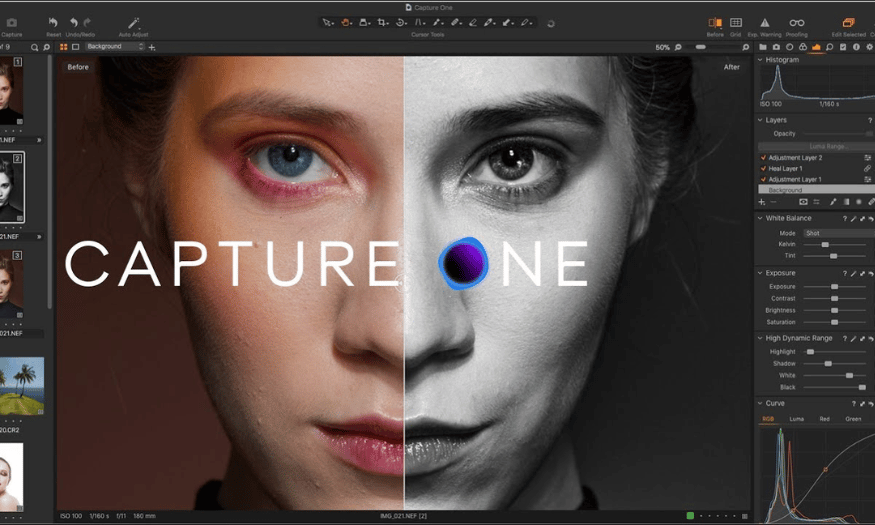
1. What Is Capture One?
Capture One is a well-known photo editing software program developed by Phase One, a reputable company in the field of professional photography. First launched in 2003, the software quickly became one of the leading tools in the photography industry thanks to its powerful RAW file processing capabilities and intuitive user interface. Capture One supports many different file formats, allowing photographers to work with the highest-quality images without reducing image quality.
One of Capture One’s strengths is its flexible customization capabilities. Users can create panels and tools that match their working styles, thereby optimizing the editing process. The software also provides many options for importing and organizing photos, helping users easily search for and manage their photo collections. This is especially useful for professional photographers who have heavy workloads and need an effective solution for processing photos.
Capture One not only supports photo editing but also provides powerful tools for data management. With its intelligent photo library organization feature, users can arrange photos according to various criteria, including dates, keywords, and ratings. This helps users save time and improve working performance, allowing them to focus on creativity and developing their photography skills.
.png)
2. Why Should You Use Capture One?
There are many reasons why Capture One has become a top choice for professional photographers and photography enthusiasts. First, the software stands out with its precise and powerful color editing capabilities. Capture One provides a rich collection of color editing tools, allowing users to adjust every small detail, from saturation to skin tones. This helps create vibrant and natural images that accurately reflect the photographer’s vision.
Second, Capture One stands out with its RAW file processing feature. The software allows users to work directly with RAW files without reducing quality, helping optimize the editing process. Tools such as brightness, contrast, and sharpness adjustments are specifically designed to process RAW files as effectively as possible. This allows photographers to obtain the highest-quality images under all lighting conditions.
Finally, Capture One’s intelligent photo organization feature provides users with significant convenience. With the ability to create collections, assign ratings, and add keywords, photographers can easily search for and manage their photos. This not only helps save time but also makes the workflow smoother. From importing photos from a camera to exporting completed images, Capture One provides a comprehensive solution that helps improve users’ working performance and quality.
.png)
3. Outstanding Features of Capture One
3.1 User-Friendly Interface
Capture One makes a strong impression with its intuitive and easy-to-use user interface. With its sophisticated design, users can quickly become familiar with the software’s tools and features without encountering any difficulties. In addition, the ability to customize the layout allows you to arrange panels and tools in your own way, creating a perfectly personalized workspace. You can easily drag and drop toolbars, creating a photo editing experience that completely suits your style and needs.
Furthermore, Capture One supports smart keyboard shortcuts, significantly speeding up the workflow. Frequent tasks such as importing photos, exporting photos, or editing can be performed with just a few clicks or keystrokes. As a result, you can focus on creating and perfecting your photos instead of wasting time on unnecessary operations. The user-friendly interface not only makes it easier for beginners to become familiar with the software but also meets the needs of professional photographers seeking optimal performance.
3.2 Advanced Color and Tone Editing
One of Capture One’s most outstanding features is its advanced and professional color editing capability. With the Color Editor tool, users can customize every color shade in detail, from adjusting saturation to changing the tones of specific objects in a photo. This allows you to create vivid and realistic images that accurately reflect your artistic vision.
Capture One not only allows you to edit colors but also provides powerful options for adjusting lighting and contrast. You can easily adjust brightness, shadows, and highlights, helping create the perfect balance for the image. Thanks to this collection of color editing tools, creating unique and impressive photos is no longer difficult but instead becomes an enjoyable and inspiring experience.
3.3 Powerful RAW File Management Tools
Capture One stands out with its RAW file processing capabilities, providing superior image quality from many different types of cameras. The software not only helps you efficiently import and manage RAW files but also optimizes the image export process, ensuring that every detail is preserved without reducing quality. This is especially important for professional photographers, for whom image quality is the highest priority.
In addition, Capture One provides intelligent photo organization tools, allowing you to easily categorize and search for photos in your collection. You can create collections, assign keywords, and rate photos according to various criteria. As a result, managing hundreds or even thousands of photos becomes simple and fast, helping you save time and focus on creativity.
3.4 Layer Editing Support (Layers)
The layer editing feature in Capture One provides users with unprecedented flexibility and creativity. With the Layers tool, you can make changes without affecting the original photo, allowing you to experiment with various styles and effects without worrying about data loss. This is especially useful when you want to refine one part of an image without blurring other important details.
Layer editing also allows you to easily undo changes or make adjustments at any time. Working between layers becomes smooth and intuitive, allowing you to completely control the editing process. Thanks to this feature, photographers can freely create and experiment without feeling worried about affecting the entire photo.
3.5 High Performance
Capture One is designed to optimize performance, especially when utilizing the power of computer hardware. The software can operate smoothly even when processing large RAW files, helping you save time and improve productivity. Its fast processing capabilities not only help you complete your work efficiently but also provide a seamless and enjoyable photo editing experience.
In particular, with GPU support, Capture One can quickly process complex effects and changes without reducing performance. This means that you can enjoy editing photos without worrying about loading times or delays. With Capture One, every second is optimized, allowing you to focus on creating the wonderful photos you have always dreamed of.
.png)
4. Differences Between Lightroom Classic and Capture One
4.1 User Interface
The user interface is the first important factor that users usually consider when choosing photo editing software. Capture One provides an advanced user interface that allows users to customize many different components, from the arrangement of tools to personalized keyboard shortcuts. This flexibility makes Capture One a powerful tool for professional photographers, but it can also create difficulties for beginners. Becoming familiar with its complex features can sometimes be challenging, but once users have mastered them, they will enjoy the unlimited creativity that the software provides.
In contrast, Lightroom Classic stands out with its simple and easy-to-use interface. The software is specially designed for beginners, with a system of clearly organized modules such as Library, Develop, and Map. Each module serves a specific purpose, helping users easily manage their workflows without feeling overwhelmed. Thanks to this intuitive design, users can quickly find the necessary tools without spending too much time learning.
4.2 File Management
When it comes to file management, Capture One has an advantage with its powerful RAW file processing and management capabilities. The software supports many different camera models and optimizes image quality when exporting files. This is very important for photographers who frequently work with multiple devices because Capture One ensures that image quality is not affected regardless of the file’s source. Capture One’s library management system allows users to create collections, assign keywords, and easily search for photos, helping save time and improve working efficiency.
Lightroom also processes RAW files very well, but users often consider its performance slower when working with large photo libraries. Some users have reported that as the number of photos in the library increases, Lightroom’s speed tends to decrease, making it more difficult to browse and edit photos. However, Lightroom still provides useful and easy-to-use photo management tools, making it a popular choice for beginners.
4.3 Color Editing
In the field of color editing, Capture One stands out with its Color Editor and Color Balance toolsets. These tools allow users to perform precise and advanced color adjustments, which are especially useful in commercial and fashion photography. Capture One allows each color shade to be adjusted separately, helping create vivid and realistic photos. With its detailed color separation capabilities, photographers can easily create unique and highly aesthetic images.
Although Lightroom also has good color editing capabilities, it cannot match Capture One in processing complex colors. Lightroom provides easy-to-use tools for basic tasks such as adjusting brightness, contrast, and white balance. This makes Lightroom an attractive choice for people who want to make quick adjustments without requiring too much professional knowledge. However, if you are a professional photographer who requires high precision in color editing, Capture One will be the better choice.
4.4 Working Performance
When it comes to working performance, Capture One is optimized to operate quickly and smoothly when processing large RAW files. The software utilizes the power of the GPU (graphics card) to ensure the best performance, making it highly suitable for projects that require high quality and detailed results. This means that users can perform complex tasks without experiencing lag or delays, helping optimize working time and improve efficiency.
Meanwhile, although Lightroom may not be as fast as Capture One when processing large RAW files, it is still considered flexible and efficient enough for most users. Especially on systems with moderately powerful configurations, Lightroom still operates smoothly and effectively meets basic editing needs. This makes Lightroom an ideal choice for beginners or people who do not need to process large and complex projects.
.png)
5. Where Should You Buy Capture One?
If you are considering upgrading your Capture One account, Appvip is one of the reputable and affordable providers that you should not overlook. At Appvip, you will be provided with an authentic Capture One account accompanied by many attractive offers, helping you make full use of its professional photo editing features.
Appvip not only provides product packages at reasonable prices—only VND 350,000 for one year—but also offers a lifetime warranty and dedicated technical support. After successfully completing the payment, you will immediately receive the account and receive free installation instructions, helping you start using the software as conveniently as possible.
One of Appvip’s strengths is its attentive customer service. You can contact the company through its hotline or chat directly on Facebook and Zalo to receive quick consultation and support. In addition, Appvip also provides VAT invoices for individual and business customers, ensuring the best benefits for you.
.png)
With Capture One, you will have the opportunity to experience outstanding photo editing features, from precise color processing to effective photo management. Visit Appvip to upgrade to an authentic Capture One account and begin your photography creation journey today!





















VIP Products








Best Selling Products
Adobe Photoshop Copyright - Full App
120 USD
Capcut Pro 1 Year
39 USD
Copyright Adobe Lightroom Account
59 USD
ChatGPT Plus Account (GPT-4)
16 USD
Genuine Adobe Illustrator account
99 USD
Windows 10 & 11 Pro Key
36 USD
Autodesk All App Account Copyright
120 USD
Upgrade genuine Capture One account
120 USD
Upgrade Genuine Office 365
49 USD
Freepik Premium Account
59 USD
Adobe Premiere Pro Account
99 USD
Genuine Cheap Canva Pro
39 USD
Upgrade Duolingo Super
29 USD
MidJourney Account
29 USD
Plugin Retouch4me
69 USD