Best Selling Products

Upgrade Genuine Office 365
49 USD

Adobe Photoshop Copyright - Full App
120 USD

Plugin Retouch4me
69 USD

Copyright Adobe Lightroom Account
59 USD

Windows 10 & 11 Pro Key
36 USD

Genuine Cheap Canva Pro
39 USD

Upgrade genuine Capture One account
120 USD

Adobe Premiere Pro Account
99 USD

Upgrade Duolingo Super
29 USD

Genuine Adobe Illustrator account
99 USD

Freepik Premium Account
59 USD

ChatGPT Plus Account (GPT-4)
16 USD

Capcut Pro 1 Year
39 USD

MidJourney Account
29 USD

Autodesk All App Account Copyright
120 USD
How to Create Object Structure Explanation Images with Nano Banana Pro in Just 1 Minute
Nội dung
- 1. What is Nano Banana Pro?
- 2. Outstanding Benefits of Using Nano Banana Pro
- 2.1 Highly Detailed Visual Images
- 2.2 No Design Skills Required
- 2.3 Extremely Fast Processing Time
- 3. How to Create Object Structure Explanation Images with Nano Banana Pro
- 3.2 Step 2: Upload the Object Image and Enter a Detailed Prompt
- 3.3 Step 3: Generate, Adjust, and Download
- 3.4 Advanced Prompt Suggestions for High-Quality Images
- 4. Examples of Object Structure Explanations with Nano Banana Pro
- 4.1 Example 1 – Prompt for Explaining the Structure of an Insulated Puffer Jacket
- 4.2 Example 2 – Prompt for Explaining the Structure of a Toy Car
- 4.3 Example 3 – Prompt for Explaining the Structure of a Handbag
- 5. Conclusion
Creating object structure explanation images with Nano Banana Pro is becoming a new weapon that helps you turn any image into a visual diagram in just seconds.

1. What is Nano Banana Pro?
Nano Banana Pro is a multimodal image generation model within the Gemini ecosystem, specifically designed for tasks requiring sharp visuals and clear annotated text. Beyond intelligent image generation, Nano Banana Pro also stands out with its highly accurate text rendering capability. Thanks to this, images such as infographics, structural diagrams, explanatory charts, or illustrated posters are displayed clearly and beautifully from the very first generation.
Unlike regular AI image generation tools, Nano Banana Pro deeply understands context and can recreate the structure of an object from only a short prompt. The tool automatically identifies important details, organizes layouts logically, and attaches intuitive labels. This allows users to easily create explanatory structural images without design skills, professional software, or time-consuming manual edits.
Thanks to this powerful capability, Nano Banana Pro is becoming an essential assistant for teachers, students, tutorial creators, content creators, and anyone who needs visual illustrations for written materials. From building machine structure diagrams and describing object operating principles to creating scientific visualizations, Nano Banana Pro helps save time, optimize quality, and produce professional-grade images in just minutes.
.png)
2. Outstanding Benefits of Using Nano Banana Pro
2.1 Highly Detailed Visual Images
Nano Banana Pro can recreate object structures with a level of sophistication that very few tools can achieve. From just a simple description, the system can reconstruct objects in 3D, perspective, or exploded cross-section formats, allowing viewers to clearly see each internal component. This makes complex knowledge more vivid, understandable, and visual, especially useful for teachers, students, and those explaining product or equipment functionality.
2.2 No Design Skills Required
One of the most highly praised advantages is its ability to generate professional visuals without requiring any graphic design expertise. You only need to input a descriptive command, and Nano Banana Pro will analyze, construct, arrange annotations, and complete the image according to your concept. This saves users significant time learning complicated design software while still delivering beautiful illustrations like those created by experts.
2.3 Extremely Fast Processing Time
Previously, creating structural diagrams required hours of modeling, redrawing details, and manually adding annotations. With Nano Banana Pro, the entire process takes only seconds. This fast processing speed allows you to generate multiple versions quickly, experiment with layouts, colors, and styles until you achieve your desired result. This is a major advantage for content creators who need fast and continuous production.
2.4 Suitable for Various Fields
Nano Banana Pro is not only useful for education but also fits countless other industries. From repair manuals, business product presentations, mechanical engineering designs, e-commerce product demonstrations, to marketing illustrations, it can handle all these needs. One tool can satisfy multiple use cases, helping users optimize costs and enhance information presentation efficiency.
2.5 Flexible Customization Based on Requirements
A key strength that makes Nano Banana Pro so popular is its flexible customization capability. You can request arrows, clear labels, exploded layer effects, unique color schemes, or presentation styles aligned with your brand identity. Every image can be adjusted to suit your intended purpose, ensuring aesthetics and consistency when used in lectures, documents, or marketing campaigns.
3. How to Create Object Structure Explanation Images with Nano Banana Pro
If creating structural diagrams once required complex graphic software and hours of annotation adjustments, Nano Banana Pro reduces the entire process to just a few simple steps. Below is a detailed guide to creating beautiful, clear, and professional structural explanation images in only one minute.
3.1 Step 1: Access Nano Banana Pro on Gemini
First, open your browser and visit gemini.google.com. On the main interface, select the Tools section and click the banana icon to activate Thinking with 3 Pro mode. Once enabled, you will see the option to switch to Nano Banana Pro. This is where the model can process images, analyze structures, and automatically generate annotated diagrams.
After switching to Nano Banana Pro, the interface will display an image upload section for you to upload the object image you want to analyze. The system accepts a wide variety of images, including products, household objects, machine parts, 3D models, and even highly complex structures.
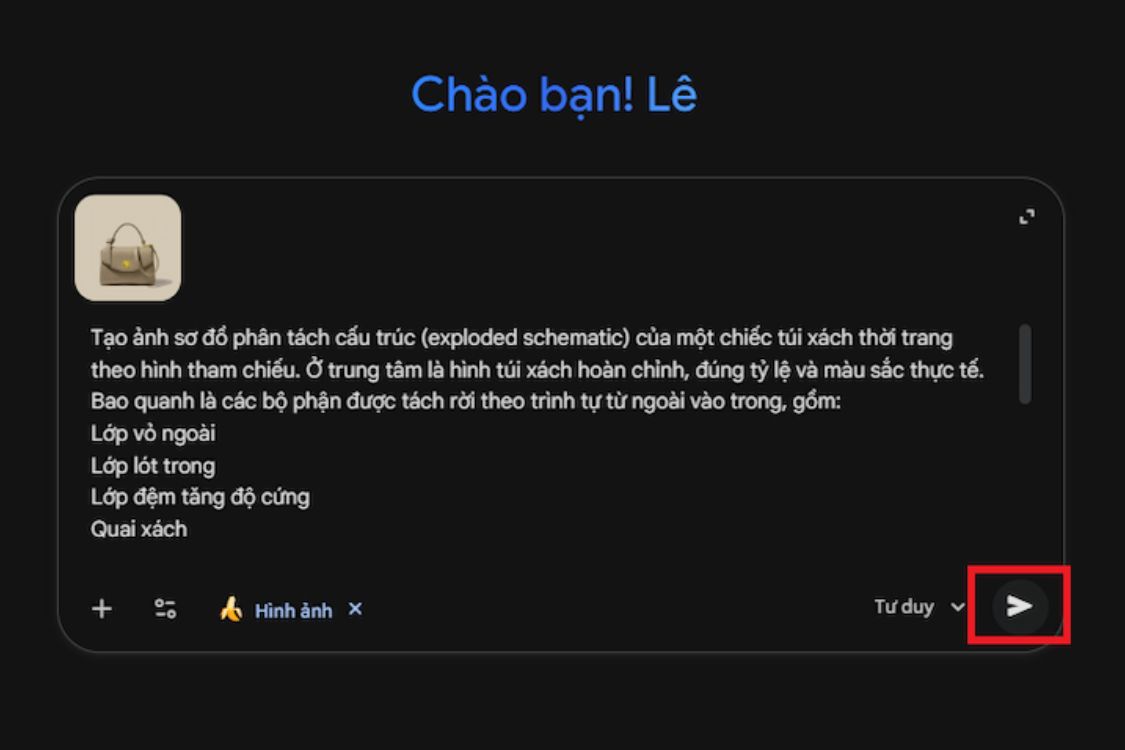
3.2 Step 2: Upload the Object Image and Enter a Detailed Prompt
Once you have the image, the next step is entering a prompt detailed enough for Nano Banana Pro to understand your request accurately. A proper prompt should clearly state the purpose, structural scope, and desired illustration style. You can use this basic template:
“Based on this image, create an annotated diagram explaining the object structure in Vietnamese. Include descriptions for each component, knolling layout, 3D perspective, harmonious colors, white paper background, and clear readable fonts. Separate structural layers in sequence and attach detailed labels.”
To improve prompt effectiveness and generate accurate visuals, ensure these 5 elements are included:
Object name or purpose of use.
Type of structure to display such as cross-section, exploded layers, exploded view, or 3D simulation.
Presentation style including colors, light or dark background, materials, and overall layout.
Labels for each component, writing style, and description length.
Overall arrangement such as knolling, symmetry, center-focused, or grouped sections.
With a clear description, AI can analyze structures precisely and build diagrams exactly as intended.
3.3 Step 3: Generate, Adjust, and Download
After pressing send, Nano Banana Pro will instantly generate the image. You will see a completed diagram with the object at the center, separated components, sharp annotations, and scientific layout organization. If certain details need adjustments, you can request color changes, label repositioning, style modifications, or additional explanations. The tool works interactively, so you can refine repeatedly until satisfied.
Once completed, simply click the image to download it. The image can immediately be inserted into lectures, presentation slides, technical documents, marketing articles, or explanatory videos.
3.4 Advanced Prompt Suggestions for High-Quality Images
If you want even more professional simulation images, you can use this advanced prompt:
“Create an exploded schematic diagram of [Product Name] from the reference image. Place the complete object at the center with accurate proportions. Surround it with separated parts from outer to inner layers, clearly showing each structural level and operational mechanism. All annotations must be written in Vietnamese with proper technical terminology. Divide content into groups such as Outer Shell, Internal Frame, Motor, Control Circuit, Battery, Sensors, or material layers. Apply a knolling layout to arrange parts logically. Display additional object perspectives at the top and material samples below.”
This prompt helps Nano Banana Pro recreate structures in greater depth, making it suitable for engineering, mechanics, technology, education, and repair guidance.
4. Examples of Object Structure Explanations with Nano Banana Pro
4.1 Example 1 – Prompt for Explaining the Structure of an Insulated Puffer Jacket
“Create an exploded schematic diagram of the insulated puffer jacket in the reference image. Place the complete jacket at the center, maintaining realistic proportions and colors for easy comparison. Surround the center with separated material layers and structural details arranged from outermost to innermost layers, clearly showing each part contributing to insulation and wind resistance.
The structure should include: waterproof and windproof outer fabric, weather-resistant protective coating, internal baffle chambers for holding insulation, down or synthetic filling for heat retention, soft inner lining, main zipper, wind flap, two side pockets, cuff ribbing, and heat-sealed stitching. Each component must be separated and arranged in knolling format for clear observation.
All annotations must be written in Vietnamese with proper garment-industry terminology. The top row should show front, back, and side views. Below the main image, include texture swatches such as waterproof polyester, nylon fibers, down or synthetic filling, soft lining, and metal zipper details.
The illustration should be rendered in 3D with depth and realistic material textures. Fonts must be clear and instantly understandable without additional explanation.”
.jpg)
4.2 Example 2 – Prompt for Explaining the Structure of a Toy Car
“Create an exploded schematic diagram of the toy car in the reference image. Place the complete car at the center while preserving original colors, proportions, and distinctive features. Surround it with separated components arranged from outermost to innermost layers to explain how the toy works and how parts connect.
Components should include: plastic body shell, simulated doors, windshield, internal structural frame, mock engine, wheel assembly including rims, tires, axles, front and rear suspension, transmission simulation, battery compartment, and lower chassis cover. Arrange each part separately using knolling layout for scientific clarity.
All annotations must be written in Vietnamese using accurate technical model-car terminology. The top row should show front, rear, and angled views. Below, include material texture swatches such as ABS plastic, PP plastic, axle metal, and tire rubber.
The illustration must be high-resolution 3D, clearly showing plastic textures, surface gloss, component thickness, and connection seams. Fonts must be sharp and suitable for educational or technical content.”
.jpg)
4.3 Example 3 – Prompt for Explaining the Structure of a Handbag
“Create an exploded schematic diagram of a fashion handbag based on the reference image. Keep the complete handbag at the center, accurately preserving proportions and colors for easy recognition. Around the center, separate structural details layer by layer from outer to inner sections to clearly show construction and functionality.
Displayed parts should include: reinforcement padding for shape retention, handles, decorative clasps, strap connectors, inner compartments, interior lining, side panels, and snap buttons. Each component must be placed separately while remaining visually connected to the main bag in knolling format.
All annotations must be written in Vietnamese using correct handbag industry terminology. The top row should display front, rear, and side perspectives. Below, include texture swatches such as PU leather, premium metal hardware, and polyester interior lining.
The illustration style should be technical 3D with high detail, clearly showing material softness, rigidity, metallic shine, and surface patterns. Fonts must be sharp and readable, suitable for educational use, product analysis, branding presentations, or e-commerce content.”
.jpg)
5. Conclusion
Creating object structure explanation images with Nano Banana Pro truly opens a completely new approach for educators, document creators, and content creators who want to communicate information quickly yet professionally. With just a few simple actions, you can instantly generate clear, easy-to-read structural simulations with all the necessary details for viewers to understand without wasting time. If you frequently need technical illustrations, structural simulations, or explanatory diagrams, Nano Banana Pro is a tool you should not overlook. Start applying it now to save time and elevate your content quality to a whole new level.





















VIP Products








Best Selling Products
Upgrade Genuine Office 365
49 USD
Adobe Photoshop Copyright - Full App
120 USD
Plugin Retouch4me
69 USD
Copyright Adobe Lightroom Account
59 USD
Windows 10 & 11 Pro Key
36 USD
Genuine Cheap Canva Pro
39 USD
Upgrade genuine Capture One account
120 USD
Adobe Premiere Pro Account
99 USD
Upgrade Duolingo Super
29 USD
Genuine Adobe Illustrator account
99 USD
Freepik Premium Account
59 USD
ChatGPT Plus Account (GPT-4)
16 USD
Capcut Pro 1 Year
39 USD
MidJourney Account
29 USD
Autodesk All App Account Copyright
120 USD
Articles on the same topic