Best Selling Products

Plugin Retouch4me
69 USD

Genuine Cheap Canva Pro
39 USD

Upgrade Duolingo Super
29 USD

Copyright Adobe Lightroom Account
59 USD

Upgrade Genuine Office 365
49 USD

Windows 10 & 11 Pro Key
36 USD

Adobe Premiere Pro Account
99 USD

MidJourney Account
29 USD

Capcut Pro 1 Year
39 USD

Genuine Adobe Illustrator account
99 USD

ChatGPT Plus Account (GPT-4)
16 USD

Freepik Premium Account
59 USD

Upgrade genuine Capture One account
120 USD

Autodesk All App Account Copyright
120 USD

Adobe Photoshop Copyright - Full App
120 USD
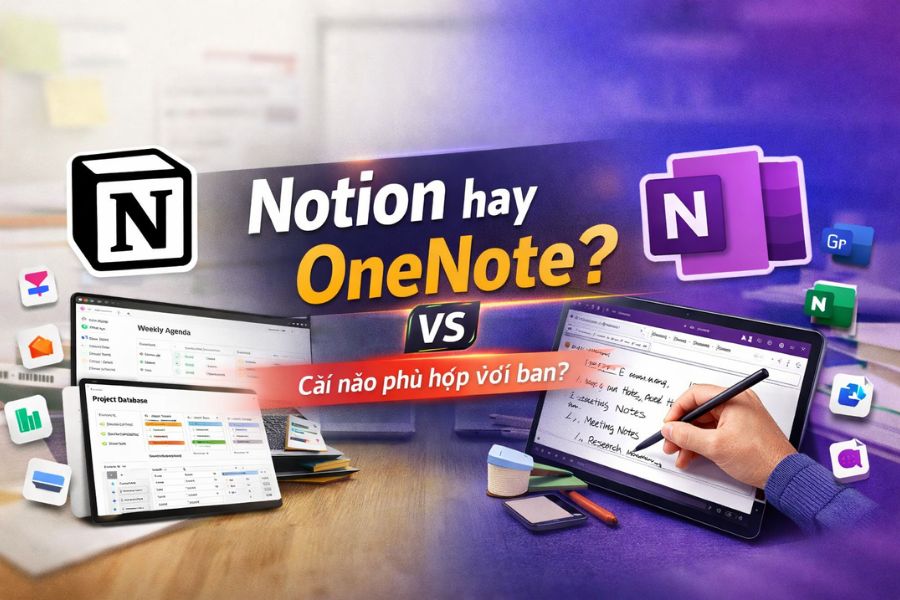
Notion vs OneNote: Which One Best Fits Your Workflow?
Nội dung
- 1. What is Notion?
- 2. What is Microsoft OneNote?
- 3. Detailed Comparison of Notion and OneNote (A–Z)
- 3.1 Interface and User Experience
- 3.2 Note-taking and Content Organization
- 3.3 Teamwork and Collaboration
- 3.4 Syncing and Platform Support
- 4. Advanced Features
- 4.1 Key Features of Notion
- 4.2 Key Features of OneNote
- 5. Where to Buy Notion or OneNote Licenses?
- 6. Conclusion
From students who need to organize lectures, office workers tracking multi-task projects, to freelancers constantly managing clients and creative ideas, everyone relies on powerful and flexible note-taking tools to optimize productivity.
1. What is Notion?
Notion is an all-in-one workspace where you can take notes, manage projects, create databases, store documents, and collaborate with teammates within a single platform. Thanks to its flexible customization, Notion allows users to design their own information systems instead of following predefined templates. Each page in Notion is built from draggable blocks that can be freely arranged and combined, creating a highly creative and efficient working environment.
The strength of Notion lies not only in its minimalism but also in its unlimited scalability. Users can start with a simple note and gradually expand it into a multi-layered workspace including tasks, schedules, internal wikis, or complex databases. Whether for studying, personal work, or team management, Notion ensures consistency and seamless organization.
Notion is commonly used for:
Smart note-taking and academic material storageTask management and project tracking
Building internal wikis for businesses or small teams
Content planning and marketing pipelines
Creating simple CRM systems to track customers
Storing ideas, personal plans, journals, or daily habits
.jpg)
2. What is Microsoft OneNote?
Microsoft OneNote is a powerful digital note-taking application within the Microsoft 365 ecosystem, designed to help users record, store, and organize information naturally. Launched in 2003, OneNote has become a familiar choice for students, teachers, and office workers thanks to its stability, ease of use, and deep integration with Microsoft tools such as Word, Outlook, PowerPoint, and Teams. Especially when upgrading to licensed Microsoft software at CentriX, users can fully unlock OneNote’s power with smooth performance, enterprise-level security, and dedicated technical support, creating a more professional and secure working environment.
Unlike Notion’s modular workspace approach, OneNote perfectly simulates the experience of using a traditional notebook. All content is organized into layers including Notebook, Section, and Page. This structure makes it intuitive, like carrying multiple notebooks for different topics. As a result, OneNote feels familiar and is suitable for those who prefer free-form note-taking without complex setup.
OneNote’s biggest strength lies in handwriting and drawing capabilities. On devices with stylus support like Surface or iPad, users can freely sketch ideas, create mind maps, highlight, underline, and annotate directly like writing on paper. This is a major advantage that Notion and many other tools cannot fully replicate. Additionally, OneNote supports PDF insertion, meeting recording, multi-device syncing, and smart search.
OneNote is commonly used for:
Taking lecture notes by hand or keyboard
Quickly recording meeting notes and ideas
Working within the Microsoft ecosystem
Storing research materials and annotating PDFs
Creating personal notebooks for study or planning
Supporting teaching through diagrams and drawings
3. Detailed Comparison of Notion and OneNote (A–Z)
3.1 Interface and User Experience
The difference between Notion and OneNote is evident from the moment you open them. Notion offers a modern, minimal interface focused on white space. Everything starts from a blank page where users can freely arrange blocks, nest pages, and customize layouts. This is ideal for system-oriented users like marketers or project managers. However, its flexibility requires a learning curve.
In contrast, OneNote uses a familiar notebook-style interface with Notebook, Section, and Page. Users can start writing immediately without setup, making it ideal for beginners and Microsoft users.
3.2 Note-taking and Content Organization
Notion acts as a comprehensive information management system. It transforms notes into structured data with databases, tags, filters, and multiple views like tables, kanban boards, or calendars. Its strength lies in linking information into a unified system.
OneNote focuses on free-form note-taking. Users can write anywhere, insert images, draw diagrams, and record audio without constraints. This makes it perfect for visual thinkers and handwriting users.
.jpg)
3.3 Teamwork and Collaboration
Notion excels in collaboration with advanced sharing permissions, real-time editing, comments, mentions, and detailed version history. It is ideal for teams managing workflows, documentation, and projects.
OneNote also supports collaboration via OneDrive and Microsoft 365 but is more basic. It lacks advanced project management features and granular permissions, making it less suitable for complex workflows.
3.4 Syncing and Platform Support
Both tools support Windows, macOS, Android, iOS, and web. Notion syncs quickly but depends heavily on internet connection and has limited offline functionality.
OneNote supports full offline work and syncs later via OneDrive, making it more reliable for users who frequently work without internet.
.jpg)
4. Advanced Features
4.1 Key Features of Notion
Thousands of free templates for various use cases
Advanced databases with multiple views
Formula support similar to Excel
Notion AI for summarizing, writing, and analyzing content
Integrations with tools like Google Calendar, Slack, Figma, GitHub
4.2 Key Features of OneNote
Deep integration with Microsoft 365 tools
Powerful OCR for handwriting and images
Natural handwriting and drawing support
Stable offline functionality
Ideal for enterprise and education environments
.jpg)
5. Where to Buy Notion or OneNote Licenses?
As productivity tools become essential, using licensed software ensures data security and stability. Unofficial or shared accounts risk data loss and lack support.
Appvip is a trusted provider offering licensed software solutions with transparent processes, competitive pricing, and dedicated support. Users can safely use Notion or Microsoft OneNote (via Microsoft 365) with full support from installation to troubleshooting.
Benefits include:
Cost savings while ensuring genuine licenses
Data security and privacy protection
Fast and transparent technical support
Reduced risk of account issues
Suitable for individuals, teams, and businesses
(1).jpg)
6. Conclusion
Choosing between Notion and OneNote depends not only on features but also on how you think and organize work. If you prefer structured systems and customization, Notion is the better long-term solution. If you prioritize simplicity, speed, and natural note-taking within the Microsoft ecosystem, OneNote is the optimal choice.
Each tool has its own strengths, and understanding your workflow will help you select the right platform to improve productivity and personal knowledge management in the digital age.





















VIP Products








Best Selling Products
Plugin Retouch4me
69 USD
Genuine Cheap Canva Pro
39 USD
Upgrade Duolingo Super
29 USD
Copyright Adobe Lightroom Account
59 USD
Upgrade Genuine Office 365
49 USD
Windows 10 & 11 Pro Key
36 USD
Adobe Premiere Pro Account
99 USD
MidJourney Account
29 USD
Capcut Pro 1 Year
39 USD
Genuine Adobe Illustrator account
99 USD
ChatGPT Plus Account (GPT-4)
16 USD
Freepik Premium Account
59 USD
Upgrade genuine Capture One account
120 USD
Autodesk All App Account Copyright
120 USD
Adobe Photoshop Copyright - Full App
120 USD