Best Selling Products

Adobe Photoshop Copyright - Full App
120 USD

Copyright Adobe Lightroom Account
59 USD

Adobe Premiere Pro Account
99 USD

Capcut Pro 1 Year
39 USD

Plugin Retouch4me
69 USD

Upgrade Genuine Office 365
49 USD

ChatGPT Plus Account (GPT-4)
16 USD

Upgrade genuine Capture One account
120 USD

Upgrade Duolingo Super
29 USD

Genuine Cheap Canva Pro
39 USD

Windows 10 & 11 Pro Key
36 USD

Freepik Premium Account
59 USD

Genuine Adobe Illustrator account
99 USD

Autodesk All App Account Copyright
120 USD

MidJourney Account
29 USD
Things You Didn't Know About Capcut Pro
Nội dung
- 1. General introduction to CapCut Pro
- 2. Why should you use CapCut Pro instead of other tools?
- 3. Is Capcut Pro worth buying?
- 3.1 User-friendly interface
- 3.2 Advanced Features
- 3.3 Regular Updates
- 4. Key features of CapCut Pro
- 4.1 Remove the watermark and create a professional product.
- 4.2 Accessing the Advanced Effects Library
- 4.3 Flexible project storage and editing in the cloud
- 4.4 Priority technical support and unlimited features
- 4.5 More advanced editing tools
- 4.6 Supports high-quality video output
- 5. Where should I get my Capcut Pro upgraded?
- 6. Conclusion
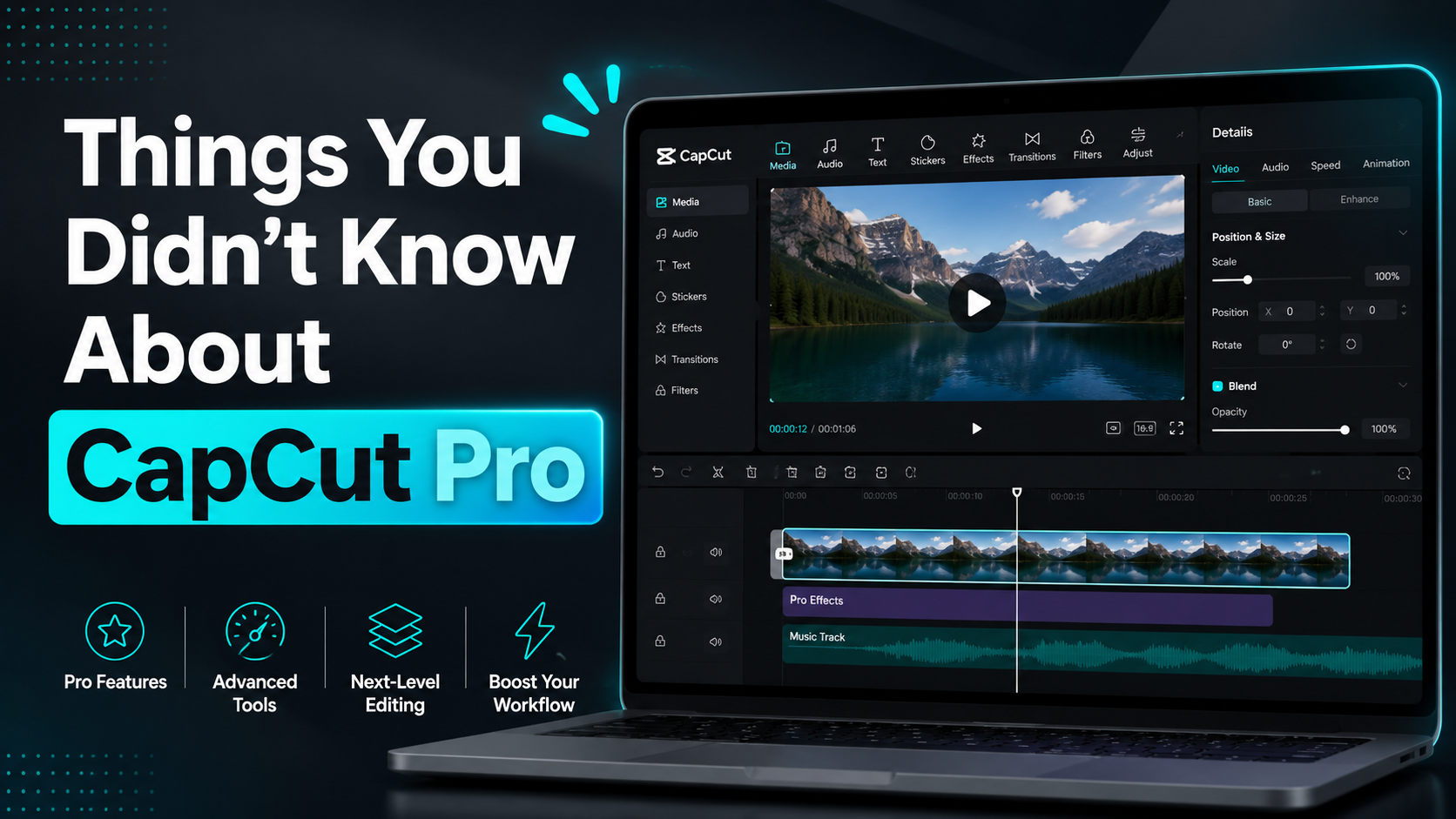
CapCut Pro has quickly become one of the most popular video editing apps today, not only thanks to its user-friendly interface but also its powerful and versatile features.
1. General introduction to CapCut Pro
CapCut Pro is an upgraded version of the popular video editing application CapCut, developed by Bytedance. With significant improvements in features and tools, CapCut Pro offers users a more professional video editing experience while retaining the ease of use that users loved from the free version. From short videos to large projects, CapCut Pro provides all the necessary tools to turn creative ideas into reality.
Running on iOS, Android, and PC platforms, CapCut Pro is particularly popular on mobile devices. This allows users to edit videos anytime, anywhere without having to sit in front of a computer. The application is not only suitable for personal content creators but is also a top choice for professional video producers, thanks to its flexible and fast processing capabilities.
With a range of advanced features such as video editing, effect insertion, color correction, text and background music addition, CapCut Pro is truly a powerful tool. The diverse visual effects and filters enhance creativity and allow users to express their personal style in each video product. In particular, the high-resolution video export feature is a major plus, helping users create high-quality products ready for sharing on social media platforms.
2. Why should you use CapCut Pro instead of other tools?
Compared to other video editing tools, CapCut Pro stands out with its user-friendly interface. Even beginners can quickly get acquainted with the application without difficulty. This is crucial in the increasingly fast-paced world of digital content, where time and efficiency are paramount. CapCut Pro helps users save editing time while still ensuring perfect video quality.
One of the main reasons CapCut Pro is so popular is its wide range of features. Beyond basic editing, the app offers many advanced tools such as motion effects, background blurring, and professional color filters. These features allow users to create unique and artistic videos, something many other apps can't easily provide.
Furthermore, CapCut Pro is regularly updated and adds new features, keeping up with trends and user needs. This not only makes the application more flexible but also provides users with new tools for creativity. Combined with its ability to export high-quality video, CapCut Pro is truly an ideal tool for those who want to create top-notch video content without investing heavily in complex software.
3. Is Capcut Pro worth buying?
This is the ddansgs tool to use for the following reasons.
3.1 User-friendly interface
CapCut Pro's interface is designed to provide the best user experience. With a clear layout and easy-to-understand icons, you can quickly find the necessary tools without wasting time searching. This is especially important for those new to the world of video editing, where getting acquainted with technology can be challenging. CapCut Pro helps you overcome that barrier, allowing you to focus on creating content.
Furthermore, the drag-and-drop feature allows you to easily arrange and edit video sections without having to familiarize yourself with complex tools. With its user-friendly interface, you'll feel like you're working with a companion, always ready to support you every step of the video editing process.
3.2 Advanced Features
CapCut Pro goes beyond basic tools; it offers a range of advanced features to help you elevate your work. Professionally designed templates allow you to easily create eye-catching videos in minutes. A variety of filters and transition effects help you add flair to your videos, making them more vibrant and engaging.
The high-quality audio in CapCut Pro is also a big plus. You can easily insert background music that suits the video's content, adding emotion and appeal to viewers. These features not only help you create high-quality videos but also encourage you to clearly express your personal style, creating unique and impressive products.
3.3 Regular Updates
One of the factors that makes CapCut Pro an ideal choice is its frequent updates. The application is constantly improving and adding new features, allowing users to always have the latest creative tools at their fingertips. This not only ensures that you don't miss any new trends but also helps improve your video editing experience.
Regular updates also mean you can experiment with many new tools and features, thereby expanding your creative possibilities. CapCut Pro provides a flexible and dynamic environment, helping you always find inspiration and continuously improve your editing skills.
4. Key features of CapCut Pro
CapCut Pro offers a range of impressive features, helping users enhance their video editing experience and create superior quality products. From removing watermarks to accessing exclusive effects, each feature is designed to cater to the needs of both beginners and professional content creators. Below are some of the standout features of this version that you shouldn't miss.
4.1 Remove the watermark and create a professional product.
One of the biggest advantages of upgrading to CapCut Pro is the ability to remove watermarks from exported videos. Watermarks often reduce video image quality, especially when you want to use them for commercial purposes or upload them to video platforms. Removing watermarks not only makes videos look more professional but also helps protect your personal or business brand image. With CapCut Pro, you can confidently share videos without worrying about disrupting the viewer's experience.
This is especially important in today's competitive environment, where building a strong brand image is essential. Professionalism in each video product will attract attention and make a strong impression on the audience. You can easily build a personal or business reputation through perfect products without being affected by unforeseen factors.
4.2 Accessing the Advanced Effects Library
CapCut Pro provides users with access to a vast library of exclusive effects, color filters, and video templates that the free version cannot match. This library is extensive, ranging from smooth transition effects and sharp filters to special effects like slow-motion and real-time. These effects make your videos more vibrant and engaging, while also bringing a fresh perspective to each product.
In addition, users can use high-quality copyrighted music, helping to avoid copyright infringement when sharing videos publicly. This not only saves time but also ensures your video has the best possible sound quality. With these tools, creating impressive videos becomes easier than ever, even for those with little experience in video editing.
4.3 Flexible project storage and editing in the cloud
One notable and convenient feature of CapCut Pro is its ability to store video projects in the cloud. This allows you to save all your projects and easily access and edit them from any internet-connected device. This not only saves storage space on your phone or computer but also ensures you never lose important projects if your device malfunctions or breaks down.
Furthermore, cloud storage offers maximum flexibility in the creative process. You can start a project on your phone, then continue editing on your computer, and vice versa, without any obstacles. This is especially helpful for those who frequently travel or work remotely, optimizing your content production workflow.
4.4 Priority technical support and unlimited features
When upgrading to CapCut Pro, users will receive priority support from the CapCut technical team. This feature is especially useful when you encounter difficulties during editing or have questions about the application's tools and features. This support not only saves you time but also ensures that you can take full advantage of CapCut Pro's potential.
Furthermore, CapCut Pro doesn't limit video length, the number of effects, or advanced features that the free version offers. This gives you creative freedom without worrying about any restrictions. You can freely explore and experiment, creating more unique and diverse products than ever before.
4.5 More advanced editing tools
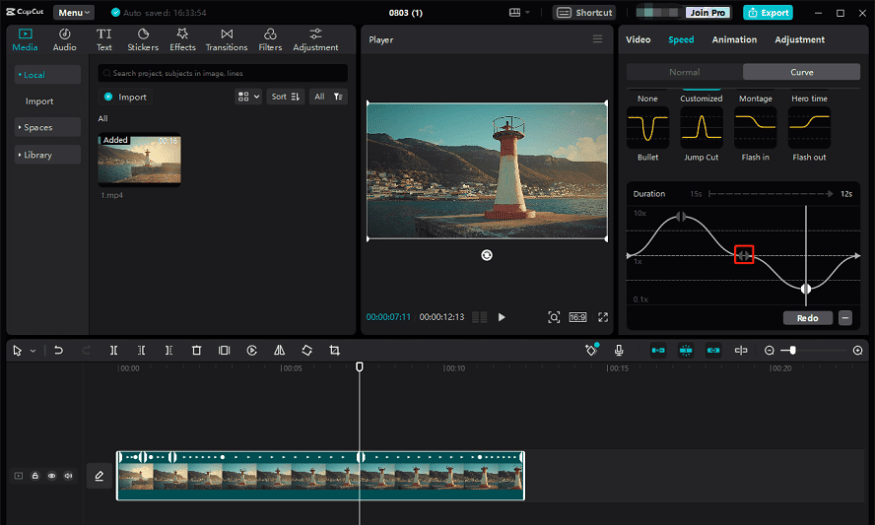
CapCut Pro offers powerful and professional video editing tools, allowing you to perform tasks such as adjusting audio, smoothly cutting and merging videos, adding text and stickers, and even changing video speed with ease. These features not only help you create high-quality video products but also allow you to subtly express your personal style.
Using these advanced editing tools doesn't require you to be familiar with complex software. CapCut Pro is designed to be user-friendly, allowing you to focus on creativity and content, rather than worrying about technical operations. This results in a highly efficient creative process, making it easy to complete professional-looking video projects.
4.6 Supports high-quality video output
CapCut Pro allows users to export videos in up to 4K resolution, HDR, and at high frame rates (60 fps). This is especially important when creating videos for platforms like YouTube, TikTok, Instagram, or for professional advertising and film projects. The superior video quality makes your product sharper and clearer, and suitable for large-screen presentations or streaming on online platforms.
The ability to export high-quality video not only enhances the value of your content but also helps you make a strong impression on your audience. When viewers experience sharp and smooth videos, they are more likely to return and follow your next projects. With CapCut Pro, you can be confident that every video you create meets the highest standards.
5. Where should I get my Capcut Pro upgraded?
If you're looking for a safe and reliable place to upgrade your CapCut Pro account, Sadesign is the perfect choice. With years of experience in providing licensed software, Sadesign has established its reputation in the Vietnamese market. Here, you'll not only receive a genuine CapCut Pro account but also experience dedicated and attentive customer service. Each product comes with a VAT invoice, ensuring consumer rights.
Sadesign offers various service packages to suit the needs of each customer. You can choose from a 1-year package for one device to a 2-year package for multiple devices, including phones, tablets, and computers. This ensures you can use CapCut Pro on multiple devices with complete peace of mind without any restrictions.
Beyond simply providing accounts, Sadesign also offers detailed installation and usage instructions for CapCut Pro. Our professional team is always ready to answer any questions and support you throughout your use of the product. With Sadesign, you'll not only upgrade your CapCut Pro account but also experience dedicated customer service, making it easy and quick to create high-quality, professional videos. Come to Sadesign and start your content creation journey today!
6. Conclusion
CapCut Pro is more than just a regular video editing app; it's a powerful tool that supports users in creating unique and professional content. Its diverse features and high level of customization have earned it the favor of many users worldwide. By understanding its functions and maximizing its potential, you can easily turn your creative ideas into reality, thereby improving the quality of your content and attracting more viewers.





















VIP Products








Best Selling Products
Adobe Photoshop Copyright - Full App
120 USD
Copyright Adobe Lightroom Account
59 USD
Adobe Premiere Pro Account
99 USD
Capcut Pro 1 Year
39 USD
Plugin Retouch4me
69 USD
Upgrade Genuine Office 365
49 USD
ChatGPT Plus Account (GPT-4)
16 USD
Upgrade genuine Capture One account
120 USD
Upgrade Duolingo Super
29 USD
Genuine Cheap Canva Pro
39 USD
Windows 10 & 11 Pro Key
36 USD
Freepik Premium Account
59 USD
Genuine Adobe Illustrator account
99 USD
Autodesk All App Account Copyright
120 USD
MidJourney Account
29 USD