Best Selling Products

ChatGPT Plus Account (GPT-4)
16 USD

Plugin Retouch4me
69 USD

Freepik Premium Account
59 USD

Upgrade Duolingo Super
29 USD

Copyright Adobe Lightroom Account
59 USD

Windows 10 & 11 Pro Key
36 USD

Upgrade genuine Capture One account
120 USD

Genuine Adobe Illustrator account
99 USD

Upgrade Genuine Office 365
49 USD

Genuine Cheap Canva Pro
39 USD

Adobe Premiere Pro Account
99 USD

Capcut Pro 1 Year
39 USD

Adobe Photoshop Copyright - Full App
120 USD

MidJourney Account
29 USD

Autodesk All App Account Copyright
120 USD
Top 10 Fast and Simple Photo De-Blurring Apps for Your Phone
Nội dung
There are currently many photo de-blurring apps integrated with modern AI technology, helping improve image quality in just a few simple steps. Whether a photo is blurry from camera shake, low light, or low original quality, these apps can all help restore sharpness quickly. In the article below, AppVip.ai will introduce the top 10 effective photo de-blurring apps for your phone, helping you easily upgrade old photos to look clearer and more professional.
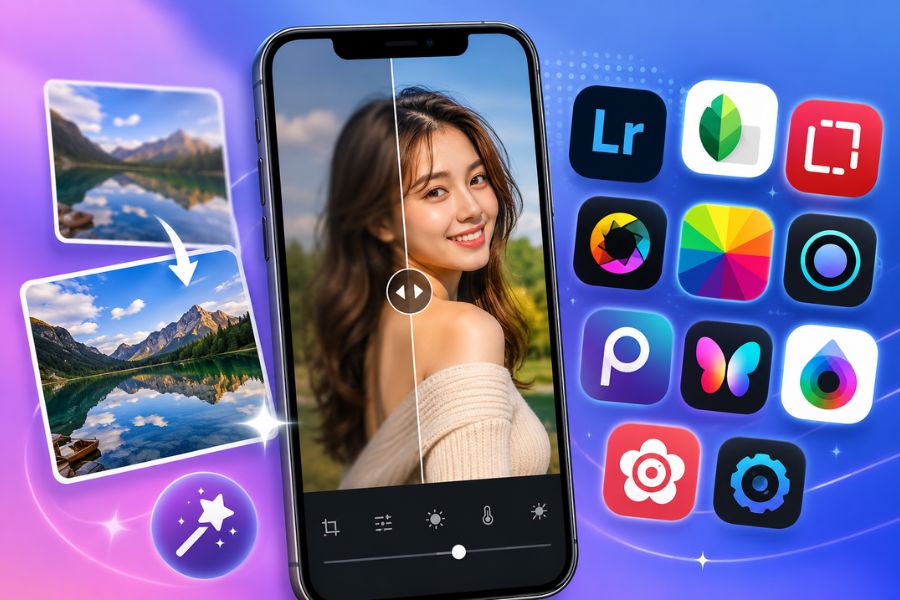
1. Adobe Lightroom
When it comes to trusted photo de-blurring apps today, Adobe Lightroom is definitely a name you can't skip. This app from Adobe has a professional photo editing toolset that's still very easy to use, suitable even for beginners. With just a few slider adjustments in the Detail section, you can improve sharpness, increase detail, and make blurry photos noticeably clearer. Besides sharpening photos, Lightroom also supports color and light adjustment, letting you create photos with an impressive, distinctive style.
Standout features:
An intuitive interface, easy to get familiar with and use.
The Sharpen and Detail tools help sharpen photos quickly.
Supports in-depth color, brightness, and contrast adjustment.
A diverse preset library lets you edit photos with just one tap.
Convenient data syncing across multiple devices.
Drawbacks:
You need to log into an account to use the full feature set.
Some advanced tools require a paid subscription.
2. Snapseed
Snapseed is a free photo de-blurring app developed by Google and loved by millions of users worldwide. The app has a simple interface but integrates a host of powerful editing tools, helping improve image quality in just a few minutes. With the Details feature, users can increase sharpness, bring out detail, and significantly improve blurry or out-of-focus photos. This is an ideal choice for those who want to edit photos professionally without needing a lot of experience.
Standout features:
Integrates 29 professional photo editing tools.
Effectively sharpens and increases photo detail.
Allows editing specific selected areas separately.
Supports processing RAW-format photos.
Many beautiful, modern color filters.
Exports high-quality photos after editing.
Drawbacks:
Doesn't support merging multiple photos at once.
The number of photo frames and templates is still limited.
.jpg)
3. Remini
If you're looking for a photo de-blurring app that uses modern AI technology, Remini is definitely worth trying. The app is famous for its ability to restore old photos, low-quality photos, or blurry photos with just one simple action. Users simply upload a photo and activate Enhance mode, and the AI system will automatically analyze, add detail, and upgrade the image's sharpness. As a result, photos that seemed unsalvageable can become significantly clearer, more realistic, and more vivid.
Standout features:
AI technology that restores blurry photos extremely effectively.
Upgrades old photos into high-quality ones.
Increases sharpness for portrait and landscape photos.
Supports improving the quality of blurry videos.
Simple operation, fast photo processing.
Drawbacks:
You need to log into an account to use it.
The free version contains quite a lot of ads.
Some premium features require upgrading to a paid package.
4. Pixlr
Pixlr is a photo de-blurring app loved by many users for its friendly interface and versatile editing toolset. The app provides a Sharpen feature that increases photo sharpness in just a few simple steps, helping blurry or detail-lacking photos become clearer. In addition, Pixlr also has a rich library of effects, filters, and photo frames, making it easy to create striking photos to post on social media.
Standout features:
A diverse, easy-to-use photo editing toolset.
Supports sharpening and improving the quality of blurry photos.
Integrates many beautiful effects and filters.
Allows adding text in many different fonts and colors.
Over 20 available photo frame templates for creating content.
Can shoot and edit photos directly within the app.
Drawbacks:
Lacks some in-depth editing features for advanced users.
.jpg)
5. Fotor
Fotor is a standout photo de-blurring app for its fast and easy image processing. Whether you're a beginner or already experienced in photo editing, you can use Fotor to upgrade blurry photos into sharper ones. Besides an effective sharpening tool, the app also offers hundreds of effects, frames, and professional editing features, letting you freely create works with your own personal mark.
Standout features:
Provides all the necessary photo editing tools.
Supports sharpening blurry photos in just a few steps.
Over 100 photo frame templates and 150 unique effects.
Insert text and design content directly on the photo.
Save editing settings to reuse next time.
Supports editing and processing multiple photos at once.
Drawbacks:
Some effects and features are still limited.
The free version only offers a short trial experience.
6. Photo Editor Pro
Photo Editor Pro is an ideal photo de-blurring app for those who want to edit photos quickly right on their phone. The app is equipped with many color filters, artistic effects, and sharpness-enhancing tools that effectively improve photo quality. With just a few simple steps, you can turn blurry, poorly lit photos into ones that are clear and more appealing. This is also a popular choice among social media content creators for its fast, convenient photo editing.
Standout features:
A rich, easy-to-use library of effects and filters.
Effectively sharpens photos and increases detail.
Flexible brightness, contrast, and color adjustment.
Integrates many beautiful photo frames for creative compositing.
Allows adding artistic text in many different styles.
Intuitive interface, suitable for beginners.
Drawbacks:
The free version contains quite a lot of ads that interrupt the experience.
.jpg)
7. PhotoDirector
PhotoDirector is a photo de-blurring app loved by many for its professional editing capabilities combined with modern AI technology. The app not only increases sharpness for blurry photos but also provides a host of creative tools that elevate image quality. Simply using the Edit and Adjust options, you can easily improve detail, color, and light, turning low-quality photos into ones that are vivid and much more appealing.
Standout features:
Quickly sharpens and improves photo quality.
Turns still photos into unique animated ones.
A rich library of effects and stickers.
Professional photo compositing tools.
Easily clones and removes unwanted objects.
Integrates many modern AI editing tools.
Drawbacks:
The free version's usage time is fairly limited.
8. Lumii
Lumii is a photo de-blurring app suited to those who love fast photo editing while still ensuring high aesthetic quality. The app has a simple, easy-to-use interface along with hundreds of modern color filters that upgrade photo quality in just a few steps. Lumii's Adjust feature lets you increase sharpness, improve contrast, and bring out detail in a photo, helping blurry photos become clearer and more professional.
Standout features:
Over 100 fashionable color filters.
Integrates 6 beautiful lighting effects.
Effectively sharpens and improves photo quality.
A versatile photo editing toolset.
A rich, creative photo frame library.
Allows adding stickers, text, and many beautiful fonts.
Drawbacks:
The free version only allows a limited-time trial experience.
.jpg)
9. Enhance Photo Quality
Enhance Photo Quality is a photo de-blurring app designed specifically for the need to improve image quality. The app provides many editing options, from basic to advanced, letting users easily adjust sharpness, color, saturation, and contrast as they like. Notably, the Sharpness tool works very effectively in improving blurry or detail-lacking photos, delivering clearer, more professional images.
Standout features:
Increases photo sharpness with just a few simple steps.
Flexible color and saturation customization.
A diverse library of frames, borders, and stickers.
Over 50 filters that create a distinctive style for each photo.
Intuitive interface, easy for beginners to use.
Drawbacks:
Quite a lot of ads appear during use.
10. Fotogenic
Besides the names mentioned above, Fotogenic is also a photo de-blurring app worth trying if you need a simple, easy-to-use tool. The app is optimized for beginners, with photo sharpening achieved with just one tap. Besides its sharpness-improving capability, Fotogenic also supports color adjustment, adding text, and portrait beautification, helping you create eye-catching photos to share on social media.
Standout features:
Quickly sharpens photos with just one action.
Supports inserting text, captions, and photo color adjustment.
A natural skin-beautifying tool for portrait photos.
Simple interface, easy to use.
Suitable for both beginners and general users.
Drawbacks:
The free version is limited in some advanced effects and features.
.jpg)
11. Conclusion
Using photo de-blurring apps will help you quickly fix blurry, unclear photos without needing in-depth editing skills. With the support of AI technology and modern image-quality-enhancing tools, you can absolutely turn photos that seemed unsalvageable into ones that are sharp and much more vivid in just a few minutes. These apps work on both smartphones and PCs, letting you download them and freely create beautiful, high-quality photos. Choose the photo de-blurring app that suits your needs to preserve every moment as perfectly as possible!





















VIP Products








Best Selling Products
ChatGPT Plus Account (GPT-4)
16 USD
Plugin Retouch4me
69 USD
Freepik Premium Account
59 USD
Upgrade Duolingo Super
29 USD
Copyright Adobe Lightroom Account
59 USD
Windows 10 & 11 Pro Key
36 USD
Upgrade genuine Capture One account
120 USD
Genuine Adobe Illustrator account
99 USD
Upgrade Genuine Office 365
49 USD
Genuine Cheap Canva Pro
39 USD
Adobe Premiere Pro Account
99 USD
Capcut Pro 1 Year
39 USD
Adobe Photoshop Copyright - Full App
120 USD
MidJourney Account
29 USD
Autodesk All App Account Copyright
120 USD