Best Selling Products

Adobe Premiere Pro Account
99 USD

Upgrade genuine Capture One account
120 USD

Upgrade Genuine Office 365
49 USD

Windows 10 & 11 Pro Key
36 USD

MidJourney Account
29 USD

Copyright Adobe Lightroom Account
59 USD

Autodesk All App Account Copyright
120 USD

Capcut Pro 1 Year
39 USD

Freepik Premium Account
59 USD

Genuine Adobe Illustrator account
99 USD

Adobe Photoshop Copyright - Full App
120 USD

Plugin Retouch4me
69 USD

Genuine Cheap Canva Pro
39 USD

ChatGPT Plus Account (GPT-4)
16 USD

Upgrade Duolingo Super
29 USD
What makes CapCut on PC so popular among millions of content creators?
Nội dung
- 1. Introduction to CapCut on computers
- 2. Why should you use CapCut on your computer?
- 3. CapCut interface on a computer
- 4. Key features of CapCut on computers
- 4.1. Extensive video sample library
- 4.2. Free video and resource library
- 4.3. Diverse document templates
- 4.4. Free audio and background music library
- 4.5. Export video in multiple formats
- 5. Discover the outstanding AI features on CapCut Desktop
- 5.1. Automatically split scenes with just one click.
- 5.2. Creating automatic subtitles using AI
- 5.3. Text-to-Speech
- 5.4. Smart background removal
- 5.5. Convert long videos to short videos
- 5.6. Video Translation using AI
- 5.7. Automatic color correction
- 6. Who is CapCut on a computer suitable for?
- 7. Conclusion
CapCut on PC is a free video editing software chosen by many content creators thanks to its intuitive, easy-to-use interface and integration of a range of modern AI tools.
1. Introduction to CapCut on computers
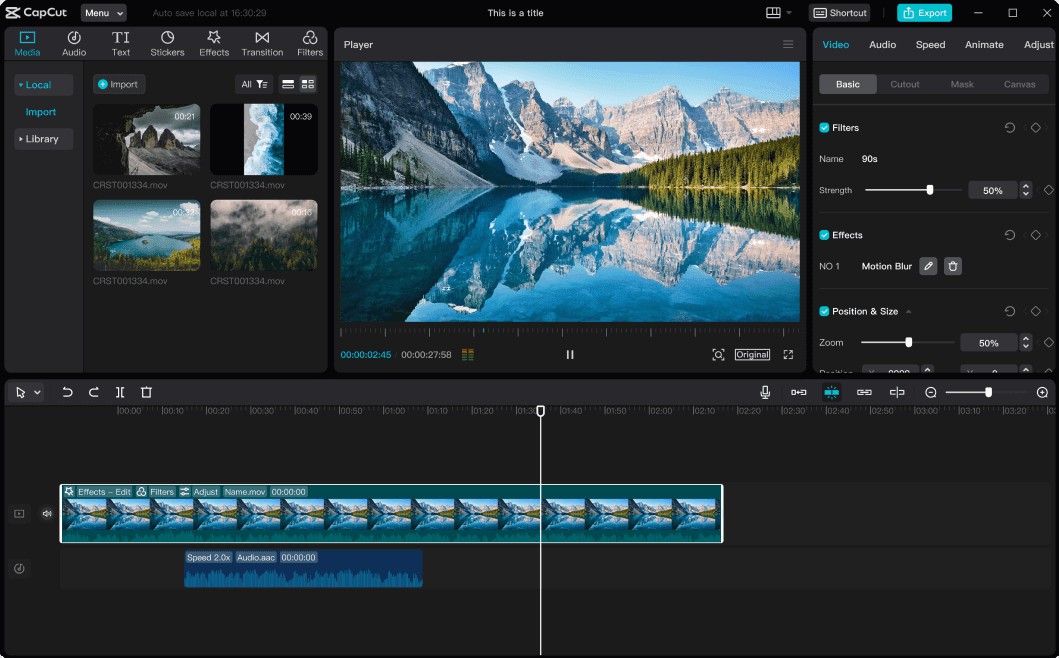
CapCut Desktop is a versatile video editing software developed by ByteDance. The application is designed for both beginners and professional content creators. With its intuitive drag-and-drop interface, users can easily create high-quality videos without needing extensive editing experience.
Unlike many complex video editing software programs, CapCut PC focuses on ease of use while still integrating all the necessary tools such as video cutting and merging, color correction, effect creation, subtitling, audio processing, and especially modern AI features that significantly save editing time.
Currently, CapCut Desktop supports both Windows and macOS, allowing project synchronization with the mobile version via a CapCut account. This makes it easy for users to continue editing on any device without interrupting their creative process.
2. Why should you use CapCut on your computer?
Compared to editing on a phone, the computer version offers many advantages in the video editing process.
The large screen allows users to clearly see the timeline, layout, and every detail in the video. The mouse and keyboard also make cutting, splicing, dragging, dropping, and editing much more precise.
CapCut Desktop also supports multi-track editing, allowing you to combine video, images, audio, text, and effects across multiple timelines. This helps create more sophisticated and professional-looking products.
In addition, the software is optimized to handle high-resolution video such as Full HD, 2K, or 4K, meeting the needs of content creators, marketers, businesses, and YouTubers.
3. CapCut interface on a computer
Upon opening CapCut Desktop, users will find a user-friendly and well-organized interface.
The area on the left contains the resource library, including videos, images, audio, effects, text, and pre-built templates. This is also where you manage all of your project data.
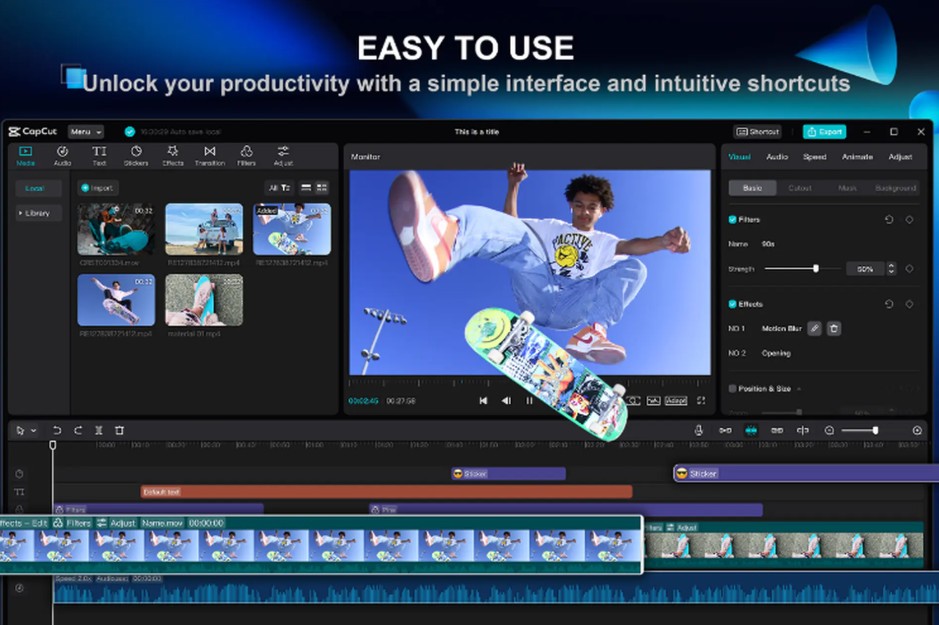
In the center is the preview window, which displays the editing results in real time. You can play back the video, check effects, or adjust the layout while working.
Below is the Timeline – the central hub for all editing operations. Here, users can arrange clips, cut and splice, add effects, insert music, and adjust the duration of each element.
On the right is the properties panel, which displays detailed editing options such as size, position, color, effects, speed, or animation of the selected object.
Thanks to this intuitive interface, even beginners can quickly get acquainted and start editing videos in just a few minutes.
4. Key features of CapCut on computers
One of the reasons CapCut Desktop is so popular is its extensive feature set, which meets most current video editing needs.
4.1. Extensive video sample library
CapCut offers hundreds of pre-designed video templates with professional layouts, transitions, and animations.
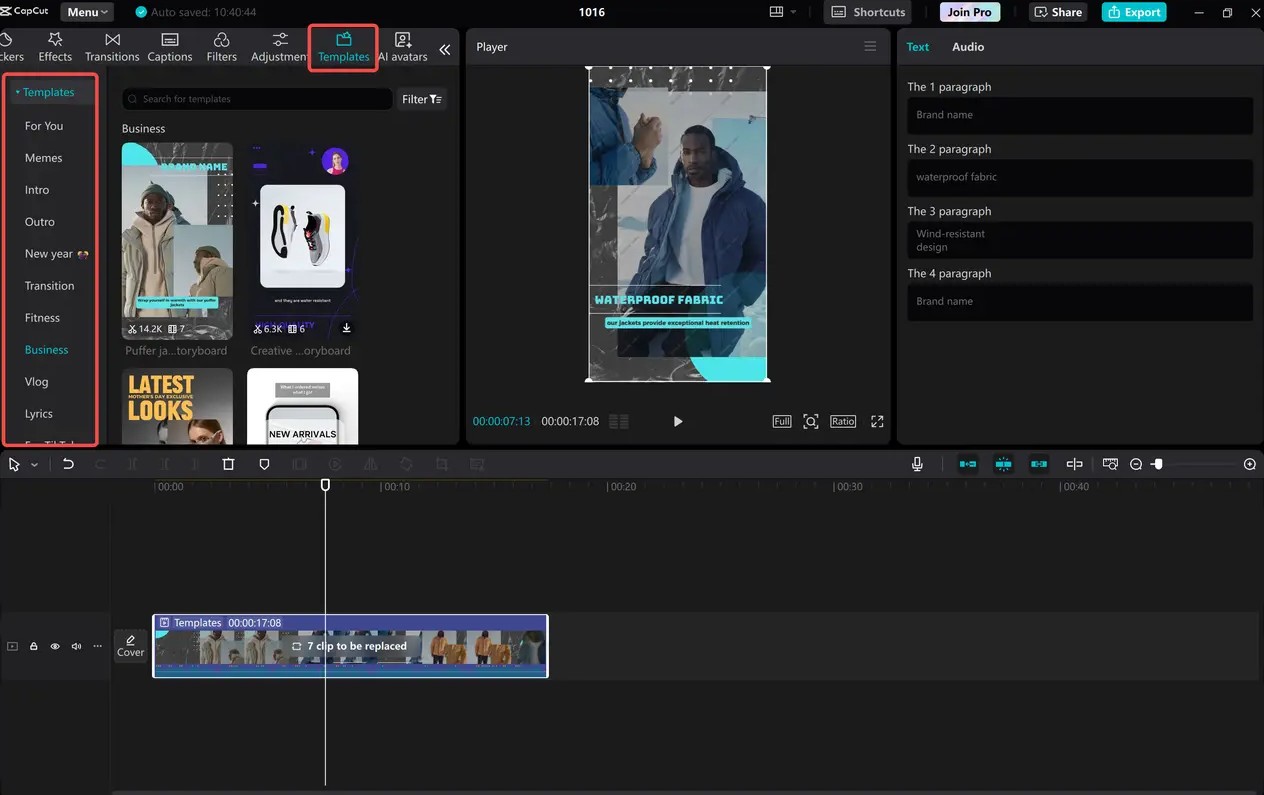
Users can simply replace the existing template with their own images or videos to create a complete product in a short amount of time. This is an ideal solution for those with little design experience.
4.2. Free video and resource library
Users don't always have the materials readily available for editing. CapCut Desktop integrates a library of high-quality videos, images, stickers, and effects, making it easy to add content without searching for external sources.
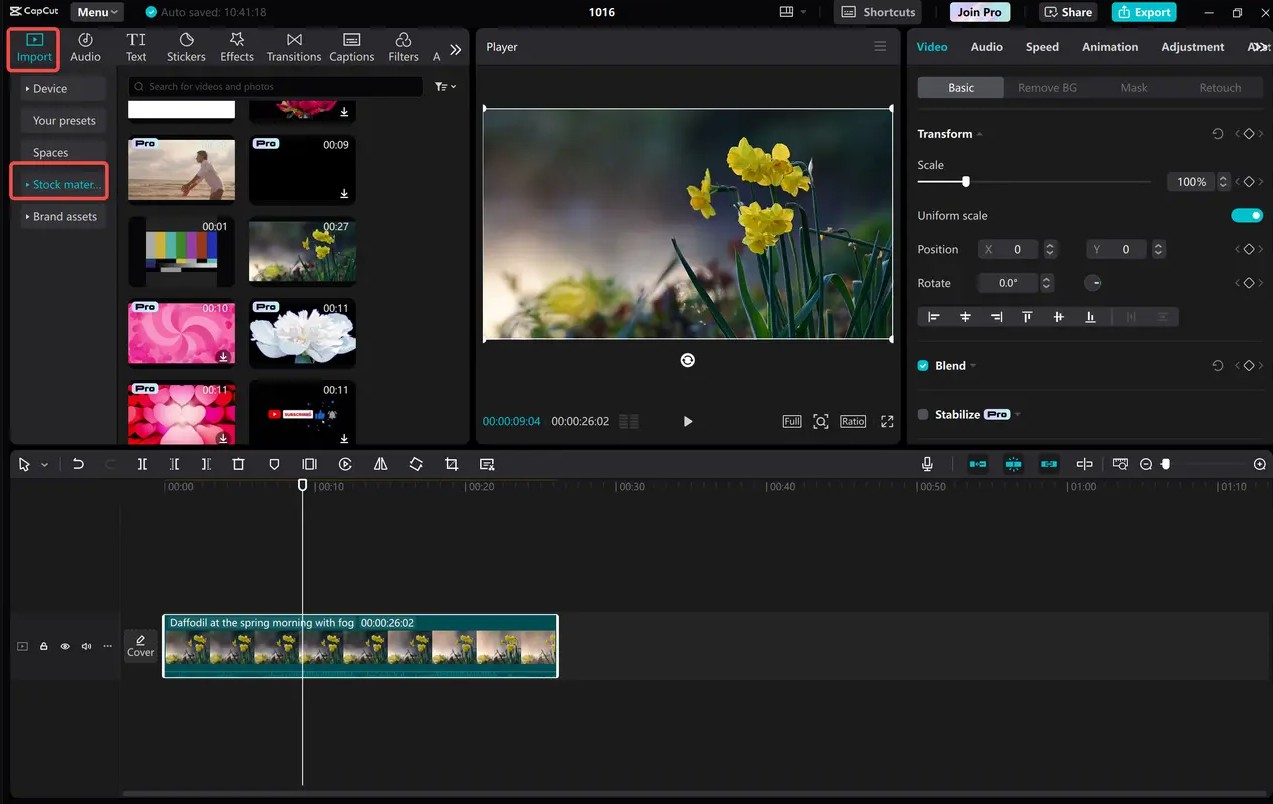
Utilizing readily available resources also helps ensure consistency and significantly saves production time.
4.3. Diverse document templates
Adding titles, subtitles, or notes becomes simpler with a wide range of pre-made text templates.
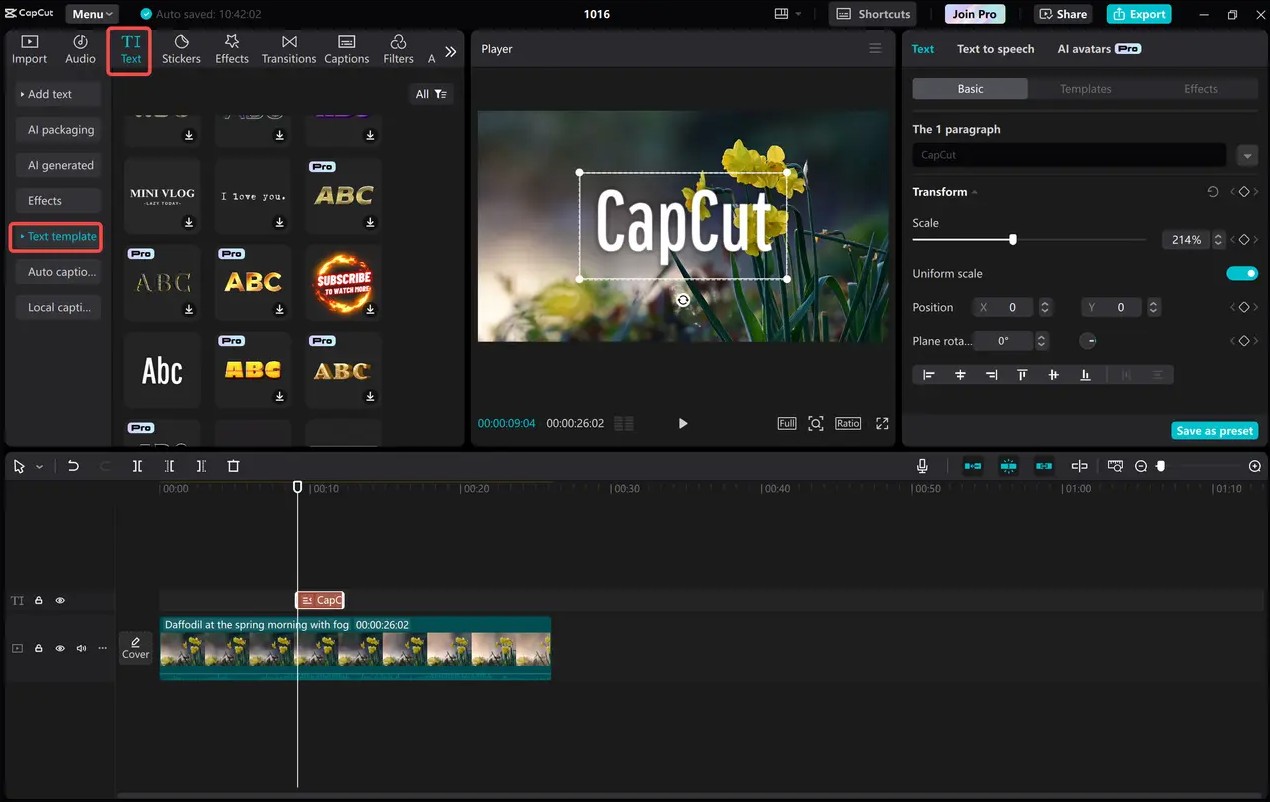
Users can change fonts, colors, sizes, appearance effects, and animations with just a few clicks. This makes videos more lively and engaging without the need for manual design.
4.4. Free audio and background music library
Sound is a key element in creating emotion in videos. CapCut Desktop integrates a library of royalty-free background music and sound effects across various genres.
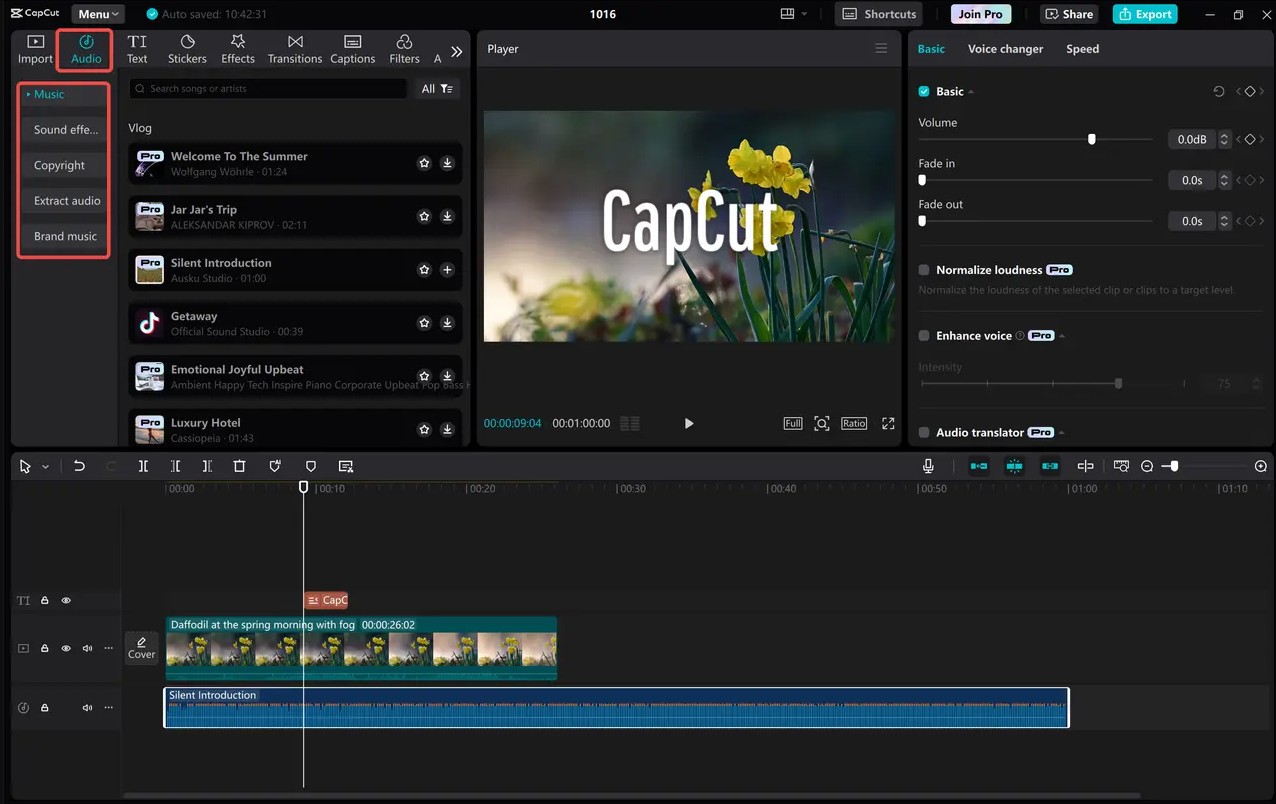
You can add music, trim and splice, adjust the volume, and create fade-in or fade-out effects to make the sound blend naturally with the video content.
4.5. Export video in multiple formats
After completing the project, CapCut allows you to export videos in many popular formats such as MP4 or MOV with various resolutions and frame rates.
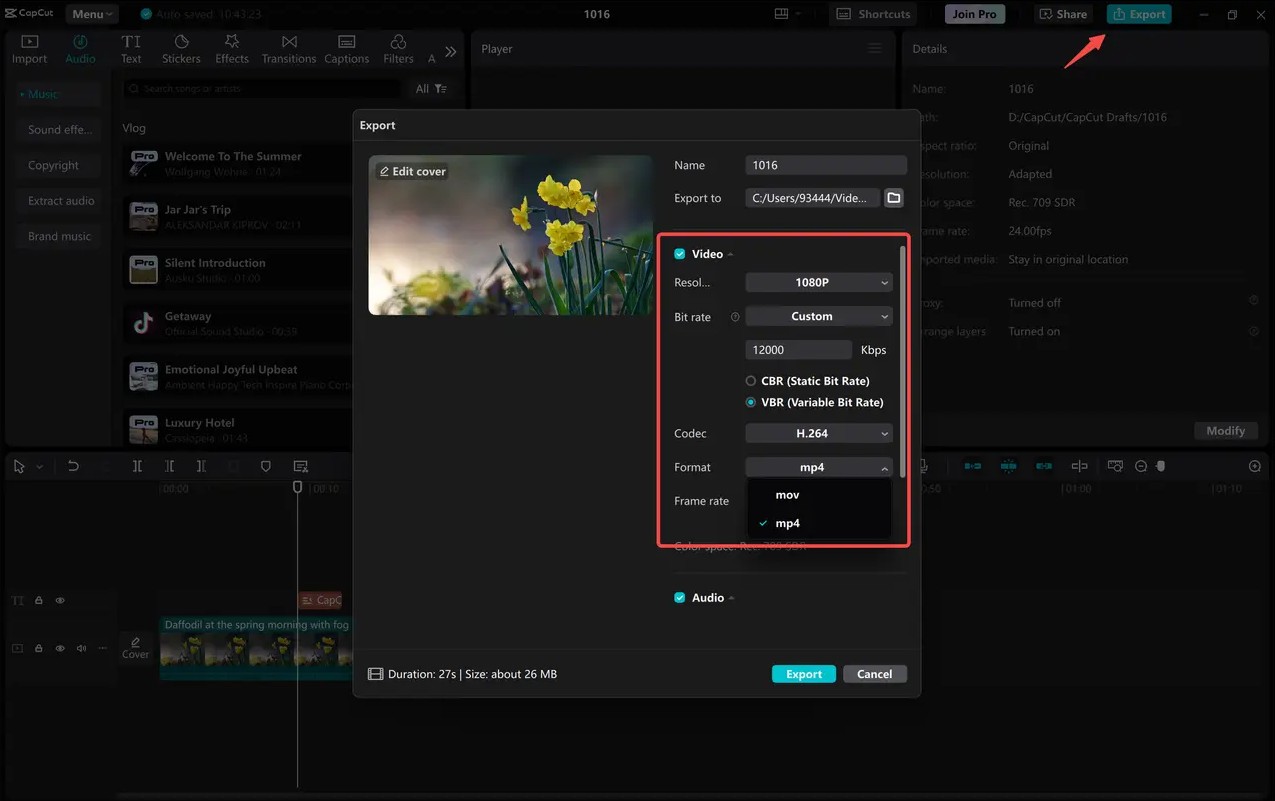
As a result, videos can be easily optimized for TikTok, YouTube, Facebook, Instagram, or other streaming platforms while maintaining image quality.
5. Discover the outstanding AI features on CapCut Desktop
One of CapCut's strengths that sets it apart from many other video editing software is its intelligent AI system. These tools not only help shorten editing time but also assist beginners in creating professional-looking videos.
5.1. Automatically split scenes with just one click.
For long videos containing many scenes, manual cutting is often quite time-consuming.
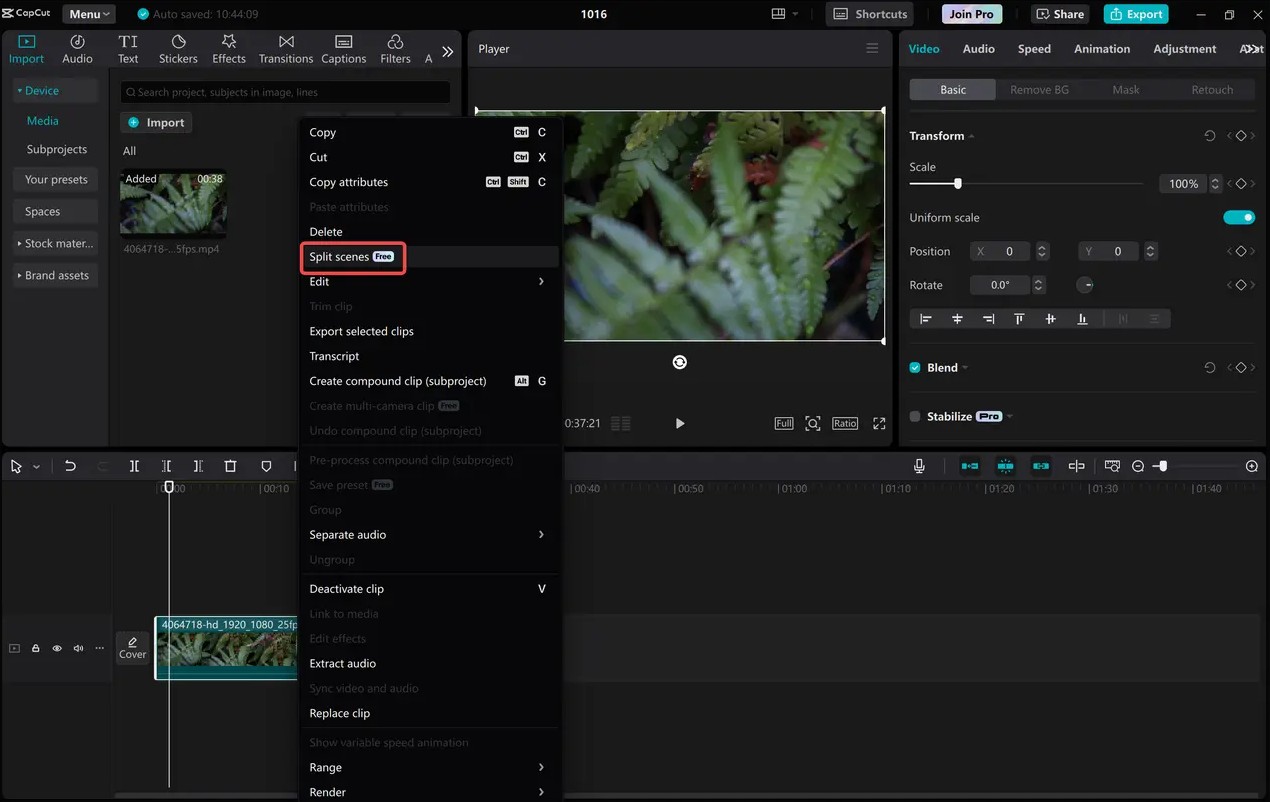
CapCut AI can recognize different footage and automatically split the video into separate segments with just one click. Users can quickly rearrange the content or remove unnecessary scenes.
5.2. Creating automatic subtitles using AI
This is one of the most frequently used features.
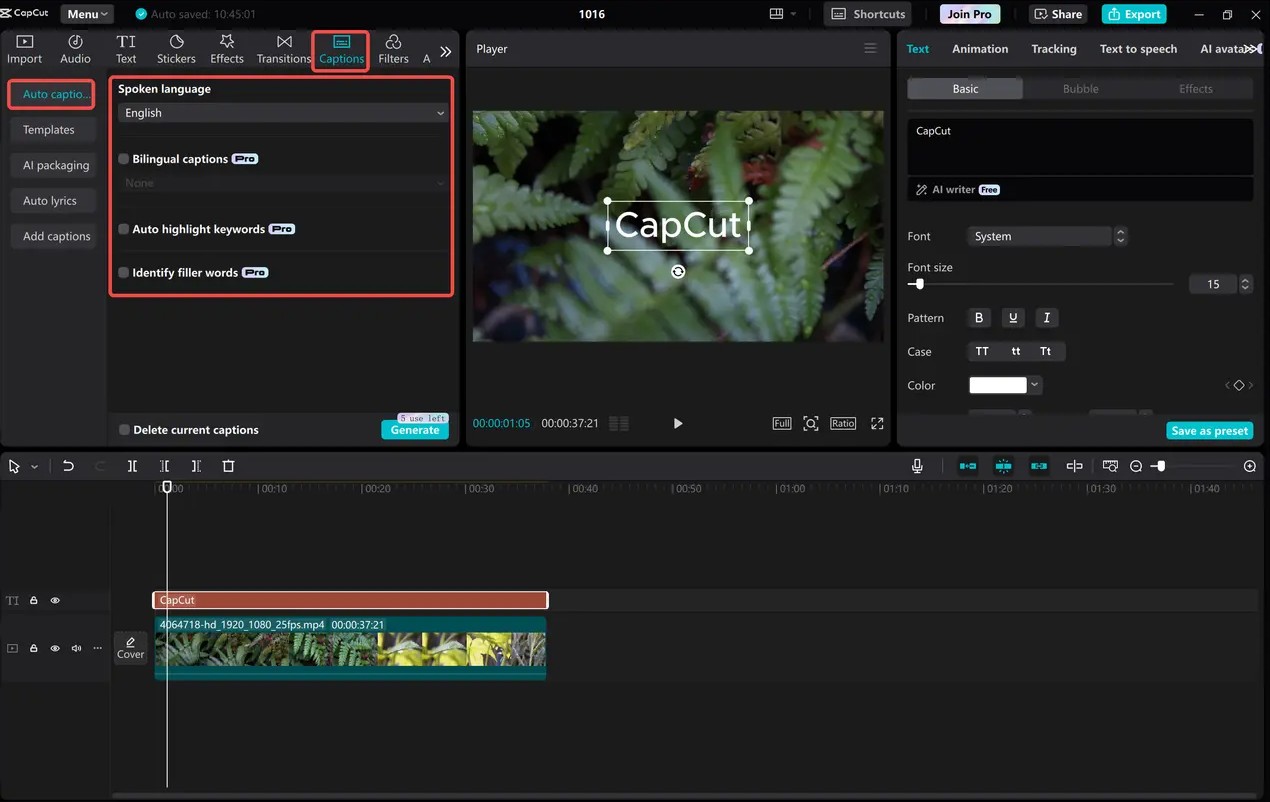
CapCut automatically recognizes speech in videos, converts it to text, and synchronizes it with the playback time. Users only need to review the content, correct a few minor errors, and choose a suitable display style.
This feature is especially useful when producing videos for TikTok, YouTube Shorts, or Facebook Reels, where subtitles help increase viewer engagement.
5.3. Text-to-Speech
If you don't want to record yourself or don't have professional recording equipment, you can use a Text-to-Speech tool.
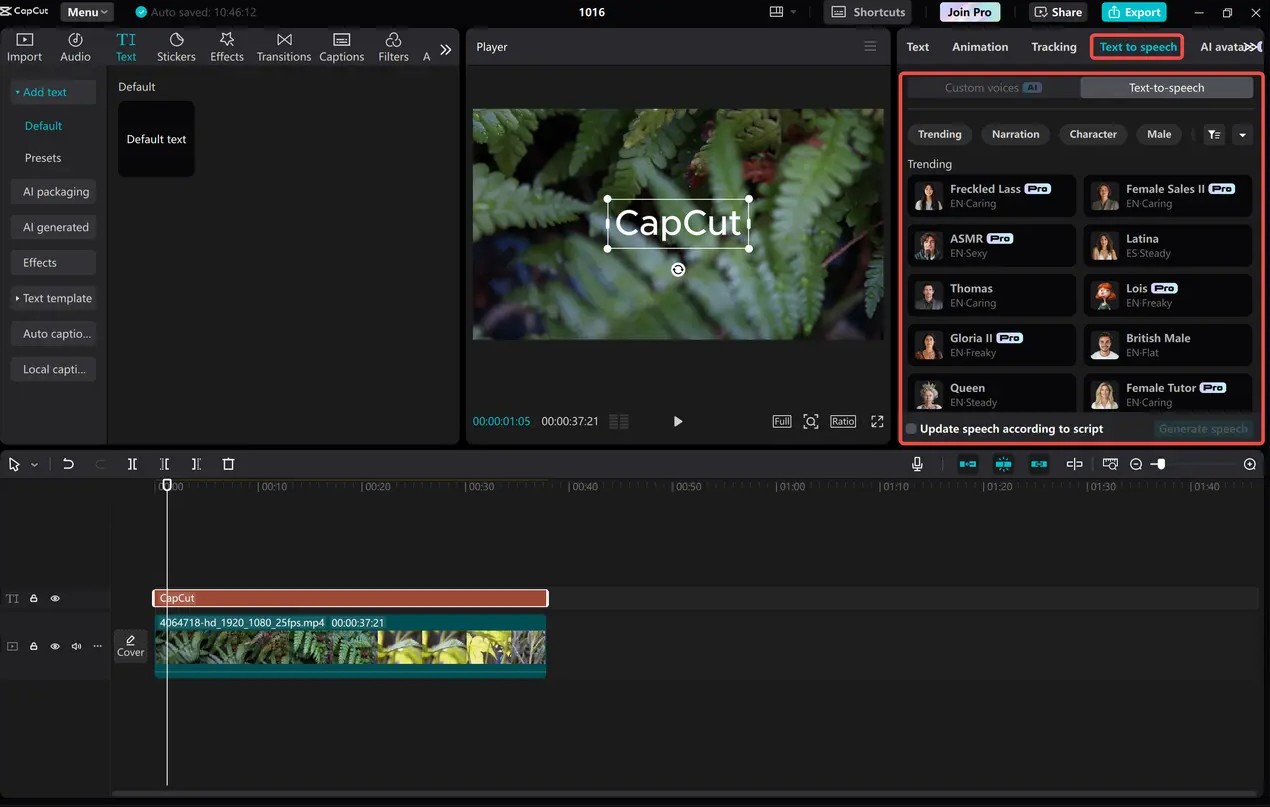
Simply input your content, and the AI will convert it into natural-sounding speech with a variety of language and style options. This is a useful solution for tutorial videos, narration videos, or educational content.
5.4. Smart background removal
CapCut AI can automatically recognize subjects and remove backgrounds without the need for a green screen.
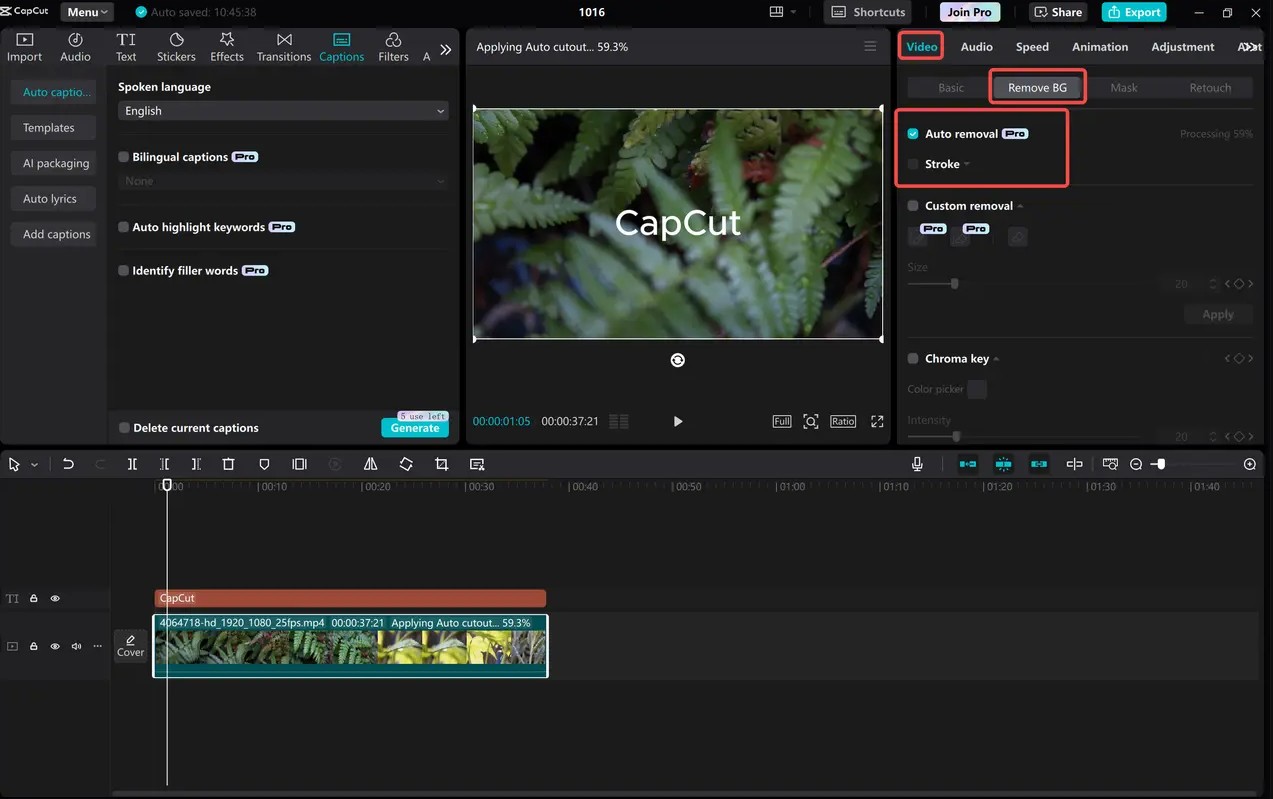
This feature helps you create product showcase videos, sales videos, or creative content with professional effects in just seconds.
5.5. Convert long videos to short videos
This is a very useful tool for content creators.
AI will analyze long videos, identify standout moments, and create suitable short videos for posting on TikTok, Facebook Reels, or YouTube Shorts.
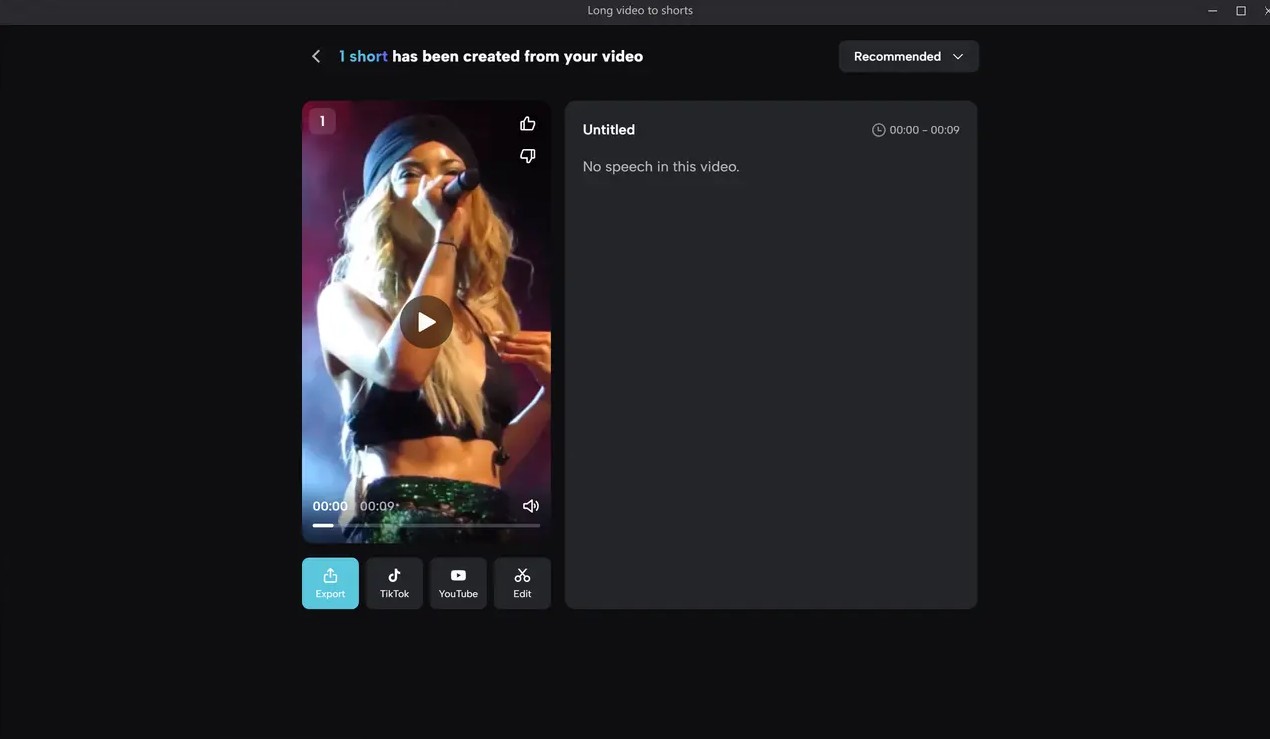
Reusing content in this way saves a lot of time while expanding its reach to a wider audience.
5.6. Video Translation using AI
CapCut also integrates a feature that translates videos into many different languages.
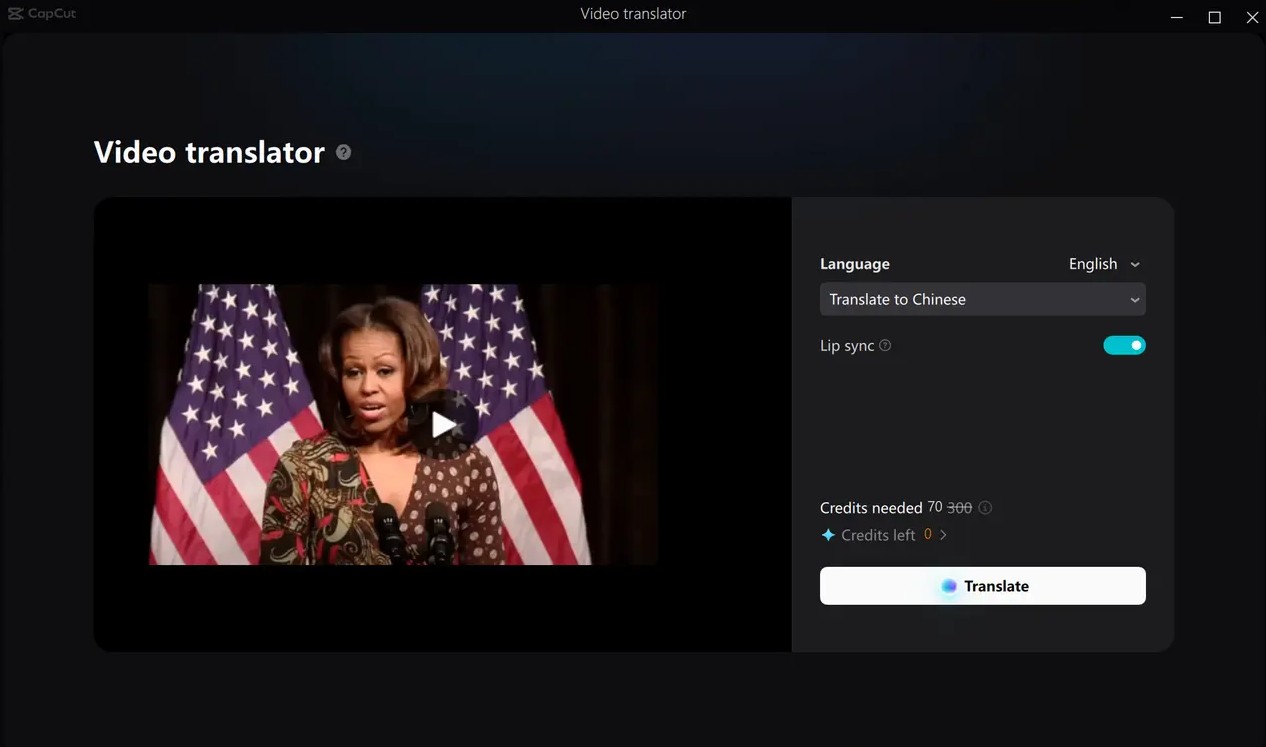
In addition to translating content, the software can also generate corresponding subtitles, making it easier for videos to reach international audiences. This is a particularly useful tool for businesses, content creators, or YouTube channels looking to expand their market.
5.7. Automatic color correction
Instead of manually adjusting each parameter, AI Color Correction analyzes the image and automatically balances color, brightness, contrast, and saturation.
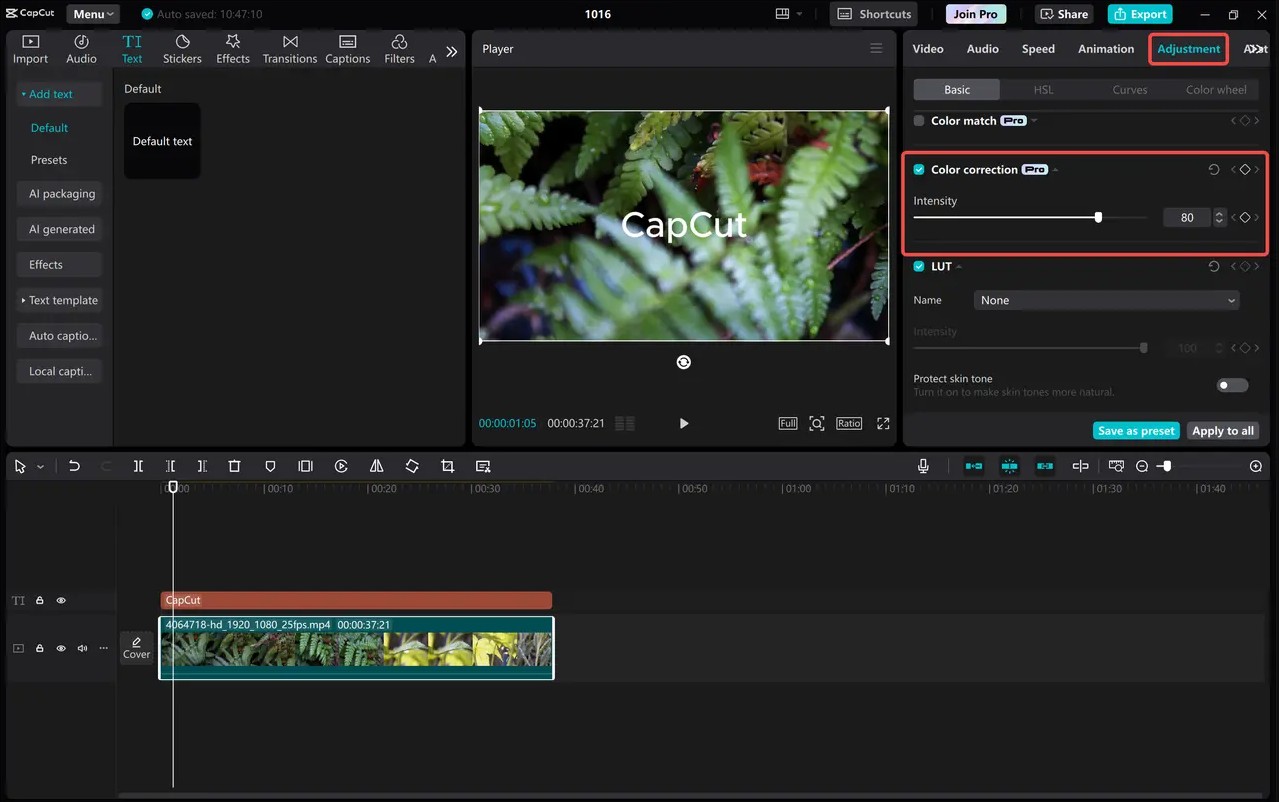
As a result, the video has more harmonious, vibrant, and professional colors after just a few seconds of processing.
6. Who is CapCut on a computer suitable for?
CapCut Desktop is an ideal choice for a wide range of users. Beginners can quickly get started thanks to its intuitive interface and pre-made templates. Content creators on TikTok, YouTube, or Facebook can leverage AI tools to shorten video production time. Businesses and marketers can also use CapCut to create professional promotional videos, product introductions, or media content without investing in complex editing software.
7. Conclusion
CapCut on PC is a comprehensive video editing solution, combining a user-friendly interface, powerful tools, and a range of modern AI features. From video cutting and merging, color correction, adding effects, creating automatic subtitles, text-to-speech, to background removal and converting long videos into short videos, everything is integrated into a single software.
If you're looking for a free, easy-to-use video editing tool that still meets your professional content creation needs, CapCut Desktop is definitely a worthwhile option. With regular updates to its features and optimized user experience, CapCut is becoming an invaluable tool for millions of content creators worldwide.





















VIP Products








Best Selling Products
Adobe Premiere Pro Account
99 USD
Upgrade genuine Capture One account
120 USD
Upgrade Genuine Office 365
49 USD
Windows 10 & 11 Pro Key
36 USD
MidJourney Account
29 USD
Copyright Adobe Lightroom Account
59 USD
Autodesk All App Account Copyright
120 USD
Capcut Pro 1 Year
39 USD
Freepik Premium Account
59 USD
Genuine Adobe Illustrator account
99 USD
Adobe Photoshop Copyright - Full App
120 USD
Plugin Retouch4me
69 USD
Genuine Cheap Canva Pro
39 USD
ChatGPT Plus Account (GPT-4)
16 USD
Upgrade Duolingo Super
29 USD