Best Selling Products

Windows 10 & 11 Pro Key
36 USD

ChatGPT Plus Account (GPT-4)
16 USD

Autodesk All App Account Copyright
120 USD

Genuine Cheap Canva Pro
39 USD

Upgrade Genuine Office 365
49 USD

Copyright Adobe Lightroom Account
59 USD

Upgrade genuine Capture One account
120 USD

Upgrade Duolingo Super
29 USD

Capcut Pro 1 Year
39 USD

Freepik Premium Account
59 USD

Genuine Adobe Illustrator account
99 USD

Adobe Photoshop Copyright - Full App
120 USD

Plugin Retouch4me
69 USD

Adobe Premiere Pro Account
99 USD

MidJourney Account
29 USD
10 AI Tools for Creatives to Boost Productivity and Efficiency
Nội dung
From design to content creation, AI is providing powerful support across many creative fields. The tools in this list help you work faster while maintaining your unique style. They are ideal choices for freelancers and creators.
1. Automating Design and Layouts
1.1. Canva
Among today's online design tools, Canva is probably one of the most familiar names for creative professionals. Initially developed as a platform that allowed non-designers to create simple graphics without deep knowledge of graphic software, Canva has evolved into a powerful tool used by freelancers, marketers, and creative teams alike.
The current free version of Canva includes several noteworthy AI features. One of the most impressive is the ability to generate design layouts from text descriptions. Users simply enter a short description of the type of design they want to create, such as “advertising poster for a music event” or “Instagram post for a coffee shop,” and the system automatically suggests multiple layout options.
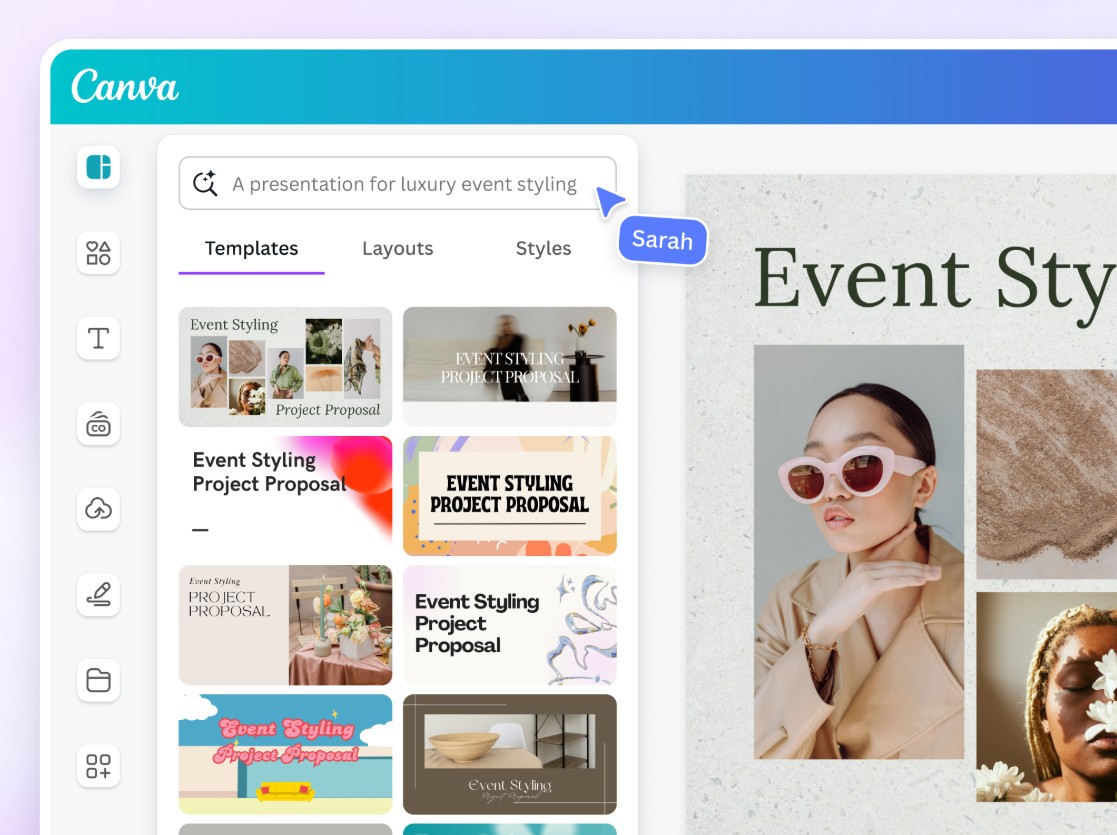
This does not mean that AI completely replaces the design process. Instead, it serves as a starting point that helps save time when beginning a project. Designers can still edit layouts, colors, images, and typography to match their personal style or client requirements.
Canva also includes an AI tool called Magic Write, which can generate written content for marketing designs. For example, if you are creating a social media post or promotional poster, Magic Write can suggest headlines, descriptions, or short paragraphs.
Although Canva’s premium features require a paid subscription, the free version remains powerful enough to create many common types of designs, including social media posts, presentations, infographics, and simple marketing materials.
1.2. Figma
Figma has become one of the most popular interface design tools in the technology industry. Its online collaboration capabilities and real-time teamwork features make it the preferred choice for many product design and UX/UI teams.
In recent years, Figma has also begun integrating AI features to support the design process. The free version of the platform includes several basic AI tools that are especially useful for prototyping and idea development.
.jpg)
One example is AI-generated text content for prototypes. When designing application or website interfaces, designers often rely on placeholder text. Figma’s AI can automatically generate sample content that fits the context, helping prototypes feel more realistic without requiring manual writing.
Additionally, AI in Figma can provide suggestions related to layouts and interface components. These suggestions are not always perfect, but they can help designers explore new directions during the ideation process.
Figma’s greatest strength remains its collaboration capabilities. AI serves only as a supporting element in certain aspects of the design process, while the majority of creative work and decision-making still belongs to humans.
1.3. Penpot
Penpot is an open-source interface design platform that is gaining increasing attention within the design community. Unlike many commercial tools, Penpot is developed with an open philosophy, allowing the community to contribute and expand its feature set.
Penpot’s AI capabilities are still in their early stages, but they demonstrate significant potential. Some current features include intelligent suggestions for improving layouts and generating design components.
For example, when creating an interface layout, the system can recommend ways to arrange elements more effectively or suggest reusable components. This helps save time while ensuring consistency across designs.
.jpg)
Because it is open source, Penpot also offers the advantage of flexibility. Developers can create plugins or integrate other AI tools into the platform, opening up many possibilities for future development.
1.4. Google Drawings with Smart Canvas
Google Drawings is a simple yet useful design tool within the Google Workspace ecosystem. It is a browser-based application that allows users to create diagrams, charts, and basic illustrations.
Recently, Google introduced AI-powered capabilities through its Smart Canvas system. These features can provide suggestions for shapes, layouts, and formatting while users create content.
.jpg)
For example, when drawing a flowchart or mind map, the system can suggest suitable shapes and automatically align them to create a cleaner layout. This saves time and reduces the amount of manual adjustment required.
One major advantage of Google Drawings is its seamless integration with other Google Workspace tools such as Docs, Slides, and Drive. This makes it particularly useful for teams that need to share and edit documents online.
1.5. Krita with AI Plugins
Krita is a free digital painting software loved by many illustrators and concept artists. The software is known for its powerful drawing tools and large user community.
In recent years, Krita has begun supporting various AI plugins developed by the community. These plugins introduce useful features such as intelligent brush suggestions, automatic color palette generation, and assistance in creating line art from sketches.
.jpg)
An important point is that AI plugins in Krita do not replace the artist’s drawing process. Instead, they serve as technical assistants, helping users work faster and experiment with different styles more easily.
Thanks to the flexibility of its plugin ecosystem, Krita continues to be an attractive tool for artists who want to combine traditional drawing techniques with modern AI technologies.
2. Content Creation and Productivity Enhancement
2.1. ChatGPT
You have probably heard of or used ChatGPT before. It is an AI chatbot capable of holding conversations, answering questions, and assisting with various tasks.
For creative professionals, ChatGPT is particularly useful for brainstorming ideas, drafting emails for clients, or planning projects. When you need someone to quickly exchange ideas with, this chatbot can become a surprisingly effective “virtual colleague.”
.png)
Of course, AI-generated content is not always accurate or perfectly reasonable. Therefore, users should treat it as a support tool rather than an absolute source of information.
2.2. Gemini
Gemini is Google’s AI chatbot and performs functions similar to many other conversational AI tools. Gemini’s strength lies in its deep integration with services throughout the Google ecosystem.
For example, Gemini can assist with information gathering, data analysis, and generating suggestions based on Google search results. This makes it particularly useful when quickly collecting information for creative projects.
.jpg)
Additionally, its integration with Google Workspace makes Gemini a valuable assistant for online collaboration teams.
2.3. Microsoft Copilot
Microsoft Copilot is an AI chatbot deeply integrated into Microsoft’s software ecosystem. Since Microsoft focuses heavily on enterprise software, Copilot is especially useful for work-related tasks.
.jpg)
For example, Copilot can assist with writing project proposals, preparing client presentations, or creating business document content. Its integration with applications such as Word, Excel, and PowerPoint helps streamline workflows.
2.4. Claude
Claude is an AI assistant developed by Anthropic and is becoming increasingly popular. One of Claude’s strongest features is its ability to understand context and subtle nuances in text.
.jpg)
This makes it particularly useful for tasks such as document analysis, text editing, and summarizing long-form content. However, the free version has limitations regarding the amount of data it can process at one time.
2.5. Grammarly
Grammarly has long been recognized as a leading grammar and spelling checker for English. In recent years, the platform has introduced numerous AI-powered features.
One of the most useful capabilities is tone suggestion. For example, when writing an email to a client, Grammarly can recommend adjustments that make the content sound more professional or more friendly.
.jpg)
AI is rapidly becoming an essential part of the creative professional’s toolkit. However, rather than replacing humans, most AI tools work best when used as assistants. The important thing is that creators still remain at the center of the creative process. Ideas, emotions, personal style, and storytelling abilities are elements that AI still finds difficult to replace.





















VIP Products








Best Selling Products
Windows 10 & 11 Pro Key
36 USD
ChatGPT Plus Account (GPT-4)
16 USD
Autodesk All App Account Copyright
120 USD
Genuine Cheap Canva Pro
39 USD
Upgrade Genuine Office 365
49 USD
Copyright Adobe Lightroom Account
59 USD
Upgrade genuine Capture One account
120 USD
Upgrade Duolingo Super
29 USD
Capcut Pro 1 Year
39 USD
Freepik Premium Account
59 USD
Genuine Adobe Illustrator account
99 USD
Adobe Photoshop Copyright - Full App
120 USD
Plugin Retouch4me
69 USD
Adobe Premiere Pro Account
99 USD
MidJourney Account
29 USD