Best Selling Products

ChatGPT Plus Account (GPT-4)
16 USD

Autodesk All App Account Copyright
120 USD

Genuine Cheap Canva Pro
39 USD

Capcut Pro 1 Year
39 USD

Upgrade genuine Capture One account
120 USD

Freepik Premium Account
59 USD

MidJourney Account
29 USD

Upgrade Duolingo Super
29 USD

Copyright Adobe Lightroom Account
59 USD

Genuine Adobe Illustrator account
99 USD

Windows 10 & 11 Pro Key
36 USD

Plugin Retouch4me
69 USD

Adobe Photoshop Copyright - Full App
120 USD

Adobe Premiere Pro Account
99 USD

Upgrade Genuine Office 365
49 USD
5 AI Tools for Video Creation and Motion Graphics You Shouldn't Miss
If you're looking for tools to improve the quality of your videos, this list is for you. These tools have been selected based on their features and popularity. They help you get started easily and enhance your skills.
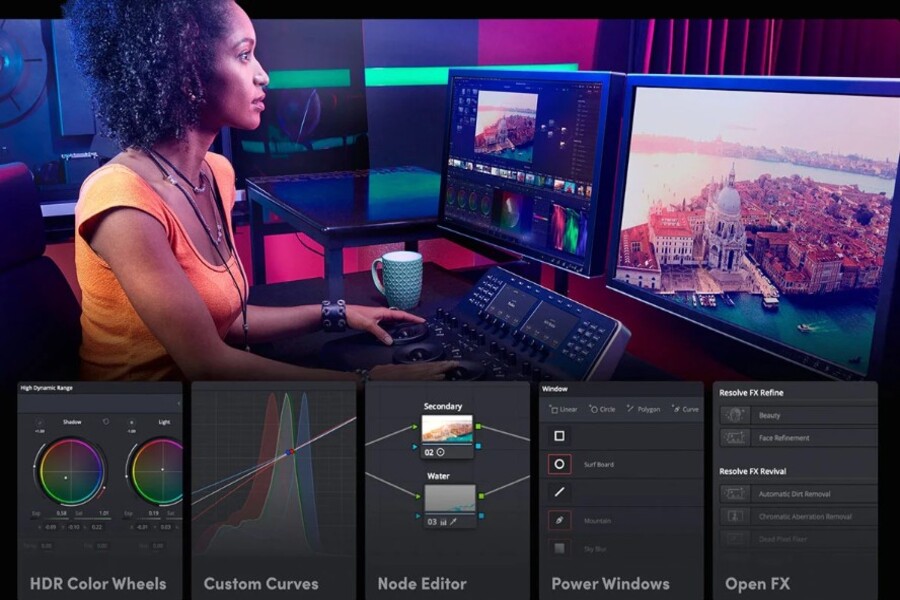
1. DaVinci Resolve
DaVinci Resolve has long been regarded as one of the most powerful professional video editing software solutions available today. What makes this software special is its highly capable free version, which offers an extensive set of features with very few of the limitations commonly found in other free software. Users do not have to deal with watermarks, video export time restrictions, or major feature barriers. This makes DaVinci Resolve an attractive choice for both beginners and professional filmmakers.
One of DaVinci Resolve’s most outstanding strengths is its professional color grading system. Before AI integration, color correction was a complex process that required experience and a keen artistic eye. However, newer AI-powered features have automated many parts of this workflow. The software can analyze video footage and provide suitable color balancing suggestions, helping users achieve the desired results quickly without manually adjusting numerous settings..jpg)
In addition, DaVinci Resolve uses AI to support facial recognition within videos. This is especially useful when you need to track a specific character throughout a long scene. AI can identify and follow that face, making it easier to apply editing effects. For example, you can apply skin smoothing or lighting adjustments exclusively to a character’s face without affecting the rest of the frame.
Another highly noteworthy feature is AI-powered audio enhancement. During video recording, audio is often affected by environmental noise, wind, or inadequate recording equipment. The AI tools in DaVinci Resolve can automatically analyze and remove unwanted noise while improving voice clarity. This saves content creators a significant amount of time compared to manual audio processing.
Thanks to the combination of professional video editing tools and intelligent AI features, DaVinci Resolve has become one of the top choices for anyone looking to produce high-quality videos without investing in expensive software.
2. OpenShot
OpenShot is an open-source video editing software loved by many users for its simplicity and ease of use. Unlike some professional editing software with complex interfaces, OpenShot is designed to help new users quickly become familiar with video editing.
One of OpenShot’s greatest advantages is the open-source community behind it. Thanks to this community, the software is continuously updated and expanded with new features, including plugins that utilize artificial intelligence..jpg)
A typical example is intelligent scene detection. When working with long videos, identifying cut points between scenes often takes a considerable amount of time. AI plugins can automatically analyze video content and identify important scene transitions. As a result, users can quickly divide videos into logical segments for editing.
AI can also assist with automatic audio balancing. In many videos, volume levels may vary because of changes in microphone distance or recording environments. AI plugins can analyze the audio and automatically adjust levels to ensure consistent volume throughout the video.
Additionally, OpenShot supports basic motion tracking through AI plugins. This allows users to attach graphics or effects to moving objects within a video. For example, you can add an icon or text label that follows a character as they move across the frame.
These capabilities make OpenShot a user-friendly editing tool that remains powerful enough to meet a variety of creative needs.
3. Audacity with AI Plugins
Audacity is one of the most famous free audio editing software applications in the world. For many years, it has been a trusted tool for podcasters, independent music producers, and video editors.
Audacity’s greatest strength lies in its powerful audio processing capabilities combined with a relatively accessible interface. However, achieving high-quality audio editing can still require significant technical expertise. This is where AI plugins prove their value.
.jpg)
One of the most common AI applications in Audacity is intelligent noise reduction. When recording in less-than-ideal environments, audio often contains unwanted sounds such as fan noise, traffic sounds, or other background disturbances. AI plugins can analyze these noises and remove them effectively without significantly affecting voice quality.
AI can also help separate speech from background audio. This is especially useful when editing dialogue in complex recordings or extracting voices from video content.
Furthermore, some plugins offer AI-powered audio enhancement, helping clarify speech, balance frequencies, and improve the overall quality of recordings. These tools make audio post-production much simpler and faster.
Thanks to its extensibility through plugins and its large user community, Audacity continues to be one of the most important audio tools for content creators.
4. Blender
Blender is a well-known open-source software platform in the field of 3D graphics and animation. Over the years, Blender has been used to create animated films, 3D models for video games, and even visual effects for movies.
Blender’s strength lies in its exceptionally comprehensive toolset. Users can perform nearly every 3D graphics-related task within a single application, from modeling and sculpting to material creation, scene building, and rendering.
In recent years, the Blender community has begun developing numerous AI-powered plugins to support creative workflows. One example is automatic character rigging. In 3D animation, creating skeleton rigs for character movement is a time-consuming task. AI plugins can automatically analyze models and generate appropriate rigs, significantly reducing the workload for artists.
.jpg)
AI can also assist in generating surface textures for 3D models. Instead of manually creating every detail, users can leverage AI to generate complex textures based on descriptions or reference images.
Additionally, some plugins help optimize 3D scenes by automatically adjusting lighting, materials, or scene structures to achieve better rendering performance. This is especially important when working on large-scale projects.
Thanks to the combination of powerful software capabilities and the creativity of its community, Blender is becoming an exceptionally powerful platform for 3D artists.
5. OBS Studio
OBS Studio is a free broadcasting and video recording software widely used by streamers, YouTubers, and online content creators. It is well known for its extensive customization options and support for multiple live-streaming platforms.
In recent years, OBS Studio has begun supporting numerous AI plugins that improve streaming quality. One of the most notable features is real-time background removal. Previously, separating a broadcaster from the background often required a dedicated green screen. With AI, OBS can analyze webcam footage and automatically separate the subject from the background without requiring specialized equipment.
.jpg)
AI can also help remove audio noise during live broadcasts. This is especially important for streamers who often broadcast from environments that are not completely quiet. AI plugins can eliminate unwanted sounds while emphasizing the speaker’s voice.
Another interesting feature is automatic scene switching. AI can analyze video content and automatically switch between different scenes, making broadcasts appear more professional without requiring constant manual control.
In addition, OBS can automatically adjust video and audio quality based on the type of content being streamed. This helps ensure the best possible viewer experience, even when network conditions are unstable.





















VIP Products








Best Selling Products
ChatGPT Plus Account (GPT-4)
16 USD
Autodesk All App Account Copyright
120 USD
Genuine Cheap Canva Pro
39 USD
Capcut Pro 1 Year
39 USD
Upgrade genuine Capture One account
120 USD
Freepik Premium Account
59 USD
MidJourney Account
29 USD
Upgrade Duolingo Super
29 USD
Copyright Adobe Lightroom Account
59 USD
Genuine Adobe Illustrator account
99 USD
Windows 10 & 11 Pro Key
36 USD
Plugin Retouch4me
69 USD
Adobe Photoshop Copyright - Full App
120 USD
Adobe Premiere Pro Account
99 USD
Upgrade Genuine Office 365
49 USD