Best Selling Products

Genuine Adobe Illustrator account
99 USD

ChatGPT Plus Account (GPT-4)
16 USD

Copyright Adobe Lightroom Account
59 USD

Genuine Cheap Canva Pro
39 USD

Windows 10 & 11 Pro Key
36 USD

Upgrade genuine Capture One account
120 USD

Upgrade Duolingo Super
29 USD

Adobe Photoshop Copyright - Full App
120 USD

Freepik Premium Account
59 USD

Capcut Pro 1 Year
39 USD

Plugin Retouch4me
69 USD

Autodesk All App Account Copyright
120 USD

Adobe Premiere Pro Account
99 USD

MidJourney Account
29 USD

Upgrade Genuine Office 365
49 USD
A Roundup of Natural Video Skin-Smoothing Apps and Professional Video Editing Solutions
Nội dung
- 1. Why Video Skin-Smoothing Apps Have Become an Indispensable Tool
- 1.1 Optimizing Makeup Time and Cost
- 1.2 Maintaining Confidence on Camera
- 2. Criteria for Choosing a Standard-Quality Video Skin-Smoothing App
- 2.1 Flexible AI Facial Recognition Capability
- 2.2 Adjusting the Smoothing Level by Percentage
- A professional app always provides sliders for adjusting smoothness, brightness, even skin tone, and preserving skin grain detail. This feature prevents the face from looking flat, losing its contours, or looking over-smoothed like peeled skin.
- 2.3 Support for High-Resolution Video Export
- 3. The Most Popular and Effective Video Skin-Smoothing Apps Today
- 3.1 CapCut — The Nation's Versatile Editing Tool
- 3.2 Meitu — The Pinnacle of Detailed Skin Processing
- 3.3 BeautyPlus — Gentle, Natural Beauty Effects
- 3.4 Adobe Premiere Pro — A Professional Beauty Solution for Computers
- 4. Introducing the Appvip.ai Platform — A Leading Support for Creating and Optimizing Video Content
- 4.1 A Comprehensive Solution for Digital Content Creators
- 4.2 A Commitment to Absolute Safety and Security
- 5. A 5-Step Process for Editing Naturally Smooth Video Skin That Doesn't Look Fake
- 5.1 Step 1: Prepare High-Quality Input Video
- Choose original footage that is sharp and well-lit. Every video skin-smoothing app performs best when the input file isn't overly blurry or heavily affected by noise.
- 5.2 Step 2: Balance Basic Lighting and Color
- 5.3 Step 3: Apply the Skin-Smoothing Feature and Adjust Parameters
- 5.4 Step 4: Rebuild Skin Texture Detail (Skin Texture)
- 5.5 Step 5: Carefully Check the Motion and Export the Video
- 6. Common Mistakes When Using Video Skin-Smoothing Apps and How to Fix Them
- 6.1 A Face That Looks Flat and Blurred From Setting the Smoothing Slider Too High
- 6.2 A Filter That Shakes or Drifts Off the Face During Movement
- 6.3 Skin Tone That Becomes Unnaturally Distorted
- 6.4 Exported Video That Comes Out Blurry or Out of Focus
- 7. Closing Thoughts
Discover professional video skin-smoothing apps that keep skin looking radiant and natural. Experience the top optimal and safe video editing solution at appvip.ai.
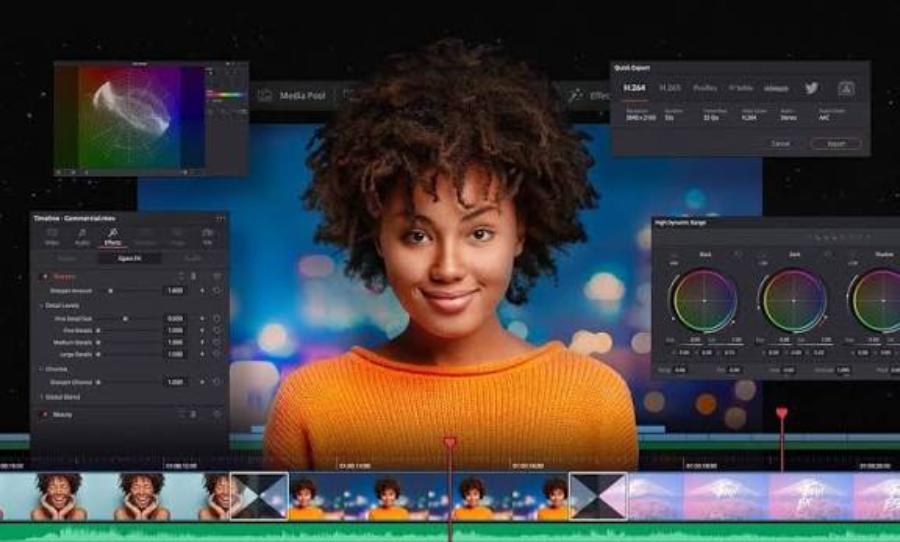
1. Why Video Skin-Smoothing Apps Have Become an Indispensable Tool
Producing high-quality video content requires a combination of lighting, filming equipment, and meticulous post-production technique. However, shooting conditions aren't always perfect.
1.1 Optimizing Makeup Time and Cost
Producing video content at a high frequency makes preparing one's appearance a time-consuming task. Modern editing apps integrate smart skin-smoothing filters that quickly handle flaws like acne, dark spots, uneven skin tone, or large pores in just a few adjustment steps.
.jpg)
1.2 Maintaining Confidence on Camera
A polished appearance in front of the camera brings confidence to the presenter, thereby improving the quality of message delivery. Having smooth skin that still retains its natural texture makes a video look more real, avoiding the artificial feel caused by overusing filters.
2. Criteria for Choosing a Standard-Quality Video Skin-Smoothing App
Countless editing tools exist on the market today, leaving users uncertain about which to choose. A quality app needs to fully meet the core technical standards below.
2.1 Flexible AI Facial Recognition Capability
The AI algorithm needs to track the face accurately even when the person in the video is moving quickly or turned at an angle. The skin-smoothing filter must closely follow the skin's surface without blurring important details like the eyes, eyebrows, lips, or hair.
2.2 Adjusting the Smoothing Level by Percentage
A professional app always provides sliders for adjusting smoothness, brightness, even skin tone, and preserving skin grain detail. This feature prevents the face from looking flat, losing its contours, or looking over-smoothed like peeled skin.
2.3 Support for High-Resolution Video Export
The beauty-effect processing must not degrade the file's overall quality. Good software must support exporting video in Full HD 1080p or 4K format with a smooth frame rate (60fps) without breaking up detail or blurring the image.
3. The Most Popular and Effective Video Skin-Smoothing Apps Today
Each piece of editing software has its own standout strengths, suited to different practical needs ranging from basic to advanced.
3.1 CapCut — The Nation's Versatile Editing Tool
CapCut is supported on iOS, Android, and PC, with an extremely powerful "Retouch" feature and an intuitive interface. Users can easily adjust skin smoothness, whiten teeth, remove under-eye bags, and slim the face in just seconds. The app's AI handles facial movement very smoothly, minimizing filter drift to the greatest extent.
3.2 Meitu — The Pinnacle of Detailed Skin Processing
Well-known on iOS and Android mobile operating systems, Meitu offers in-depth intervention on every area of skin on the body. Besides smoothing facial skin, the app also supports smoothing skin on the neck, arms, and legs, and automatically balances skin tone across the whole body, making the overall image look as harmonious as if it had been cared for at a spa.
3.3 BeautyPlus — Gentle, Natural Beauty Effects
BeautyPlus suits those who love a minimalist style on mobile devices. The app's algorithms focus on preserving natural skin texture, only blurring light acne marks without erasing the authentic contours of the face, thanks to its natural color filters.
3.4 Adobe Premiere Pro — A Professional Beauty Solution for Computers
Made for Windows and macOS users, Adobe Premiere Pro allows for in-depth intervention through dedicated skin-beautifying plugins. This tool requires professional skill but delivers detailed customization capability, helping images achieve the highest cinematic quality.
4. Introducing the Appvip.ai Platform — A Leading Support for Creating and Optimizing Video Content
.png)
Beyond using video skin-smoothing apps to perfect the visual side, TikTokers and Vloggers greatly need a comprehensive ecosystem to support ideas and channel-building technology. Appvip.ai was created as an advanced technology solution for the creator community.
4.1 A Comprehensive Solution for Digital Content Creators
The appvip.ai website provides a system of tools that support data analysis, trend research, and automation of the scriptwriting process. Combining properly skin-smoothed video imagery with captivating content from appvip.ai will help a video easily reach millions of views.
4.2 A Commitment to Absolute Safety and Security
The system at appvip.ai operates on a high-tech foundation that respects user information privacy policy. The platform is oriented to help creators grow their channel in a standard, natural way, saying no to tricks that violate community guidelines.
5. A 5-Step Process for Editing Naturally Smooth Video Skin That Doesn't Look Fake
Following the correct technical process for editing helps a video achieve a smooth, polished visual effect while still retaining maximum authenticity.
5.1 Step 1: Prepare High-Quality Input Video
Choose original footage that is sharp and well-lit. Every video skin-smoothing app performs best when the input file isn't overly blurry or heavily affected by noise.
5.2 Step 2: Balance Basic Lighting and Color
Before applying the smoothing effect, adjust the Brightness, Contrast, and color accuracy. Standard lighting will help the AI recognize the facial skin area more accurately.
5.3 Step 3: Apply the Skin-Smoothing Feature and Adjust Parameters
Activate the Retouch or Smooth tool in the app. A smoothing level of 30% to 50% is recommended. Avoid pushing the slider all the way to 100%, as this will make the face look flat and lose its natural contours.
5.4 Step 4: Rebuild Skin Texture Detail (Skin Texture)
Use the "Sharpen" tool or a light "Grain" effect to restore fine skin texture. This small technique makes the skin look healthy and radiant instead of dull and flat.
5.5 Step 5: Carefully Check the Motion and Export the Video
Play back the entire video at normal speed to check whether the smoothing layer drifts off the face during fast-moving shots. Once complete, proceed to export the video at a minimum resolution of Full HD 1080p.
6. Common Mistakes When Using Video Skin-Smoothing Apps and How to Fix Them
Many beginner users often make basic mistakes that strip a video of its professional aesthetic quality.
.jpg)
6.1 A Face That Looks Flat and Blurred From Setting the Smoothing Slider Too High
The main cause is users pushing the Smooth slider to the maximum level (above 80%). To fix this, reduce the smoothing to a level of 30–40% and slightly increase sharpness (Sharpen) to preserve the face's natural contours.
6.2 A Filter That Shakes or Drifts Off the Face During Movement
This phenomenon occurs when the light source is too weak or the person in the video moves too fast, causing the AI to lose track. The best fix is to add a Softbox light while filming and limit sudden movements.
6.3 Skin Tone That Becomes Unnaturally Distorted
This error stems from using the wrong color filter layered on top of the skin-smoothing layer. You should perform the skin-smoothing step first, then apply neutral color filters afterward so the overall frame stays natural.
6.4 Exported Video That Comes Out Blurry or Out of Focus
The cause is the user selecting the wrong resolution setting when exporting the file. Always make sure to select a minimum resolution of Full HD 1080p or 4K with a high Bitrate to preserve video quality.
Beyond polishing the visuals, content creators also need to focus on keeping up with new algorithm trends on short-video platforms. Balancing visual aesthetics with the value of the information being conveyed will help keep viewers watching longer, increasing conversion rates as well as natural engagement metrics. When you know how to flexibly combine smart beauty software with an in-depth support platform like appvip.ai, you'll not only own captivating, professional videos but also gradually build a channel that grows safely, sustainably, and effectively breaks through in revenue.
7. Closing Thoughts
Applying video skin-smoothing apps skillfully and subtly is the perfect stepping stone that helps creators elevate their personal image online. The harmonious combination of a polished appearance, standard post-production technique, and leveraging smart content solutions at appvip.ai will be the sustainable formula that helps you create quality footage, build your personal brand, and attract a large, devoted following.





















VIP Products








Best Selling Products
Genuine Adobe Illustrator account
99 USD
ChatGPT Plus Account (GPT-4)
16 USD
Copyright Adobe Lightroom Account
59 USD
Genuine Cheap Canva Pro
39 USD
Windows 10 & 11 Pro Key
36 USD
Upgrade genuine Capture One account
120 USD
Upgrade Duolingo Super
29 USD
Adobe Photoshop Copyright - Full App
120 USD
Freepik Premium Account
59 USD
Capcut Pro 1 Year
39 USD
Plugin Retouch4me
69 USD
Autodesk All App Account Copyright
120 USD
Adobe Premiere Pro Account
99 USD
MidJourney Account
29 USD
Upgrade Genuine Office 365
49 USD