Best Selling Products

Upgrade Duolingo Super
29 USD

Capcut Pro 1 Year
39 USD

Genuine Adobe Illustrator account
99 USD

Adobe Premiere Pro Account
99 USD

Freepik Premium Account
59 USD

Plugin Retouch4me
69 USD

Autodesk All App Account Copyright
120 USD

Windows 10 & 11 Pro Key
36 USD

Genuine Cheap Canva Pro
39 USD

Copyright Adobe Lightroom Account
59 USD

Upgrade genuine Capture One account
120 USD

MidJourney Account
29 USD

ChatGPT Plus Account (GPT-4)
16 USD

Adobe Photoshop Copyright - Full App
120 USD

Upgrade Genuine Office 365
49 USD
Adobe Firefly: Edit photos with AI, achieving professional-quality results with just one touch.
Nội dung
- 1. Smart photo editing tools powered by AI.
- 1.1. Edit photos incredibly fast thanks to Firefly's free AI-powered photo editing features.
- 1.2. Easily edit AI photos in just a few minutes.
- 1.3. AI Photo Editing Tools for Creators, Marketers, and Everyday Users
- 2. Why should you use Firefly for AI photo editing?
- 3. Use cases and examples of photo editing using AI
- 4. How to use the Command-Based Editing feature in Firefly
Firefly uses AI-generated technology to help you edit photos quickly and accurately. From background removal and color correction to detail adjustments, every operation takes only seconds. Suitable for both beginners and professional creatives.
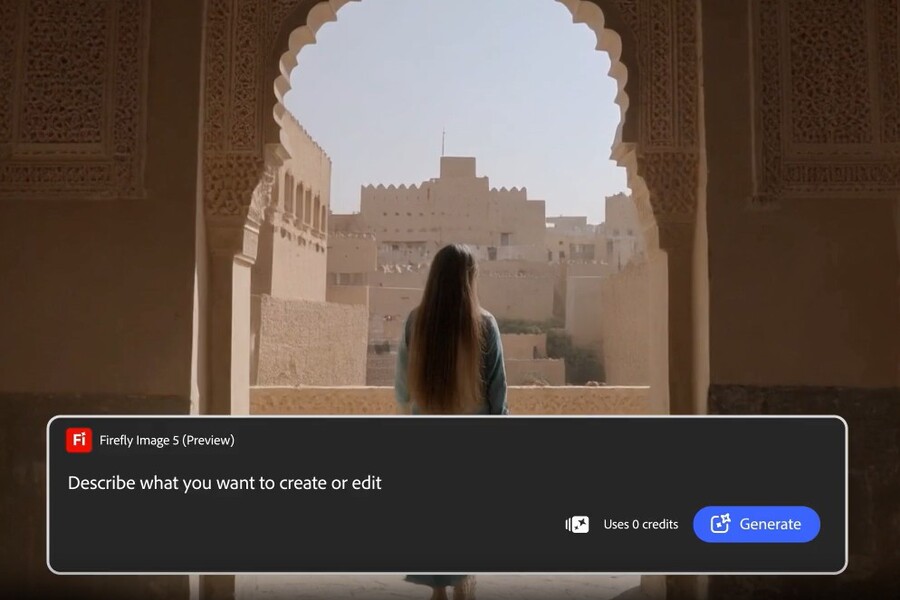
Adobe Firefly: Edit photos with AI, achieving professional-quality results with just one touch.
Firefly uses AI-generated technology to help you edit photos quickly and accurately. From background removal and color correction to detail adjustments, every operation takes only seconds. Suitable for both beginners and professional creatives.
Adobe Firefly emerged as a solution to that problem. As a next-generation AI photo editor developed by Adobe, Firefly offers the ability to transform images with just a few simple commands , or even with a single click. No complex operations or memorizing a multitude of tools are required; users can still achieve impressive, aesthetically pleasing photo editing results, ready for both personal and commercial use.
Firefly is more than just a regular photo editing tool. It's a comprehensive creative assistant designed to serve a wide range of users: from content creators and marketers to businesses and everyday consumers. With its powerful AI-powered platform, Firefly makes photo editing more intuitive, faster, and more flexible than ever before, across all devices and browsers.
Buy Genuine Licensed Software at Affordable Prices
The biggest difference with Firefly lies in its approach to photo editing. Instead of starting with tools and operations, Firefly starts with the user's intention. You don't need to know which tools to choose, how to adjust parameters, or in what order to perform the operations. You simply describe what you want in natural language, and Firefly will handle the rest.
This approach makes Firefly an ideal tool for a wide range of users. Creators can quickly experiment with new visual directions. Marketers can process campaign images at high speed while maintaining brand consistency. Everyday users can easily edit personal photos, travel photos, or family photos without needing specialized knowledge.
More importantly, Firefly doesn't compromise quality for convenience. Adobe's AI-generated algorithms are optimized to retain detail, natural lighting, and a realistic feel in images, while allowing users to control the results in a flexible and intuitive way.
.jpg)
1. Smart photo editing tools powered by AI.
Adobe Firefly represents a new generation of photo editing tools, where AI not only assists but also plays a central role in the entire creative process. With Command-Based Editing, users can experience faster, smarter editing that is closer to their natural creative thinking.
Instead of performing a series of manual operations, you can ask Firefly to automatically enhance your photos, adjust colors, remove backgrounds, or replace objects with just a description. AI-generated technology allows Firefly to understand the context of the image, making appropriate adjustments without losing its natural look.
This is especially important in situations where quick editing is needed but still requires high accuracy, such as processing product photos, portraits, or brand communication images.
1.1. Edit photos incredibly fast thanks to Firefly's free AI-powered photo editing features.
One of Firefly's most outstanding advantages is its ability to edit images almost instantly. Simply type what you want to change into the Command Edit tool, and Firefly will analyze the image and make the edits in seconds.
.jpg)
You can request to add or remove objects, change the background, and fine-tune small details like lighting, sharpness, or overall color. After the initial result, Firefly still allows you to go deeper with tools like Generating Images and Generating Color Correction, giving you control over image detail and style.
In addition, quick operations such as cropping, resizing, and adjusting the color tone are built-in, helping you perfect your photos in a seamless process. Because Firefly runs directly in your browser, you can edit photos anytime, anywhere without installing complicated software.
1.2. Easily edit AI photos in just a few minutes.
Not only is Firefly fast, it's also designed to provide an easy and intuitive editing experience. In just a few minutes, you can achieve complete results, ready for a variety of purposes.
.jpg)
Tools like Image-to-Image Conversion and Scene-to-Image Conversion allow you to recreate the composition, lighting, and mood of a photograph. This is especially useful when you want to experiment with new creative directions or fine-tune the final product without starting from scratch.
The Create Generating Combination feature helps synchronize colors and tones against a reference image, ensuring consistency across the entire image series or campaign. This is crucial in brand design and marketing, where visual consistency contributes to building a strong brand identity.
1.3. AI Photo Editing Tools for Creators, Marketers, and Everyday Users
Firefly is designed to serve a wide range of users while maintaining a balance between power and ease of use. For professional creators, Firefly is a tool that accelerates workflows, allowing for the testing of numerous ideas in a short amount of time without interrupting the creative process.
.jpg)
For marketers, Firefly helps process campaign images quickly, from product photos and advertising banners to social media content. Batch editing capabilities, background changes, and color adjustments help maintain consistent aesthetics across all media channels.
For everyday users, Firefly offers a simple and intuitive photo editing experience. You can easily remove unwanted details, change the background, or adjust colors to capture memorable moments in the most beautiful way.
2. Why should you use Firefly for AI photo editing?
Adobe Firefly is more than just a convenient tool; it's an AI-powered photo editing platform built with a long-term vision for professional creativity. Firefly combines Adobe's long-standing creative expertise with advanced AI generation technology, delivering high-quality, commercially-ready editing results.
One of the key reasons Firefly is highly regarded is its ability to optimize the creative process. Using natural language commands allows you to focus on the idea rather than technical manipulation. You can enhance an image, remove unwanted details, or create an entirely new image with just a few clicks.
Firefly also offers flexibility in AI model selection. Users can utilize Firefly models trained on Adobe-licensed and publicly available content to ensure commercial safety, or explore partner models to experiment with new styles.
More importantly, Firefly gives you complete creative freedom without increasing complexity. From lighting, composition, and tone to image texture, everything can be easily fine-tuned through powerful yet user-friendly AI tools.
(1).jpg)
3. Use cases and examples of photo editing using AI
In practice, Adobe Firefly's AI photo editor can be applied to a wide variety of situations. For travel photos, Firefly helps remove distracting elements such as pedestrians, power lines, or unwanted objects, while also improving lighting and color to make the photo more vibrant.
In the e-commerce sector, Firefly helps clean up product images, change backgrounds, and apply a consistent style to the entire online store. This enhances brand image and increases conversion rates.
For social media, Firefly allows you to create engaging visual content in just minutes. You can quickly edit, restyle, or create image variations to suit different platforms.
In a professional work environment, Firefly helps creative teams quickly test and refine ideas, especially useful for advertising projects, marketing materials, or editorial content that requires quick feedback.
.jpg)
4. How to use the Command-Based Editing feature in Firefly
To get started, simply log in to Adobe Firefly with your Adobe ID or create a free account. From the main interface, you can access quick actions or directly open the Command-line Editing feature.
After uploading your image, enter a clear description of what you want to change. Detailed commands that describe style, lighting, or context will help Firefly better understand your intentions and produce more accurate results.
In just seconds, Firefly will generate an edited version of your image. You can further refine it by adjusting commands, changing settings, or using additional features like Image to Image conversion or Generating Combinations to explore even more creative possibilities.
Once you're happy with the result, you can download the image, copy it to the clipboard, or share it directly for use on social media, videos, flyers, or other communication materials.
With command-line editing capabilities, high-quality results, and commercial safety features, Firefly is the ideal choice for anyone wanting to transform ideas into stunning images in just a few clicks. Whether you're a professional creator, marketer, or everyday user, Firefly helps you master your images more easily and effectively than ever before.





















VIP Products








Best Selling Products
Upgrade Duolingo Super
29 USD
Capcut Pro 1 Year
39 USD
Genuine Adobe Illustrator account
99 USD
Adobe Premiere Pro Account
99 USD
Freepik Premium Account
59 USD
Plugin Retouch4me
69 USD
Autodesk All App Account Copyright
120 USD
Windows 10 & 11 Pro Key
36 USD
Genuine Cheap Canva Pro
39 USD
Copyright Adobe Lightroom Account
59 USD
Upgrade genuine Capture One account
120 USD
MidJourney Account
29 USD
ChatGPT Plus Account (GPT-4)
16 USD
Adobe Photoshop Copyright - Full App
120 USD
Upgrade Genuine Office 365
49 USD