Best Selling Products

Capcut Pro 1 Year
39 USD

Upgrade Duolingo Super
29 USD

MidJourney Account
29 USD

Genuine Cheap Canva Pro
39 USD

Copyright Adobe Lightroom Account
59 USD

Windows 10 & 11 Pro Key
36 USD

Genuine Adobe Illustrator account
99 USD

Autodesk All App Account Copyright
120 USD

Upgrade genuine Capture One account
120 USD

Freepik Premium Account
59 USD

Upgrade Genuine Office 365
49 USD

Plugin Retouch4me
69 USD

Adobe Premiere Pro Account
99 USD

ChatGPT Plus Account (GPT-4)
16 USD

Adobe Photoshop Copyright - Full App
120 USD
CapCut for iPad: Download now and create professional videos anytime, anywhere.
Nội dung
- 1. Key features of the CapCut video editor on iPad
- 1.1. AI-powered editing tools
- 1.2. Advanced Keyframe Animation Control
- 1.3. Access to a rich resource library
- 1.4. A huge collection of filters and effects
- 2. Instructions on how to download and install CapCut on iPad
- 3. Benefits of using CapCut Pad for video editing
- 4. Use cases for CapCut on iPad for video editing
You don't need a high-end computer to edit high-quality videos on your iPad. CapCut offers a powerful toolset and smooth processing capabilities.
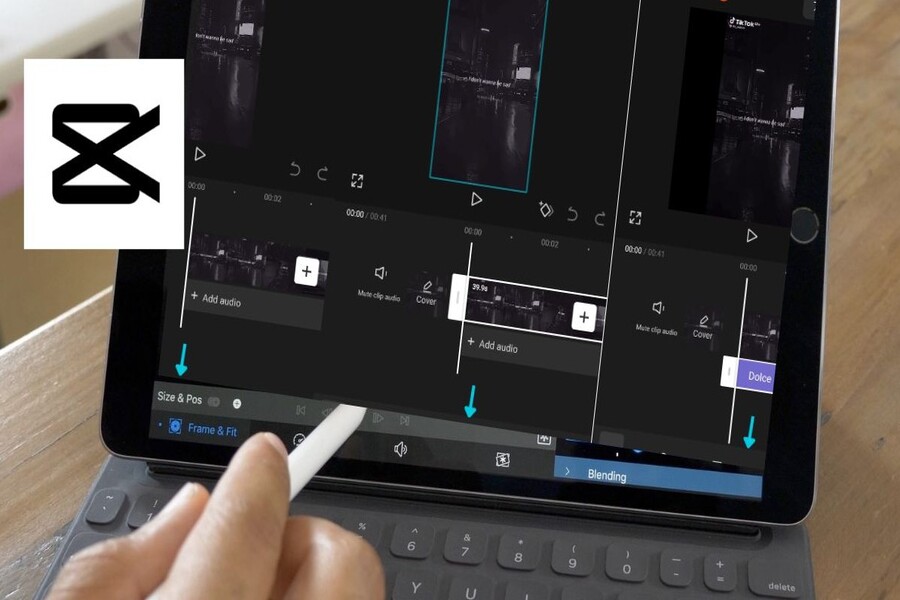
Simply click the Download button or scan the QR code to download CapCut IPA for iPad, and you've unlocked a flexible creative space where advanced features like AI-powered auto-subtitles, multi-channel editing, text-to-speech, and keyframe animation are all at your disposal. CapCut not only helps you edit videos, but also helps you tell your story visually in a more coherent, emotional, and compelling way.
For modern content creators, the ability to edit, enhance, and share videos directly on the iPad offers a huge advantage. You can work anytime, anywhere, leveraging the iPad's multi-touch capabilities and large screen to control every frame in detail. CapCut for iPad is therefore more than just a video editing app; it's a complete creative platform for both beginners and professional content creators.
1. Key features of the CapCut video editor on iPad
1.1. AI-powered editing tools
One of the reasons CapCut on iPad is highly regarded is its ability to apply artificial intelligence to the video editing process. Instead of having to perform a series of complex manual operations, users can leverage AI tools to automate and optimize the post-production process.
.jpg)
CapCut for iPad integrates many advanced AI features such as AI avatars, automatic subtitles, face editing, and video translation. These tools make it easy to create professional videos in a short amount of time. For example, automatic subtitles not only save time but also ensure high accuracy, especially useful for educational videos, vlogs, or social media content. The video translation feature helps expand the reach of your content, allowing your videos to reach a wider audience in different markets.
Whether you're editing a short video clip or working on a complex project with multiple layers of content, CapCut on iPad always ensures consistent and professional output, true to the spirit of "smart editing" of the modern era.
1.2. Advanced Keyframe Animation Control
Keyframe animation is one of the key elements that makes videos more dynamic and immersive. CapCut Pad delivers a keyframe experience fully optimized for touch screens, allowing you to precisely control every movement of the subject in your video.
.jpg)
You can create smooth animations and customize every visual element, from position and aspect ratio to opacity. Applying keyframes to text, stickers, or video clips is more intuitive than ever thanks to tap-and-drag gestures on the iPad. This not only speeds up your workflow but also encourages creativity, especially for content creators who frequently need to create eye-catching motion effects.
CapCut on iPad therefore provides a working experience very similar to professional video editing software on a computer, but is much more flexible and user-friendly.
1.3. Access to a rich resource library
One undeniable strength of CapCut is its incredibly rich built-in resource library. When using CapCut on an iPad, you have access to a wide range of video templates, sound effects, stickers, and text overlays designed in a modern style.
.jpg)
Whether you need a quick template for social media videos or professional visual elements for vlogs and branding videos, CapCut has you covered. Its library is constantly updated, keeping you up-to-date with the latest trends without needing to search for resources externally.
1.4. A huge collection of filters and effects
When you download CapCut IPA for iPad, you'll instantly have access to a vast collection of cinematic filters, trending transition effects, and unique visual effects. From warm cinematic tones to light leak effects or technical glitch styles, CapCut lets you experiment and shape your own video style.
.jpg)
Each filter is not simply a layer of color, but a tool that helps you convey emotions and stories more effectively. Thanks to this, initial raw footage can be transformed into finished products with a distinct personal touch.
2. Instructions on how to download and install CapCut on iPad
Step 1: Download and install
To start using CapCut on your iPad, simply click the provided download button or open the App Store directly on your device. In the search bar, type "CapCut" and press the "Download" button. This process is quick and simple, suitable for all users.
.jpg)
Step 2: Grant permissions and download.
In some cases, the App Store may ask you to confirm or allow the installation of the CapCut IPA file. Simply tap “Allow” to continue. The app will then automatically download and install on your iPad without any further complications.
.jpg)
Step 3: Launch and grant image access permissions
After installation is complete, tap the CapCut icon on your home screen to launch the app. The first time you open it, the system will request permission to access photos and videos on your device. To ensure a smooth editing process, you should grant full access. Alternatively, you can go to Settings, select CapCut, then select Photos, and enable “Full Access”.
This allows CapCut on iPad to seamlessly import video and images, letting you start editing immediately.
3. Benefits of using CapCut Pad for video editing
Edit videos anytime, anywhere.
CapCut for iPad offers ultimate creative freedom. You're no longer confined to a desk or desktop computer. With an iPad in hand, you can edit videos at home, in a cafe, on a plane, or during long trips.
The large touchscreen combined with an optimized interface makes editing intuitive and precise. CapCut Pad allows you to manage projects flexibly, from quick edits to finalizing long and complex videos.
.jpg)
Export professional-quality video
One of the key factors when editing video is output quality. CapCut allows you to export videos in up to 4K resolution directly from your iPad. Whether you're sharing videos on social media or using them professionally, image quality and smoothness are always guaranteed.
.jpg)
CapCut handles video processing stably, minimizing lag and quality degradation during file export, something many other mobile editing applications struggle to achieve.
Free access to advanced editing tools
A major advantage of CapCut on iPad is that it offers many advanced editing features completely free of charge. Tools such as keyframes, AI-powered automatic subtitles, and text-to-speech are all available without requiring users to pay extra.
.jpg)
This makes CapCut an ideal choice for both beginners and content creators who want to optimize costs while still ensuring high-quality editing.
4. Use cases for CapCut on iPad for video editing
Social media content
CapCut on iPad is especially suitable for creating Reels, Shorts, and TikTok videos. With a diverse library of templates, rich effects, and AI-powered automatic music synchronization, you can quickly create trending videos.
.jpg)
The intuitive editing capabilities allow you to experiment with different styles, thereby optimizing your content and increasing engagement on social media platforms.
Edit travel videos and vlogs.
With CapCut, editing travel videos and vlogs is easier than ever. You can add music, subtitles, and filters right after shooting, helping your story tell seamlessly and authentically.
.jpg)
CapCut for iPad is the ideal companion for those who love capturing life's moments and sharing them while the emotions are still fresh.
Educational and instructional videos
CapCut for iPad is also a great tool for creating educational and tutorial videos. Combining screen recording, text overlays, and narration makes the content clearer and easier to understand.
.jpg)
CapCut's intuitive tools help you create professional-quality learning videos without the need for complex computer software.
Downloading CapCut for iPad is more than just installing a video editing app; it's an investment in a powerful, versatile, and accessible creative tool. With AI support, a rich resource library, and the ability to export high-quality video, CapCut lets you edit videos like a pro right on your iPad.





















VIP Products








Best Selling Products
Capcut Pro 1 Year
39 USD
Upgrade Duolingo Super
29 USD
MidJourney Account
29 USD
Genuine Cheap Canva Pro
39 USD
Copyright Adobe Lightroom Account
59 USD
Windows 10 & 11 Pro Key
36 USD
Genuine Adobe Illustrator account
99 USD
Autodesk All App Account Copyright
120 USD
Upgrade genuine Capture One account
120 USD
Freepik Premium Account
59 USD
Upgrade Genuine Office 365
49 USD
Plugin Retouch4me
69 USD
Adobe Premiere Pro Account
99 USD
ChatGPT Plus Account (GPT-4)
16 USD
Adobe Photoshop Copyright - Full App
120 USD