Best Selling Products

Autodesk All App Account Copyright
120 USD

Upgrade Duolingo Super
29 USD

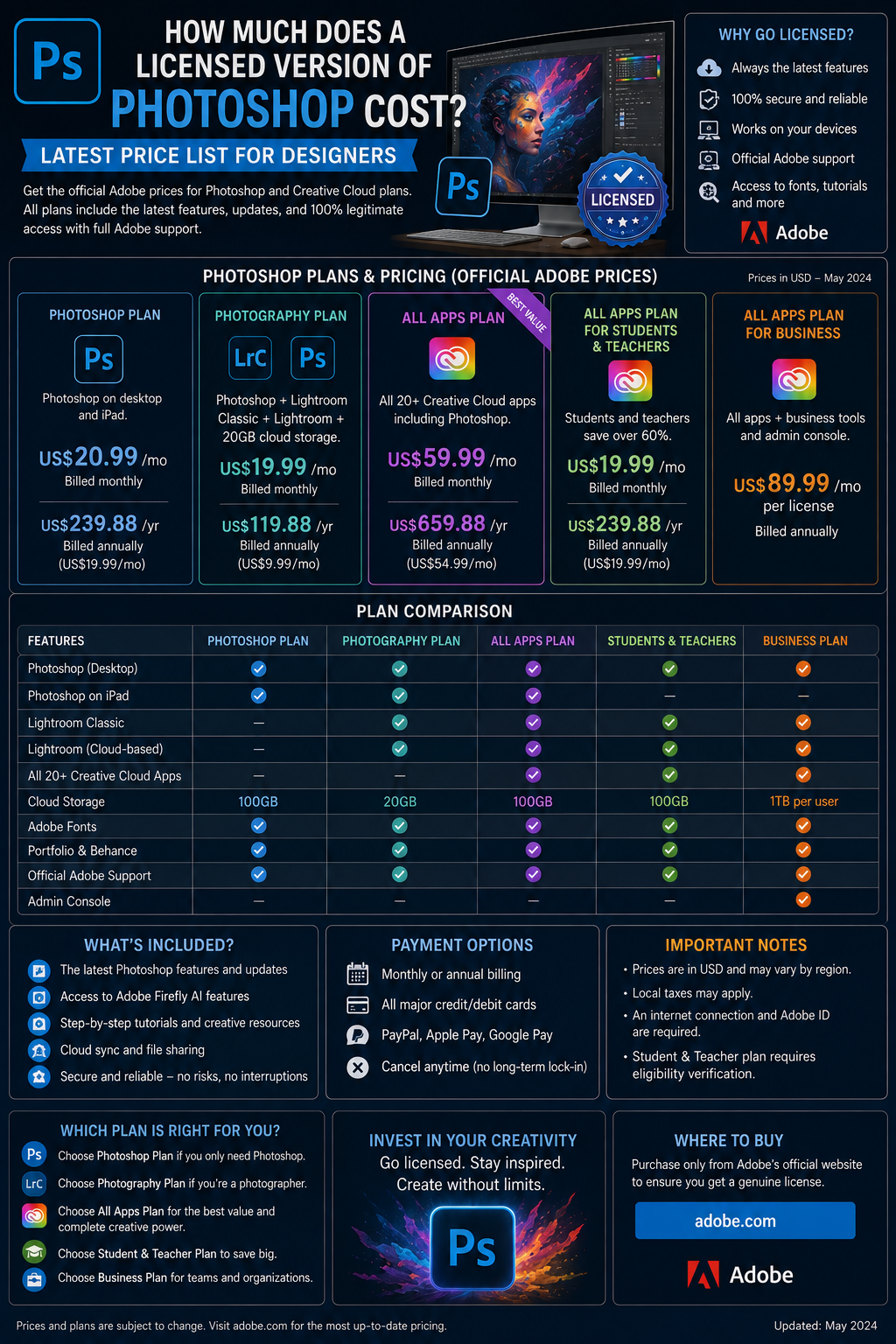
Adobe Photoshop Copyright - Full App
120 USD

MidJourney Account
29 USD

Genuine Adobe Illustrator account
99 USD

Plugin Retouch4me
69 USD

Copyright Adobe Lightroom Account
59 USD

ChatGPT Plus Account (GPT-4)
16 USD

Adobe Premiere Pro Account
99 USD

Upgrade Genuine Office 365
49 USD

Capcut Pro 1 Year
39 USD

Windows 10 & 11 Pro Key
36 USD

Genuine Cheap Canva Pro
39 USD

Upgrade genuine Capture One account
120 USD

Freepik Premium Account
59 USD
COMPLETE GUIDE: PROFESSIONAL CANVA WEB DESIGN FOR BEGINNERS
Nội dung
- 1. Reasons why the trend of creating websites without programming is becoming increasingly popular.
- 1.1 Ability to optimize product production and launch time
- 1.2 Minimize initial investment costs for individuals and small businesses.
- 1.3 Simplification of content management and update processes
- 2. Outstanding benefits of choosing Canva as a web design solution.
- 2.1 A vast and diverse library of interface templates across various industries.
- 2.2 The intuitive drag-and-drop experience completely eliminates coding barriers.
- 2.3 Ability to automatically optimize responsive display on all devices
- 3. A step-by-step guide to designing websites using Canva for beginners.
- 3.1 Step 1: Initialize the project and select the correct format.
- 3.2 Step 2: Build the content structure and arrange the component blocks
- 3.3 Step 3: Perform a final check and publish the website to the internet.
- 4. Tips for optimizing aesthetic thinking to make your website look professional.
- 4.1 Strictly adhere to the principles of minimalist color schemes.
- 4.2 Limit the number of fonts displayed to ensure consistency.
- 4.3 Utilizing negative space to create a sense of rhythm in design
- 6. Conclusion
Discover how to design websites using Canva in a simple, intuitive way that requires no programming.
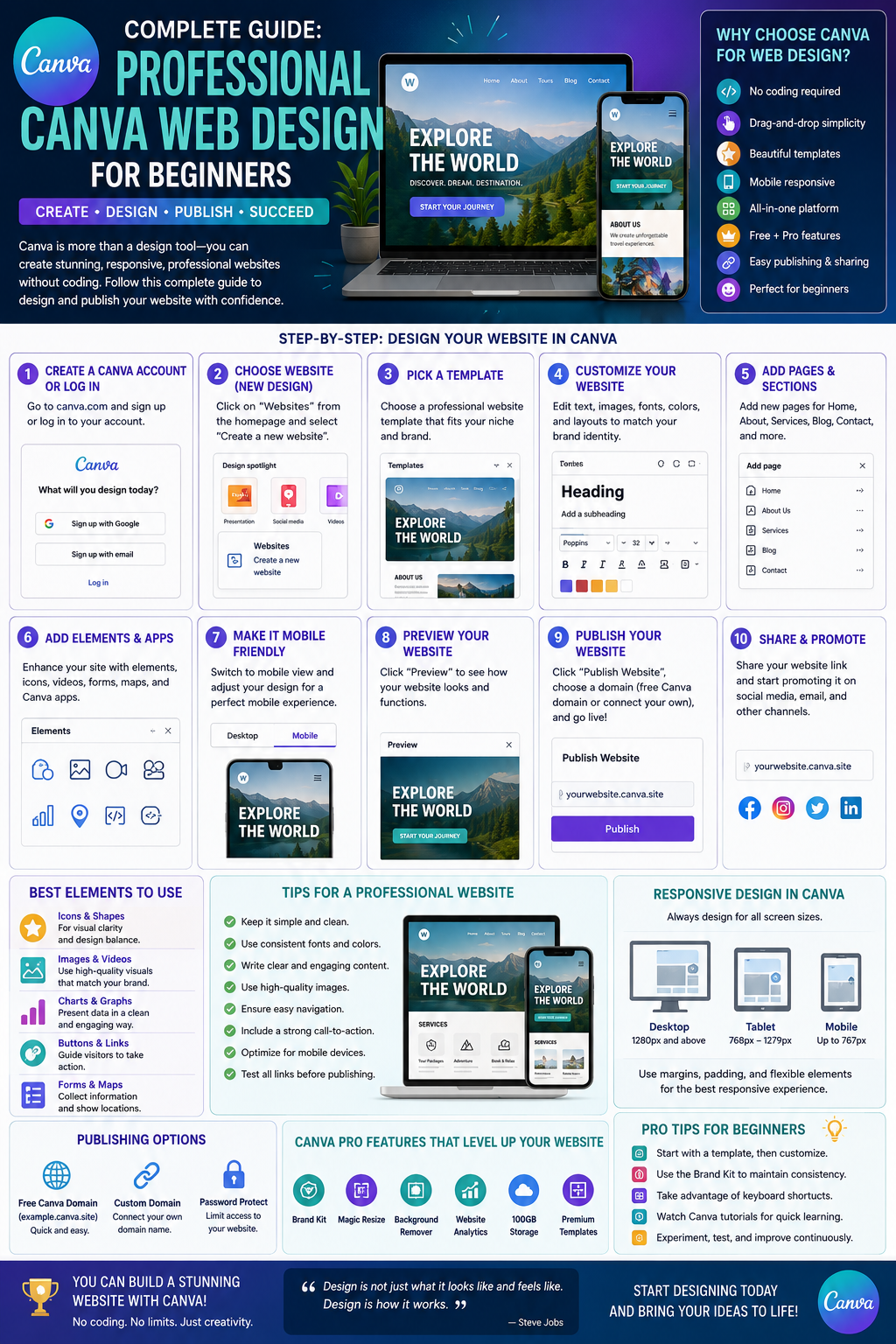
1. Reasons why the trend of creating websites without programming is becoming increasingly popular.
1.1 Ability to optimize product production and launch time
The online business environment demands that marketing campaigns be implemented quickly to keep up with market trends. Business owners cannot wait weeks for programmers to complete a simple event landing page. Visual design tools allow users to realize ideas, arrange layouts, and publish websites within hours, helping businesses seize golden opportunities.
1.2 Minimize initial investment costs for individuals and small businesses.
Building a website using traditional methods requires numerous fixed costs, from hiring programmers and purchasing theme licenses to monthly system maintenance fees. For startups, online shops, or small and medium-sized enterprises, this is a significant financial burden. Shifting to minimalist platforms can cut these costs by up to 90%, allowing resources to be focused on optimizing the quality of core products and services.
1.3 Simplification of content management and update processes
Open-source website systems often require users to have a certain level of technical knowledge when they want to change an image, edit a piece of text, or update promotional information. This causes many inconveniences and relies entirely on the technical team. Modern drag-and-drop tools have completely solved this problem, making all editing operations as easy as editing a regular presentation slide.
2. Outstanding benefits of choosing Canva as a web design solution.
2.1 A vast and diverse library of interface templates across various industries.
The biggest advantage of using Canva for web design is the strong support from thousands of templates created by professional designers worldwide. Users can find interfaces suitable for every business field, from fashion, food, real estate, and education to polished personal portfolios. These templates have been carefully designed in terms of geometric proportions, color harmony, and structure to guide user behavior.
2.2 The intuitive drag-and-drop experience completely eliminates coding barriers.
Users don't need to know a single line of HTML, CSS, or JavaScript code to create a smoothly functioning website. All operations, from adding and removing frames, changing fonts, inserting video clips, to creating navigation buttons, are performed with simple clicks and drags of the mouse. This completely frees up the user's creative thinking, allowing them to focus entirely on arranging content in the most engaging way.
2.3 Ability to automatically optimize responsive display on all devices
One of the stringent standards of modern websites is that they must display beautifully on computer screens, tablets, and mobile phones. When designing a website using Canva, the intelligent system automatically resizes and rearranges content elements to perfectly fit all screen resolutions. Users can easily preview the display interface on each device during the editing process to make timely adjustments.
3. A step-by-step guide to designing websites using Canva for beginners.
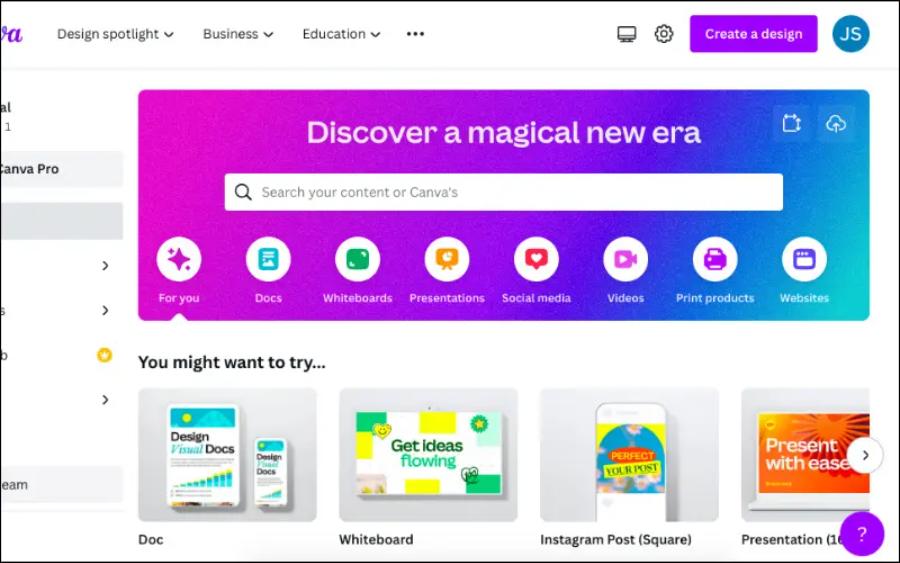
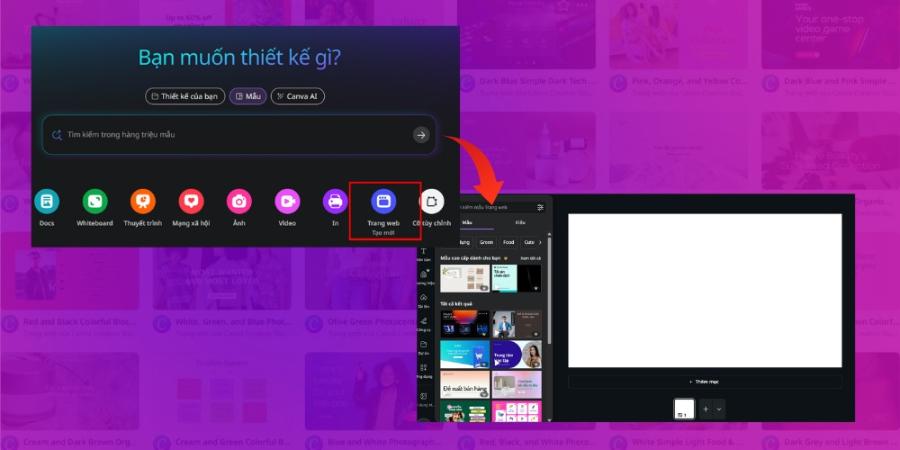
3.1 Step 1: Initialize the project and select the correct format.
The process of building a web space should begin with establishing a properly designed workspace to ensure optimal display quality.
-
Instructions: Users log into their account, then in the central search bar, enter the keyword "Website" or "Website" so that the system displays the correct project category.
-
Key takeaway: Choose a blank template if you want to build the layout from scratch, or select a pre-made template that best matches your brand style to save time.
3.2 Step 2: Build the content structure and arrange the component blocks
An engaging website needs a clear structure that guides the customer's gaze from the main message to the benefits and values, and concludes with a specific action.
-
Sapo (Hero Section) Layout: The top of the page should feature a sharp, impactful image accompanied by a large headline highlighting the product's core value.
-
Body Sections: Use text blocks to break down information, combined with icons and real product images to keep viewers engaged while scrolling.
-
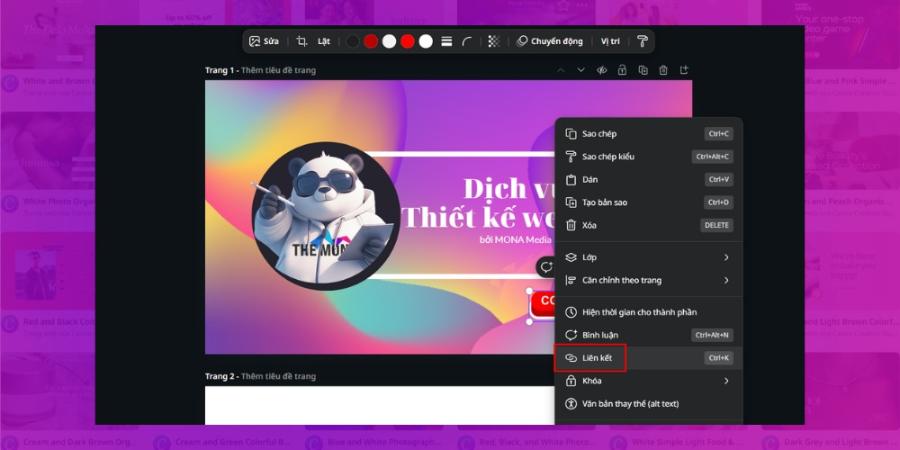
Hyperlink integration: Insert direct links into call-to-action buttons such as "Buy Now" or "Sign Up for Consultation" to redirect users to your sales page or social media pages.
3.3 Step 3: Perform a final check and publish the website to the internet.
The final stage requires meticulous attention to detail to ensure the website operates without any technical errors before being released to the public.
-
Preview the interface: Click the eye icon on the toolbar to review all spelling errors and layout balance on both the computer and mobile interfaces.
-
Domain selection: The system allows you to publish for free using the platform's extended domain name, or you can connect with your own custom business domain name to increase professionalism.
-
Publish: Click the publish button, set the page description options to support SEO, and officially launch your website online.
4. Tips for optimizing aesthetic thinking to make your website look professional.
4.1 Strictly adhere to the principles of minimalist color schemes.
A classic mistake beginners make is overusing too many bright colors on the same interface, creating visual chaos. The golden rule in interface design is to use a maximum of three main colors: a background color occupying 60% of the area, a structural color occupying 30%, and an accent color for important buttons occupying 10%. This scientifically distributed color makes the website elegant, high-end, and helps customers focus on the core content.
4.2 Limit the number of fonts displayed to ensure consistency.
Combining too many different fonts on a landing page will disrupt the consistency of your brand identity. You should only choose a maximum of two contrasting fonts: a bold, bold font for large headings and a thin, easy-to-read sans-serif font for body text. Always ensure sufficient spacing between lines and letters to prevent eye strain.
4.3 Utilizing negative space to create a sense of rhythm in design
Negative space, also known as white space, surrounding images and text plays a crucial role in shaping website structure. Cramming too much information into one area will overwhelm viewers and cause them to quickly leave the site.
5. Introducing a superior automated design optimization solution at appvip.ai
The website appvip.ai is a pioneering ecosystem that provides the creative community with the ability to automate the entire digital content editing process based on the power of advanced artificial intelligence. Without requiring users to possess complex graphic design skills or spend years researching cumbersome tools, the intelligent system automatically analyzes structure, identifies market trends, and suggests optimal image optimization solutions with just one click. This is a groundbreaking solution that helps content creators, marketers, and business owners optimize 90% of their working time while still producing aesthetically superior media products and landing pages that keep pace with the latest technological trends.
6. Conclusion
The journey of realizing ideas and mastering the digital space through web design using Canva is a strategic move, opening up tremendous development opportunities for content creators and business owners in the era of visual media. The harmonious combination of logical layout thinking and the user-friendliness and intuitiveness of drag-and-drop tools will create impressive landing pages, optimize user experience, and enhance business conversion rates.





















VIP Products








Best Selling Products
Autodesk All App Account Copyright
120 USD
Upgrade Duolingo Super
29 USD
Adobe Photoshop Copyright - Full App
120 USD
MidJourney Account
29 USD
Genuine Adobe Illustrator account
99 USD
Plugin Retouch4me
69 USD
Copyright Adobe Lightroom Account
59 USD
ChatGPT Plus Account (GPT-4)
16 USD
Adobe Premiere Pro Account
99 USD
Upgrade Genuine Office 365
49 USD
Capcut Pro 1 Year
39 USD
Windows 10 & 11 Pro Key
36 USD
Genuine Cheap Canva Pro
39 USD
Upgrade genuine Capture One account
120 USD
Freepik Premium Account
59 USD