Best Selling Products

Windows 10 & 11 Pro Key
36 USD

Adobe Photoshop Copyright - Full App
120 USD

Genuine Cheap Canva Pro
39 USD

Upgrade genuine Capture One account
120 USD

Freepik Premium Account
59 USD

Capcut Pro 1 Year
39 USD

Genuine Adobe Illustrator account
99 USD

Upgrade Genuine Office 365
49 USD

Copyright Adobe Lightroom Account
59 USD

ChatGPT Plus Account (GPT-4)
16 USD

Plugin Retouch4me
69 USD

Autodesk All App Account Copyright
120 USD

MidJourney Account
29 USD

Upgrade Duolingo Super
29 USD

Adobe Premiere Pro Account
99 USD
Essential Rules to Follow When Applying ChatGPT to Your Work
Nội dung
- 1. Principles for effectively applying ChatGPT in the workplace.
- 1.1. Clearly define the objectives before proceeding with use.
- 1.2. Provide complete and detailed input information.
- 1.3. Use clear and easily understandable language.
- 1.4. Check and correct the results
- 1.5. Apply in small steps and test.
- 1.6. Combining ChatGPT with other tools
- 1.7. Keep sensitive information confidential and avoid sharing it.
- 1.8. Learn how to write effective prompts.
- 1.9. Not entirely dependent on ChatGPT software.
- 1.10. Continuously learn and optimize usage.
- 2. Benefits of applying ChatGPT to work
- 3. Purchase a licensed ChatGPT package at SaDesign
Many ChatGPT users are not optimizing their performance because they overlook basic principles.
To maximize the value that ChatGPT offers, users not only need to know how to ask questions but also understand the principles of optimizing its use. This is similar to owning a smart machine but only truly harnessing its power when you understand how to operate it. Many people use ChatGPT instinctively, leading to unexpected results or sometimes producing inaccurate output. In a work environment, especially when it comes to content, research, or analysis, using ChatGPT correctly will directly determine the quality of the output. This article will delve into the most important principles when applying ChatGPT in the workplace. Let's explore them with SaDesign!
1. Principles for effectively applying ChatGPT in the workplace.
1.1. Clearly define the objectives before proceeding with use.
One of the reasons many people use ChatGPT but don't achieve the desired results is because they don't clearly define their goals from the outset. ChatGPT can handle a variety of requests, from content writing and data analysis to script creation, planning support, and knowledge explanation. However, for the model to produce suitable results, users need to specifically define their purpose.
When initiating a request, you should ask yourself: What is my ultimate goal? Do I need creative or precise content? Do I need a general answer or in-depth analysis? Do I want to receive information in a concise format or a complete article? By answering these questions, you will guide ChatGPT in the right direction and the results will be more closely aligned with your needs.
Clearly defining objectives not only reduces editing time but also increases the accuracy of information. Especially in a professional environment where information can influence business decisions, defining objectives is a mandatory principle for using ChatGPT effectively.
1.2. Provide complete and detailed input information.
ChatGPT is a data- and context-driven language model, so the quality of its output depends heavily on the information provided by the user. If you provide vague data, the response will likely be general, lacking depth, or misleading. Conversely, if you provide specific data, the model can generate higher-quality and more relevant content.
In tasks such as writing marketing content, analyzing reports, or developing plans, you should provide as much information as possible. For example, your target audience, article goals, desired length, style, context, or any data that must be included in the content. Gathering this information helps ChatGPT understand the requirements and create more accurate content.
Detailed information also helps reduce the number of edits, saving you time and improving overall efficiency. This is a fundamental principle that plays a crucial role in the entire process of using ChatGPT for work purposes.
1.3. Use clear and easily understandable language.
The way you communicate your request will directly affect the quality of ChatGPT's response. The language must be clear, concise, and avoid ambiguous or ambiguous terminology. When using short but unclear requests, ChatGPT will miss the point and easily go off track.
During the course of work, many people tend to ask questions based on their subjective opinions without considering that ChatGPT needs specific information to process them. Therefore, you should express your requests simply, directly, and in a structured way. If the content is complex, you can break down the request into smaller parts for ChatGPT to handle.
With clear and effective communication, the use of ChatGPT is significantly enhanced, helping the model understand accurately and respond faster, minimizing the risk of errors.
1.4. Check and correct the results
Although ChatGPT is a powerful tool, it can still generate false information or misinterpretations. Therefore, double-checking the results is a crucial principle that any professional user must follow. You should not use information directly without verification, especially when it comes to business, financial, legal data, or fields requiring a high degree of accuracy.
After ChatGPT provides the results, you need to reread the entire content, evaluating its logic, accuracy, and relevance to your needs. If the content is unsatisfactory, you can request ChatGPT to revise it to your liking, such as changing the writing style, adding details, or clarifying information. This repeated process helps to continuously improve the quality of the content.
This review also helps you identify shortcomings or suggest adjustments to improve work quality. When combining the capabilities of ChatGPT with human supervision, work efficiency will be optimized.
1.5. Apply in small steps and test.
Effective use of ChatGPT requires continuous experimentation. Instead of requiring a lengthy content creation model or complex task processing right from the start, you should break down the requirements into smaller steps. This helps control content quality and makes adjustments easier when needed.
For example, when writing a long blog post, you can ask ChatGPT to create an outline first. Then, review, edit, and request that the model develop each part of the content according to the approved outline. This method helps ensure consistency and makes it easy to edit before launching the complete content.
By implementing it in small steps, you also have the opportunity to evaluate ChatGPT's responsiveness, and adjust the prompt accordingly. Frequent testing will help you understand how the model works and how to maximize its potential.
1.6. Combining ChatGPT with other tools
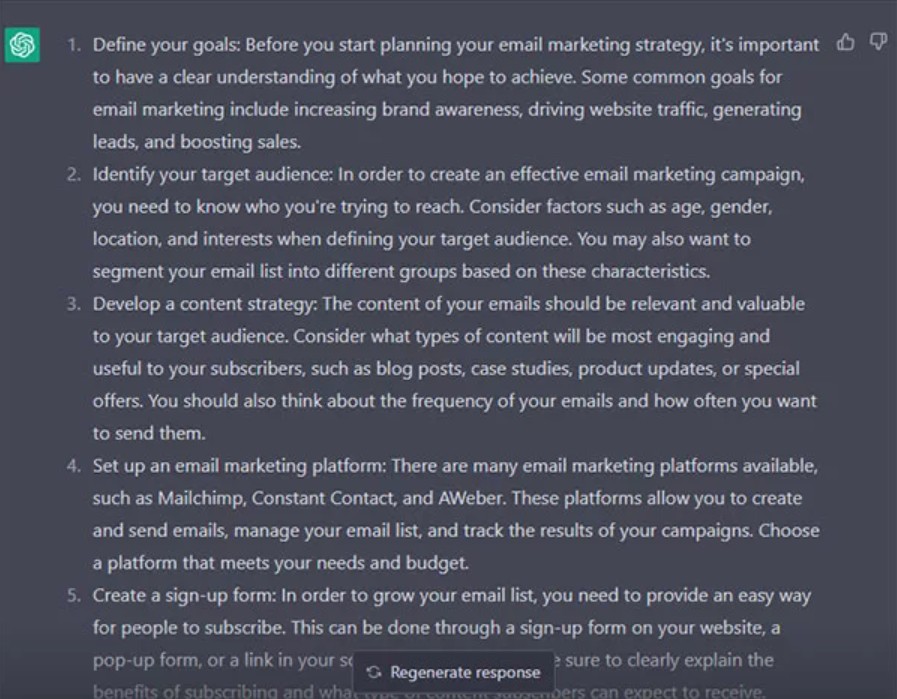
ChatGPT can be powerful, but it's not the only tool needed for the job. To optimize performance, you should combine ChatGPT with other supporting tools, such as spell checkers, SEO tools, project managers, designers, or data analysts. This combination makes the workflow more comprehensive and efficient.
In marketing, ChatGPT can generate content, while SEO tools like Ahrefs or Surfer SEO optimize keywords. In design, ChatGPT helps develop ideas, while Figma or Canva transform those ideas into visual products. In data analysis, ChatGPT assists in explaining trends, while Excel or BI visualizes the data.
Knowing how to combine multiple tools not only increases efficiency but also expands the scope of technology application in the workplace.
1.7. Keep sensitive information confidential and avoid sharing it.
One of the most important principles when using ChatGPT is information security. Avoid sharing personal information, customer data, contracts, passwords, or any sensitive information. Although ChatGPT has a privacy policy, providing private data still carries risks. Therefore, in your work, you should handle content in a way that does not compromise the organization's security.
If you must use content related to real data, replace sensitive information with false information or symbols. This is an essential habit for ensuring safety in the digital environment.
1.8. Learn how to write effective prompts.
Writing prompts is the most important skill when working with ChatGPT. A clear, structured prompt with specific goals will produce accurate results. An effective prompt not only tells the model what to do but also how to do it.
To write good prompts, you need to understand response models, identify the core of the request, and provide sufficient information. Once you become familiar with this skill, your work performance will improve significantly. Many experts call this a "new profession" in the AI era, and practicing prompts every day will help you become a professional user.

1.9. Not entirely dependent on ChatGPT software.
Although ChatGPT is intelligent, it cannot completely replace human thinking and creativity. You need to use ChatGPT as a supporting tool, not to do everything for you. Complete dependence will cause you to lose your analytical and content control skills. In the workplace, the combination of human experience and AI automation capabilities creates optimal efficiency.
1.10. Continuously learn and optimize usage.
AI technology is changing rapidly, so users need to stay constantly updated. Keeping track of new features, learning new prompting techniques, or reviewing AI application case studies will help you continuously improve your ChatGPT skills in your work. By always being in a learning state, you will adapt faster and maximize the power of AI.
2. Benefits of applying ChatGPT to work
The application of ChatGPT offers many outstanding benefits that were previously difficult to achieve. Work efficiency increases significantly thanks to its ability to process information quickly and accurately. Tasks such as content writing, data analysis, planning, and document summarization are completed in just seconds. Instead of spending hours on repetitive tasks, you can focus on strategy or creativity.
ChatGPT also helps improve work quality thanks to its spell-checking, language enhancement, and idea suggestion capabilities. Users can easily create professional documents even if they are not good writers or do not have much experience.
Another key benefit is that ChatGPT helps save costs. Businesses can reduce staffing for simple tasks while increasing overall team productivity. ChatGPT also supports new employee training, explaining processes, or creating lessons, reducing the cost of traditional training.
Furthermore, ChatGPT offers the ability to learn faster. Users can learn new knowledge, ask any questions, and receive answers within seconds. This not only speeds up learning but also motivates self-development.
3. Purchase a licensed ChatGPT package at SaDesign
For the most stable and powerful use of ChatGPT, a ChatGPT Plus license is always the top choice. SaDesign is currently one of the most reputable software companies in Vietnam, specializing in upgrading large numbers of ChatGPT Plus accounts at affordable prices and high quality. It is a trusted address for many individuals and businesses nationwide.
SaDesign offers significantly more competitive pricing compared to users upgrading directly from OpenAI. Thanks to its flexible payment system, you can choose a suitable method such as bank transfer, e-wallet, or international credit card. This makes the upgrade process easy and convenient.
SaDesign is committed to the absolute confidentiality of customer information and will not share it with third parties. This is a crucial factor in the digital age, where users are always worried about their information being leaked when using online platforms.

Payment methods when purchasing at SaDesign
SaDesign supports many convenient payment methods. You can transfer money directly to SaDesign Co., Ltd.'s MB Bank account, or use modern methods such as e-wallets like Momo, ZaloPay, VietPay, or PayPal. In addition, domestic and international Visa cards are also supported to ensure all customers can upgrade their accounts quickly.
Thanks to its professional service, prompt support, and reasonable pricing, SaDesign has become the preferred choice of thousands of customers nationwide who want to use a stable and long-term licensed version of ChatGPT.
The application of ChatGPT in the workplace has become an inevitable trend in the digital age. However, to maximize the effectiveness of AI, users need to adhere to important principles such as defining clear goals, providing quality input data, checking and refining results, and continuously learning how to use it more optimally.
In parallel, owning a stable, licensed ChatGPT account at a reasonable cost is also a crucial factor in long-term work efficiency. SaDesign, with its reputation, competitive pricing, and professional service, is a top choice for individuals and businesses seeking a reliable ChatGPT solution.





















VIP Products








Best Selling Products
Windows 10 & 11 Pro Key
36 USD
Adobe Photoshop Copyright - Full App
120 USD
Genuine Cheap Canva Pro
39 USD
Upgrade genuine Capture One account
120 USD
Freepik Premium Account
59 USD
Capcut Pro 1 Year
39 USD
Genuine Adobe Illustrator account
99 USD
Upgrade Genuine Office 365
49 USD
Copyright Adobe Lightroom Account
59 USD
ChatGPT Plus Account (GPT-4)
16 USD
Plugin Retouch4me
69 USD
Autodesk All App Account Copyright
120 USD
MidJourney Account
29 USD
Upgrade Duolingo Super
29 USD
Adobe Premiere Pro Account
99 USD