Best Selling Products

Copyright Adobe Lightroom Account
59 USD

Capcut Pro 1 Year
39 USD

Genuine Cheap Canva Pro
39 USD

Adobe Premiere Pro Account
99 USD

Genuine Adobe Illustrator account
99 USD

Upgrade genuine Capture One account
120 USD

Autodesk All App Account Copyright
120 USD

Adobe Photoshop Copyright - Full App
120 USD

MidJourney Account
29 USD

Freepik Premium Account
59 USD

Plugin Retouch4me
69 USD

ChatGPT Plus Account (GPT-4)
16 USD

Upgrade Genuine Office 365
49 USD

Windows 10 & 11 Pro Key
36 USD

Upgrade Duolingo Super
29 USD
How to Create a Picture of You Sitting and Playing Games with ChatGPT
Nội dung
- 1. What is the trend for creating photos of people playing games with celebrities?
- 2. Benefits of creating game photos with celebrities
- 3. How to create game screenshots with celebrities using ChatGPT - super simple.
- 4. Instructions on how to create an image
- 4.1 Step 1: Prepare the images
- 4.2 Step 2: Wait for processing and download
- 4.3 Step 3: Using Remaker AI Multiface
- 4.4 Step 4: Save and share
- 5. Some basic tips when creating game screenshots with celebrities
- 5.1 Clear Prompt
- 5.2 Respect the image of celebrities
- 5.3 Select a high-quality original image
- 5.4 Avoid misusing deepfake technology.
- 6. Prompt for creating game screenshots with celebrities
- 6.1 English Prompt
- 6.2 Prompt in Vietnamese
- 7. Reliable ChatGPT Plus upgrade addresses
- 7.1 Reasonable costs
- 7.2 Put the customer first.
- 7.3 Secure and reliable, with warranty and support.
- 8. Conclusion
Have you ever dreamed of taking a photo with your idol during an exciting gaming session? With the help of ChatGPT, this is no longer a distant dream. With just a few simple steps on your phone or computer, you can create unique photos, capturing amazing moments with famous stars. Let''s explore with Sadesign how to do this easily and effectively!
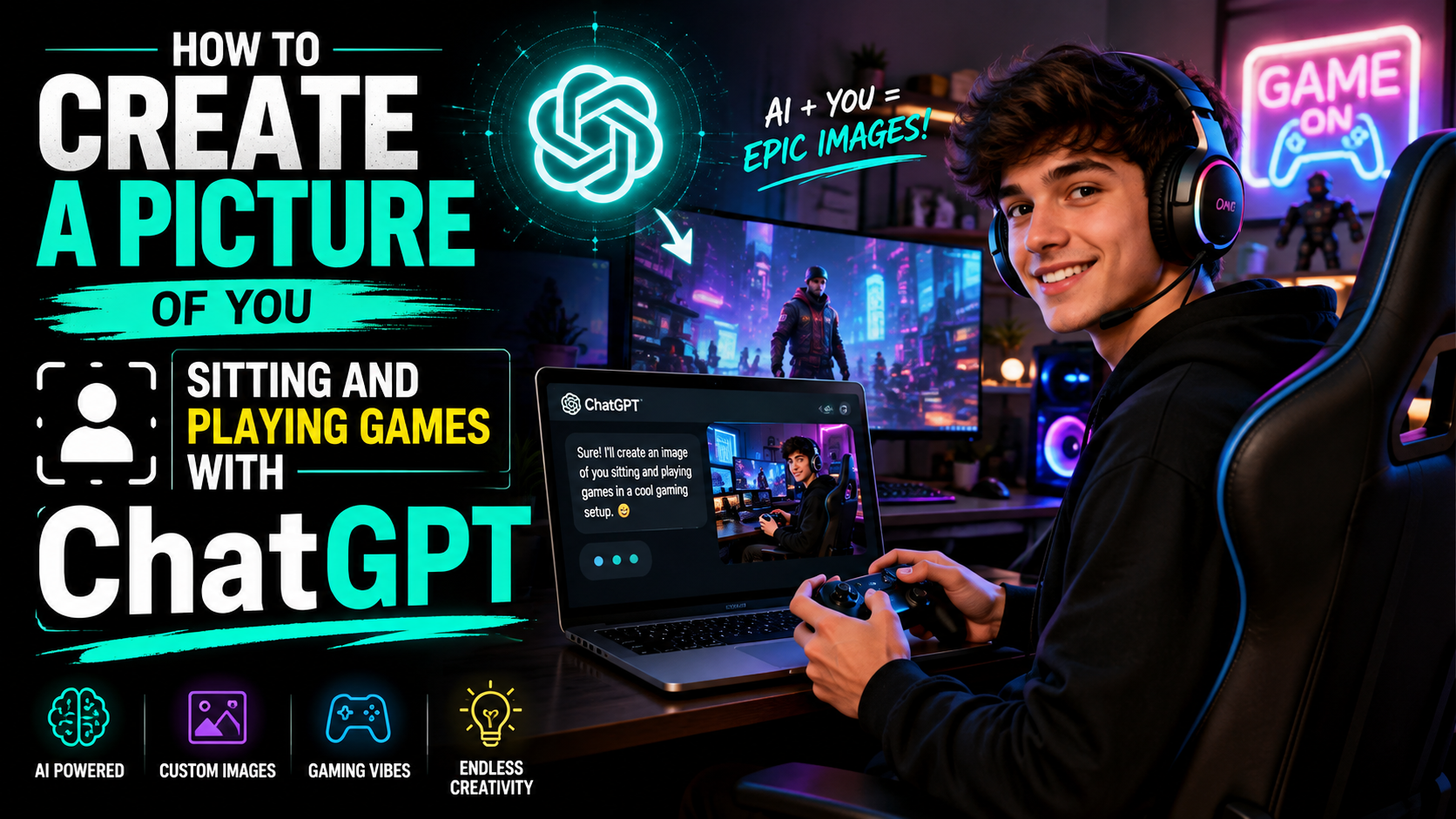
1. What is the trend for creating photos of people playing games with celebrities?
Creating gaming photos with celebrities isn't just a trend; it's a way to recreate fond memories of the 90s gaming era. Thanks to the power of AI technology, especially ChatGPT, users can easily create vivid photos where famous figures become enthusiastic gamers. This trend is currently going viral on TikTok, attracting millions of views and interactions.
When these classic pixel art images appear, they not only evoke memories of the golden age of 8-bit games but also stir nostalgic feelings for the 80s and 90s generations. This is a unique blend of modern pop culture and inspiration from the past, offering viewers a fascinating and novel experience. These images are not simply pictures; they are a bridge between two generations, where creativity and memory intersect.
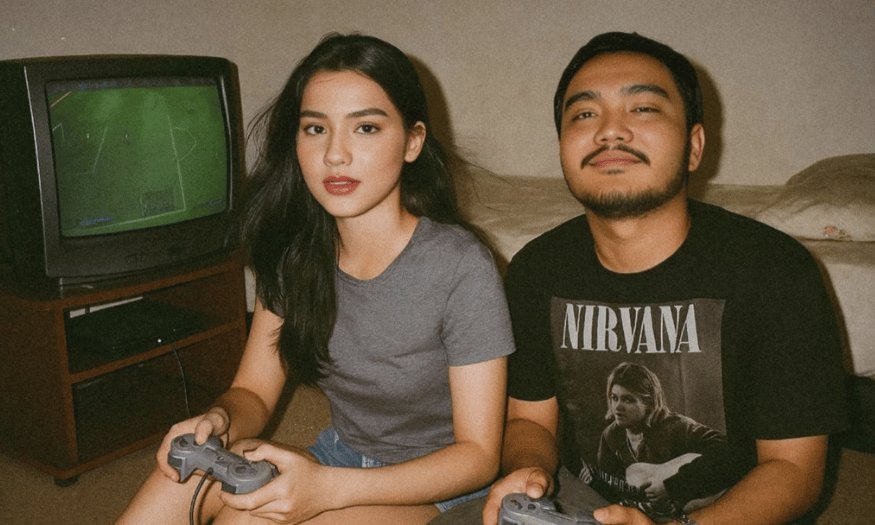
2. Benefits of creating game photos with celebrities
One of the biggest benefits of creating gaming photos with celebrities is the potential for increased social media engagement. Unique and creative photos easily capture viewers' attention, making them want to share, comment, and participate in the conversation. When you post these images, you're not just sharing a picture; you're creating a lively and engaging discussion.
The process of creating these images is also an opportunity to express your creativity. Combining elements of pop culture with classic styles not only helps you develop your artistic abilities but also encourages you to come up with fresh ideas. Each image is a work of art, and creativity knows no bounds. You can experiment with many different styles, from pixel art to special effects, creating images that bear your personal touch.
Finally, creating gaming photos with celebrities also helps you build strong social connections. When you share these photos, you can connect with like-minded people, thereby creating a community of gaming and popular culture enthusiasts. Conversations surrounding these photos can lead to new relationships, opening up opportunities to interact and learn from others in the community.
3. How to create game screenshots with celebrities using ChatGPT - super simple.
Creating photos of yourself playing games with celebrities is becoming a hot trend on social media. The best part is you don't need any design or complex photo editing skills. With the help of ChatGPT, you can create surreal photos that will leave viewers in awe. Not only do these photos bring joy, but they also help you feel closer to your idols.
To get started, simply open the ChatGPT app and enter a specific prompt, along with a picture of yourself. With the details you provide, the AI will help recreate the unique moment you've always dreamed of. Get ready, because these photos will not only bring joy but also make you feel like you're actually playing a game with your idol.
4. Instructions on how to create an image
4.1 Step 1: Prepare the images
First, open the ChatGPT app and enter the prompt below into the chat box. Don't forget to include your image so the AI can accurately capture your face.
"A nostalgic early-2000s photo of me and [a famous celebrity] sitting on the floor, playing the original PlayStation 1 on a vintage American-style CRT TV. Both of us are holding gray PS1 controllers and have turned around to look directly at the camera. The room has a cozy, retro vibe with old electronics and soft warm lighting. The photo was taken with a camera flash, creating realistic lighting with slightly overexposed faces and a candid, authentic feel, ar 1:1."
Please replace “[a famous celebrity]” with the name of your favorite celebrity. Make sure the photo you choose is clear and well-lit to ensure the best results.
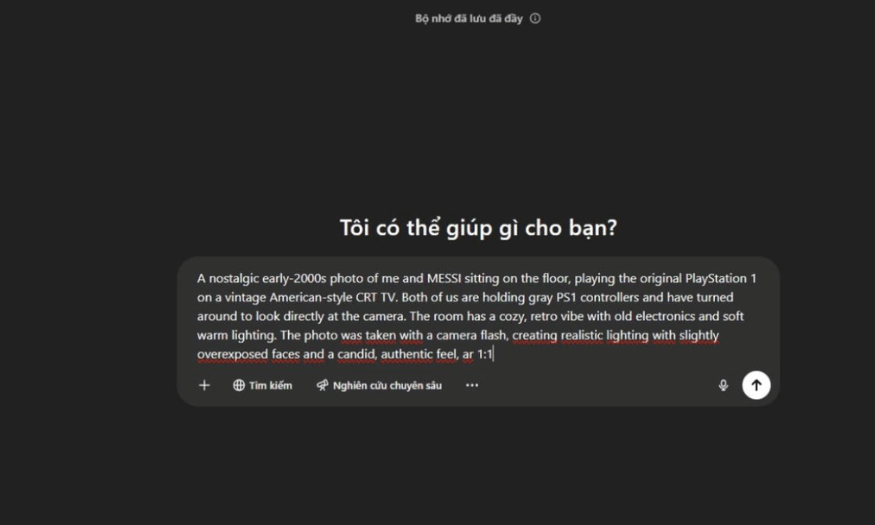
4.2 Step 2: Wait for processing and download
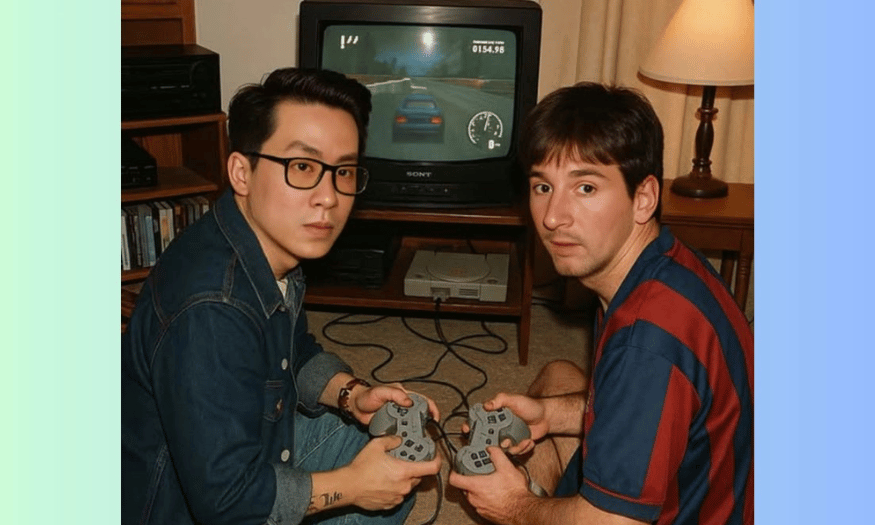
After entering the prompt, please be patient and wait a moment for the AI to process it. The result will be displayed on the screen. Simply click on the image and select "Download" to save it to your computer. Don't forget to double-check to ensure that the image has been created exactly as you wanted!
Once downloaded, you can review the created image to ensure all elements are as you intended. If further editing is needed, you can repeat the process with different information.
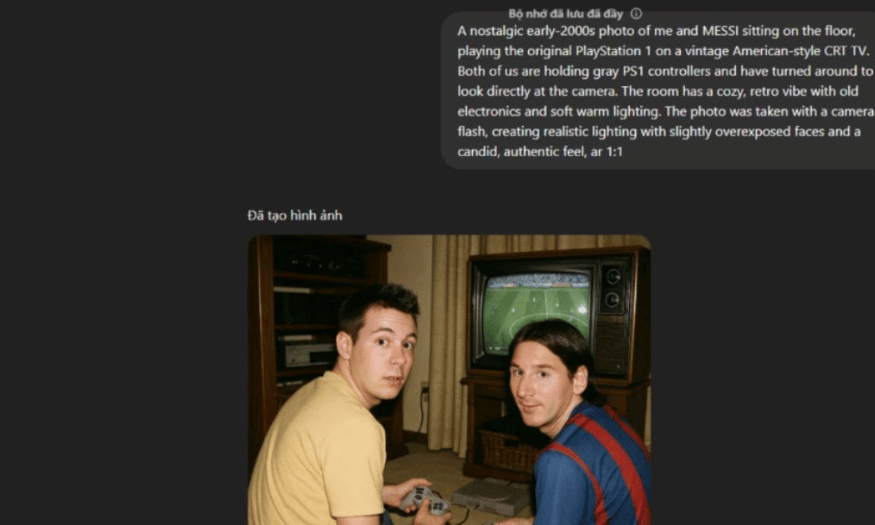
4.3 Step 3: Using Remaker AI Multiface
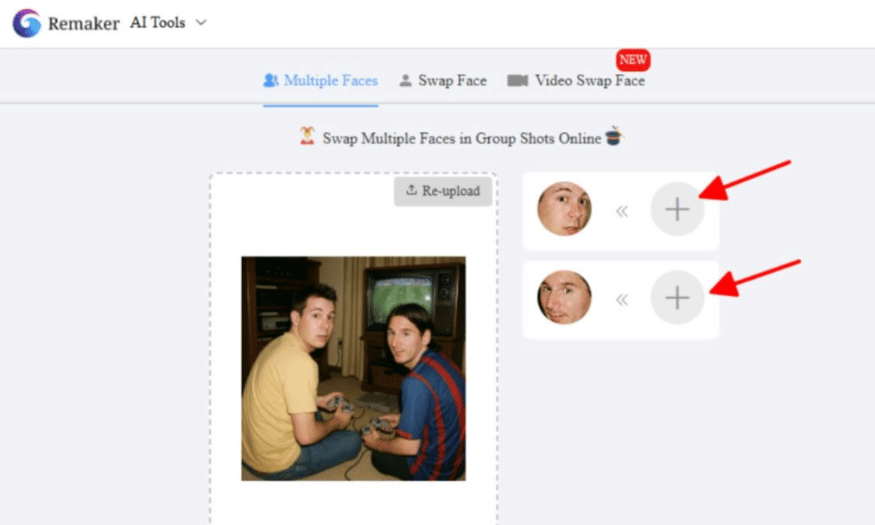
Next, access Remaker AI Multiface via this link: [ https://remaker.ai/multiple-face-swap/ ]. Here, you can swap your face and your idol's face into the correct positions to get the most realistic image possible. Each creation will cost about 4 credits, but don't worry, you can get free credits to use.
The face swapping process is very simple. You just drag and drop the face into the desired position, ensuring the proportions and angles are correct to get the best possible photo. The AI will help you process the image to make it look natural and lifelike.
4.4 Step 4: Save and share
Finally, save the photos to your computer and share them on your favorite social media. These photos not only bring laughter but also create opportunities to connect with like-minded people. Impress your friends with these memorable moments!
Share these photos on platforms like Instagram, Facebook, or TikTok to get attention from your friends. You can include funny stories or your own feelings to make the post even more appealing.
5. Some basic tips when creating game screenshots with celebrities
5.1 Clear Prompt
Before embarking on your AI-powered image creation journey, mastering a few key principles is crucial to ensuring your output images are not only high-quality but also authentic and ethically sound. Paying attention to these considerations will help you optimize results and avoid unnecessary problems.
First, remember that the clearer the prompt, the higher the quality of the resulting image. AI works most effectively when given detailed information. When drafting a prompt, be specific about the setting, clothing, pose, lighting, and the subject's emotions. These details will help the AI better understand your vision, resulting in an image that closely matches your initial intentions.
5.2 Respect the image of celebrities
When using images of celebrities, respecting their privacy and image rights is essential. You should only use the images for personal or wholesome entertainment purposes, avoiding offensive or sensitive content. Furthermore, be cautious about commercializing images without their official permission.
This not only protects you from legal issues but also shows respect for those who have contributed to popular culture. Using images responsibly will help you maintain a positive community and avoid unnecessary controversies.
5.3 Select a high-quality original image
When using tools like Remaker to superimpose faces onto AI images, selecting high-quality original photos is crucial. Look for clear portraits with good lighting and angles that suit the subject. This helps create a more natural and convincing result, making the image look vibrant and realistic.
In addition, using high-quality original images will minimize the possibility of noise or loss of sharpness during editing. A clear image will help the AI recreate the image more accurately, providing you with the best experience.
5.4 Avoid misusing deepfake technology.
Finally, remember that the use of deepfake technology must be responsible. Creating still images for entertainment is generally legal and acceptable in most cases. However, faking videos, voices, or fabricating misleading content can be illegal and unethical.
Using AI responsibly not only protects you from trouble but also contributes to maintaining the reliability and accuracy of information. Always remember that technology should only be used for positive purposes and to build a community.
6. Prompt for creating game screenshots with celebrities
6.1 English Prompt
-
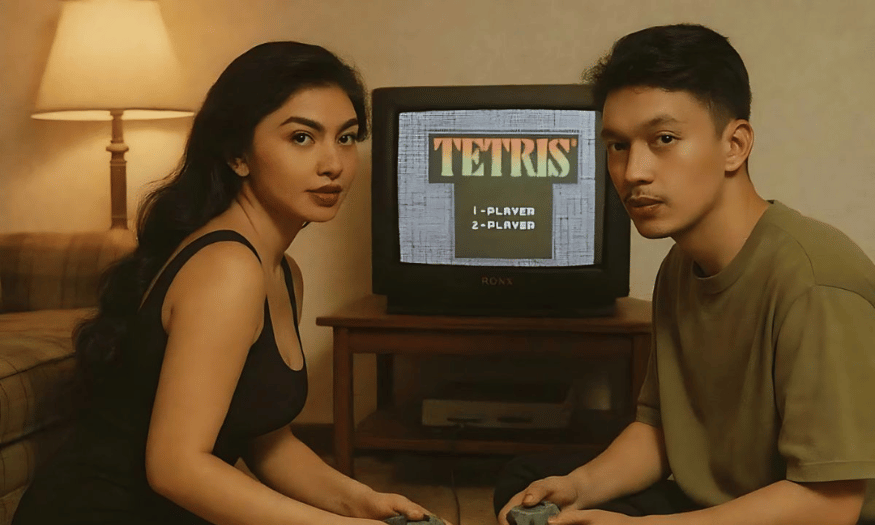
"A lively scene of me and [a famous celebrity] playing video games together in a cozy living room, surrounded by snacks and gaming posters."
-
"An epic moment of me and [a famous celebrity] battling it out in a retro arcade, with colorful lights and classic games all around us."
-
"A casual afternoon of me and [a famous celebrity] sitting on bean bags, playing the latest multiplayer game on a giant screen."
-
"A nostalgic setting with me and [a famous celebrity] enjoying a classic game on an old-school console, with vintage game controllers in hand."
-
"A fun gaming night with me and [a famous celebrity], laughing and competing in a friendly match on a couch, with cozy lighting and game trophies on the shelf."
6.2 Prompt in Vietnamese
-
"A fun scene of me and [the celebrity] playing games together in a cozy living room, surrounded by snacks and game posters."
-
"My epic moment of me and [the celebrity] battling it out in a vintage arcade, with colorful lights and classic games all around."
-
"A relaxing afternoon of me and [the celebrity] sitting on beanbag chairs, playing multiplayer games on a big screen."
-
"A nostalgic scene with me and [the celebrity] enjoying a classic game on an old console, with vintage game controllers in hand."
-
"A fun evening of gaming with me and [the celebrity], laughing and competing in a friendly match on the sofa, with warm lighting and game trophies on the shelf."
7. Reliable ChatGPT Plus upgrade addresses
When you need to upgrade your ChatGPT Plus account, choosing a reputable provider is crucial to ensure your rights and a positive experience. SaDesign stands out as one of the leading providers in Vietnam, offering account upgrade services with many outstanding advantages.
7.1 Reasonable costs
One of the reasons SaDesign is chosen by many is its reasonable upgrade cost. For just 199,000 VND for a ChatGPT Plus account, you get a quality service package without worrying about paying high fees like at other providers. This makes it easy for users to access advanced AI technology without harming their personal or business budget.
Furthermore, SaDesign frequently offers promotions and discounts, helping you save even more money. This allows you to experience the superior features of ChatGPT Plus without worrying about the price.
7.2 Put the customer first.
SaDesign always puts customers first in all its activities. Our dedicated and professional staff will support you throughout the upgrade process, from advising on the most suitable service package to providing usage instructions. They are ready to listen and answer all your questions, ensuring you have the best possible experience.
Furthermore, SaDesign is committed to providing after-upgrade customer service, helping you quickly resolve any issues that may arise. This attentive care has built trust and satisfaction among our customers.
7.3 Secure and reliable, with warranty and support.
A crucial factor when upgrading an account is security. SaDesign is committed to protecting customers' personal information with rigorous security measures. Your information will never be shared with third parties, ensuring absolute privacy.
Furthermore, SaDesign offers a lifetime warranty for ChatGPT Plus accounts, giving you peace of mind without worrying about any issues that may arise during use. Our technical support team is always ready to assist you, ensuring you experience the service smoothly and efficiently.
8. Conclusion
Creating game screenshots with celebrities is not only fun but also a way to express your creativity. With ChatGPT, the power of AI technology is put in everyone's hands, making it easy to create unique works of art. Try it today and share these fun screenshots with your friends to enjoy colorful moments of entertainment together!





















VIP Products








Best Selling Products
Copyright Adobe Lightroom Account
59 USD
Capcut Pro 1 Year
39 USD
Genuine Cheap Canva Pro
39 USD
Adobe Premiere Pro Account
99 USD
Genuine Adobe Illustrator account
99 USD
Upgrade genuine Capture One account
120 USD
Autodesk All App Account Copyright
120 USD
Adobe Photoshop Copyright - Full App
120 USD
MidJourney Account
29 USD
Freepik Premium Account
59 USD
Plugin Retouch4me
69 USD
ChatGPT Plus Account (GPT-4)
16 USD
Upgrade Genuine Office 365
49 USD
Windows 10 & 11 Pro Key
36 USD
Upgrade Duolingo Super
29 USD