Best Selling Products

Genuine Cheap Canva Pro
39 USD

Adobe Premiere Pro Account
99 USD

Copyright Adobe Lightroom Account
59 USD

Genuine Adobe Illustrator account
99 USD

MidJourney Account
29 USD

ChatGPT Plus Account (GPT-4)
16 USD

Freepik Premium Account
59 USD

Upgrade Duolingo Super
29 USD

Windows 10 & 11 Pro Key
36 USD

Adobe Photoshop Copyright - Full App
120 USD

Upgrade genuine Capture One account
120 USD

Upgrade Genuine Office 365
49 USD

Capcut Pro 1 Year
39 USD

Autodesk All App Account Copyright
120 USD

Plugin Retouch4me
69 USD
How to Create Toy Box Images Using ChatGPT - Trending in 2025
Nội dung
- 1. How to write a prompt to create an image of a toy figure box.
- 2. Where did the toy box photo trend originate?
- 3. Why you shouldn't miss this trend
- 4. Things to note when creating toy box images via ChatGPT
- 5. Instructions on how to create toy box images using ChatGPT
- 5.1 Step 1: Access ChatGPT
- 5.2 Step 2: Enter the prompt to create a detailed image.
- 5.3 Step 3: Submit the request and wait for the AI to process it.
- 5.4 Step 4: Review and edit if necessary
- 6. Some Prompt templates for creating toy figure box images using ChatGPT.
- 7. Upgrade ChatGPT at SaDesign at a super low price.
- 8. Payment methods when purchasing at SaDesign
- 9. Conclusion
Have you ever been captivated by those super cute "toy box" photos that are sweeping social media? Now, you can create your own personalized box filled with "virtual toys" with ChatGPT! With just a few clicks and a few lines of description, ChatGPT will help you bring your ideas to life as a beautiful, trendy photo without needing any design skills. Let''s explore with Sadesign how to transform your imagination into unique gift boxes that will impress everyone!
1. How to write a prompt to create an image of a toy figure box.
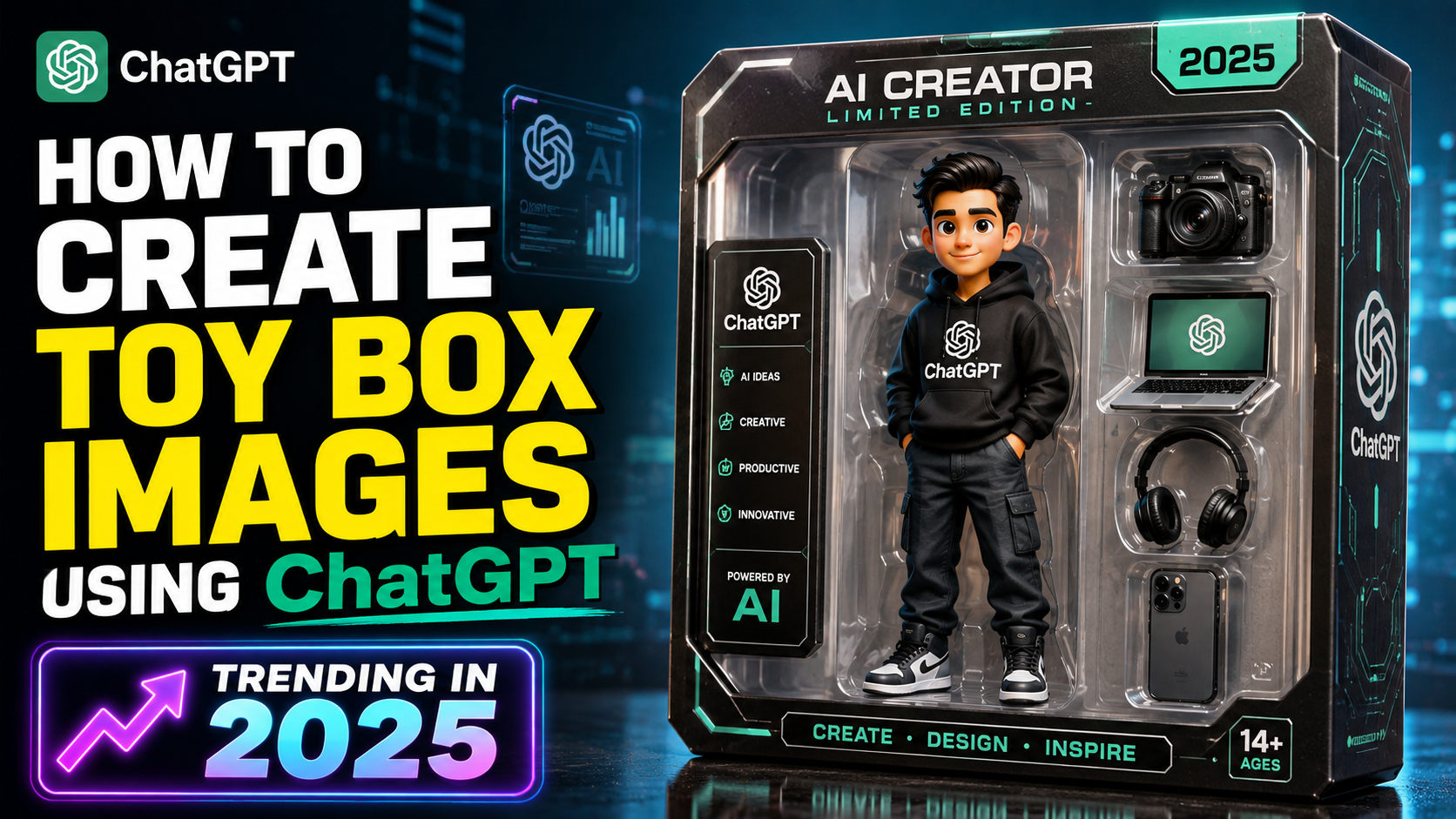
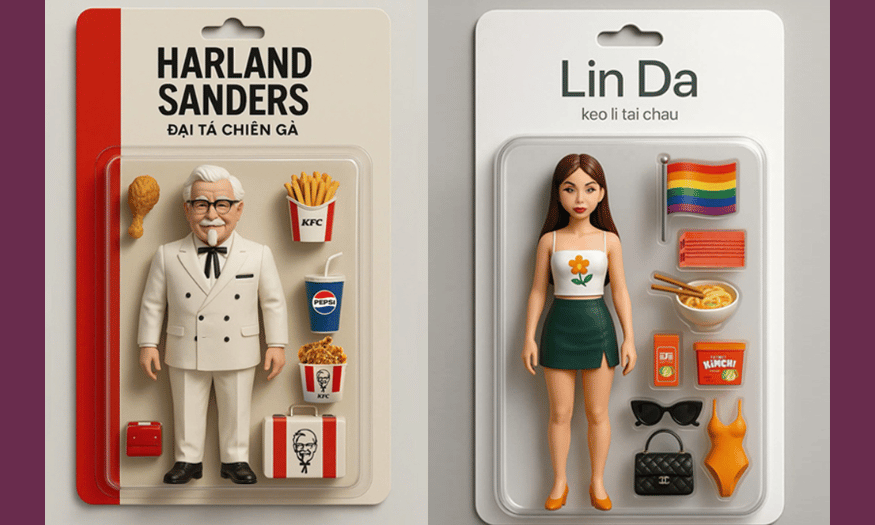
Prompts are key to AI understanding your ideas and transforming them into concrete, accurate visuals. When creating toy figure box images using ChatGPT, the more detailed the prompt, the more impressive and visually appealing the resulting image will be.
First, clearly define the theme or main character you want to include in the toy box. This could be the brand name, character name, or even a short description of their personality, outfit, or accessories. For example, you could try "CellphoneS – a mascot figure box with a red, white, and black color scheme, cute style, and fun expressions."
Next, don't forget to describe the product style : Is it an action figure, chibi figure, or static model? Along with that, you should clarify the box material (glossy cardboard, transparent plastic window to see the figure inside) and the image layout : main colors, brand logo, character placement, background, 3D angle. All these details will help the AI create an attractive, trendy, and unique toy box.
2. Where did the toy box photo trend originate?
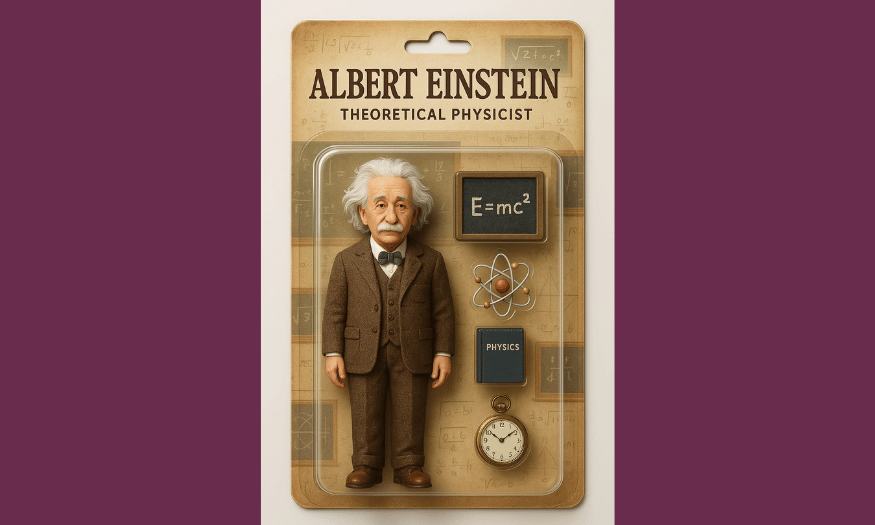
The trend of taking photos of toy figure boxes isn't actually new, but it has exploded back into popularity thanks to the widespread influence of creative communities on social media. Initially, this style originated from Japanese figure collectors, where figure boxes are always meticulously designed, possessing display value no less than the product inside.
As AI develops, image creation tools like ChatGPT and Midjourney have turned the impossible into reality: anyone can design their own toy box to their liking without needing complex design knowledge. With just a simple prompt, a series of personalized figure box designs are created, becoming eye-catching content that is shared rapidly on TikTok, Instagram, and Facebook.
This trend quickly spread because it perfectly captured the younger generation's love of "showing off their belongings" and DIY spirit. Everyone wanted to see the brand name, their own name, or even a drawing of their pet appear on a fancy figure box like those found in stores. As a result, this trend went viral and shows no signs of slowing down.
3. Why you shouldn't miss this trend
Joining the figure toy box trend isn't just about following the trend for fun; it's also a way to build a unique, cute, and memorable personal or brand image. A custom-designed figure box will pique people's curiosity and make an impression at first glance, especially when you share it on social media.
Furthermore, the image of the toy box also serves as a "paving the way" for marketing campaigns, product promotion, or associating the brand with cute stories. A beautifully designed figure box can be printed as a gift for customers, or simply used to decorate a workspace or for live stream sales – extremely useful.
Finally, this is also a "golden opportunity" for you to hone your creative descriptive skills and better understand how AI "understands" humans. Each prompt you create is an opportunity to practice your writing skills, visual thinking, and logical idea organization – a crucial skill in the age of AI "collaborating" with humans.
4. Things to note when creating toy box images via ChatGPT
While ChatGPT can generate many interesting ideas, you still need to keep a few things in mind to effectively "catch the trend" and avoid flawed or inaccurate products. First, always start with a concise, clear, and structured prompt , listing the key elements from the general to the specific so that the AI can easily understand it.
Secondly, choose descriptive elements that are specific and visually appealing rather than general. Instead of just writing "beautiful box," specify "figure box made of glossy cardboard, clear plastic window, prominent red logo, blue background, simulated 3D lighting." This will help the AI create a more realistic image with fewer errors.
Finally, be patient and fine-tune the prompt if the image isn't quite right. ChatGPT usually requires several attempts; each time you change or add a few details, the image will gradually improve. Don't be afraid to be creative, try new tones, textures, and styles – that's the greatest joy of this trend!
5. Instructions on how to create toy box images using ChatGPT
Once you've mastered the detailed prompt creation process, you can easily create unique and trendy 3D model toy box images yourself using ChatGPT. The process isn't complicated; just follow the steps below to create a satisfying product to show off to your friends.
5.1 Step 1: Access ChatGPT
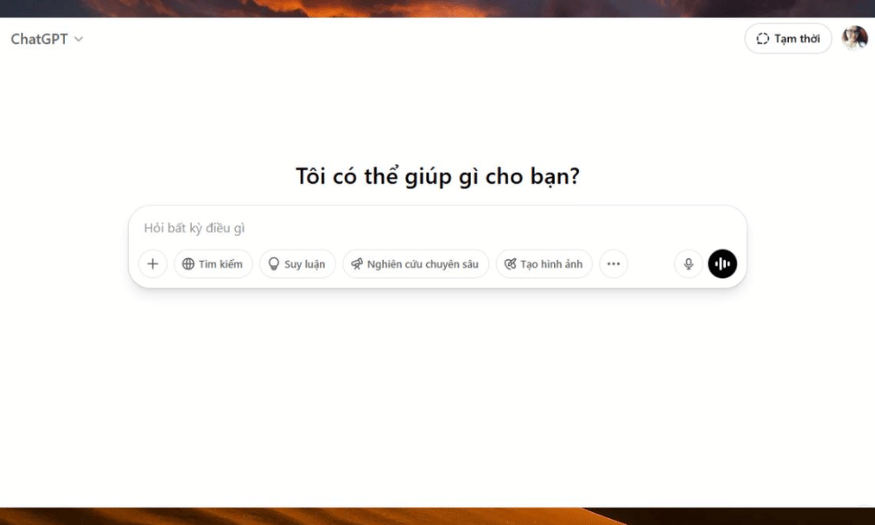
First, you need to open the ChatGPT app on your phone or access it directly via the official website: https://chatgpt.com/ . Make sure your device has a stable internet connection so that the prompt input and image creation process runs smoothly without interruption.
Using ChatGPT for image creation is now very convenient; you can work anytime, anywhere. Therefore, take a few minutes to familiarize yourself with the interface and basic features before you start designing your dream toy box.
5.2 Step 2: Enter the prompt to create a detailed image.
Next, type a very specific prompt into the chat box, including all the important information such as: the theme or main character, figure style, box material and color, logo details, design style, and shooting context. The clearer you describe it, the closer the AI image will be to your wishes.
Don't be afraid to express your ideas vividly, as if you were describing them to an artist. For example, specify the background color, character placement, lighting style, or box layout. Investing time in the prompt will save you time on editing later.
5.3 Step 3: Submit the request and wait for the AI to process it.
Once you're satisfied with the prompt, simply press Enter for ChatGPT to begin transforming your idea into a toy box image. The waiting time can range from a few seconds to a few minutes, depending on the level of detail of the request and the complexity of the image to be rendered.
Be patient and maintain a stable internet connection throughout this process. While waiting, you can brainstorm new ideas or consider revisions if the initial result isn't perfect.
5.4 Step 4: Review and edit if necessary
After ChatGPT returns the image, take the time to carefully observe every detail: from the shape of the box, the logo, the characters, to the overall color scheme. If you find anything unsuitable or want to add any elements, don't hesitate to make specific requests for editing right in the chat window.
You can clearly describe the changes you want to make, for example: adding a logo in the left corner, changing the background to a pastel color, adjusting the lighting to a 3/4 angle, or changing the character's expression. ChatGPT will receive your feedback and make adjustments until you have the most satisfactory version of the toy box to share with the community.
6. Some Prompt templates for creating toy figure box images using ChatGPT.
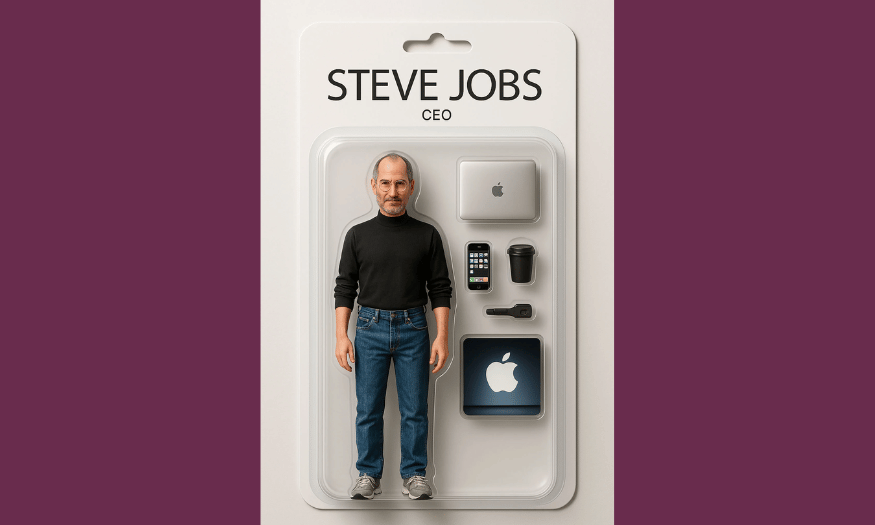
It's safe to say that the prompt is the "secret weapon" that determines the quality and uniqueness of the figure toy box images that ChatGPT will create. If you don't know where to start, check out the examples below to easily visualize and apply them to your own ideas. Simply replace the personal information, and you'll surely have one-of-a-kind toy box images that truly reflect your personality.
Example 1
**“Create a [male/female] figure standing inside an action figure toy box. Print your [Your Name] name in bold in the most prominent position on the box, along with a description of your occupation ([your job]). The figure should wear [characteristic attire] appropriate for this job. Next to the figure, arrange relevant accessories to highlight the characteristics of the profession.”
The box background should be in your favorite color, with the brand logo clearly displayed at the top. The image style should be a vibrant 3D cartoon, with soft lighting and a neat composition, like a valuable collectible item.
Example 2
“Create a full-body collectible action figure of this person, posed naturally inside a clear blister toy box. At the top of the packaging, prominently display the name: [Your Name]. Neatly arrange signature accessories related to the character inside the box: [List specific items or describe them]. The overall design should look stylish, modern, and eye-catching, with vibrant colors and a polished retail look.”
This prompt is perfect if you want a toy box photo with an international, modern style that can also be used for a super cool self-introduction on social media.
Example 3
“Upload a sample image of a toy box in your preferred style. Then, enter the prompt: 'Please create a toy box image based on the submitted sample box style. Use the face of [male/female], replace the brand name on the box with [Your Name], and add a description of your occupation or hobby below. Keep the colors and layout similar to ensure consistency.'”
This method makes it easy to recreate the style of a famous toy box, but with a personal twist.
Example 4
**“Design a high-end 3D render of a custom collectible toy box that features [Your Name], known as a Vietnamese creative expert in viral short videos. The figure should wear [detailed description of outfit, hair style, color palette, and signature accessories] to capture their unique vibe and energy.
Visual style: Hyper-realistic product shot with crisp, clean packaging design, studio-quality lighting, and a vibrant, upbeat presentation to make the figure look premium and ready for display.”**
This prompt is ideal if you want to create a professional-looking figure box design, suitable for personal branding or creative promotional campaigns.
7. Upgrade ChatGPT at SaDesign at a super low price.
If you're looking for a reputable place to upgrade your ChatGPT Plus account while saving money, SaDesign is a top choice. As one of the leading software companies in Vietnam, SaDesign has partnered with thousands of individuals, freelancers, and businesses in upgrading their AI tools at very reasonable prices. This allows users to access cutting-edge technology without worrying about exorbitant costs.
A major advantage that makes SaDesign trustworthy is its consistently competitive pricing compared to paying directly through OpenAI. With experience handling a large number of accounts daily, SaDesign offers attractive pricing policies for both individual customers and organizations needing to upgrade multiple accounts simultaneously. Furthermore, their customer support team is always ready to assist with any questions, ensuring your complete peace of mind throughout the entire process.
Furthermore, SaDesign places special emphasis on protecting customers' personal information. All payment data is securely encrypted and not disclosed to third parties, ensuring you can confidently use the service long-term without worrying about the risk of information leakage. This transparency, professionalism, and dedication have made SaDesign a familiar name when it comes to reputable ChatGPT Plus upgrade services in Vietnam.
8. Payment methods when purchasing at SaDesign
To provide maximum convenience for customers, SaDesign has implemented a variety of payment methods, making it easy for anyone to own a ChatGPT Plus account in just a few minutes. No matter where you are, transactions and upgrades are quick, transparent, and completely secure.
The most common method is direct bank transfer. Customers simply need to transfer funds to SaDesign Co., Ltd.'s bank account: MB Bank, account number 3966 999 9999, with a clearly stated account name, ensuring transparent transactions and minimizing risks. Additionally, for those unfamiliar with banking procedures, SaDesign also supports payments via Visa cards (both domestic and international) or e-wallets with great flexibility.
Furthermore, SaDesign is also at the forefront of digital payment trends by integrating the most popular e-wallets currently available, such as Momo, ZaloPay, and ViettelPay. With just a few taps of a QR code scan or phone number entry, the payment process is completed instantly. The system will automatically confirm the order and process the account upgrade in the shortest possible time, saving you time and allowing you to start exploring the outstanding benefits that ChatGPT Plus offers.
9. Conclusion
The toy box photo trend isn't just a fun way to "follow the trend," but also a way to express your personality, creativity, and uniqueness. With ChatGPT, any idea can be transformed into a vibrant image in just seconds. Don't hesitate to try it out! Create lots of personalized "toy boxes" to share on social media, impress your friends, and inspire creativity in the community!





















VIP Products








Best Selling Products
Genuine Cheap Canva Pro
39 USD
Adobe Premiere Pro Account
99 USD
Copyright Adobe Lightroom Account
59 USD
Genuine Adobe Illustrator account
99 USD
MidJourney Account
29 USD
ChatGPT Plus Account (GPT-4)
16 USD
Freepik Premium Account
59 USD
Upgrade Duolingo Super
29 USD
Windows 10 & 11 Pro Key
36 USD
Adobe Photoshop Copyright - Full App
120 USD
Upgrade genuine Capture One account
120 USD
Upgrade Genuine Office 365
49 USD
Capcut Pro 1 Year
39 USD
Autodesk All App Account Copyright
120 USD
Plugin Retouch4me
69 USD