Best Selling Products

ChatGPT Plus Account (GPT-4)
16 USD

Copyright Adobe Lightroom Account
59 USD

Adobe Photoshop Copyright - Full App
120 USD

Genuine Cheap Canva Pro
39 USD

Upgrade Genuine Office 365
49 USD

Genuine Adobe Illustrator account
99 USD

Windows 10 & 11 Pro Key
36 USD

Capcut Pro 1 Year
39 USD

Upgrade Duolingo Super
29 USD

Freepik Premium Account
59 USD

Adobe Premiere Pro Account
99 USD

Plugin Retouch4me
69 USD

Upgrade genuine Capture One account
120 USD

MidJourney Account
29 USD

Autodesk All App Account Copyright
120 USD
Retouch4me and the Must-Have Plugins
Nội dung
- 1. What Is Retouch4Me?
- 2. How to Access Retouch4Me
- 3. AI Photo Editing Tools in Retouch4Me
- 3.1 Heal, Skin Mask, Skin Tone, and Mattifier
- 3.2 Dodge & Burn
- 3.3 Portrait Volumes
- 3.4 Eye Brilliance and Vessel Removal
- 3.5 Teeth Whitener
- 3.6 Fabric
- 3.7 Clean Backdrop and Dust
- 3.8 Frequency Separation and Color Match
- 3.9 Heal and Dodge & Burn
- 3.10 Color Match
- 4. Where Should You Upgrade Retouch4Me?
- 5. Conclusion
Modern technology has brought many outstanding tools that make image editing simpler and more effective. Retouch4me stands out as a leading software program, helping photographers and photography enthusiasts optimize their works with unique features. Retouch4me’s diverse plugins not only save time but also significantly improve image quality. If you are looking for solutions to make your photos more perfect, join Appvip in exploring the must-have plugins of Retouch4me!
1. What Is Retouch4Me?
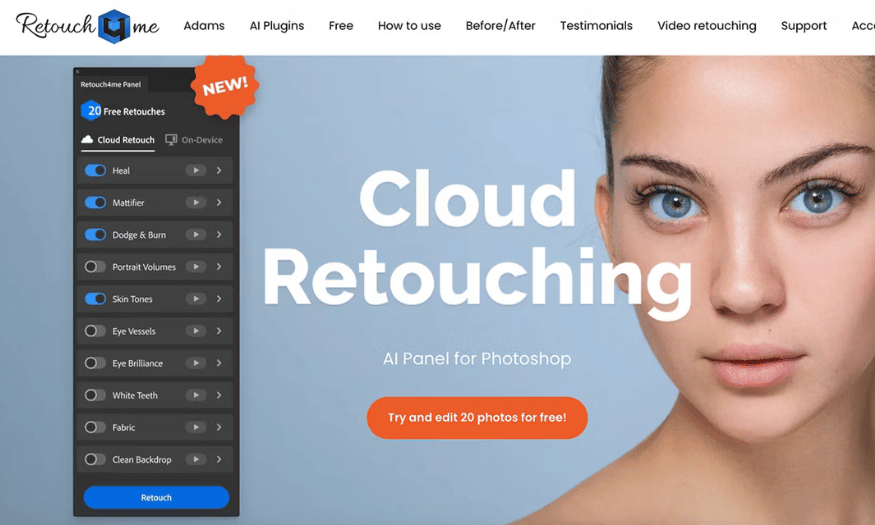
Retouch4Me is not simply a set of photo editing tools, but it is also a revolution in the field of image editing thanks to artificial intelligence (AI) technology. Retouch4Me’s plugins and standalone tools are designed to provide natural editing results, helping users save time without losing the original beauty of the photo. By applying advanced AI technology, Retouch4Me makes editing easier than ever, allowing users to focus on creativity without worrying about complicated editing steps.
One of Retouch4Me’s strengths is its ability to quickly and effectively perform edits such as smoothing skin, color grading, or even removing backgrounds. This is especially useful in fields such as portrait photography and filmmaking, where producing high-quality images is very important. The results from Retouch4Me are not only beautiful but also realistic, helping maintain the natural appearance of the subject in the image. Thanks to artificial neural network technology, time-consuming tasks such as scanning and refining can be automated, providing maximum efficiency for users.
You no longer have to worry about over-editing or creating images that look artificial, as Retouch4Me will help you achieve perfect photos with just a few clicks. That is exactly why this tool has become a top choice for many photographers and video producers around the world.
.png)
2. How to Access Retouch4Me
To begin your photo editing journey with Retouch4Me, you can easily access its official website. Here, you will find a wide range of photo and video editing plugins and tools specifically designed for both Mac and Windows operating systems. One of the most attractive things is that you can purchase each plugin individually, allowing you to select the tools that best suit your needs without having to invest in a complete package from the beginning.
Prices for photography tools start at USD 124 per tool, while video editing plugins start at USD 224. All purchases come with perpetual licenses, ensuring that you can use the tools without worrying about renewals. Furthermore, Retouch4Me provides several free tools and allows users to experience 20 free uses of the photography plugins before deciding to purchase them. This gives users an opportunity to learn about and experience the features of each tool before investing.
Retouch4Me is not only available as a standalone tool but can also be integrated into popular photo editing software programs such as Photoshop and Lightroom. You can use it as a plugin in Photoshop or as an external editor in Adobe Lightroom and Capture One. This flexibility makes it easy to integrate Retouch4Me into your workflow without difficulty.
.png)
3. AI Photo Editing Tools in Retouch4Me
Retouch4Me provides an advanced set of photo editing tools, making the image processing workflow faster and easier than ever. Thanks to modern AI technology, these tools not only save time but also ensure the highest image quality. By automating editing steps that normally take a lot of time, Retouch4Me helps users focus on the creative aspect of photography.
Retouch4Me’s AI tools are designed for common use in the photo editing process, helping reduce effort and improve performance. You do not need to be an expert to easily apply sophisticated edits to your images with just a few clicks. Below are the outstanding tools that you cannot miss when using Retouch4Me.
3.1 Heal, Skin Mask, Skin Tone, and Mattifier
One of the most notable tools in Retouch4Me is Heal, which identifies skin in an image and removes imperfections without losing its natural appearance. This tool allows users to correct imperfections such as acne and dark spots without causing excessive smoothing, providing realistic results.
The Skin Mask tool is also very useful, helping identify skin areas in the photo and mask unwanted areas. Thanks to Skin Mask, you can apply general adjustments only to the skin without having to manually select each area. Skin Tone is another excellent tool that helps enhance skin tones, ensuring that the tones are distributed evenly and naturally across the skin’s surface.
Finally, the Mattifier plugin helps remove shine and oil from the skin, providing the model with a naturally matte appearance. This tool evens out skin tone, especially in areas exposed to strong light, helping create perfect portrait photos.
.png)
3.2 Dodge & Burn
In traditional photography, using Dodge & Burn usually requires users to manually brush over the areas they want to brighten or darken, which is not only time-consuming but also requires high precision. With Retouch4Me, the Dodge & Burn tool is simplified into a single button. This helps users easily correct problems such as under-eye bags, veins on the skin, or wrinkles without spending too much effort.
This feature is not only fast but also extremely effective, allowing users to edit the layer to improve the results in the way they desire. The final result provided by this tool is a natural and vivid portrait, helping enhance the artistic value of the work.
3.3 Portrait Volumes
Retouch4Me’s Portrait Volumes tool allows users to enhance depth in portrait photos. By making the eyes brighter and emphasizing the lips, this tool improves the overall appearance of the face without losing its natural look. These small but important details help create impressive portrait photos that attract viewers’ attention.
Retouch4Me pays special attention to subtlety in editing results. Facial features are not distorted or made stiff when Portrait Volumes is used but still retain their original natural beauty. This is the strength that makes this tool a top choice for people who want to create perfect portraits.
3.4 Eye Brilliance and Vessel Removal
The Eye Brilliance and Vessel Removal tools focus on improving the eyes in photos, which are considered the “windows to the soul.” Eye Brilliance not only enhances the appearance of the eyes but also improves the color of the irises, adds subtle light, and makes the eyes stand out more. This is an excellent choice for photographers who want to create attractive and impressive images.
Meanwhile, the Vessel Removal tool helps remove red blood vessels from the eyes. Although these are natural blood vessels, they can be distracting in some cases. Removing these small details helps improve the quality of the photo, providing viewers with a more natural and pleasant feeling.
Retouch4Me truly provides a new approach to photo editing, with intelligent AI tools that help users easily create perfect works of art.
.png)
3.5 Teeth Whitener
The Teeth Whitener AI tool in Retouch4Me is an excellent solution for portraits featuring smiles. A bright white smile not only creates a good impression but also provides confidence to the model. Teeth Whitener automatically identifies the teeth in the image and performs the whitening process naturally. The result is a bright and attractive smile without losing the natural appearance of the face.
If you feel that the whitening result is excessive, Retouch4Me allows you to adjust the opacity of the editing layer. Simply reduce the opacity until you achieve a satisfactory level. This provides you with flexibility when customizing the image to suit your personal style or the customer’s requirements. The Teeth Whitener tool not only improves the quality of the photo but also helps you easily create beautiful and impressive portraits.
3.6 Fabric
The Fabric AI tool in Retouch4Me is specifically designed to enhance the beauty of clothing in photos. With the ability to automatically identify large sections of fabric, this tool helps remove any unnecessary wrinkles, giving the model’s clothing a perfect appearance. The result is an image with polished and sophisticated clothing without losing the natural characteristics of the fabric.
What is special about the Fabric tool is that it only removes excessive wrinkles while retaining the necessary folds that show the model’s pose or movement. This ensures that the clothing still looks natural and does not become overly smooth. With this tool, you can create impressive fashion photos, demonstrate professionalism in editing, and provide viewers with the best experience.
3.7 Clean Backdrop and Dust
In the world of studio photography, the background often plays an important role in creating a perfect portrait. However, small stains, shadows, or dust can reduce the quality of the photo. Retouch4Me’s Clean Backdrop tool helps quickly restore a flat, neutral background color, providing your portrait with a clean and professional background.
The Dust tool works alongside Clean Backdrop, helping identify and remove remaining dust particles from the image. This is very useful for removing dust spots that may appear because of the lens or the surrounding environment. By combining these two tools, you can create perfect photos with clean backgrounds, helping the subject stand out without being distracted by unwanted elements.
3.8 Frequency Separation and Color Match
The Frequency Separation plugin is an extremely useful free tool that all Retouch4Me users can take advantage of. This tool divides the image into layers based on frequency, allowing you to edit it more easily. High frequencies retain fine textures, medium frequencies display major spots and imperfections, while low frequencies process depth and color. Thanks to this separation, you can control sharpness and create a smooth, soft-focus effect for your photo.
The Color Match tool adds another powerful capability, allowing you to adjust the overall colors of the photo. By using the color picker, Color Match can match the image’s color grading to any selected color, making it easy to change the feeling of the photo. With both premium and free versions, this tool opens up many creative possibilities for users, helping create unique and impressive works of art.
.png)
3.9 Heal and Dodge & Burn
The Heal tool in Retouch4Me is not only designed for photo editing but can also be applied to videos, providing users with optimal convenience. When you use this tool, it automatically identifies and removes skin imperfections, helping the skin become more perfect. This is especially useful in close-up videos, where small details can become more noticeable. If you are recording a vlog or any content in which the skin needs to be improved, the Heal tool will help you create more beautiful and confident frames.
The Dodge & Burn tool also plays an important role in the video editing process. Similar to photo editing, this tool allows users to adjust the brightness and darkness of specific areas in a video. It helps highlight important details and create depth in the footage. Retouch4Me automatically identifies the areas that need to be brightened or darkened, making it easy to apply effects without requiring too many manual operations. The result is a video with better contrast that attracts viewers’ attention.
3.10 Color Match
Retouch4Me does not stop at image editing but also provides the Color Match tool for videos, helping you easily adjust colors and color grading for your footage. This tool allows you to synchronize colors between different clips or adjust the colors according to a specific reference image. Thanks to this feature, you can create a consistent look for the entire video, ensuring that every frame is harmonious and beautiful.
By using Color Match, you can quickly transform the colors of your footage without having to perform complicated steps. This not only saves time but also helps you focus on creating content. With powerful tools such as Heal, Dodge & Burn, and Color Match, Retouch4Me truly provides users with the ability to perform professional video editing easily and effectively.
4. Where Should You Upgrade Retouch4Me?
If you are looking for a reliable provider to upgrade Retouch4Me, Appvip is an excellent choice. Appvip not only provides upgrades for Retouch4Me but also ensures that you receive the latest versions with all features included. With a team of experts who have extensive experience in photo and video editing, Appvip is committed to providing dedicated support services so that you can optimize your workflow.
In addition to providing upgrades, Appvip can also assist you with installing and learning how to use Retouch4Me’s tools. This helps you quickly become familiar with and make the most of the features provided by the software. Visit Appvip to discover more about its services and products, helping you improve the quality of your photo editing work in the most effective way.
.png)
5. Conclusion
Retouch4me is not only photo editing software but also an indispensable companion for every photographer and art lover. Retouch4me’s plugins provide flexibility and convenience, helping you transform simple photos into works of art. If you are looking for a way to improve your photography and editing skills, do not overlook these excellent tools. Let Retouch4me help you shine in the world of images, and do not hesitate to explore the new things it provides!





















VIP Products








Best Selling Products
ChatGPT Plus Account (GPT-4)
16 USD
Copyright Adobe Lightroom Account
59 USD
Adobe Photoshop Copyright - Full App
120 USD
Genuine Cheap Canva Pro
39 USD
Upgrade Genuine Office 365
49 USD
Genuine Adobe Illustrator account
99 USD
Windows 10 & 11 Pro Key
36 USD
Capcut Pro 1 Year
39 USD
Upgrade Duolingo Super
29 USD
Freepik Premium Account
59 USD
Adobe Premiere Pro Account
99 USD
Plugin Retouch4me
69 USD
Upgrade genuine Capture One account
120 USD
MidJourney Account
29 USD
Autodesk All App Account Copyright
120 USD