Best Selling Products

MidJourney Account
29 USD

Windows 10 & 11 Pro Key
36 USD

Genuine Cheap Canva Pro
39 USD

Autodesk All App Account Copyright
120 USD

Genuine Adobe Illustrator account
99 USD

Upgrade genuine Capture One account
120 USD

Freepik Premium Account
59 USD

Upgrade Genuine Office 365
49 USD

Upgrade Duolingo Super
29 USD

Plugin Retouch4me
69 USD

Capcut Pro 1 Year
39 USD

Adobe Photoshop Copyright - Full App
120 USD

Copyright Adobe Lightroom Account
59 USD

ChatGPT Plus Account (GPT-4)
16 USD

Adobe Premiere Pro Account
99 USD
Technological Breakthrough Replaces Online Profile Picture Backgrounds, Saving You Time
Nội dung
- 1. The Importance of Formatting a White Background for Document Photos
- 1.1. Mandatory standards for modern administrative documents
- 1.2. Aesthetics and professionalism in job applications
- 2. Common Difficulties Encountered When Separating Handicrafts Using Traditional Methods
- 2.1. Jagged edges and color bleeding at the edges
- 2.2. Distortion of hair structure and clothing details
- 3. Discover the Super Fast White Background Photo Editing App at Appvip.ai
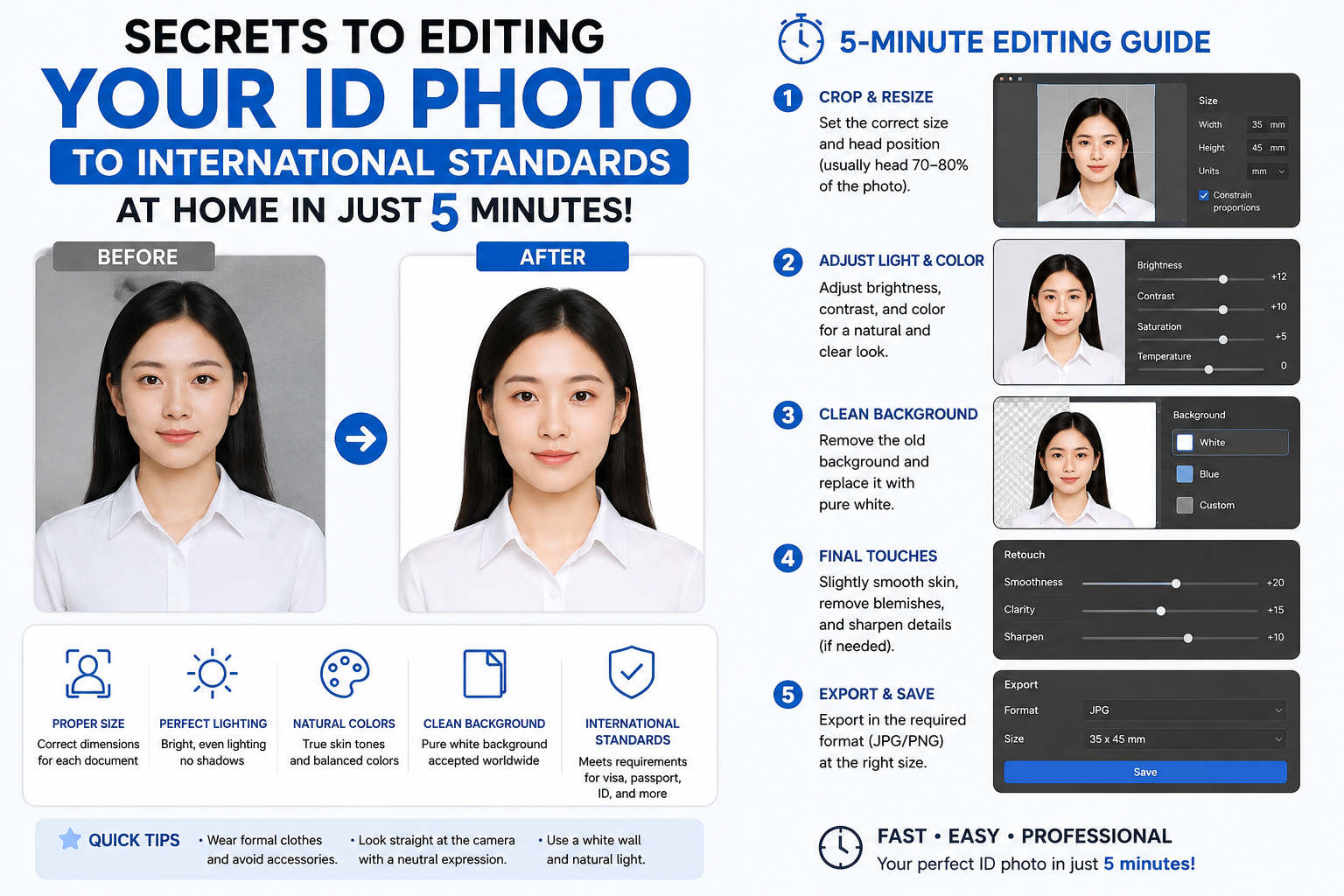
- 4. Automatic White Background Photo Update Process in 4 Steps
- 4.1. Step 1: Access the online system and upload the original image.
- 4.2. Step 2: Activate the automatic subject recognition feature
- 4.3. Step 3: Select the standard white background color format
- 4.4. Step 4: Check details and output high-quality file
- 5. Technical Criteria to Remember When Taking ID Photos at Home
- 5.1. Setting the camera's distance and viewing angle
- 5.2. Lighting techniques to eliminate shadows
- 6. Outstanding Advantages of Using Artificial Intelligence-Based Background Separation Solutions
- 6.1. Superior processing speed to address urgent needs.
- 6.2. Minimize post-production service costs.
- 7. Important Notes for Obtaining a Legally Compliant Passport Photo
- 8. Conclusion
This guide shows you how to quickly and accurately adjust the background of your ID photo using AI technology at appvip.ai.
1. The Importance of Formatting a White Background for Document Photos
International standards and current laws both provide specific guidelines on synchronizing background colors for legal portrait photographs.

1.1. Mandatory standards for modern administrative documents
Most government agencies and national embassies now require the use of white background photos for passport, national identity card, or entry/exit visa applications. White creates maximum contrast with the subject's skin and hair color, allowing for the most accurate scanning and analysis of biometric data by automated facial recognition systems at border crossings. Using the wrong background color can lead to the application being rejected during the initial screening process.
1.2. Aesthetics and professionalism in job applications
Besides legal requirements, a professional office portrait with a clean, consistent background helps an applicant's resume (CV) stand out to recruiters. The clean white background eliminates visual distractions, focusing attention on your fresh demeanor and confident expression. This indirectly demonstrates the applicant's respect for the hiring company.
2. Common Difficulties Encountered When Separating Handicrafts Using Traditional Methods
Using older editing tools often yields unsatisfactory results due to technological limitations in edge processing.

2.1. Jagged edges and color bleeding at the edges
The transition area between thin strands of hair and the surrounding environment is always a challenging problem for any image editor. When performing cropping using manual tools like the Pen Tool or Magic Wand in common software, the outline easily becomes harsh, leaving streaks of green and red from the original background. This technical error makes the photo look unnatural and is easily detected when printed on professional photo paper.
2.2. Distortion of hair structure and clothing details
Attempting to smooth out the cut lines with excessive feathering effects often inadvertently obscures the natural texture of the hair or distorts the neat shape of the shirt collar. The resulting image loses its authenticity, giving the impression that the face has been clumsily superimposed onto a pre-existing white background.
3. Discover the Super Fast White Background Photo Editing App at Appvip.ai
The website appvip.ai is currently a leading online platform providing a photo editing app that uses advanced artificial intelligence to create white backgrounds for ID photos . The system boasts intelligent algorithms capable of separating image layers with absolute pixel-perfect accuracy. Users don't need to download bulky installation files or have powerful computers; the entire editing process is handled directly on their phone or computer via the cloud.
4. Automatic White Background Photo Update Process in 4 Steps
The app's interface is optimized in a minimalist style, ensuring smooth operation for all user groups right from their first experience.

4.1. Step 1: Access the online system and upload the original image.
Users activate the internet browser application on their mobile device or computer to access the platform's workspace. Tap the central area with the upload icon to select the original portrait photo from the device's library. The original photo should have even lighting and the face facing forward for optimal analysis by the system.
4.2. Step 2: Activate the automatic subject recognition feature
The AI system will instantly scan the entire image surface as soon as the file is successfully uploaded. The algorithm automatically locates key points on the face, shoulder line, and hair structure to create a mask map that protects the subject, then completely isolates the unwanted background.
4.3. Step 3: Select the standard white background color format
Customers navigate to the app's color control panel and select the pure white icon. The system will automatically overlay the new color onto the isolated area, while also activating a natural, subtle shadow effect around the shoulder edges to give the photo depth and prevent it from looking flat like with typical photo manipulation techniques.
4.4. Step 4: Check details and output high-quality file
Users zoom in on the screen to review all the trim lines around the hair to see if the desired smoothness has been achieved. Once completely satisfied with the result, they press the download button to save the image file to their computer in the highest quality format, ready for printing for work.
5. Technical Criteria to Remember When Taking ID Photos at Home
Preparing a high-quality input data source will help artificial intelligence applications maximize their image extraction and filtering capabilities.
5.1. Setting the camera's distance and viewing angle
The recording device should be positioned at eye level with the photographer, approximately one and a half to two meters away. This standard distance minimizes image distortion caused by the phone's wide-angle lens, maintaining a balanced proportion between the nose, ears, and cheeks.
5.2. Lighting techniques to eliminate shadows
You should choose a shooting location with abundant natural light, such as facing a large window, or arrange two LED lights of equivalent power, shining at a 45-degree angle from either side onto your face. This setup completely eliminates dark areas under the chin and eye sockets, and minimizes strong shadows cast on the wall behind, creating ideal conditions for the edge recognition app.
6. Outstanding Advantages of Using Artificial Intelligence-Based Background Separation Solutions
The replacement of machines in the field of graphic design brings practical benefits in terms of both finances and daily labor productivity.
6.1. Superior processing speed to address urgent needs.
Instead of wasting time traveling to traditional photo studios and waiting in line for photographers to edit your photos, you can get valid results instantly with just a few taps on a touchscreen. This solution is especially useful for those who need to quickly complete study abroad applications, visas, or submit online forms at night.

6.2. Minimize post-production service costs.
Managing and editing your own images completely eliminates the cost of hiring external designers. You can freely experiment with different photos, choosing your best angle to change the background without any limitations on the number of photos or any additional cost pressures.
7. Important Notes for Obtaining a Legally Compliant Passport Photo
The process of editing background colors sometimes leads users to inadvertently violate certain unspoken regulations of the immigration and public administration sectors.
-
Maintain your original identifying features: Do not use features that create a V-line face, raise the nose, or remove birthmarks or distinctive moles on your face. Such discrepancies will cause significant problems when verifying your identity with relevant authorities.
-
Clothing with good contrast is key: Photographers should prioritize wearing dark-colored or dark neutral-colored collared shirts when changing to a white background. Avoid wearing white shirts that match the new background color, as this will cause the subject to blend into the background.
-
A serious facial expression: Eyes should look directly into the camera with focus, lips slightly closed, and no teeth showing. Maintaining a cheerful yet serious expression will ensure the ID photo meets legal standards and creates a positive impression on viewers.
8. Conclusion
Applying automated image processing technology to white background conversion offers absolute convenience and accuracy for all content creators and general users. The powerful support from the white background photo editing app at appvip.ai helps you easily master the portrait post-processing process in the most professional way without requiring in-depth knowledge of graphic design techniques.





















VIP Products








Best Selling Products
MidJourney Account
29 USD
Windows 10 & 11 Pro Key
36 USD
Genuine Cheap Canva Pro
39 USD
Autodesk All App Account Copyright
120 USD
Genuine Adobe Illustrator account
99 USD
Upgrade genuine Capture One account
120 USD
Freepik Premium Account
59 USD
Upgrade Genuine Office 365
49 USD
Upgrade Duolingo Super
29 USD
Plugin Retouch4me
69 USD
Capcut Pro 1 Year
39 USD
Adobe Photoshop Copyright - Full App
120 USD
Copyright Adobe Lightroom Account
59 USD
ChatGPT Plus Account (GPT-4)
16 USD
Adobe Premiere Pro Account
99 USD