Best Selling Products

Plugin Retouch4me
69 USD

Upgrade Genuine Office 365
49 USD

Capcut Pro 1 Year
39 USD

Freepik Premium Account
59 USD

Autodesk All App Account Copyright
120 USD

Windows 10 & 11 Pro Key
36 USD

Copyright Adobe Lightroom Account
59 USD

Genuine Adobe Illustrator account
99 USD

Genuine Cheap Canva Pro
39 USD

ChatGPT Plus Account (GPT-4)
16 USD

Adobe Photoshop Copyright - Full App
120 USD

Upgrade genuine Capture One account
120 USD

MidJourney Account
29 USD

Adobe Premiere Pro Account
99 USD

Upgrade Duolingo Super
29 USD
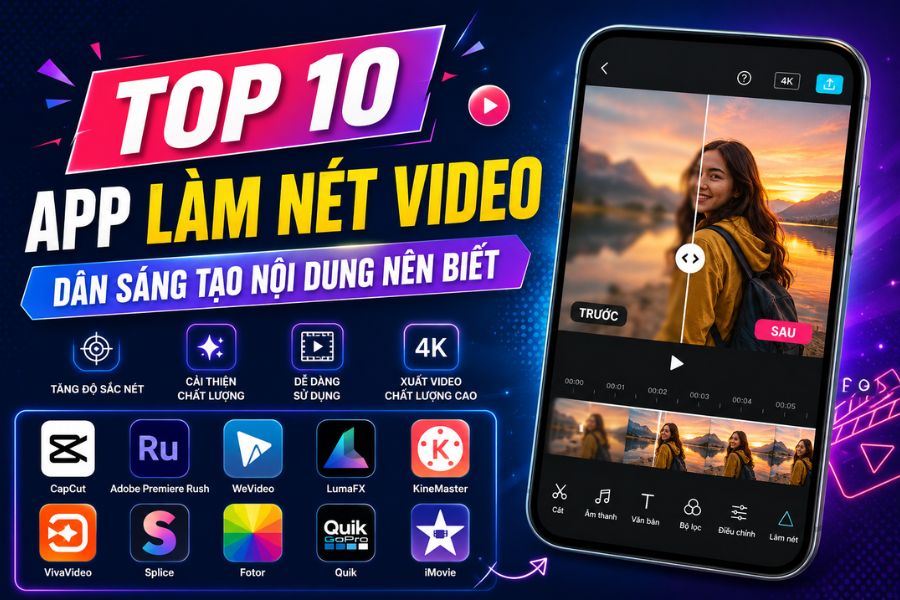
Top 10 Video Sharpening Apps Content Creators Should Know
Nội dung
Today, many applications integrate smart AI that can restore details, enhance sharpness, improve colors, and upgrade video quality from low resolution to HD or even 4K.
1. CapCut
Phone compatibility: iOS 9.0 and above, Android 6.0 and above
Pricing: Free or paid (storage costs from 0.99 - 19.99 USD)
Video quality: 4K
CapCut is a video sharpening app loved by many users thanks to its easy-to-use interface and professional editing toolkit. The app supports increasing sharpness, improving blurry video quality, and creating dynamic effects with just a few simple actions. It is also a popular choice for many TikTokers and content creators when they need quick mobile video editing.
Open the app and create a new project
Select the video to edit
Find the “Sharpen” feature in the toolbar
Adjust the sharpness level as desired
Save the video and export the file using the arrow button in the top-right corner
.jpg)
2. Adobe Premiere Rush
Phone compatibility: iOS 12.0 and above, Android
Pricing: Free
Video quality: 4K
Adobe Premiere Rush is a standout online video sharpening app for those who want professional editing directly on their phones. The app offers powerful features such as cutting, merging, adding music, color grading, and enhancing video clarity. Thanks to smooth performance and a modern interface, it helps users easily create high-quality, visually appealing videos.
Open the app and select “Storage” to create a new project
Name the project and press “Accept”
Select the video and drag it into the timeline
Go to the “Color and Light” tab
Choose “Basic Corrections” to increase brightness and sharpness
Adjust lighting and shadows to make the video clearer
Export the video after completing edits
3. WeVideo
Phone compatibility: Android 6.0 and above, iOS 10.0 and above
Pricing: Free
Video quality: 4K
WeVideo is a video sharpening app suitable for users who enjoy fast and convenient online editing. The app provides many useful tools such as trimming, voiceovers, adding music, and improving image quality. With simple controls and smooth processing, WeVideo helps transform blurry clips into sharper and more professional-looking videos.
Select “Media” on the menu bar
Tap “Browse to Select” and upload your video
Choose “Create New” to start a project
Drag the video into the editing area
Double-click the video and select “Color”
Adjust the sliders to increase video sharpness
Click “Finish Editing” to save changes
.jpg)
4. LumaFX
Phone compatibility: iOS 11.0 and above
Pricing: Paid
Video quality: 4K
LumaFX is a video sharpening app chosen by many iPhone users thanks to its advanced editing capabilities and beautiful visual effects. The app is suitable for both beginners and TikTokers wanting to upgrade video quality. With its powerful sharpening tools, LumaFX makes videos clearer, sharper, and more professional with only a few simple steps.
Download and install the app on your phone
Open the app and upload the video to edit
Use the built-in sharpening tool
Adjust settings to fit your video
Save and export the video after editing
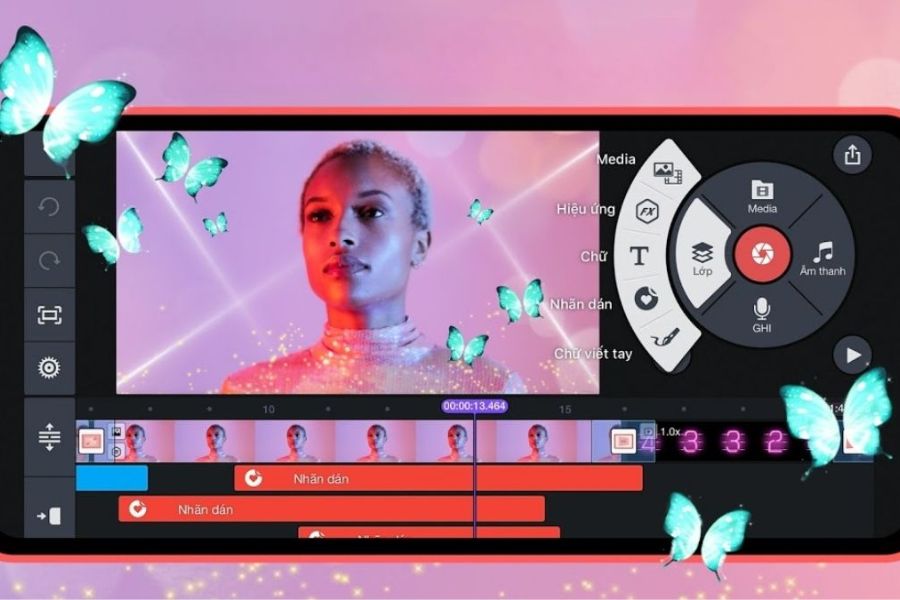
5. KineMaster
Phone compatibility: All devices
Pricing: Free or paid (119,000 VND/month or 729,000 VND/year)
Video quality: 4K 30fps
KineMaster is a famous video sharpening app with an intuitive interface and many professional editing features. The app supports enhancing sharpness, color correction, and effectively improving blurry video quality. It is also widely used by content creators to make eye-catching TikTok videos that attract viewers.
Tap “+” to create a new project
Choose the appropriate aspect ratio
Go to “Media” to add your video
Tap “✓” to import the video
Select “Color Adjustment” in the right-side menu
Increase brightness, sharpness, and adjust colors as desired
Tap “✓” to save edits
Export the video with the arrow icon and choose quality settings
6. VivaVideo
Phone compatibility: All devices
Pricing: Free
Video quality: Ultra HD 4K or 1080P
VivaVideo is a free video sharpening app loved by many for its fast editing, easy operation, and rich visual effects. The app supports increasing sharpness, adjusting contrast, and improving video colors to make blurry clips clearer and more vivid. With its friendly interface, VivaVideo is suitable even for beginners editing videos on mobile.
Open the app and choose “Edit”
Select the video to sharpen and tap “Next”
Choose “Edit Clip”
Adjust the slider to increase sharpness
Customize contrast, saturation, and focus areas
Reduce blur and optimize video lighting
Tap “✓” to save the edited video
7. Splice
Phone compatibility: iOS 6.0 and above, Android
Pricing: Free
Video quality: Resolution 1280x720 or 960x540
Splice is a free video sharpening app loved for its simple and easy operation. The app quickly increases video sharpness, making blurry clips clearer and more eye-catching. In addition, Splice provides many useful editing tools to make videos look more professional and engaging when posted on TikTok or Reels.
Upload the video to the app
Select the sharpening tool from the editing toolbar
Drag the slider to the right to increase sharpness
Adjust lighting and colors if needed
Save the video after editing
.jpg)
8. Fotor
Phone compatibility: iOS 9.0 and above, Android 4.4 and above
Pricing: Free
Video quality: 4K
Fotor is a popular video sharpening app thanks to its powerful yet easy-to-use editing tools. The app improves clarity, colors, and video quality in just a few simple steps. With a friendly interface and fast processing, Fotor is suitable for both beginners and frequent mobile video editors.
Upload the video to the app
Use the built-in sharpening tool
Adjust sharpness to match the video
Combine with color and light adjustments for better results
Export high-quality video after completion
9. Quik
Phone compatibility: Android 5.0 and above, iOS 10.0 and above
Pricing: Free
Video quality: 4K
Quik is a standout video sharpening app with beautiful effects and a diverse free music library. The app supports quick editing, increases clarity, and creates professional transitions in just minutes. It is ideal for those who want creative and visually appealing videos without needing advanced editing skills.
Upload your video to Quik
Choose the sharpening tool
Increase clarity and optimize image quality
Combine effects, background music, and filters for a more vivid result
Export the video in suitable quality for social sharing
.jpg)
10. iMovie
Phone compatibility: iOS 14.0 and above
Pricing: Free
Video quality: 4K
iMovie is Apple’s free video sharpening app highly rated by iPhone users for smooth performance and an easy-to-use interface. The app supports color correction, sharpness enhancement, and exporting videos in up to 4K quality. It is an excellent choice for users who want quick editing while maintaining professionalism and visual appeal.
Select “Create New Video” to start a project
Tap the arrow icon to add your video
Select “Import Selected” to upload the clip
Add the video to the timeline using the “+” button
Choose the “Color Palette” icon to adjust colors and sharpness
Move the slider to make the video clearer
Save and export the video after finishing edits
11. Conclusion
Investing in image quality is no longer optional but has become an essential factor for helping videos stand out among thousands of pieces of social media content. A suitable video sharpening app not only improves clarity but also helps optimize colors, lighting, and elevate the professionalism of your work. Especially with the strong development of AI, even old, shaky, or blurry videos can now be processed quickly directly on a phone. Each application on this list has its own strengths, suitable for different needs ranging from basic editing to advanced video enhancement. If you regularly create TikTok content, YouTube videos, or promotional clips, do not hesitate to try different tools to find the video sharpening app that best matches your creative style. A sharp and polished video will always feel more professional and increase your chances of effectively attracting viewers.





















VIP Products








Best Selling Products
Plugin Retouch4me
69 USD
Upgrade Genuine Office 365
49 USD
Capcut Pro 1 Year
39 USD
Freepik Premium Account
59 USD
Autodesk All App Account Copyright
120 USD
Windows 10 & 11 Pro Key
36 USD
Copyright Adobe Lightroom Account
59 USD
Genuine Adobe Illustrator account
99 USD
Genuine Cheap Canva Pro
39 USD
ChatGPT Plus Account (GPT-4)
16 USD
Adobe Photoshop Copyright - Full App
120 USD
Upgrade genuine Capture One account
120 USD
MidJourney Account
29 USD
Adobe Premiere Pro Account
99 USD
Upgrade Duolingo Super
29 USD