Best Selling Products

Upgrade Duolingo Super
29 USD

Adobe Photoshop Copyright - Full App
120 USD

Genuine Adobe Illustrator account
99 USD

Plugin Retouch4me
69 USD

MidJourney Account
29 USD

Copyright Adobe Lightroom Account
59 USD

Windows 10 & 11 Pro Key
36 USD

Upgrade genuine Capture One account
120 USD

Autodesk All App Account Copyright
120 USD

Adobe Premiere Pro Account
99 USD

ChatGPT Plus Account (GPT-4)
16 USD

Genuine Cheap Canva Pro
39 USD

Freepik Premium Account
59 USD

Upgrade Genuine Office 365
49 USD

Capcut Pro 1 Year
39 USD
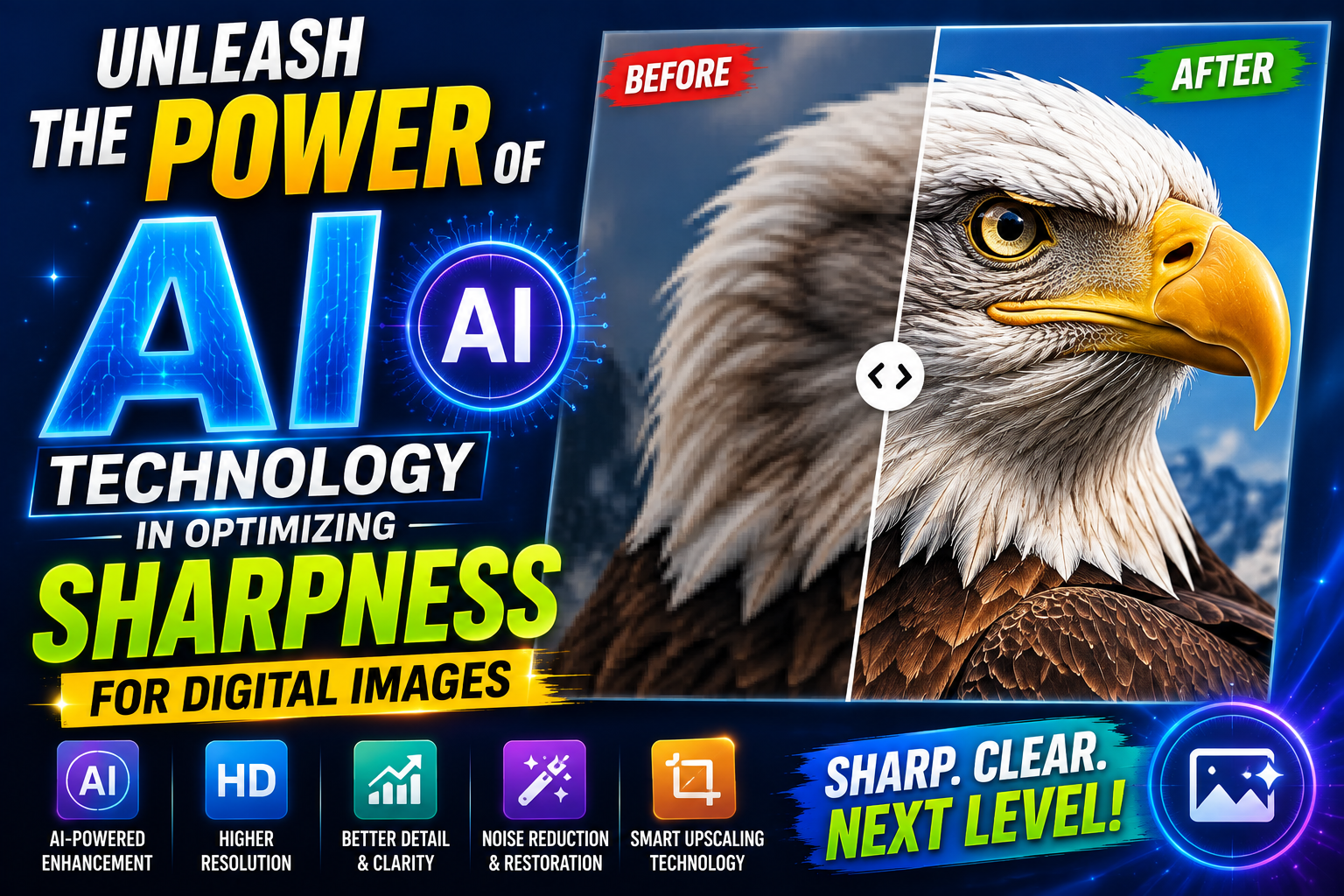
Unleash the power of AI technology in optimizing sharpness for digital images.
Nội dung
- 1. How modern image sharpening applications work
- 1.1. Intelligent Pixel Interpolation Technology
- 1.2. Noise Reduction and Artifact Removal
- 1.3. Generative Adversarial Networks (GANs)
- 1.4. Local Contrast Enhancement
- 2. The gold standards for evaluating a photo editing app to improve image sharpness.
- 2.1. Authenticity after processing
- 2.2. Ability to process old and black and white images
- 3. List of typical image sharpening applications categorized by purpose of use.
- 3.1. AI-powered portrait photo restoration applications
- 3.2. Tools for detailing landscapes and objects
- 4. The step-by-step process for achieving maximum sharpness.
- 4.1. Image preparation and cropping steps
- 4.2. Applying resolution enhancement algorithms
- 4.3. Adjust brightness and color after sharpening.
- 5. Barriers and limitations of current photo editing technology
- 6. How to optimize image sharpness for printing and advertising purposes.
- 6.1. Converting formats to preserve detail
- 6.2. Check sharpness at 100% scale.
- 7. Future trends in photo editing applications.
- 8. Appvip.ai – A comprehensive technology ecosystem supporting image optimization.
- 8.1. Optimal user experience and high security
- 8.2. Integrating multiple tools for all creative needs
- 9. Conclusion
Discover a list of the best photo editing apps for professional-level image sharpness currently available.
1. How modern image sharpening applications work
To understand why an app can transform a blurry photo into a sharp one, we need to explore the technology behind it. Most leading apps today utilize the Super Resolution algorithm.

1.1. Intelligent Pixel Interpolation Technology
Instead of simply stretching existing pixels, which can cause image distortion, AI analyzes neighboring areas to predict and logically insert new pixels. This increases image size while maintaining the smoothness of details, especially in sensitive areas like hair strands or eye pupils.
1.2. Noise Reduction and Artifact Removal
Noise is the number one enemy of sharpness. Professional applications will perform noise filtering before increasing the resolution. This process helps to smooth out skin textures in portraits while preserving important details.
1.3. Generative Adversarial Networks (GANs)
This is the core technology behind the breakthrough in image detail restoration. The system comprises two opposing neural networks: one attempts to create artificial details based on the original image structure, and the other verifies whether those details match reality. This interaction occurs thousands of times in an instant, allowing the application not only to sharpen but also to realistically "recreate" details completely lost due to blurring, from the texture of pores to the veins on flower petals.
1.4. Local Contrast Enhancement
Besides pixel enhancement, modern applications also focus on processing edges. By increasing the contrast between dark and bright areas at the edges of objects, the algorithm creates a sharper and more detailed image. Instead of applying this to the entire image, which can cause overexposure, AI automatically identifies which subjects need sharpening and which backgrounds need to be kept soft, creating a professional visual effect as if taken with expensive lenses.
2. The gold standards for evaluating a photo editing app to improve image sharpness.
With thousands of apps on the app store, identifying truly effective tools requires users to have objective evaluation criteria. A good tool should strike a balance between powerful features and a convenient user experience.

2.1. Authenticity after processing
Many apps over-sharpen photos, making them look like paintings or "plasticized." A truly high-quality photo editing app should maintain the natural texture of the subject, especially pores and fabric details, making the photo look like it was taken with a professional camera rather than being edited.
2.2. Ability to process old and black and white images
Restoring old photographs is one of the toughest tests for algorithms. Excellent applications need to be able to handle cracks on the surface of old photographic paper while simultaneously recreating the contrast of images that have faded over time.
3. List of typical image sharpening applications categorized by purpose of use.
Depending on their specific needs, users can choose different types of applications to achieve the best results for their photos.
3.1. AI-powered portrait photo restoration applications
These tools focus heavily on facial recognition. When you upload a blurry portrait photo, the system automatically scans for identifying features and sharpens the eyes, nose, and mouth. This is an ideal option for refreshing social media profile pictures or ID photos.
3.2. Tools for detailing landscapes and objects
For nature or architectural photos, the need for sharpness lies in the edges and micro-details. These applications often provide sliders to adjust sharpness and clarity, allowing users to freely fine-tune the image without losing depth of field.
4. The step-by-step process for achieving maximum sharpness.
To achieve a perfect photograph, you shouldn't rely solely on automatic mode. A proper editing process will give you better control over the output quality.
4.1. Image preparation and cropping steps
Before sharpening, remove any unwanted parts of the image. Focusing the application's processing resources on the main subject will result in a more detailed output.
4.2. Applying resolution enhancement algorithms
This is the most important step. You should choose the appropriate resolution increase (usually 2x or 4x). Increasing the resolution too much compared to the original image can lead to image distortion or unwanted halos around objects.
4.3. Adjust brightness and color after sharpening.
The sharpening process sometimes alters the tonal range of an image. Compensating slightly for brightness and color saturation will help the image look more vibrant and lively after achieving the desired sharpness.
5. Barriers and limitations of current photo editing technology
Although AI has advanced significantly, users also need to be realistic about the limitations of the technology. No application can transform a completely black or detail-deficient photo into a flawless masterpiece.
Data security is also a major concern. Most photo editing apps that enhance image quality process data on cloud servers. Therefore, users should exercise caution when uploading images containing sensitive information or important personal documents.
6. How to optimize image sharpness for printing and advertising purposes.
A sharp image on a phone screen isn't necessarily suitable for large-format printing. For printing-related tasks, you need to pay attention to the DPI (Dots Per Inch) rating.
6.1. Converting formats to preserve detail
When exporting images, always prioritize PNG or TIFF formats. These formats don't compress data as heavily as JPEG, helping to preserve every pixel you've carefully edited.
6.2. Check sharpness at 100% scale.
Before sending the file to print, enlarge the image to 100% on your computer screen. If at this level the details are still clear, without any pixelation or blurring at the edges, your image is ready for publication.
7. Future trends in photo editing applications.
Image sharpening techniques are shifting from post-processing to direct integration into hardware. In the future, the line between a photo taken with a cheap phone and a DSLR camera will become even more blurred thanks to the support of specialized AI processing chips. We will soon see applications capable of sharpening video in real time with cinematic quality.
8. Appvip.ai – A comprehensive technology ecosystem supporting image optimization.
Amidst the explosion of photo editing tools, appvip.ai has emerged as a reliable destination for those seeking professionalism and high efficiency. It's not simply a website offering typical editing features, but an ecosystem of applications integrated with the most advanced artificial intelligence algorithms available today. This platform focuses on thoroughly solving challenging problems in digital photography, such as restoring sharpness and increasing image resolution without sacrificing detail.
8.1. Optimal user experience and high security
The biggest difference of appvip.ai lies in its intuitive interface and streamlined data processing. Users don't need high-end computer systems or specialized graphic design knowledge to get a sharp image. All complex tasks are handled on a powerful cloud server system, ensuring fast image output and absolute security for personal data.
8.2. Integrating multiple tools for all creative needs
Beyond its superior image enhancement capabilities, this website offers the creative community a range of supplementary solutions. From removing unwanted objects and intelligently separating backgrounds to fine-tuning colors to cinematic standards, everything is conveniently packaged in a single workspace. Using the tools at appvip.ai helps users save significant post-production time, allowing them to focus more on developing ideas and sustainably creating digital content.
9. Conclusion
Having a sharp photo isn't just a technical matter; it's also about respecting the moments captured. Mastering photo editing apps helps you feel more confident sharing your personal stories and preserving priceless family memories. Technology is constantly changing, but the value of a sharp and emotionally rich photograph will always endure. Take the time to experiment and find the tool that best suits your style so that every photo you produce is a masterpiece.





















VIP Products








Best Selling Products
Upgrade Duolingo Super
29 USD
Adobe Photoshop Copyright - Full App
120 USD
Genuine Adobe Illustrator account
99 USD
Plugin Retouch4me
69 USD
MidJourney Account
29 USD
Copyright Adobe Lightroom Account
59 USD
Windows 10 & 11 Pro Key
36 USD
Upgrade genuine Capture One account
120 USD
Autodesk All App Account Copyright
120 USD
Adobe Premiere Pro Account
99 USD
ChatGPT Plus Account (GPT-4)
16 USD
Genuine Cheap Canva Pro
39 USD
Freepik Premium Account
59 USD
Upgrade Genuine Office 365
49 USD
Capcut Pro 1 Year
39 USD