Best Selling Products

Upgrade Duolingo Super
29 USD

Plugin Retouch4me
69 USD

Freepik Premium Account
59 USD

Capcut Pro 1 Year
39 USD

ChatGPT Plus Account (GPT-4)
16 USD

Windows 10 & 11 Pro Key
36 USD

Genuine Cheap Canva Pro
39 USD

Copyright Adobe Lightroom Account
59 USD

Upgrade Genuine Office 365
49 USD

Genuine Adobe Illustrator account
99 USD

MidJourney Account
29 USD

Upgrade genuine Capture One account
120 USD

Adobe Photoshop Copyright - Full App
120 USD

Autodesk All App Account Copyright
120 USD

Adobe Premiere Pro Account
99 USD
What Is VoiceGPT? Discover the Features That Help You Optimize Your Work
Nội dung
- 1. What is VoiceGPT?
- 2. How does VoiceGPT work?
- 2.1 Speech Recognition
- 2.2 Natural Language Processing (NLP)
- 2.3 Voice Feedback
- 2.4 Learning and Improving
- 3. Key features of Voice Chat GPT
- 3.1 Voice input and feedback for natural conversations
- 3.2 Multilingual support
- 3.3 User-friendly interface, easy to use
- 3.4 Sharing and exporting stories
- 3.5 Extremely accurate speech recognition and analysis
- 3.6 Easy integration with other applications
- 3.7 OCR technology for extracting text from images
- 4. Where can I upgrade ChatGPT to use the VoiceGPT feature?
- 5. Conclusion
In the era of Industry 4.0, integrating artificial intelligence into daily work has become an inevitable trend. VoiceGPT, a prominent product in this field, has been creating significant breakthroughs. With its natural language processing and voice interaction capabilities, VoiceGPT not only helps save time but also improves work efficiency. This article from Appvip will help you explore VoiceGPT more deeply, from how it works to the outstanding features that help optimize your work.
1. What is VoiceGPT?
VoiceGPT is an advanced application that integrates with OpenAI's ChatGPT platform, allowing users to interact with artificial intelligence via voice. Instead of typing each word on a keyboard, you simply speak naturally, and VoiceGPT will listen and understand what you want to convey. This opens up a completely new, convenient, and fast way of communicating, saving users time and effort in data entry.
VoiceGPT was developed to assist people who have difficulty using a keyboard, providing a more convenient communication experience. With its fast and accurate response, this application not only enriches interaction methods but also helps users feel more comfortable communicating with AI. Importantly, VoiceGPT is completely free in Vietnam, allowing everyone to easily create an account and explore its exciting features.
2. How does VoiceGPT work?
2.1 Speech Recognition
VoiceGPT begins its process with speech recognition technology, where the user's speech is converted into text. When the user speaks into the microphone, the system records and processes the audio to identify the words being spoken. This technology uses deep learning models, allowing it to recognize speech accurately and quickly.
What's special about speech recognition technology is that it doesn't simply transcribe words; it also has the ability to recognize intonation and context. This is crucial because each person's voice can carry different nuances and emotions. For example, the same sentence can be expressed in many different ways depending on the situation and the speaker's emotions. VoiceGPT is designed to understand and analyze these differences, thereby improving the accuracy of recognition and response.
Furthermore, VoiceGPT's speech recognition system can learn from previous interactions. Each time a user speaks, the system can record data and adjust its recognition method to better suit each individual. This makes it more sensitive and effective in interactions, improving the user experience over time.
2.2 Natural Language Processing (NLP)
After speech is converted into text, VoiceGPT proceeds with natural language processing (NLP). This is a crucial step, where the GPT model analyzes the text to understand the context and meaning of the user's question or request. This is not simply about identifying words, but also includes understanding how those words can be combined to create meaning.
The GPT model has been trained on a massive amount of text data, giving it deep linguistic insights. Thanks to being trained on diverse texts, VoiceGPT can generate natural and logical responses, much like a conversation between two people. When a user asks a question or makes a request, VoiceGPT analyzes not only the words but also the sentence structure and the speaker's intent.
This deep understanding allows VoiceGPT to generate multi-dimensional, contextually relevant responses. For example, if a user asks about the weather, the app doesn't just provide a simple answer but can also offer additional information such as temperature, humidity, and even a weather forecast for the coming days. This creates a rich and engaging communication experience, leading to greater user satisfaction.
2.3 Voice Feedback
After generating a text response, VoiceGPT converts this response back into speech using text-to-speech (TTS) technology. TTS technology allows for the creation of natural-sounding, clear speech, and the ability to adjust intonation to suit the communication context.
This voice feedback is more than just sound; it delivers a truly immersive experience for the user. VoiceGPT can adjust the speed, volume, and even the tone of voice to suit individual user needs. This is especially useful in situations like instruction manuals, where clarity and comprehensibility are crucial.
Using natural-sounding voice prompts makes users feel more comfortable interacting with the app. They don't need to read rigid text; instead, they can hear responses that are natural and easy to understand. This not only enhances the user experience but also creates a friendly and approachable communication environment, making it easier for users to exchange information.
2.4 Learning and Improving
One of VoiceGPT's standout strengths is its ability to continuously learn and improve with each interaction. Every time a user converses with the app, the system collects new data and analyzes that information to enhance the accuracy of speech recognition and language processing.
This improvement process occurs through machine learning algorithms, allowing VoiceGPT to adjust its recognition and response methods based on real-world experience. For example, if a user has a distinctive way of speaking or uses specific vocabulary, VoiceGPT will recognize and adapt to their communication style. This makes the application more personalized and better suited to the needs and habits of each user.
This improvement not only impacts accuracy but also enhances the overall user experience. By learning from previous interactions, VoiceGPT becomes smarter, resulting in faster and more accurate responses. This not only increases user satisfaction but also solidifies VoiceGPT's position as a powerful and effective communication support tool.
3. Key features of Voice Chat GPT
3.1 Voice input and feedback for natural conversations
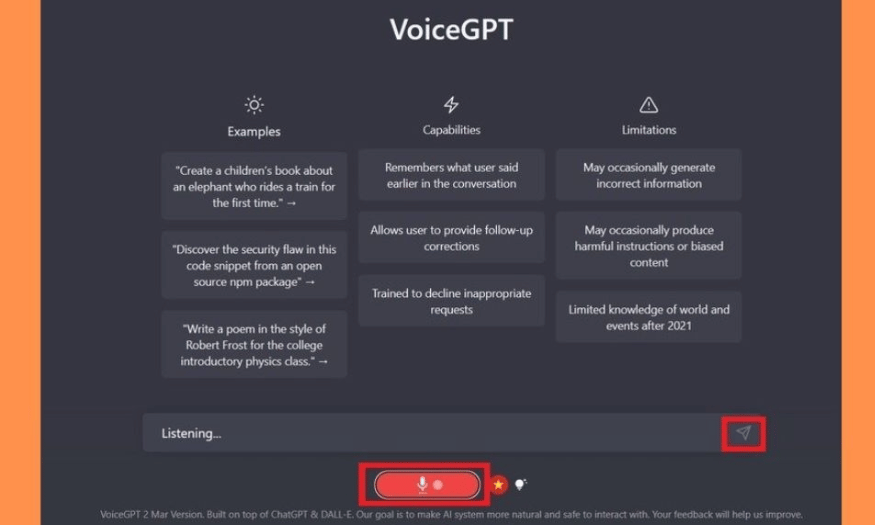
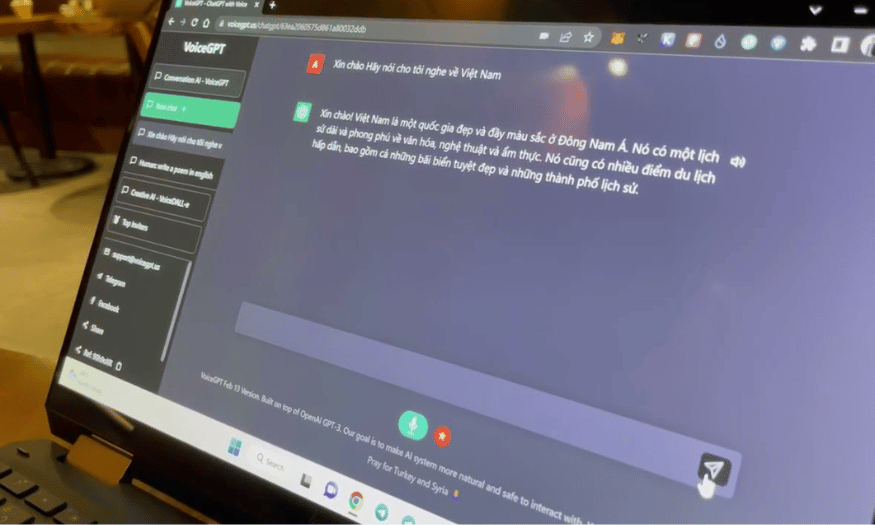
VoiceGPT allows users to interact with ChatGPT using their voice, creating a natural and seamless communication experience. Instead of typing each word, you simply ask a question or give a command by voice, and the AI will respond immediately, also by voice. This not only saves time but also creates a more intimate feeling, as if you were chatting with a friend. Voice communication removes technical barriers, making interaction with artificial intelligence more enjoyable and convenient than ever before.
Beyond simply recognizing questions, VoiceGPT can understand and analyze intonation, providing responses tailored to the user's mood. This creates rich and multifaceted conversations, allowing you to not only receive information but also feel cared for by the AI. This natural interaction increases user satisfaction and encourages them to use the app more frequently.
3.2 Multilingual support
One of Voice Chat GPT's strengths is its ability to support 67 different languages, including Vietnamese. This opens up opportunities for global users to communicate with AI in their native language. This not only creates convenience but also encourages users from diverse cultural backgrounds to embrace technology. No matter who you are or where you come from, VoiceGPT can be a useful tool for learning, working, or simply communicating in daily life.
VoiceGPT's multilingual support also makes it an ideal application in multicultural environments where the use of multiple languages is common. Users can easily switch between different languages, facilitating communication in diverse situations, from learning a foreign language to working in an international team.
3.3 User-friendly interface, easy to use
VoiceGPT is designed with a user-friendly and intuitive interface, making it easy for users to get acquainted with and use the application. From selecting the language and activating the microphone to navigating the main functions, everything is logically arranged, allowing users to quickly and effectively start chatting with the AI. The interface is not only visually appealing but also very accessible, suitable for all ages, from children to the elderly.
The user-friendly interface design also contributes to the app's appeal. Users don't need to perform complex operations to start using it; they can simply focus on communicating with the AI. This allows them to fully utilize VoiceGPT's features without any difficulty, creating a seamless and comfortable experience.
3.4 Sharing and exporting stories
A unique feature of Voice Chat GPT is the ability to share and export conversations or stories. Users can save memorable moments from conversations with the AI and export them as text or audio. This allows you to share enjoyable experiences with friends, family, or colleagues through social media platforms, email, or messaging apps.
This feature not only helps users record interesting conversations but also expands social interaction possibilities. You can easily share funny moments, useful information, or touching stories you've experienced with VoiceGPT. This creates a rich communication space where people can experience and discuss new things together.
3.5 Extremely accurate speech recognition and analysis
VoiceGPT utilizes advanced speech recognition technology, allowing it to accurately identify and analyze users' speech. This not only improves the quality of AI responses but also ensures that answers are always contextually relevant and appropriate to the user's question or request. This technology makes VoiceGPT more responsive, minimizing misunderstandings and enhancing effective communication.
Voice recognition systems go beyond simply transcribing speech; they can also recognize nuances, allowing AI to better understand users' emotions and moods. This creates a more intimate and natural communication experience, making users feel like they are talking to a real person. Thanks to this advanced technology, VoiceGPT can provide accurate and relevant responses, resulting in engaging and beneficial conversations.
3.6 Easy integration with other applications
Voice Chat GPT can be easily integrated with other applications and services, allowing users to fully leverage the power of AI in various fields. Whether you need support in customer service, education, or entertainment, VoiceGPT can be a powerful tool. This integration opens up new opportunities, allowing you to maximize the potential of the technology in your work and daily life.
Integration with other applications also makes VoiceGPT an indispensable part of the modern technology ecosystem. It can interact with management software, learning applications, or social media platforms, thereby creating a seamless and efficient user experience. This not only enhances work efficiency but also provides maximum convenience for users.
3.7 OCR technology for extracting text from images
Another standout feature of VoiceGPT is its ability to use OCR (Optical Character Recognition) technology to extract text from images. If you have an image containing text and want VoiceGPT to process it, simply upload the image and the system will automatically recognize and extract the information. This feature is extremely useful in many situations, from extracting information from documents and whiteboards to advertising images.
Integrating OCR technology not only saves users time but also improves the accuracy of information processing. You don't need to retype lengthy text from images; just let VoiceGPT do it for you. This not only improves work efficiency but also allows you to focus on more important tasks in your daily life.
4. Where can I upgrade ChatGPT to use the VoiceGPT feature?
If you're looking for a way to upgrade your ChatGPT account and enjoy new features, SaDesign is one of the reliable companies you can choose. With its reputable and affordable ChatGPT Plus account upgrade service, SaDesign has become the top choice for many users.
When you upgrade your account at SaDesign, you will receive a genuine ChatGPT Plus account and dedicated support from our staff. The company is committed to providing services at reasonable prices, along with flexible payment methods to suit each customer's needs. In addition, SaDesign provides quick consultation and support for installation and upgrades, making it easy for you to access new features.
Furthermore, SaDesign provides a full-time warranty for the services you use, ensuring you will always receive support when needed. In particular, the company also issues VAT invoices for both individual and business customers, facilitating financial management. For detailed advice on upgrade services, you can contact SaDesign Software Co., Ltd. directly via hotline or Zalo: 0868 33 9999.

5. Conclusion
VoiceGPT is not just a support tool, but also an intelligent companion on your work journey. Thanks to its flexible interaction and rapid information delivery, VoiceGPT helps you free up time for more important tasks. With the continuous development of technology, it is certain that VoiceGPT will increasingly contribute to making our work more efficient and creative.





















VIP Products








Best Selling Products
Upgrade Duolingo Super
29 USD
Plugin Retouch4me
69 USD
Freepik Premium Account
59 USD
Capcut Pro 1 Year
39 USD
ChatGPT Plus Account (GPT-4)
16 USD
Windows 10 & 11 Pro Key
36 USD
Genuine Cheap Canva Pro
39 USD
Copyright Adobe Lightroom Account
59 USD
Upgrade Genuine Office 365
49 USD
Genuine Adobe Illustrator account
99 USD
MidJourney Account
29 USD
Upgrade genuine Capture One account
120 USD
Adobe Photoshop Copyright - Full App
120 USD
Autodesk All App Account Copyright
120 USD
Adobe Premiere Pro Account
99 USD