Best Selling Products

Capcut Pro 1 Year
39 USD

Freepik Premium Account
59 USD

Genuine Cheap Canva Pro
39 USD

Adobe Photoshop Copyright - Full App
120 USD

Upgrade genuine Capture One account
120 USD

Genuine Adobe Illustrator account
99 USD

Autodesk All App Account Copyright
120 USD

Plugin Retouch4me
69 USD

Windows 10 & 11 Pro Key
36 USD

ChatGPT Plus Account (GPT-4)
16 USD

Upgrade Duolingo Super
29 USD

Copyright Adobe Lightroom Account
59 USD

Adobe Premiere Pro Account
99 USD

Upgrade Genuine Office 365
49 USD

MidJourney Account
29 USD
What''s New in Microsoft Copilot Fall 2026? 8 Changes You Shouldn''t Miss.
Nội dung
- 1. Centralize Task Management
- 2. Smart Screen Sharing with Copilot Vision
- 3. Automating PowerPoint Slide Creation
- 4. Brand Identity for Excel
- 5. Build Interactive Dashboards Directly in SharePoint
- 6. Share Commands and Chat Results with Copilot
- 7. Unify the Copilot Brand Image
- 8. Optimizing Work Performance with Microsoft Copilot
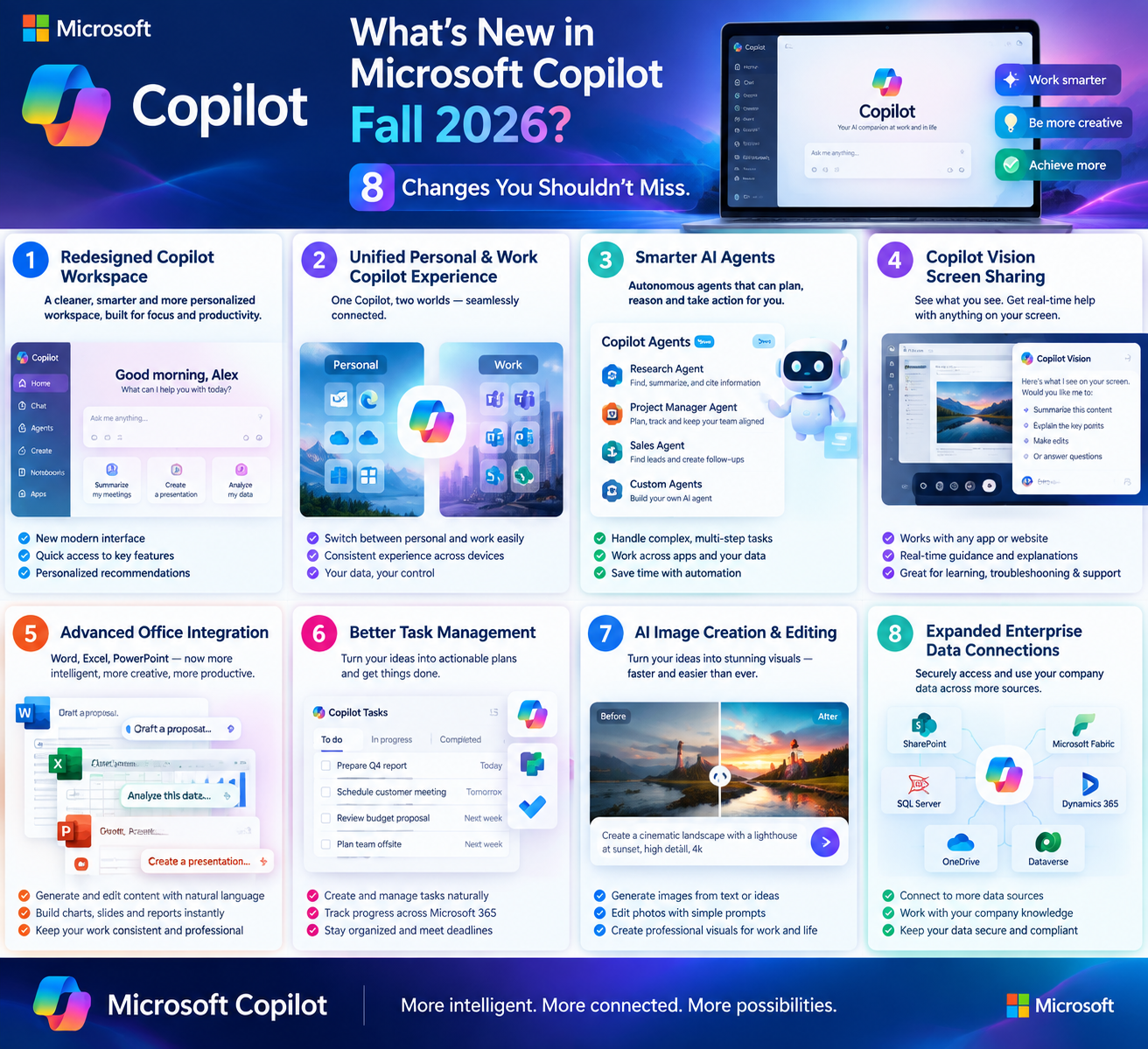
Beyond simply adding a few individual virtual assistant features, Microsoft is gradually transforming Copilot into a comprehensive orchestration layer across the entire work ecosystem, from managing daily tasks and creating presentations to standardizing spreadsheet formats, visualizing data, and sharing interaction results with the assistant.
1. Centralize Task Management
One of the biggest headaches for modern office workers is the fragmentation of tasks, with some scattered across emails, others in meeting schedules, and still others scattered throughout chat conversations. To address this, Microsoft has equipped Copilot with a centralized task management system that can consolidate tasks from various applications such as chat, calendars, and information retrieval tools into a single monitoring screen.
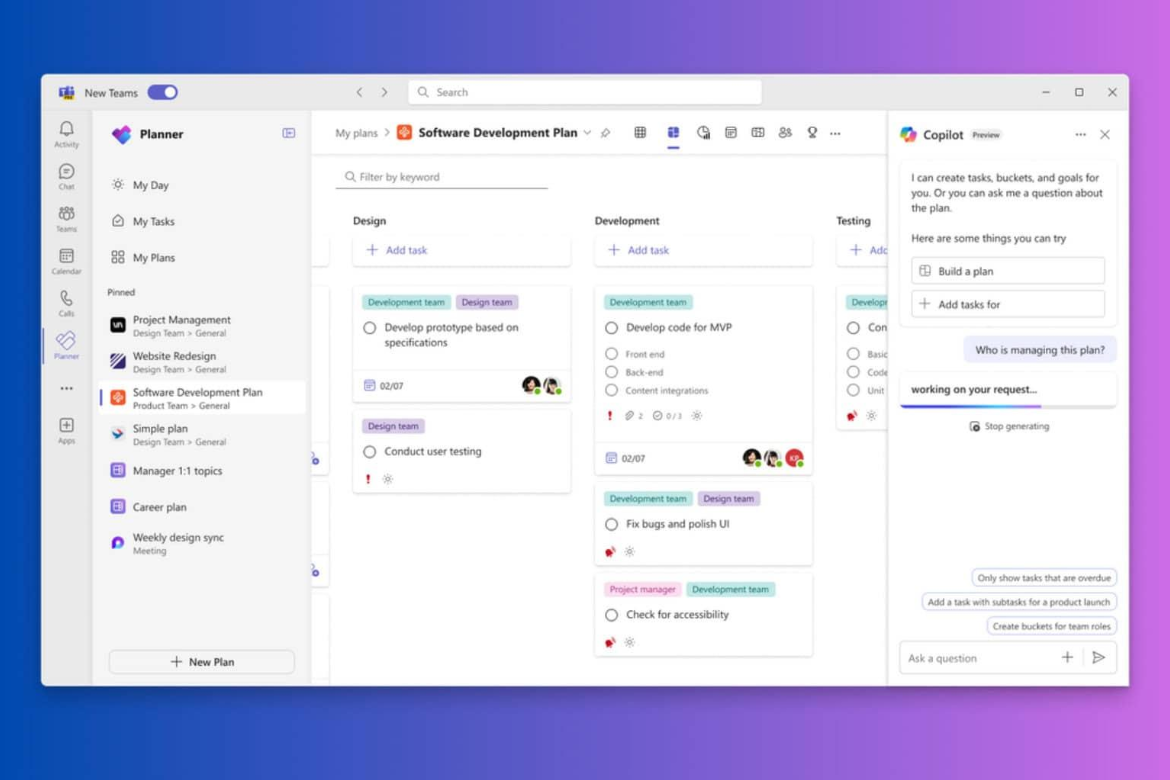
The value of this feature lies in the fact that it doesn't simply list tasks, but also clearly categorizes them by status, including completed tasks, tasks in progress, and outstanding tasks. This eliminates the need for users to constantly switch between multiple platforms just to check if they've missed anything. For those simultaneously working on multiple projects, attending numerous meetings, and tracking various deadlines in a single day, this is a truly useful tool for maintaining focus and minimizing the risk of overlooking important tasks.
2. Smart Screen Sharing with Copilot Vision
While screen sharing in online meetings used to be a one-way presentation, Copilot Vision is redefining this experience with real-time, two-way interaction. The tool allows users to seamlessly share their screen and receive instant feedback from other participants during the presentation, instead of waiting until the end of the session to gather comments.
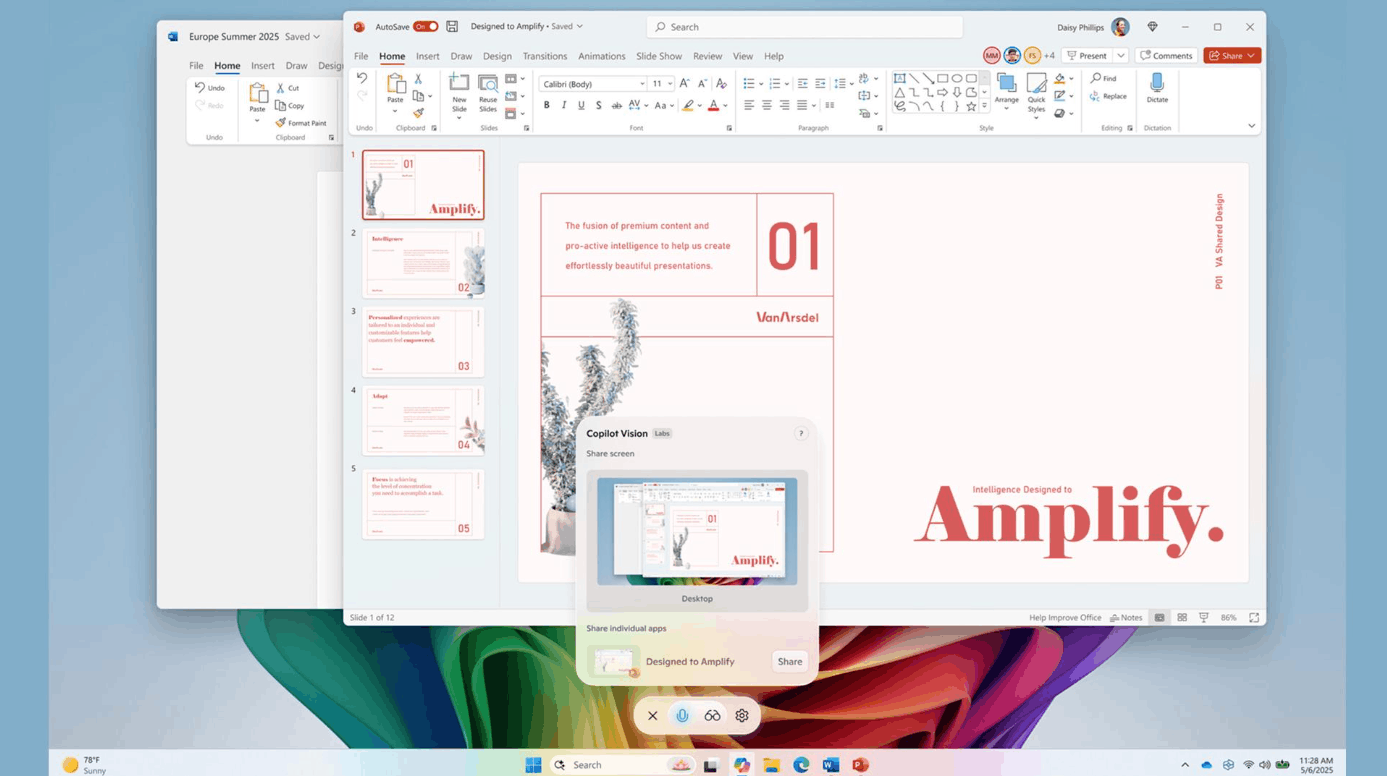
This feature is designed to serve both primary target groups, including business and educational environments, although it is currently limited to premium subscription packages. In a context where remote work and online learning have become commonplace, the ability to bridge the gap between in-person and remote collaboration experiences is particularly important. An instructor can share their lecture screen and receive instant questions from students, while a project team can review material together and provide feedback immediately without waiting for the next feedback round.
3. Automating PowerPoint Slide Creation
Creating a professional presentation slideshow is time-consuming, especially when it comes to layout and ensuring visual consistency. With this update, Copilot can automatically generate slides based on pre-existing topics, references, or outlines provided by the user, ensuring the overall presentation has a harmonious and coherent layout from the first publication.
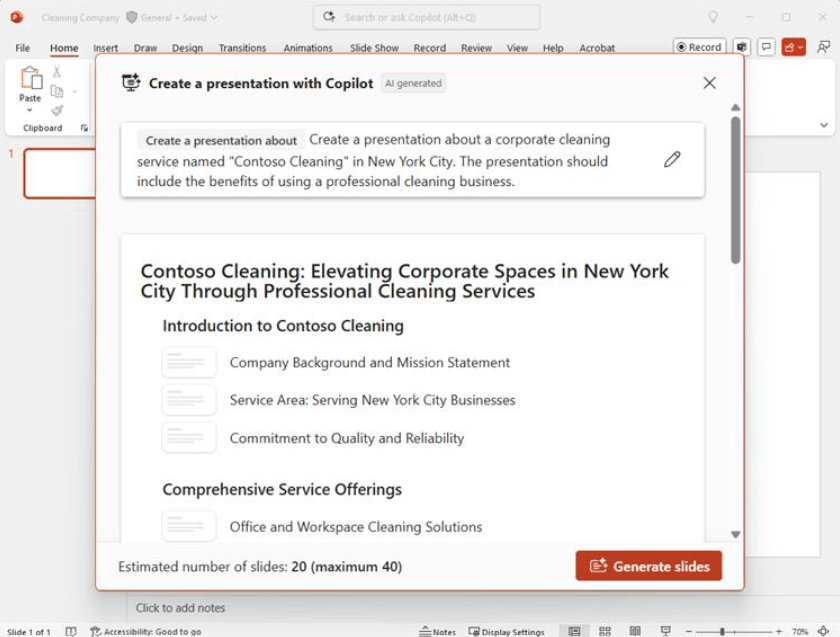
Furthermore, this feature simplifies the process of implementing organizational branding through pre-loaded design templates, completely eliminating the need for manual editing of small details such as colors, fonts, or logo placement. By significantly reducing the time spent on formatting, users can focus their efforts on creating compelling content and effectively conveying their message, instead of struggling with technical presentation details.
4. Brand Identity for Excel
For those who frequently work with spreadsheets, maintaining formatting consistency across dozens, even hundreds, of different files is a silent but laborious challenge. Excel's new Brand Identity feature addresses this very problem, allowing organizations to pre-set standards for styling, color palettes, and fonts that perfectly match their brand identity.
Once this standard has been configured, Copilot will automatically apply it consistently to all newly created spreadsheets, ensuring all documents adhere to the company's visual standards without any manual user intervention. The benefits extend beyond time savings; it also enhances the professionalism and clarity of documents, making financial reports and data analysis more readable and visually appealing when presented to partners or management.
5. Build Interactive Dashboards Directly in SharePoint
One of the most groundbreaking updates in this release is the ability to build interactive HTML dashboards directly in SharePoint, created from raw data files such as Excel spreadsheets. Instead of exporting data to a separate visualization tool and then embedding it back into the system, users can now transform dry numbers into dynamic and highly interactive presentations in just a few simple steps.
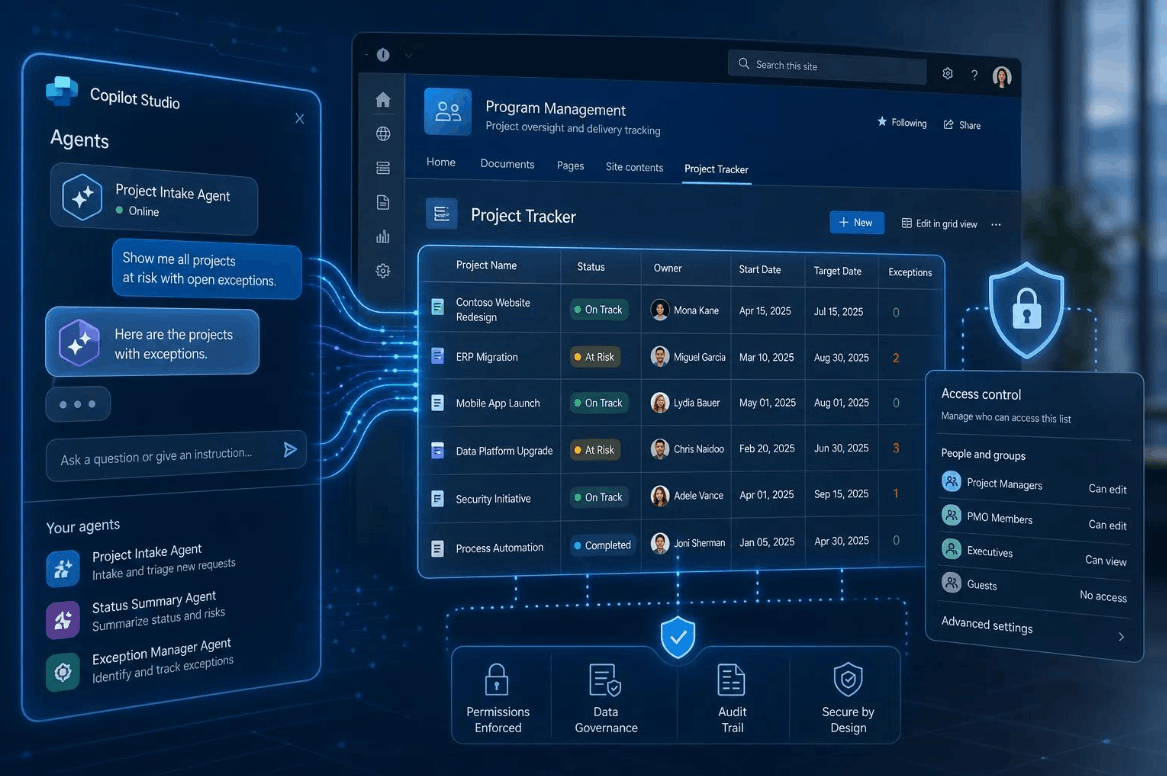
This feature offers exceptional value to data-driven teams, as the resulting dashboards can be widely shared across the organization, making complex information more accessible and supporting faster, more accurate decision-making. Instead of sifting through thousands of lines of raw data, stakeholders can now grasp the big picture with a single glance at an intuitive dashboard.
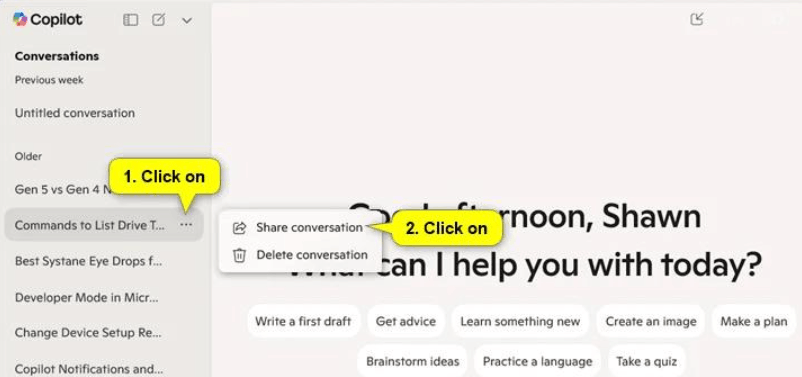
6. Share Commands and Chat Results with Copilot
The command and response sharing feature opens up a whole new way of collaborating around content generated by Copilot. Specifically, users can now create shareable links for any conversation or result generated by Copilot, allowing colleagues to easily access, refer to, and even contribute to that content, without having to manually copy and paste it back and forth between different communication channels.
Notably, access control remains entirely in the hands of the link creator, with flexible options to manage or revoke access whenever necessary. This mechanism ensures secure and efficient sharing within a work group or the entire organization, while contributing to a more transparent work environment where ideas and research findings can be disseminated quickly rather than being confined to an individual's inbox.
7. Unify the Copilot Brand Image
To simplify the navigation experience and enhance consistency, Microsoft has consolidated all of Copilot's functionalities into a single application instead of the previous scattered approach. The login process has been significantly streamlined, and a unified brand identity and icons are used across all touchpoints, creating a more seamless and intuitive user experience.
By consolidating all Copilot tools under a single platform, Microsoft reduces unnecessary complexity in how users access features, eliminating the need to search through multiple sub-applications just to use a specific function. In the long run, this seemingly simple change has a significant impact on the overall user experience, as users save time getting acquainted with the tools and can focus directly on their work instead of struggling to find the right tool.
8. Optimizing Work Performance with Microsoft Copilot
Looking back at all eight changes introduced in this fall update, it's clear Microsoft is pursuing a consistent strategy: eliminating the small but repetitive friction points in daily office work. From consolidating fragmented tasks in a single location and automating presentation design, to transforming raw data into intuitive dashboards, each feature directly addresses a specific problem that almost everyone in the workplace has encountered.
For office workers, educators, and collaborative teams, this toolset provides the flexibility and functionality needed to better adapt to the increasingly fast-paced work environment of today. Fully utilizing these updates not only saves time on repetitive tasks but also contributes to consistency in output and allows individuals to focus more on truly important goals, rather than being bogged down in bureaucratic manual processes. With its current rate of continuous updates, Copilot is clearly becoming an indispensable foundation in the daily workflow of Microsoft 365 users.





















VIP Products








Best Selling Products
Capcut Pro 1 Year
39 USD
Freepik Premium Account
59 USD
Genuine Cheap Canva Pro
39 USD
Adobe Photoshop Copyright - Full App
120 USD
Upgrade genuine Capture One account
120 USD
Genuine Adobe Illustrator account
99 USD
Autodesk All App Account Copyright
120 USD
Plugin Retouch4me
69 USD
Windows 10 & 11 Pro Key
36 USD
ChatGPT Plus Account (GPT-4)
16 USD
Upgrade Duolingo Super
29 USD
Copyright Adobe Lightroom Account
59 USD
Adobe Premiere Pro Account
99 USD
Upgrade Genuine Office 365
49 USD
MidJourney Account
29 USD