Best Selling Products

Genuine Adobe Illustrator account
99 USD

Copyright Adobe Lightroom Account
59 USD

Autodesk All App Account Copyright
120 USD

MidJourney Account
29 USD

Plugin Retouch4me
69 USD

Adobe Photoshop Copyright - Full App
120 USD

Freepik Premium Account
59 USD

Upgrade genuine Capture One account
120 USD

Windows 10 & 11 Pro Key
36 USD

Upgrade Duolingo Super
29 USD

Upgrade Genuine Office 365
49 USD

Genuine Cheap Canva Pro
39 USD

Capcut Pro 1 Year
39 USD

Adobe Premiere Pro Account
99 USD

ChatGPT Plus Account (GPT-4)
16 USD
YouTube Premium 2026: What''s New? Discover the Key Features.
Nội dung
- 1. Auto Speed
- 2. On-the-go
- 3. High-quality sound on Smart TVs and gaming consoles.
- 4. AI on YouTube Music
- 5. Premium Lite adds the feature to download videos and play them in the background.
- 6. The core features of YouTube Premium are still very valuable.
- 7. How to check out and experience the new features
- 8. Conclusion
This is a summary of the notable YouTube Premium updates for 2026, from Auto Speed and On-the-go features to high-quality audio, AI on YouTube Music, and changes to Premium Lite.

1. Auto Speed
Previously, users often had to manually select speeds of 1.25x, 1.5x, or 2x when they wanted to watch videos faster. If the speed was too high, following information-rich segments could become difficult. Conversely, if the speed was too slow, viewers might spend too much time on introductions or simple content sections.
Auto Speed is designed to address this issue by automatically adjusting the playback speed based on the content. The feature can speed up during slow speeches or lengthy introductions, then adjust back down during sections with more information that requires focus.
This feature is especially useful for students, language learners, office workers, or anyone who frequently watches long lectures and tutorial videos. Instead of constantly tapping the screen to change the speed, users can let the system automatically adjust within the set limits.
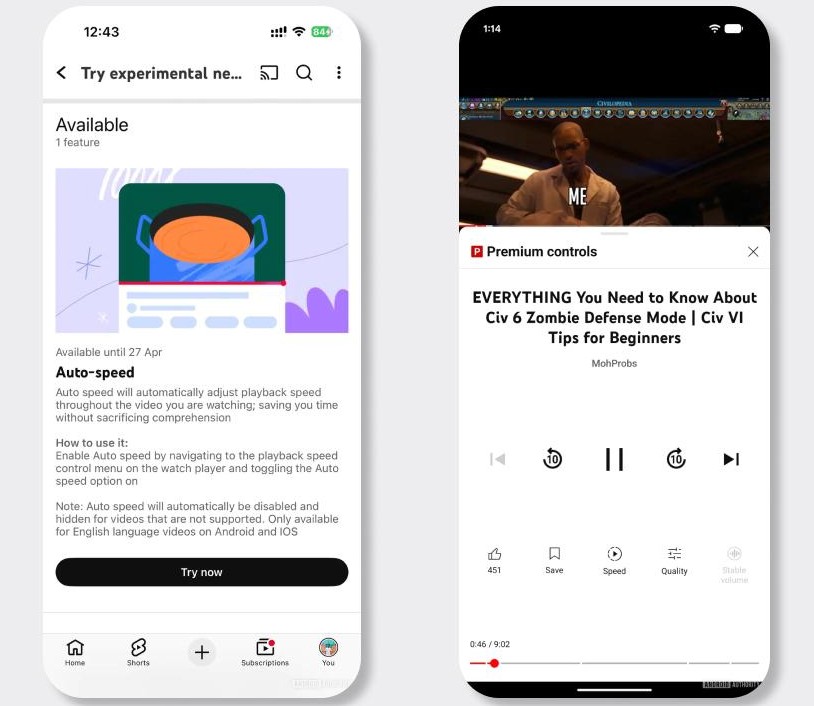
To use it, open the video in the YouTube app, select Settings, go to the Playback Speed section, and turn on Auto Speed if the option appears. Users can set a base speed for the feature to adjust from that level.
Auto Speed is currently available to Premium members on the Android app, and support is in English. The feature is not yet available for all video types, such as Shorts, livestreams, music, movies, and TV shows. Therefore, users in Vietnam should check directly on their account.
2. On-the-go
On-the-go offers a control interface more suited to listening needs. Users can fast forward, rewind, skip to a different chapter, change playback speed, or switch between audio and video modes. These operations are also more convenient when the phone screen is locked.
On Android devices, YouTube may suggest switching to On-the-go mode when it detects movement such as walking or jogging for a certain period of time. Users can also proactively enable this mode from the video player's Settings.
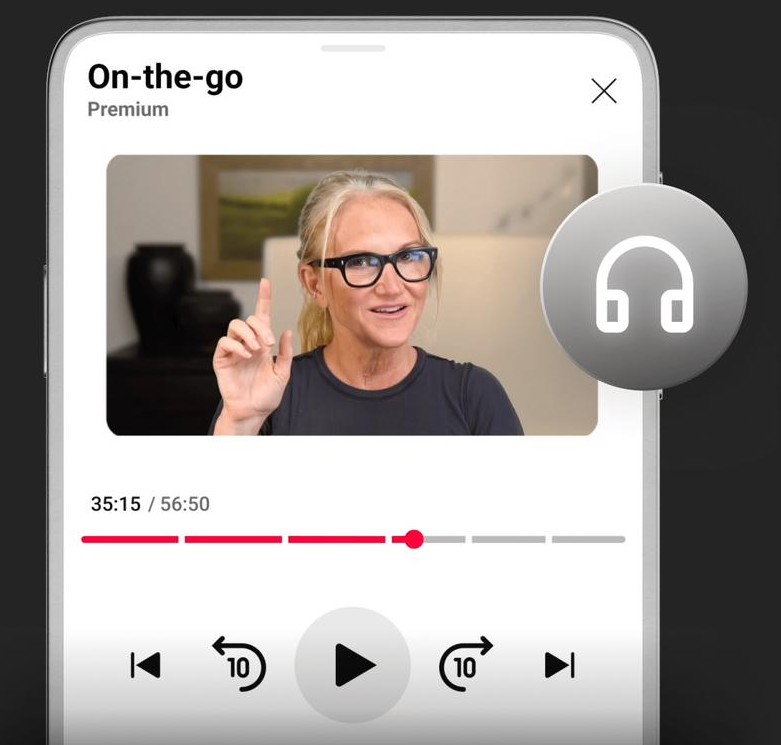
For example, if you typically listen to 40–60 minute podcasts while commuting to work, you can use On-the-go to control the content without constantly having to open the full video viewing interface.
According to an official announcement in May 2026, the feature has been rolled out to Premium members on Android, while the iOS version is expected to be expanded later. The actual release date may vary between accounts.
3. High-quality sound on Smart TVs and gaming consoles.
High-quality audio can reach 256 kbps for suitable music videos. The goal is to deliver clearer and more detailed sound when enjoying content on a large screen with external speakers.
This is a worthwhile upgrade for users who frequently watch music videos, live performances, or other music content on their TV at home. When combined with good quality speakers, a suitable source, and a stable connection, the listening experience can be significantly improved.
To check, users open the YouTube app on their TV, access the Sound Settings, and look for the High-quality audio option if the device supports it.
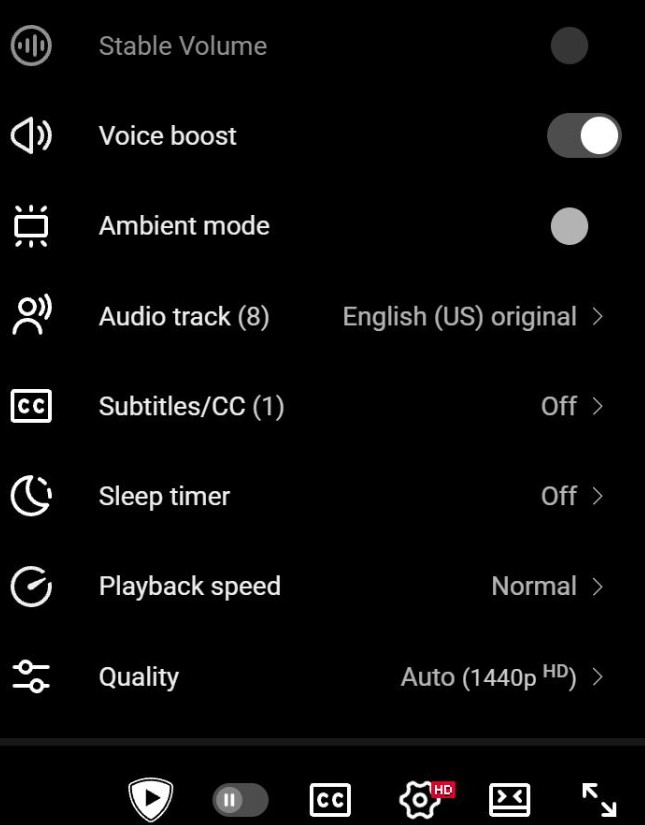
However, it's important to note that higher transmission speeds don't automatically mean all videos will have the same audio quality. Actual quality depends on the original content, the playback device, and the application's capabilities.
4. AI on YouTube Music
YouTube also mentioned the ability to use Ask Music to discover podcasts by genre, mood, or user-favorite shows in certain supported countries.
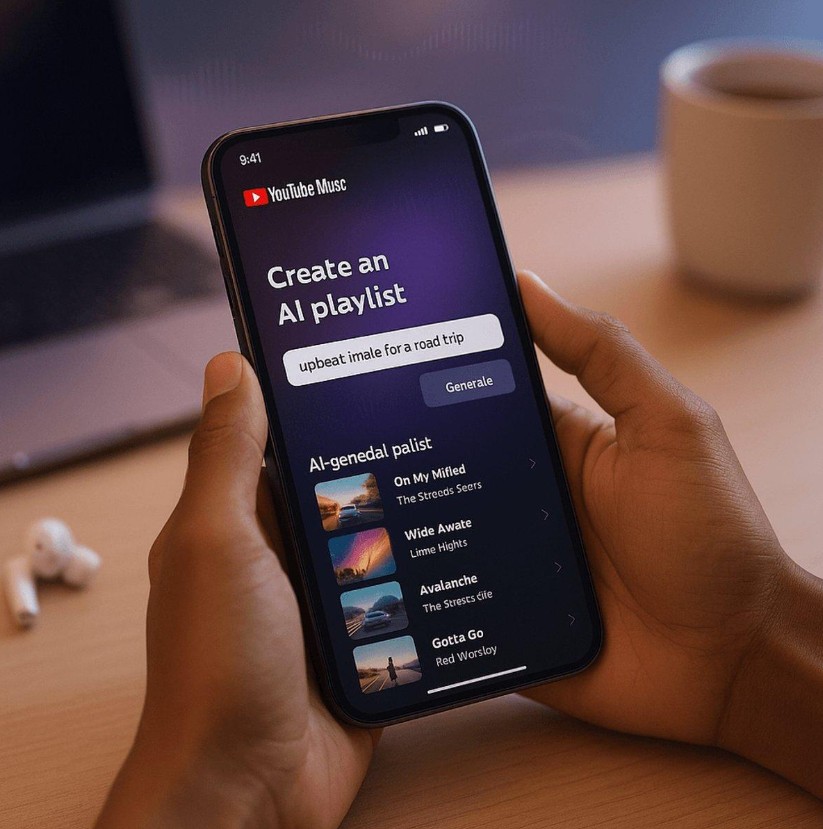
Notably, AI not only helps find familiar content but can also assist in discovering new options based on personal preferences. This is especially useful for frequent music listeners who don't want to spend a lot of time building playlists manually.
However, access to Ask Music and AI tools may vary by country, device, and account. It should not be assumed that all features are available in Vietnam simply because they were introduced internationally.
5. Premium Lite adds the feature to download videos and play them in the background.
With the download feature, users can save supported videos to watch offline. Meanwhile, background playback allows users to continue listening to content when switching to another app or turning off the phone screen.
These changes make Premium Lite more suitable for people who regularly watch tutorial videos, entertainment content, news, or creator videos without necessarily needing a paid music streaming service.
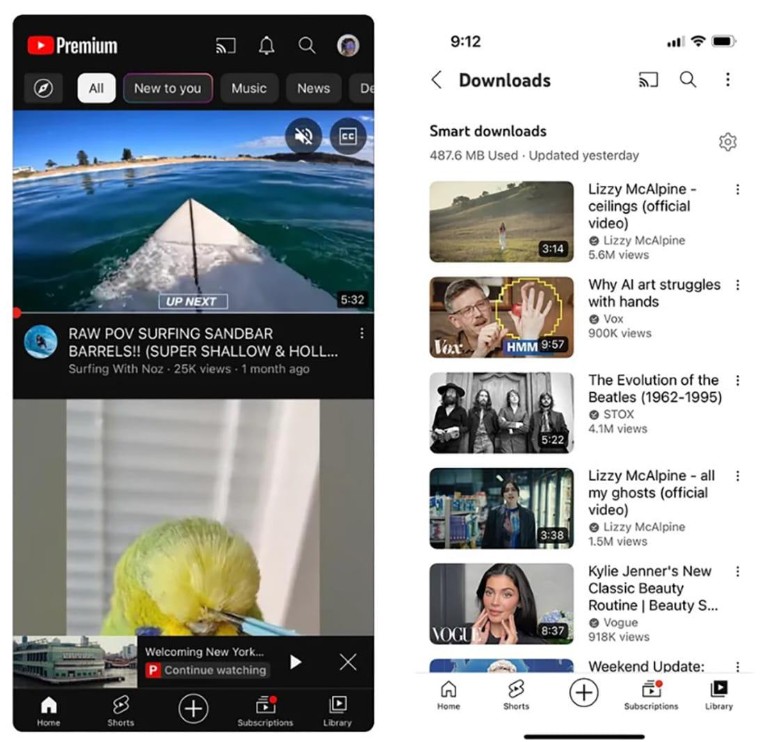
However, Premium Lite is not a full equivalent to standard Premium. Ads may still appear in music content, Shorts, and some areas such as search results or content browsing pages. Background download and playback features also do not apply to Shorts and some music-related content. The Lite package does not include YouTube Music Premium.
For users in Vietnam, please check the official registration page to determine if Premium Lite is available in your region.
6. The core features of YouTube Premium are still very valuable.
Despite the new features, the traditional benefits remain the main reason many people choose YouTube Premium.
Watch ad-free videos delivered by YouTube: Subscribers can watch most videos without interruption from pre- or in-video ads. However, sponsored content directly integrated by creators, promotional information, and some special programs may still appear.
Background playback: The video continues to play when the user switches to another app or locks the phone screen. This is a useful feature when listening to lectures, podcasts, or audio-only content.
Download videos for offline viewing: Users can download supported videos and playlists to watch while traveling, on public transport, or in areas with weak network connections.
Use YouTube Music Premium: The standard Premium plan includes access to YouTube Music Premium, allowing you to listen to music ad-free, download music offline, and play it in the background.
1080p Premium and Jump Ahead: For eligible videos, 1080p Premium offers a higher bitrate version of 1080p. Meanwhile, Jump Ahead allows you to quickly jump to sections of content that many viewers typically look for. The usability of Jump Ahead depends on the video type, language, and device.
Overall, these features make YouTube Premium suitable for users who watch videos frequently, often listen to content while working, or want to reduce the time spent searching for and controlling videos.
7. How to check out and experience the new features
To take advantage of the new upgrades, users should update the YouTube app to the latest version and sign in with their Premium subscription account.
Next, open a video and check the player's settings. Options like Auto Speed or On-the-go will appear if your account, device, and content meet the support requirements. For high-quality audio, check the Sound Settings on your compatible Smart TV or gaming console.
If you're considering subscribing, you should determine your primary needs. Those who frequently watch videos, listen to music, and download content offline may benefit greatly from the standard Premium plan. Those who primarily watch creator videos and don't need YouTube Music Premium might consider Premium Lite if it's offered in their region.
8. Conclusion
YouTube Premium updates in 2026 show the service evolving towards greater personalization and convenience. Auto Speed optimizes video viewing time, On-the-go improves the listening experience while on the go, high-quality audio expands the possibilities of enjoying music on TV, and AI tools on YouTube Music help users discover content based on their preferences.





















VIP Products








Best Selling Products
Genuine Adobe Illustrator account
99 USD
Copyright Adobe Lightroom Account
59 USD
Autodesk All App Account Copyright
120 USD
MidJourney Account
29 USD
Plugin Retouch4me
69 USD
Adobe Photoshop Copyright - Full App
120 USD
Freepik Premium Account
59 USD
Upgrade genuine Capture One account
120 USD
Windows 10 & 11 Pro Key
36 USD
Upgrade Duolingo Super
29 USD
Upgrade Genuine Office 365
49 USD
Genuine Cheap Canva Pro
39 USD
Capcut Pro 1 Year
39 USD
Adobe Premiere Pro Account
99 USD
ChatGPT Plus Account (GPT-4)
16 USD