Best Selling Products

Adobe Photoshop Copyright - Full App
120 USD

Upgrade Duolingo Super
29 USD

Autodesk All App Account Copyright
120 USD

Freepik Premium Account
59 USD

ChatGPT Plus Account (GPT-4)
16 USD

Genuine Adobe Illustrator account
99 USD

MidJourney Account
29 USD

Copyright Adobe Lightroom Account
59 USD

Upgrade genuine Capture One account
120 USD

Adobe Premiere Pro Account
99 USD

Genuine Cheap Canva Pro
39 USD

Windows 10 & 11 Pro Key
36 USD

Capcut Pro 1 Year
39 USD

Plugin Retouch4me
69 USD

Upgrade Genuine Office 365
49 USD
YouTube Summary with ChatGPT: A Tool to Optimize Video Content on YouTube
Nội dung
- 1. What is YouTube Summary with ChatGPT?
- 2. The role of the YouTube Summary application with ChatGPT
- 2.1 Save time when watching long videos
- 2.2 Supporting effective learning and research
- 2.3 Content handling capabilities
- 2.4 Optimizing the search for important information
- 2.5 Easy access to information
- 2.6 Improve work management skills
- 2.7 Flexibility in use
- 2.8 Effective Information Connection
- 3. How to add YouTube Summary with ChatGPT to your computer
- 4. Instructions for using YouTube Summary with ChatGPT
- 5. Explore the multilingual feature.
- 6. Conclusion
In today's information-saturated age, YouTube has become a massive resource with millions of knowledge-rich videos.
1. What is YouTube Summary with ChatGPT?
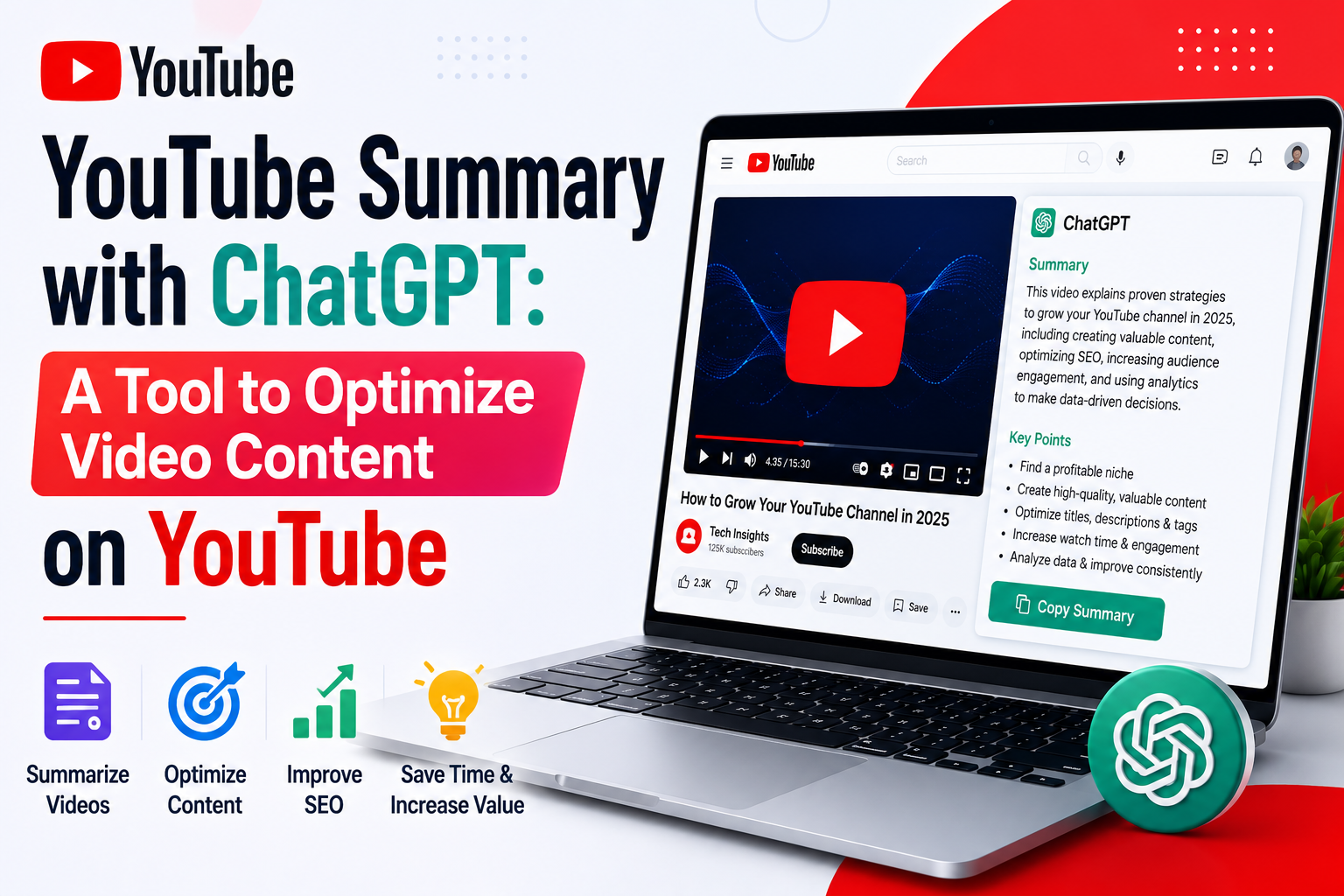
YouTube Summary with ChatGPT is an intelligent tool designed to automatically generate summaries of YouTube video content, powered by artificial intelligence (AI). This tool not only saves you time but also helps you grasp the key information without watching the entire video. With a single click, you can transform long videos into concise, easy-to-understand summaries.
Furthermore, YouTube Summary with ChatGPT allows you to customize the summary content to your individual needs. You can request different lengths, levels of detail, and even output formats. This gives you maximum flexibility in how you approach information.
2. The role of the YouTube Summary application with ChatGPT
2.1 Save time when watching long videos
One of the standout strengths of YouTube Summary with ChatGPT is its ability to save users time. Instead of spending hours watching long videos like podcasts or lectures, you can simply read the summary to grasp the key points. This is very convenient for busy people who need to process a lot of information quickly.
This tool not only helps reduce your workload but also allows you to focus on the truly important content. In this way, you can optimize your time to do other things, from studying to working.
2.2 Supporting effective learning and research
For students and researchers, YouTube Summary with ChatGPT is a great companion. This tool automatically summarizes the main points from videos, helping learners quickly grasp key concepts without manual note-taking. This not only saves time but also allows users to focus on analyzing and applying the information.
Using this tool also helps learners avoid missing important information, thereby improving learning efficiency. Thanks to its intelligent summarization feature, users can easily review and reinforce their knowledge.
2.3 Content handling capabilities
YouTube Summary with ChatGPT is capable of handling a wide variety of content, from academic videos to entertainment. This tool helps users access information from many fields easily and quickly. You can learn about complex topics without needing in-depth expertise.
This is especially useful for those who want to expand their knowledge. Whether you're looking for a science lecture or a video sharing life experiences, YouTube Summary with ChatGPT can provide a concise and easy-to-understand summary.
2.4 Optimizing the search for important information
This tool is also useful for finding important details from videos. If you need specific information, instead of rewinding the video multiple times, you can simply read the summary. This saves time and effort, especially when working with long videos or complex content.
This also helps users easily identify the content they need, thereby optimizing their workflow and learning process. You'll no longer feel inconvenienced searching for information amidst a sea of videos!
2.5 Easy access to information
YouTube Summary with ChatGPT offers significant benefits to those who struggle with listening to or understanding video content. By converting video content into summarized text, this tool makes it easier for these users to access information without relying on their ability to listen to or understand spoken language.
This not only expands access to information but also creates opportunities for more people to participate in the learning and research process. This tool truly becomes an important bridge between users and knowledge.
2.6 Improve work management skills
Using YouTube Summary with ChatGPT helps users manage their time more effectively. You can plan to watch many videos without feeling overwhelmed, thanks to only needing to read summaries instead of watching the entire content. This is very useful for those who need to process large amounts of information in a short amount of time, such as entrepreneurs, researchers, or content professionals.
This tool not only saves time but also improves your work management skills, helping you become more efficient in many different areas.
2.7 Flexibility in use
One of the highlights of YouTube Summary with ChatGPT is its ability to customize summaries to individual needs. You can request the tool to generate summaries of varying lengths and levels of detail, from concise main points to more comprehensive summaries. This provides maximum flexibility for users.
This customization not only makes it easier for you to access information but also suits your specific needs. You can use this tool for various purposes, from studying to work, while still ensuring maximum effectiveness.
2.8 Effective Information Connection
With its ability to generate high-quality summaries, YouTube Summary with ChatGPT helps you connect information effectively. You can not only grasp the key content but also compare and analyze different videos based on the summaries provided by the tool.
It helps you build a more comprehensive overview of the topics you are interested in, thereby improving your understanding and enabling you to make better decisions in the fields you are researching.
3. How to add YouTube Summary with ChatGPT to your computer
YouTube Summary with ChatGPT offers many benefits, from saving time to accessing information more effectively. To start experiencing this tool on your computer, follow these 5 simple steps:
Step 1: Access the Chrome Web Store
First, open the Google Chrome browser on your computer. In the address bar, type "Chrome Web Store" or go directly to chrome.google.com/webstore . When the website opens, you will see a search bar at the top. Enter the keyword "YouTube Summary with ChatGPT" into the search bar and press Enter. Immediately, a list of results will appear. Look for the first result displayed; that is the tool you need to install.
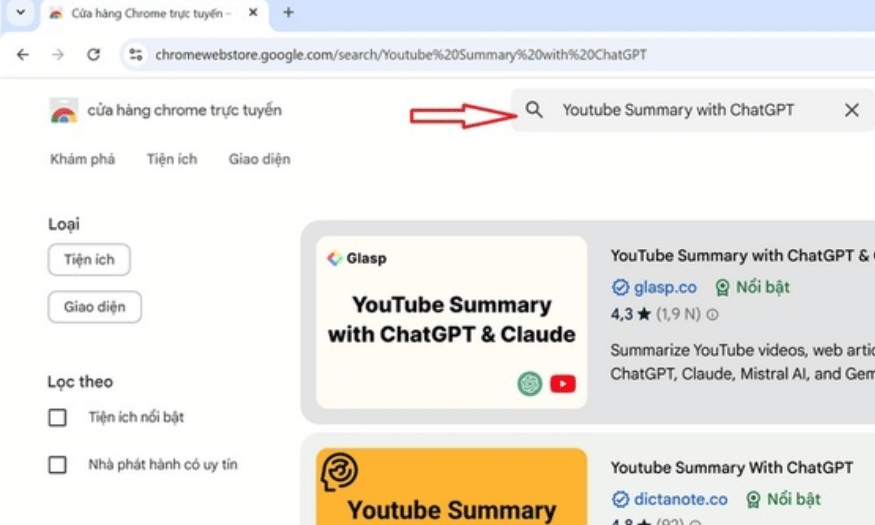
Step 2: Add Extensions to Chrome
Once you've found the YouTube Summary with ChatGPT extension, click the blue "Add to Chrome" button next to its name. This clearly and prominently named button will make installation easy. Immediately after clicking, a dialog box will appear providing information about the extension and the permissions it requests.
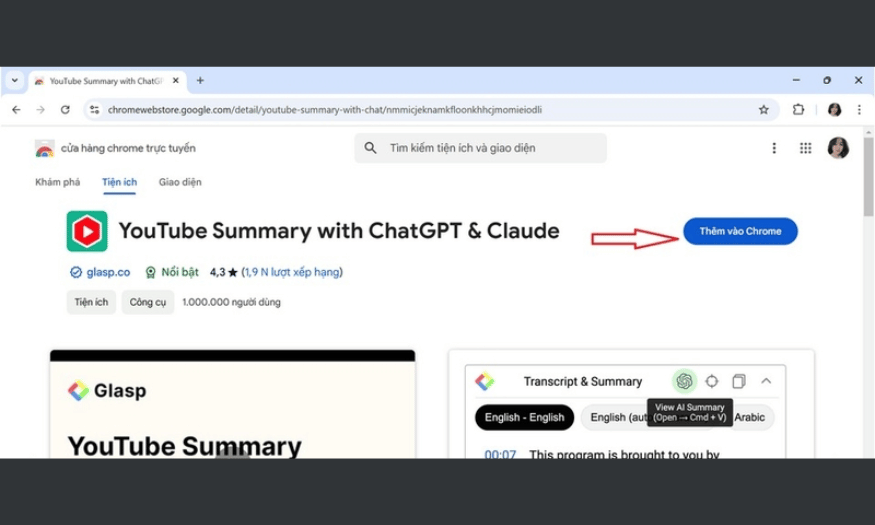
Step 3: Confirm Installation
After clicking “Add to Chrome,” the system will ask you to confirm the application download. Pay attention to the permissions the extension requests, and if you agree, click the “Add extension” button in the confirmation dialog. The installation process will begin immediately, and you will see a message indicating that the extension has been successfully added to your browser.
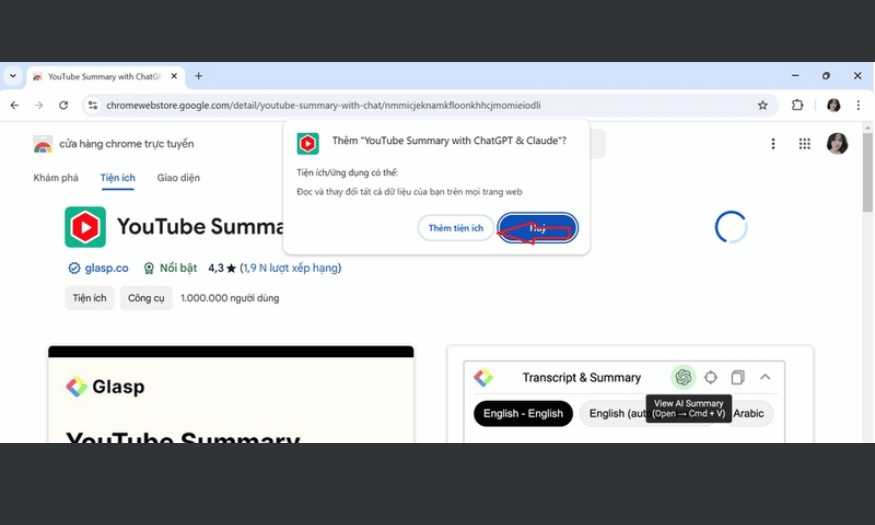
Step 4: Open Utilities
Once the installation is complete, you will see the YouTube Summary with ChatGPT extension icon appear in the upper right corner of your browser screen. Click on this icon to open the extension. From here, you need to link the tool with ChatGPT to start using it. The tool will guide you through the necessary setup steps.
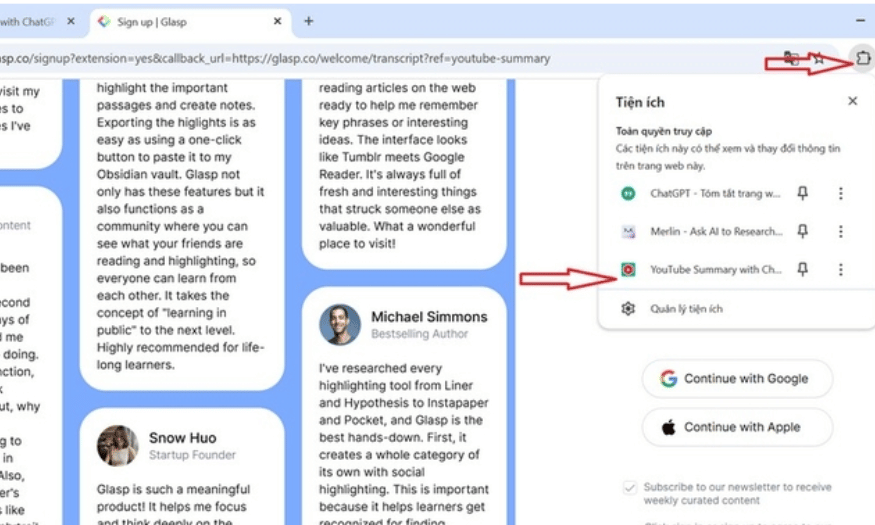
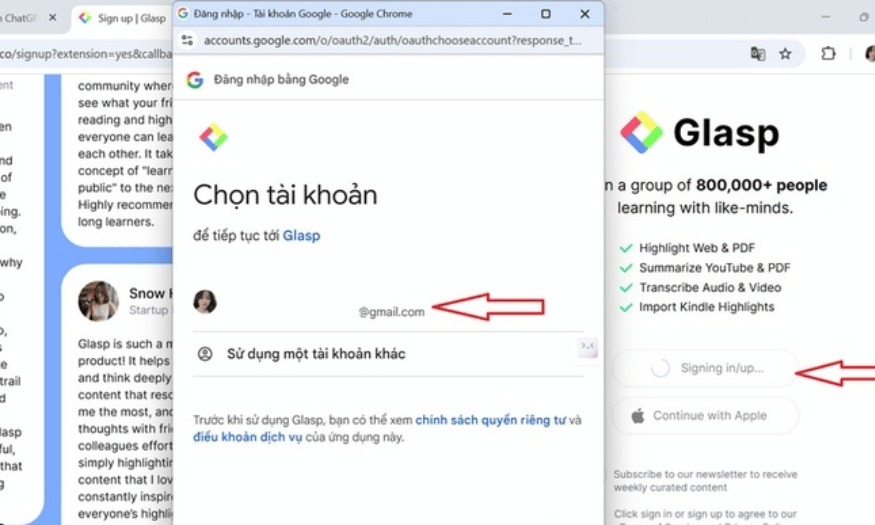
Step 5: Log In to Your Google Account
Finally, you'll need to log in to your Google account. Note that you need to use the account that was previously linked to ChatGPT. After successfully logging in, you'll be able to use YouTube Summary with ChatGPT to create video summaries quickly and efficiently. Don't forget to check the settings and customize them to suit your needs.
4. Instructions for using YouTube Summary with ChatGPT
To make the most of YouTube Summary with ChatGPT for summarizing video content, follow the detailed instructions below.
Step 1: Select the video you want to summarize.
First, open the YouTube app on your computer and search for the video you want to summarize. Once the video is playing, you'll see a "Create Summary" option appear in the upper right corner of the video. Click this button to begin the summary process.
Step 2: Wait for the results
When you tap “Create summary,” wait a few seconds for the YouTube Summary with ChatGPT tool to process the video content. Once complete, the summary will appear on the right side of your screen. You can read and see the highlights of the video without having to watch the entire video.
5. Explore the multilingual feature.
YouTube Summary with ChatGPT supports many popular languages worldwide, including English, French, Spanish, German, Chinese, Japanese, Korean, and many others.
This tool can automatically detect the video's language and generate a corresponding summary. Users can select the output language for the summary, making it easy to switch languages if needed. This feature is especially useful for those who are not fluent in the video's original language.
For the best summarization results, you should ensure that the video has accurate and clear subtitles. Thanks to its ability to provide summaries in multiple languages, YouTube Summary with ChatGPT has become a useful tool for users worldwide.
6. Conclusion
YouTube Summary with ChatGPT is a great tool that helps users save time and quickly and effectively grasp video content. With its intelligent summarization features, multilingual support, and flexible information processing capabilities, this tool has truly become a valuable aid in learning, working, and entertainment. It's the optimal solution for anyone who wants to maximize their video viewing experience.





















VIP Products








Best Selling Products
Adobe Photoshop Copyright - Full App
120 USD
Upgrade Duolingo Super
29 USD
Autodesk All App Account Copyright
120 USD
Freepik Premium Account
59 USD
ChatGPT Plus Account (GPT-4)
16 USD
Genuine Adobe Illustrator account
99 USD
MidJourney Account
29 USD
Copyright Adobe Lightroom Account
59 USD
Upgrade genuine Capture One account
120 USD
Adobe Premiere Pro Account
99 USD
Genuine Cheap Canva Pro
39 USD
Windows 10 & 11 Pro Key
36 USD
Capcut Pro 1 Year
39 USD
Plugin Retouch4me
69 USD
Upgrade Genuine Office 365
49 USD