Best Selling Products

Plugin Retouch4me
69 USD

Upgrade Genuine Office 365
49 USD

MidJourney Account
29 USD

Upgrade genuine Capture One account
120 USD

Genuine Adobe Illustrator account
99 USD

Autodesk All App Account Copyright
120 USD

Adobe Premiere Pro Account
99 USD

Windows 10 & 11 Pro Key
36 USD

ChatGPT Plus Account (GPT-4)
16 USD

Adobe Photoshop Copyright - Full App
120 USD

Capcut Pro 1 Year
39 USD

Copyright Adobe Lightroom Account
59 USD

Upgrade Duolingo Super
29 USD

Genuine Cheap Canva Pro
39 USD

Freepik Premium Account
59 USD
11 Design Tools That Are Just as Good as Canva for Creative Professionals
Nội dung
If you're looking for platforms with beautiful templates, flexible features, and fast processing speeds, this list is for you.
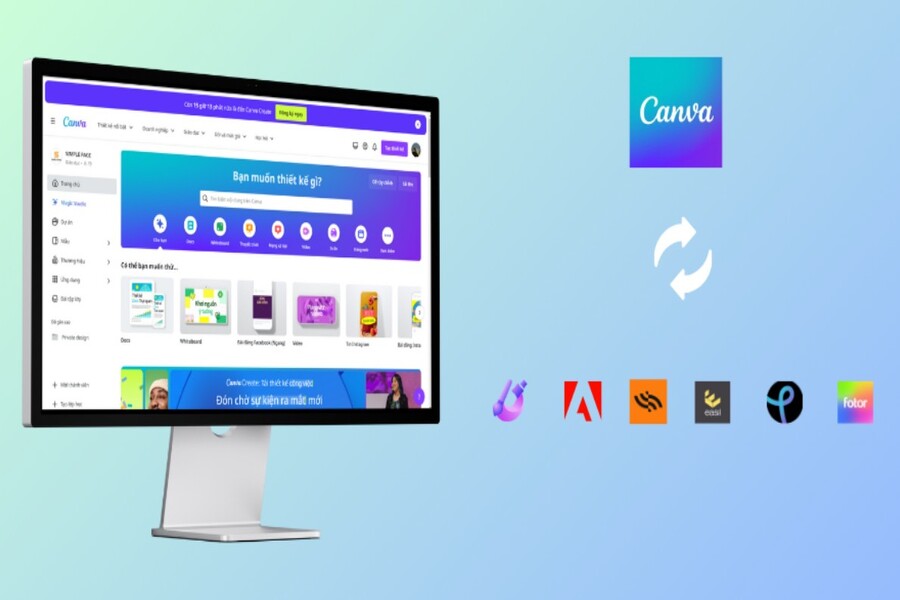
Currently, there are many powerful design solutions that are just as good as Canva. Some platforms excel in photo editing features, while others stand out for animation templates, professional mockup creation, or visual data presentation. Choosing the right tool depends on your design style, project goals, team collaboration capabilities, and individual user experience.
This article will take you on a journey to discover 11 of the best alternatives to Canva, ranging from professional photo editing and data design tools to versatile, multi-purpose platforms for individuals or businesses. Hopefully, after reading this article, you will find the ideal application to upgrade your design experience and effectively increase your work efficiency.
1. Easil
Among the most frequently mentioned tools when looking for a platform similar to Canva, Easil almost always ranks at the top. Easil is renowned for its intuitive drag-and-drop design model, which is user-friendly for everyone, even first-time users. You can easily adjust the layout, insert images, add icons, or place your logo in the desired position with just a few simple steps.
One of Easil's biggest strengths is its vast resource library. The platform offers over a million archived images, catering to most design needs such as posters, restaurant menus, advertising banners, infographics, print materials, and even GIFs. Easil's template library is meticulously designed and features a modern aesthetic, suitable for marketing, communications, and events.
.jpg)
Easil also attracts designers thanks to its ability to create brand kits and features related to managing design styles. This is extremely useful for collaborative teams as it allows all members to maintain consistency throughout each project. Additionally, Easil allows the creation of locked design layers, helping to limit erroneous edits in a team environment.
Easil offers a free account with all the basic features. If you need to use more templates, export high-quality files, or collaborate more professionally in a team, Easil Pro at $7.50/month or Easil Edge at $59/month would be a suitable choice.
2. Stencil
For those who create social media content or need to publish images quickly, Stencil is an indispensable tool. Unlike many general-purpose design platforms, Stencil focuses on the social media market and optimizes the experience for those who need to create images quickly and efficiently while maintaining aesthetic appeal.
.jpg)
One of Stencil's most appealing features is its massive library of over 100,000 inspirational quotes. This is incredibly convenient for designers who like to create posters, quotes, or motivational content for Facebook, Instagram, or Pinterest. You don't need to search for quotes from many sources; you can simply choose from Stencil's ready-made library.
Furthermore, Stencil allows users to upload their own fonts to personalize their designs. This is a feature that many free tools often lack. Other resources such as millions of free-stock images, standard-size presets for social media, and the ability to export high-quality files make Stencil a formidable competitor to Canva in the fast design field.
With its free plan, Stencil allows you to create up to 10 images per month. To expand this limit, users can subscribe to Stencil Pro for $9/month or Stencil Unlimited for $12/month. Overall, it's a perfect choice for social media managers, marketers, and bloggers who need high-speed design.
3. Adobe Express
As a product of the design giantAdobe,it's understandable that Adobe Express competes directly with Canva. Previously known as Adobe Spark, this platform has undergone improvements and feature expansions, becoming a powerful design solution that offers a professional yet user-friendly experience for beginners.
Adobe Express gives users access to thousands of professional templates, advanced photo effects, royalty-free image collections, and over 2,000 unique fonts. Whether you design on the web, tablet, or smartphone, the experience is consistent and seamless.
(1).jpg)
The free Adobe Express plan offers up to 2GB of storage, sufficient for small projects. The paid version, at $9.99 per month, unlocks over 20,000 premium fonts, 160 million stored images, and advanced design tools such as brand content creation, banner design, file management, and connectivity with other Adobe products.
Adobe Express's greatest strength lies in its reliability and the professionalism of its resource quality. This is why the platform is particularly favored by businesses, designers, educational institutions, and creative teams.
4. Visme
If you frequently create reports, presentations, data visualizations, or infographics, Visme is a better choice than Canva. Not only does it offer templates, Visme also allows users to add charts, maps, data widgets, videos, and other interactive elements to their presentation slides.
.jpg)
Visme's unique selling point lies in its ability to combine visual data with visual storytelling, transforming dry information into accessible content. Designers can add visual animations, create timelines, dynamic charts, or interactive sliders directly on the web platform.
Visme offers free accounts, allowing access to many basic templates. In addition, the platform provides a range of free courses, tutorials, and webinars – something not all competitors offer.
5. VistaCreate
Formerly known as Crello, VistaCreate is one of the most user-friendly and easy-to-use platforms to replace Canva. VistaCreate's interface is so familiar that users can get acquainted with it immediately without much instruction.
This platform boasts a massive template library with over 10,000 animated designs and 40,000 static creative content pieces. In addition, it offers 650 fonts along with a wide range of royalty-free images, videos, and audio. For those who enjoy animation design, VistaCreate is a pioneering platform in creating visually stunning animation templates.
.jpg)
Users can create their own branding toolkits, support teamwork, and apply them to marketing, advertising, social media, or e-commerce projects. VistaCreate's free lifetime plan is sufficient for most beginners, while the $13/month Pro plan unlocks all premium features.
6. PicMonkey
Launched in 2012, PicMonkey initially started as a photo editing tool but later evolved into a professional design platform. PicMonkey is renowned for its powerful image editing tools, surpassing those of Canva, particularly in tasks such as color correction, applying effects, creating collages, and retouching portraits.
.jpg)
PicMonkey's strengths lie in its in-depth photo editing capabilities, combined with a vast library of templates for social media design, advertising, banners, posters, and invitations. Its built-in integration with Facebook and Twitter allows users to upload their designs immediately after completion.
PicMonkey offers three paid plans: Basic $7.99/month, Pro $9.99/month, and Business $23.99/month. It's a suitable tool for content creators, online fashion shops, photographers, or anyone who values image aesthetics.
7. Piktochart
Piktochart is the ideal platform for those who want to transform data into visually appealing content without needing advanced design skills. Like Visme, Piktochart focuses primarily on infographics, professional reports, charts, and maps.
(1).jpg)
Piktochart's standout feature is its ability to categorize templates by industry. If you work in human resources, education, healthcare, marketing, or finance, you'll easily find a suitable design within its library. Piktochart optimizes smart charts, allowing you to import data directly and edit in real time.
The free Piktochart Basic plan is sufficient for small design projects. If you want to expand your features, Piktochart Pro, at $29/month, offers more templates, illustrations, and the ability to export high-quality files. Special pricing for teachers and educational institutions starts at $39.99/year.
8. Fotor
Among online photo editing tools, Fotor is highly regarded for its balance between simplicity and powerful editing capabilities. Fotor is known for its portrait retouching tools, allowing users to whiten teeth, adjust skin tone, remove blemishes, blur backgrounds, or reshape faces.
.jpg)
Not only suitable for portrait photo editing, Fotor also offers HDR technology to help uploaded photos have higher quality, more vibrant colors, and better detail. The platform supports creating collages, resizing, and changing colors and brightness to suit photography enthusiasts.
The Fotor Basic plan is free, while Fotor Pro starts at $8.99 per month. This is a reasonable option for photographers, influencers, or those in e-commerce who need high-quality product photos.
9. Placeit
For online businesses, e-commerce designers, or small brands, Placeit is an indispensable tool. Unlike Canva, Placeit focuses heavily on creating logos, product mockups, and promotional videos.
.jpg)
Placeit boasts a massive mockup library, allowing users to apply their own images to t-shirts, product packaging, water glasses, posters, banners, electronic devices, and hundreds of other items. This helps you quickly create professional advertising images without needing to take actual photos.
This platform also offers drag-and-drop tools for creating marketing videos and design templates for the gaming industry, a feature not found on all platforms.
The free plan offers limited content, while the premium plan at $7.47/month unlocks the entire resource library and allows unlimited downloads. This is a great solution for online shops, startups, or small agencies.
10. Design Wizard
Design Wizard was developed to help beginners create professional designs without requiring extensive experience. Its simple, intuitive interface is what makes Design Wizard popular, especially among marketers, small business owners, and students.
With its extensive template selection, high-quality stock image library, and quick text addition capabilities, Design Wizard is a powerful tool for designing social media content, advertising posters, and presentation slides. The platform also supports image resizing across various standards, saving users time.
.jpg)
Although a free trial is available, Design Wizard primarily operates on a subscription model with a Pro plan at $9.99/month and a Business plan at $49.99/month. The advanced version allows for team collaboration and brand identity creation.
11. Pixlr X
Pixlr X is a lightweight, fast, and easy-to-use option for those who need to edit photos online without downloading heavy software. Although simpler than Adobe products, Pixlr X still adequately meets basic editing needs such as cropping, adjusting brightness and contrast, adding filters, or blurring the background.
.jpg)
Pixlr X's template library is quite limited in the free version, but users can still create fairly effective images. If you need quick editing without spending a lot of money, Pixlr X is a reliable solution.
The free version has ads, but you can remove them for just $0.75/month. Alternatively, the $4.90/month Pixlr Suite offers more templates, advanced layers, and more powerful editing tools. The team version is also reasonably priced at $9.95/month.
Easil, Stencil, Adobe Express, Visme, VistaCreate, PicMonkey, Piktochart, Fotor, Placeit, Design Wizard, and Pixlr X are all worthwhile alternatives. Each tool offers different strengths, with both free and paid platforms to suit everyone – from creative individuals to large enterprises.





















VIP Products








Best Selling Products
Plugin Retouch4me
69 USD
Upgrade Genuine Office 365
49 USD
MidJourney Account
29 USD
Upgrade genuine Capture One account
120 USD
Genuine Adobe Illustrator account
99 USD
Autodesk All App Account Copyright
120 USD
Adobe Premiere Pro Account
99 USD
Windows 10 & 11 Pro Key
36 USD
ChatGPT Plus Account (GPT-4)
16 USD
Adobe Photoshop Copyright - Full App
120 USD
Capcut Pro 1 Year
39 USD
Copyright Adobe Lightroom Account
59 USD
Upgrade Duolingo Super
29 USD
Genuine Cheap Canva Pro
39 USD
Freepik Premium Account
59 USD