Best Selling Products

Windows 10 & 11 Pro Key
36 USD

Genuine Cheap Canva Pro
39 USD

Freepik Premium Account
59 USD

Copyright Adobe Lightroom Account
59 USD

Plugin Retouch4me
69 USD

Adobe Photoshop Copyright - Full App
120 USD

Upgrade genuine Capture One account
120 USD

Capcut Pro 1 Year
39 USD

Upgrade Genuine Office 365
49 USD

Genuine Adobe Illustrator account
99 USD

MidJourney Account
29 USD

Autodesk All App Account Copyright
120 USD

Adobe Premiere Pro Account
99 USD

ChatGPT Plus Account (GPT-4)
16 USD

Upgrade Duolingo Super
29 USD
16+ Features of YouTube Studio You Should Know
Nội dung
- 1. Manage multiple YouTube channels using YouTube Studio
- 2. View real-time channel analytics using YouTube Studio
- 3. Upload videos
- 4. Edit videos in YouTube Studio
- 5. Draft video in YouTube Studio
- 6. Schedule video uploads in YouTube Studio
- 7. Add users
- 8. Create and manage your playlists
- 9. Manage comments using YouTube Studio
- 10. Add subtitles to your video using YouTube Studio
- 11. Hide your channel
- 12. Take advantage of Creator Insider.
- 13. Audience Analysis
- 14. Notification Management
- 15. Create a content chart
- 16. Create and manage video cards
- 17. Customize channel interface
- 18. Create and manage live streaming programs.
- 19. Conclusion
YouTube Studio is a powerful tool for content creators on the YouTube platform, helping them manage their channel and optimize content effectively.
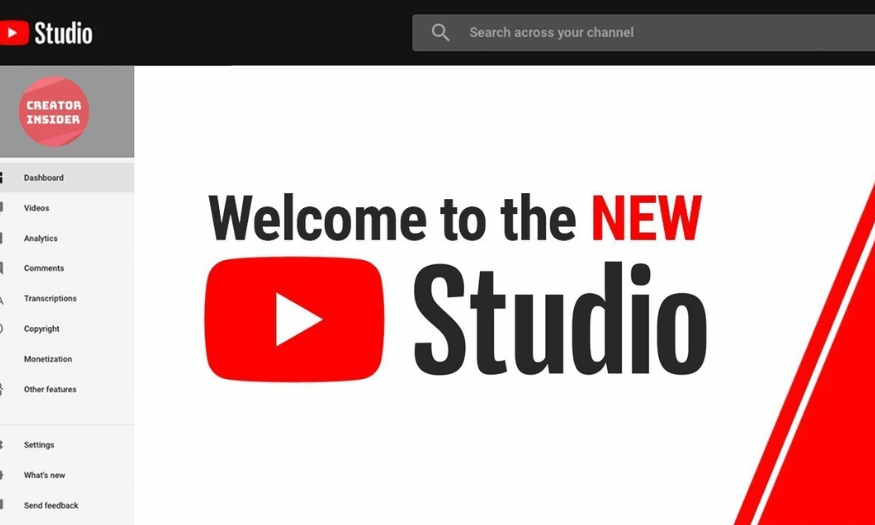
1. Manage multiple YouTube channels using YouTube Studio
YouTube Studio is a versatile tool that allows users to efficiently manage multiple YouTube channels. With this feature, you can log into multiple channels simultaneously without having to log out. This saves time and increases flexibility for those working across multiple platforms.
To switch between channels, simply click the image icon in the upper right corner and select the account you want to use. This process is very smooth, just like switching accounts on the YouTube app. This allows you to easily manage each channel individually without any hassle.
Additionally, YouTube Studio allows you to create branded channels, enabling you to develop multiple channels with just one Google account. This not only saves time but also makes it easier to manage content and interact with your audience across different channels.
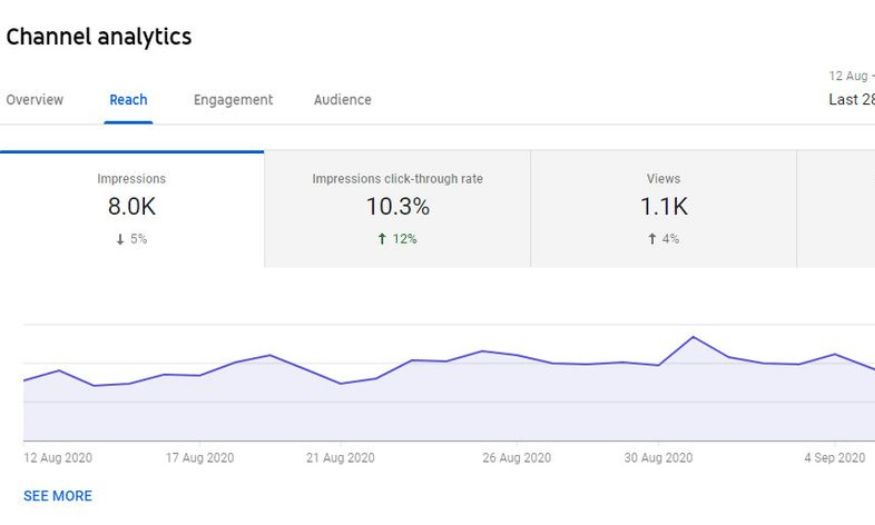
2. View real-time channel analytics using YouTube Studio
Tracking channel performance is an essential part of YouTube content development. YouTube Studio provides video performance analytics tools with detailed information on views, watch time, and subscribers. You can access this feature through the "Analytics" button in the bottom right corner of the dashboard.
The analytics page not only displays overall metrics but also allows you to track the performance of each video in detail. You can see who your audience is, where they come from, and how long they spend watching your videos. This information is invaluable, helping you make informed decisions about content creation.
Additionally, you can compare the performance of different videos to find the content that resonates most with your audience. The "Compare to" feature allows you to conduct deeper analysis and adjust your content strategy accordingly.
3. Upload videos
Uploading videos to YouTube via YouTube Studio offers several advantages over using the mobile app. With YouTube Studio, you have more control over how your videos appear and are categorized. To upload a video, simply click the "Add Video" button in the upper right corner.
The video upload process is very simple; you just select the file from your computer and wait until the video finishes uploading. Once the video is uploaded, you can immediately start editing the title, description, and other settings, helping you optimize the video for your audience right from the start.
Furthermore, YouTube Studio allows you to schedule video releases, which is very useful if you want to release a video at a specific time to attract the maximum number of viewers.
4. Edit videos in YouTube Studio
If you don't have the budget for professional video editing software, YouTube Studio offers a very convenient online video editor. You can easily access this feature by setting your video to private before editing.
YouTube Studio's video editor allows you to perform basic edits such as trimming, merging video segments, and adding endings. While not as feature-rich as dedicated software, it still helps you make the necessary changes to improve your video.
Recently, YouTube updated its app to include a blurring effect, giving you more control over what appears in your videos. This is very useful for those who want to protect their privacy or simply make their videos look more professional before publishing them.

5. Draft video in YouTube Studio
One of the useful features of YouTube Studio is the ability to create draft videos. When you successfully upload a video but don't want to publish it immediately, it's saved as a draft. This allows you to easily go back and edit the video when you're ready, without having to re-upload it from scratch.
Once the video has been uploaded, you can close the upload interface and return to add it to the draft list. This not only saves you time but also allows you to prepare more thoroughly for the next public release. From there, you can focus on optimizing your content without being pressured by time constraints.
Additionally, draft videos are a great way to test new ideas. You can customize and experiment with different styles before deciding to release the final video. This not only helps you improve the quality of your content but also creates more unique and engaging products.
6. Schedule video uploads in YouTube Studio
Scheduling video releases is a great feature for content creators who want to effectively manage the public release time of their videos. If you don't want your video to appear immediately, YouTube Studio lets you choose the exact time for it to be published. This feature is available right in the display settings when you upload a video.
Simply select the "Schedule" option and choose your desired time, and your video will automatically be released at the scheduled time. This is very useful if you know that your audience is typically active at a particular time of day or week.
Scheduling not only saves you time but also creates anticipation for your audience. They'll know when you have new videos, thereby increasing engagement and building a better relationship with your viewing community.
7. Add users
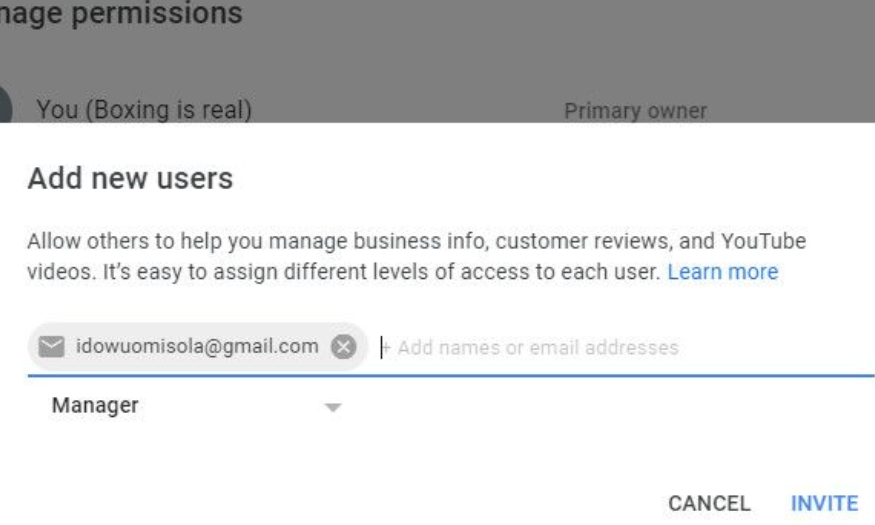
If you work in a team or have creative partners, the add user feature in YouTube Studio can be very helpful. You can grant access to other team members so they can assist you in managing the channel. This helps to divide tasks and increase efficiency in the content creation process.
To add users, simply go to Settings, select Permissions, and then click "Manage Permissions". After verifying your account, you can invite more users by selecting the "Add" option. You can also assign specific roles to each person, helping them understand their responsibilities.
This feature not only makes collaboration easier but also ensures that everyone on the team has the necessary information and access to contribute to and support your channel.
8. Create and manage your playlists
Playlists are a great way to organize your videos and make it easier for viewers to find content they're interested in. With YouTube Studio, you can create multiple different playlists, each with its own name and description. This not only helps viewers understand the content but also gives your channel a professional feel.
To create a playlist, simply select "Playlists" in the left corner of Studio and click the "New Playlist" option. You can choose the videos you want to add to the playlist and arrange them in your preferred order. This makes it easier for viewers to follow related videos without having to search for each one individually.
Managing playlists also helps you increase your channel's watch time. When viewers can easily access related videos, they tend to stay longer and interact more with your content.
9. Manage comments using YouTube Studio
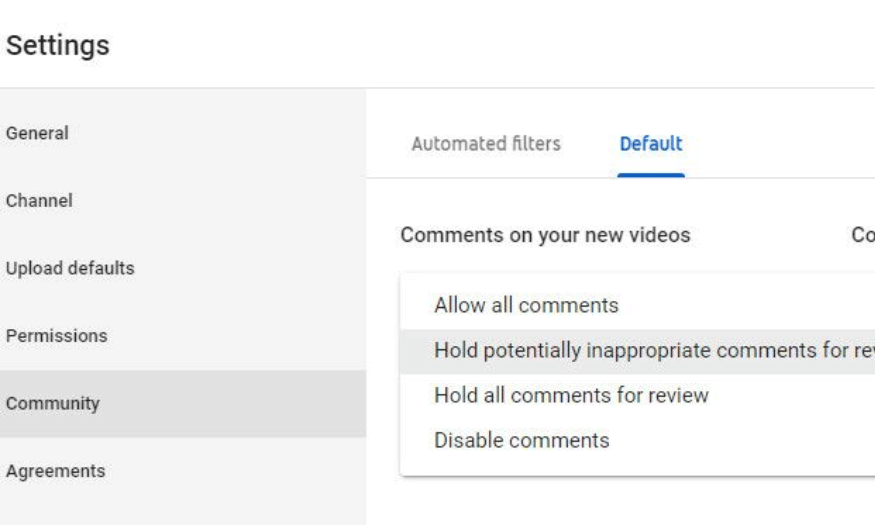
Comments are a crucial part of engaging with your audience, and YouTube Studio provides many tools to help you manage them effectively. You can filter comments, allow all comments, keep them for moderation, or disable comments entirely if necessary. This helps you create a positive environment and protect your channel from inappropriate comments.
To manage comments, simply go to the Community section in your Studio settings. Here, you can choose between Automatic Filters or Default, depending on your needs. These options help you control what content your audience sees, thereby improving the quality of interaction on your channel.
Effectively managing comments not only helps you maintain your channel's image but also creates opportunities to build better relationships with your audience. When viewers feel heard and respected, they are more likely to return and interact with your content.
10. Add subtitles to your video using YouTube Studio
Adding subtitles to your videos not only makes your content more engaging but also expands its reach to a wider audience. YouTube Studio provides this feature easily, allowing you to create and upload subtitle files during the video upload process. Simply click "More options," select your video language, and upload subtitle files from your computer.
Subtitles not only help viewers understand the content better but also support those with hearing impairments. This demonstrates professionalism and your concern for a diverse audience. When your videos have subtitles, the likelihood of attracting and retaining viewers is also higher.
Additionally, adding subtitles also helps improve your video's SEO. Search engines can easily scan the content in subtitles, thereby increasing your video's visibility on the platform. All these factors make subtitles an indispensable part of the YouTube content creation process.
11. Hide your channel
When starting a new YouTube channel, you might want to create some content before officially going public. The channel hiding feature in YouTube Studio allows you to do this easily. You can continue uploading videos without worrying about your audience seeing them immediately.
To hide your channel, go to Settings in YouTube Studio. There, select Channels, then go to Advanced settings and find the Delete content option. You can decide to hide your channel or remove content from public view, giving you time to refine your content before officially launching.
Hiding your channel not only protects your reputation but also allows you to create a consistent image when it goes public. This gives viewers a better experience, as they see a channel that is well-prepared and professional.
12. Take advantage of Creator Insider.
YouTube Studio is not just a management tool, but also a valuable source of information for content creators. With the Creator Insider news section, you'll always be up-to-date on the latest features and important changes to the platform. Regularly checking notifications will help you avoid missing anything.
Creator Insider gives you insight into what's happening in the creator community. You can learn about new tools, tips and tricks to optimize your channel, and how YouTube is changing to better support creators.
Leveraging Creator Insider will not only help you improve your content strategy but also create opportunities to connect with other creators. By understanding emerging trends, you can more easily tailor your content to better suit audience needs and market trends.
13. Audience Analysis
YouTube Studio offers audience analytics, helping you better understand who's watching your content. This feature allows you to track your audience's age, gender, and geography, so you can tailor your content to better serve them. Understanding your audience not only helps you optimize your content but also creates more effective marketing strategies.
Through audience analysis, you can identify which audiences are most engaged with your videos. This allows you to create more similar content, thereby strengthening the connection between you and your audience. Furthermore, you can also discover untapped audiences, expand your market, and grow your channel.
This feature is especially useful for creators who want to grow their channel sustainably. When you know who is watching your videos, you can create more relevant messages and content, and build long-term relationships with your audience.
14. Notification Management
YouTube Studio allows you to easily manage notifications from your channel. This feature helps you track important notifications from YouTube, including notifications about comments, views, and other channel activity. Managing notifications will help you avoid missing any opportunities to interact with your audience.
By customizing notifications, you can focus on the most important information. You can choose to receive notifications via email or in the app, saving you time and energy in monitoring channel activity. Furthermore, responding quickly to comments and notifications will create a better impression on your audience.
Managing notifications also helps you quickly grasp trends and viewer feedback. When you know which videos are attracting attention, you can adjust your content strategy in a timely manner, thereby optimizing channel performance.
15. Create a content chart
One interesting feature of YouTube Studio is its ability to create content graphs. This feature allows you to visually visualize the structure of your content, making it easy to see which topics are attracting attention and engagement from your audience. With content graphs, you can analyze videos by topic, genre, or release time.
Visualizing your content makes it easier to adjust your video production strategy. You can identify gaps in your content and discover potential topics to explore. This not only helps you maintain content diversity but also enhances audience satisfaction.
Furthermore, content graphs also help you track the performance of each video type. You can compare metrics such as views, watch time, and engagement levels between different videos. From there, you can optimize future videos to better meet the needs of your audience.
16. Create and manage video cards
The video tag creation and management feature in YouTube Studio makes it easy to connect related content. Video tags are a powerful tool for guiding viewers to other videos on your channel, thereby increasing watch time and engagement. You can add tags to your videos during uploads or while editing existing videos.
Using video tags not only makes it easier for viewers to find content they're interested in, but also encourages them to explore more videos on your channel. This creates a seamless viewing experience and helps viewers stay on your channel longer. Furthermore, video tags are a great way to showcase featured videos or videos related to topics viewers are interested in.
Managing video tags in YouTube Studio is also very easy. You can track the performance of each tag and adjust them to suit the content you're producing. This not only helps you optimize your content strategy but also increases your ability to attract viewers, thereby contributing to building a more loyal and engaged audience.
17. Customize channel interface
YouTube Studio's channel customization features allow you to make a strong first impression on your audience. You can set up banner images, channel icons, and channel descriptions to match your brand and content. An attractive channel interface not only attracts viewers but also reflects your personality and style.
Customizing your channel's interface also helps you stand out among millions of other channels on YouTube. You can add sections like featured videos, playlists, and contact information, making it easier for viewers to find the content they enjoy. A well-designed channel will feel more professional and trustworthy, thereby encouraging viewers to subscribe.
Additionally, you can monitor the performance of the elements within the channel interface to better adjust it to your audience's needs. This feature helps you continuously improve and develop your channel, ensuring that your content and visuals remain engaging and relevant to the changing market.
18. Create and manage live streaming programs.
YouTube Studio offers features for creating and managing live streams, allowing you to interact directly with your audience. This feature lets you host live sessions for interaction, Q&A, or showcasing new content. Live streaming not only provides a sense of intimacy but also creates opportunities to build a stronger community.
When setting up a live stream, you can customize the title, description, and thumbnail to attract your audience. YouTube Studio also lets you schedule live streams, letting your audience know when they can join. This not only creates anticipation but also encourages viewers to return for future streams.
Additionally, during live streams, you can interact with your audience through live chat, answering questions and responding to their comments instantly. This not only strengthens the relationship between you and your audience but also creates an engaging and memorable viewing experience. Live streaming is a great way to build your personal brand and attract more subscribers to your channel.
19. Conclusion
YouTube Studio is an indispensable tool for any creator looking to grow their channel. With its outstanding features, you can effectively manage and optimize your content, from monitoring video performance to engaging with your audience. Mastering these features will not only improve video quality but also build a strong community around your channel. Take advantage of YouTube Studio to enhance your content creation experience and achieve success on this platform!





















VIP Products








Best Selling Products
Windows 10 & 11 Pro Key
36 USD
Genuine Cheap Canva Pro
39 USD
Freepik Premium Account
59 USD
Copyright Adobe Lightroom Account
59 USD
Plugin Retouch4me
69 USD
Adobe Photoshop Copyright - Full App
120 USD
Upgrade genuine Capture One account
120 USD
Capcut Pro 1 Year
39 USD
Upgrade Genuine Office 365
49 USD
Genuine Adobe Illustrator account
99 USD
MidJourney Account
29 USD
Autodesk All App Account Copyright
120 USD
Adobe Premiere Pro Account
99 USD
ChatGPT Plus Account (GPT-4)
16 USD
Upgrade Duolingo Super
29 USD