Best Selling Products

Genuine Adobe Illustrator account
99 USD

Adobe Premiere Pro Account
99 USD

Windows 10 & 11 Pro Key
36 USD

Genuine Cheap Canva Pro
39 USD

Freepik Premium Account
59 USD

Copyright Adobe Lightroom Account
59 USD

ChatGPT Plus Account (GPT-4)
16 USD

Capcut Pro 1 Year
39 USD

Plugin Retouch4me
69 USD

Upgrade Duolingo Super
29 USD

MidJourney Account
29 USD

Upgrade Genuine Office 365
49 USD

Upgrade genuine Capture One account
120 USD

Autodesk All App Account Copyright
120 USD

Adobe Photoshop Copyright - Full App
120 USD
2 Ways to Create “Stunning” Snow-Watching Photos Trending This Winter
Nội dung
- 1. The Snow-Watching Photo Trend Taking Over Social Media
- 1.1 From Cinematic Inspiration to a Social Media Craze
- 2. How to Create Snow-Watching Photos with Meitu – Easy to Use, High Quality
- 2.1 Introduction to Meitu and Its Outstanding Advantages
- 2.2 Steps to Create Snow Photos with Meitu
- 3. How to Create Free Snow Photos with Gemini AI
- 3.1 Introduction to Gemini and Why You Should Use It
- 3.2 How to Create Snow-Watching Photos with Prompts in Gemini
- 4. Tips for Taking and Choosing Photos for Better AI Results
- 4.1 Suitable Lighting and Angles
- 4.2 Facial Expressions and Outfit Style
- 4.3 Background and Overall Composition
- 5. Quick Comparison: Meitu vs Gemini AI
- 5.1 Pros and Cons of Each Tool
- 5.2 Advice on Choosing the Right Tool for You
- 6. Frequently Asked Questions
- 7. Conclusion
Have you ever scrolled through social media and secretly wished to appear in those sparkling snow-viewing photos that are taking over the internet, but had no idea where to start?
1. The Snow-Watching Photo Trend Taking Over Social Media
1.1 From Cinematic Inspiration to a Social Media Craze
It is no coincidence that in just the last two months of 2025, the hashtags #WinterTrend and #Khung3AnhTuyet have attracted millions of views on TikTok and Instagram. This trend spread rapidly because it creates the feeling of becoming the main character in your own unique winter story.
The appeal of this style comes from the perfect combination of emotion, lighting, and falling snow. With just a few clicks, you can create romantic and vivid cinematic photos that leave viewers amazed and eager to try it themselves. According to Google Trends, searches for the keyword “how to create snow-viewing photos” increased by 350% in November 2025, proving that this is the most powerful and outstanding trend of this winter season.
Highlights of the three-frame snow photo trend
Create the feeling that you are the main character in your own winter story
Images carry a strong cinematic atmosphere with delicate harmony between lighting and snowfall
Easy to create on platforms like Meitu, Gemini AI, TikTok, and Instagram
1.2 What Is the “Three Snow Frames” Structure?
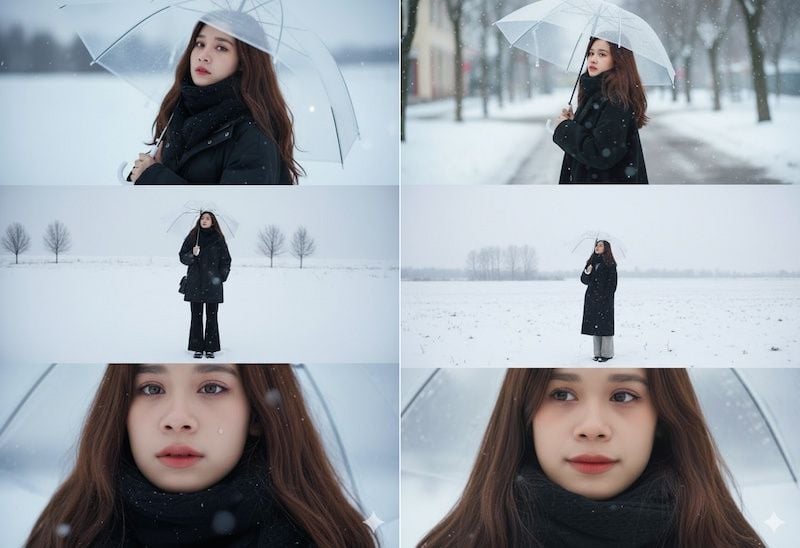
The “three cinematic snow frames” trend is inspired by emotional film compositions popular on Pinterest and Xiaohongshu. The photo set usually consists of three horizontal frames with a 2.35:1 ratio arranged vertically, with each frame telling a small chapter of your winter story.
Details of the three frames
Frame 1: Over-the-shoulder angle, the character turns their back and gazes into the snowy distance, creating a romantic and mysterious feeling
Frame 2: Medium shot, the character looks thoughtful under the cold sky, expressing reflection and loneliness
Frame 3: Close-up of the face, emphasizing emotion through deep eyes, with snow lightly resting on the hair, creating intimacy and realism
This structure makes the photo cohesive, emotional, and highly attention-grabbing on social media. Followers can feel the winter story through each frame while also feeling inspired to create similar photo sets.
.jpg)
2. How to Create Snow-Watching Photos with Meitu – Easy to Use, High Quality
2.1 Introduction to Meitu and Its Outstanding Advantages
Meitu is a popular photo editing application well known for its AI Art feature, allowing users to turn ordinary portrait photos into artistic masterpieces or stunning cinematic scenes. The app is especially suitable for creating romantic snowy winter photos, helping users quickly own high-quality pictures ready for social media posting.
Outstanding advantages of Meitu
An intuitive interface, easy to use even for those unfamiliar with photo editing
Many ready-made winter snow style templates, from light snowfall scenes to heavy cinematic snow
Sharp results with harmonious colors, suitable for sharing on Instagram, TikTok, or Facebook
Allows users to fine-tune lighting details, color balance, and background blur for more vivid images
However, some premium style templates may require payment or a premium subscription. You should consider your needs and budget before choosing.
.jpg)
2.2 Steps to Create Snow Photos with Meitu
Step 1: Open Meitu and Select AI Art
First, if you do not have Meitu installed, download and install it on your phone, then create an account or log in with your existing account. On Meitu’s main interface, select AI Art or Create with AI to begin transforming your photo into a cinematic winter style.
The AI Art section gathers all style templates, effects, and specialized filters, helping you quickly find impressive snowfall effects. Prepare a clear portrait photo so the AI can accurately recognize facial details and hair.
Step 2: Upload Your Portrait and Choose a Winter Snow Template
Select a photo you have taken or already have, preferably with even lighting and a face looking straight ahead or slightly angled. These types of photos help the AI recognize details better, resulting in more beautiful and realistic output.
Next, in the Style section, choose the Winter Snow Cinematic template or search for styles such as “snow winter field” or “snow falling portrait.” Apply the filter and wait for AI processing. You can test different templates to compare results and choose your favorite.
Step 3: Wait for AI Processing and Fine-Tune the Result
After the AI completes processing, you can adjust details such as cooling the tones, adding light effects, or adjusting background blur to make the image more cinematic and layered. This step is essential for making your photo unique and standout on social media.
To create the trending three-frame composition, you can use three different results from the same photo or three different photos in the same style. Arrange them into a three-frame layout to create a cohesive and impressive winter story.
Notes when using Meitu
Avoid using blurry or backlit photos, as AI may struggle with hair and snowfall details, making the result look unnatural
When choosing paid templates, carefully consider cost and actual usage needs
Make sure your photo does not contain large watermarks if you plan to post it online for a more professional appearance
.jpg)
3. How to Create Free Snow Photos with Gemini AI
3.1 Introduction to Gemini and Why You Should Use It
Google Gemini is an AI image-generation tool that is free or offers a free version for regular users. It stands out for creating detailed and vivid photos, helping you quickly produce winter photo sets with a cinematic style.
Outstanding advantages of Gemini AI
Free or low cost, suitable for personal users and experimentation
Supports detailed prompts, helping you control style, emotion, outfit, and setting
Allows reference photo uploads so AI can maintain character identity
Results are usually sharp and suitable for creating “three cinematic frames” or cinematic-style images
3.2 How to Create Snow-Watching Photos with Prompts in Gemini
Step 1: Open Gemini and Select “Create Image”
Visit the Gemini website or app and log in if needed. Choose the image generation section to begin designing your winter photo set.
The “Create Image” section allows flexible selection of frame ratio, resolution, and layout. This is an important preparation step for helping AI understand your spatial and emotional requirements.
Step 2: Upload a Photo and Enter Prompt Suggestions
You can upload a reference face photo so AI can maintain your identity. Then enter a detailed prompt, preferably in English, so the AI understands accurately and generates higher-quality results.
Prompt suggestions
Specify frame ratio, resolution (for example 2160×3840 pixels), and three-horizontal-frame layout
Describe the main character: reference face, expression, hairstyle, outfit, and overall color tone
Describe the setting: falling snow, lighting, emotions, and surrounding scenery
For each frame:
Frame 1: Character holding a transparent umbrella, turning to look directly ahead, with a sad and distant expression
Frame 2: Character standing in a vast snowy field, walking slowly and looking up at the sky, with lonely barren trees emphasizing isolation
Frame 3: Close-up of the eyes, showing sadness and a longing for silence
After entering the prompt and reference photo, click generate and wait a few seconds for AI processing.
Step 3: Review Results and Choose Your Favorite Version
Gemini will generate several image versions. You should choose three with the same style to combine into a triple-frame set, or crop one image into three horizontal sections.
Notes when choosing photos
If you are not satisfied, adjust the prompt and try again several times
Save successful prompts for reuse with different characters, outfits, or settings
Detailed prompts help AI understand emotional tone, lighting, and layout for the perfect winter cinematic photo
.jpg)
4. Tips for Taking and Choosing Photos for Better AI Results
4.1 Suitable Lighting and Angles
Lighting is a crucial factor in determining realism and vividness after AI processing. Choose soft lighting such as near sunset or under cloudy skies, avoiding harsh direct sunlight that causes glare or strong shadows. Natural front or side lighting helps AI recognize facial details more accurately.
Lighting and angle suggestions
Shoot during golden hour or under cloudy weather for softer natural light
Use slightly angled or frontal shots, avoiding steep low-angle shots that distort facial structure
Keep lighting even across the face without heavy shadows hiding key features
4.2 Facial Expressions and Outfit Style
Gentle expressions with eyes looking far away or to the side create a natural and emotional mood, perfect for romantic winter aesthetics. There is no need for bright commercial smiles; let emotions flow naturally.
Outfit and accessory suggestions
Dark coats such as black or gray, thick scarves, and transparent umbrellas highlight the subject against snowy backgrounds
Keep outfits simple, avoiding excessive patterns or bright colors
Accessories like umbrellas, gloves, scarves, or wool hats enhance realism and winter atmosphere
4.3 Background and Overall Composition
A simple, open background helps AI create beautiful and natural snowfall effects. Choose snowy fields, snowy forests, or gray skies while avoiding crowded scenes or visually cluttered objects.
Composition and framing tips
Aim for 16:9 or 2.35:1 ratios for a stronger cinematic effect
Keep the subject occupying about 40–60% of the frame for balanced composition
Stand centered in open space with moderate arm or umbrella positioning to avoid blocking key details
5. Quick Comparison: Meitu vs Gemini AI
5.1 Pros and Cons of Each Tool
When choosing a snow-photo creation tool, both Meitu and Gemini AI have distinct strengths suited to different needs. Meitu stands out for its intuitive interface, ease of use, and ready-made style templates, making it ideal for quick cinematic winter photos without technical complexity. However, some premium styles require payment, and prompt customization is limited.
Gemini AI offers greater flexibility with detailed prompts, allowing precise control over emotion, outfit, scenery, and lighting. It is free or low-cost and ideal for users seeking high-quality cinematic image sets. However, it requires some familiarity with writing English prompts and may process images more slowly.
Comparison table
Tool | Advantages | Disadvantages
Meitu | Easy-to-use interface, ready-made style templates | May require payment, limited deep prompt customization
Gemini AI | Free or low cost, flexible prompt control | Requires English prompt understanding, slightly slower generation
5.2 Advice on Choosing the Right Tool for You
If you prioritize speed, simplicity, and ease of use, Meitu is the right choice. Simply choose a template, upload your photo, and let AI handle almost everything.
If you want deeper customization and precise control over layout and emotional storytelling, Gemini AI is better. You can experiment with prompts to perfect lighting, colors, and scenery.
You can also combine both tools: generate a cinematic image with Gemini AI, then refine it with Meitu by enhancing effects, cropping layouts, or adding romantic snowfall details.
.jpg)
6. Frequently Asked Questions
Are Meitu and Gemini AI completely free?
Meitu offers many free templates, but some premium styles require payment or subscription upgrades. Gemini AI provides a free version sufficient for personal use, though paid plans offer faster processing and advanced features.
Do I need professional photo-editing skills?
Not at all. With Meitu, simply choose a style and upload your image. Gemini AI requires basic prompt writing, but anyone can create cinematic winter photos with simple guidance.
Can I post generated photos on social media?
Absolutely. Both Meitu and Gemini AI allow saving high-quality images ready for Instagram, TikTok, or Facebook. Just make sure the image does not contain large watermarks if you want a cleaner, more professional look.
7. Conclusion
With these two methods for creating snow-viewing photos using Meitu and Gemini AI, you can quickly own breathtaking winter images while freely expressing your unique style. From gentle falling snow to mesmerizing snowstorm moments, every detail can be vividly recreated with just a few simple steps. This winter 2025, let yourself become the main character in your own snowy story and create unforgettable sparkling moments that will leave social media amazed.





















VIP Products








Best Selling Products
Genuine Adobe Illustrator account
99 USD
Adobe Premiere Pro Account
99 USD
Windows 10 & 11 Pro Key
36 USD
Genuine Cheap Canva Pro
39 USD
Freepik Premium Account
59 USD
Copyright Adobe Lightroom Account
59 USD
ChatGPT Plus Account (GPT-4)
16 USD
Capcut Pro 1 Year
39 USD
Plugin Retouch4me
69 USD
Upgrade Duolingo Super
29 USD
MidJourney Account
29 USD
Upgrade Genuine Office 365
49 USD
Upgrade genuine Capture One account
120 USD
Autodesk All App Account Copyright
120 USD
Adobe Photoshop Copyright - Full App
120 USD