Best Selling Products

Windows 10 & 11 Pro Key
36 USD

Capcut Pro 1 Year
39 USD

Adobe Photoshop Copyright - Full App
120 USD

Autodesk All App Account Copyright
120 USD

Genuine Adobe Illustrator account
99 USD

Upgrade Duolingo Super
29 USD

Adobe Premiere Pro Account
99 USD

Copyright Adobe Lightroom Account
59 USD

ChatGPT Plus Account (GPT-4)
16 USD

MidJourney Account
29 USD

Upgrade Genuine Office 365
49 USD

Genuine Cheap Canva Pro
39 USD

Upgrade genuine Capture One account
120 USD

Plugin Retouch4me
69 USD

Freepik Premium Account
59 USD
7 indispensable ChatGPT applications for office workers.
Nội dung
- 1. Convert Word files to PDF in an instant.
- 2. Quick photo editing
- 3. Record and summarize the meeting.
- 4. Track calories and create a healthy meal plan.
- 5. Create posters, banners, or invitation cards.
- 6. Manage expenses using photos of receipts or spreadsheets.
- 7. Create small applications without knowing programming.
With a range of capabilities such as document summarization, data analysis, image creation, and content writing, ChatGPT is changing the way we work.

While users previously viewed ChatGPT simply as a tool for asking and receiving questions, this "virtual assistant" has now become a multi-functional ecosystem. It can handle file processing, audio analysis, image editing, nutritional calculations, media design, financial management, and even write code to create small applications for work. A range of tasks that previously required separate software are now conveniently integrated into a single platform.
This blog post will help you understand how to use ChatGPT in the smartest and most practical way. Not vague advice, not overly technical tips, but how you can immediately leverage AI to speed up and improve performance. It all revolves around seven very simple yet incredibly powerful applications.
1. Convert Word files to PDF in an instant.
Converting document formats may seem like a minor issue, but in a work environment, it's a major bottleneck that consumes more time than we realize. Many people open Word to adjust the layout and then save it as a PDF; some upload it to an online conversion website but encounter font errors; others have to manually check each page for line breaks or paragraph breaks.
Simply upload your Word file, and the AI will automatically process the content and publish a complete PDF. The biggest advantage is that it accurately preserves the formatting. Margins, fonts, line spacing, special characters, tables, and annotations are all reproduced perfectly. This is crucial for documents requiring high accuracy, such as contracts, research reports, theses, formal forms, or documents sent to partners.
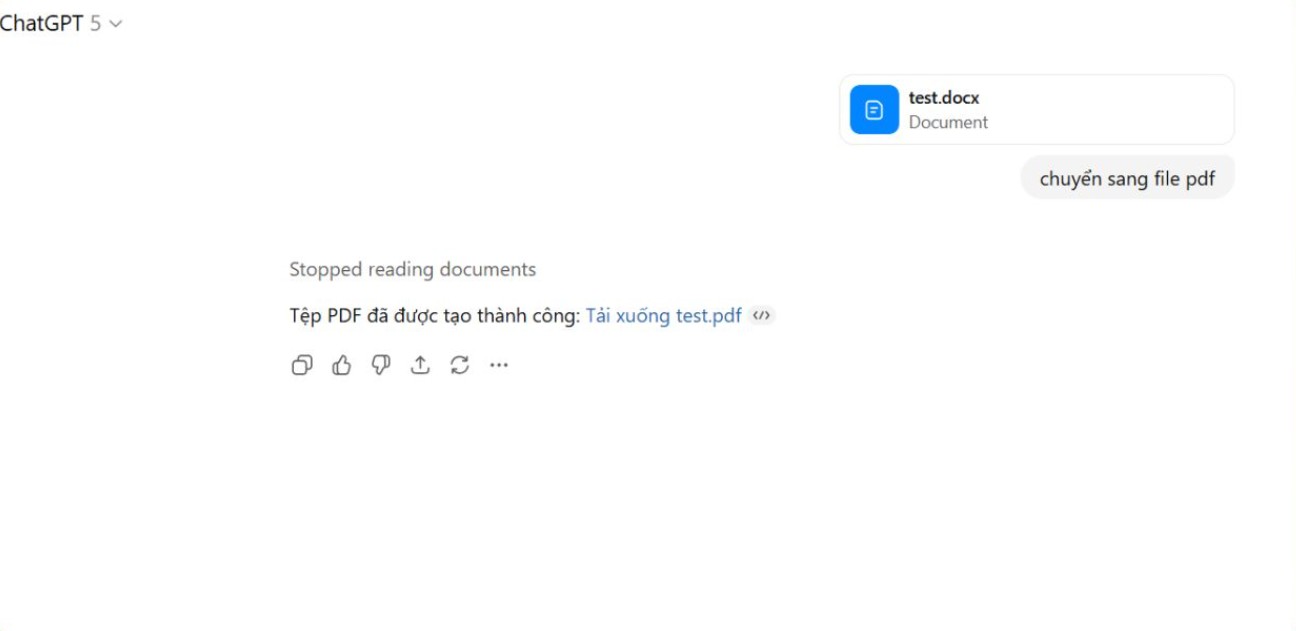
Interestingly, ChatGPT doesn't simply convert like typical free tools. You can ask the AI to edit the text during the file conversion process. For example, you can shorten the content, add an automatic table of contents, correct spelling, add an introduction, or merge multiple documents into a single file before creating the PDF. All of this can be done with a single request.
2. Quick photo editing
In the digital age, the need for image editing arises in almost every aspect of work. Employers need event photos, marketing staff need advertising images, salespeople need product photos, and content teams need illustrations for articles. For those unfamiliar with Photoshop, this is a major obstacle. Even for professional designers, basic editing can sometimes be a waste of time.
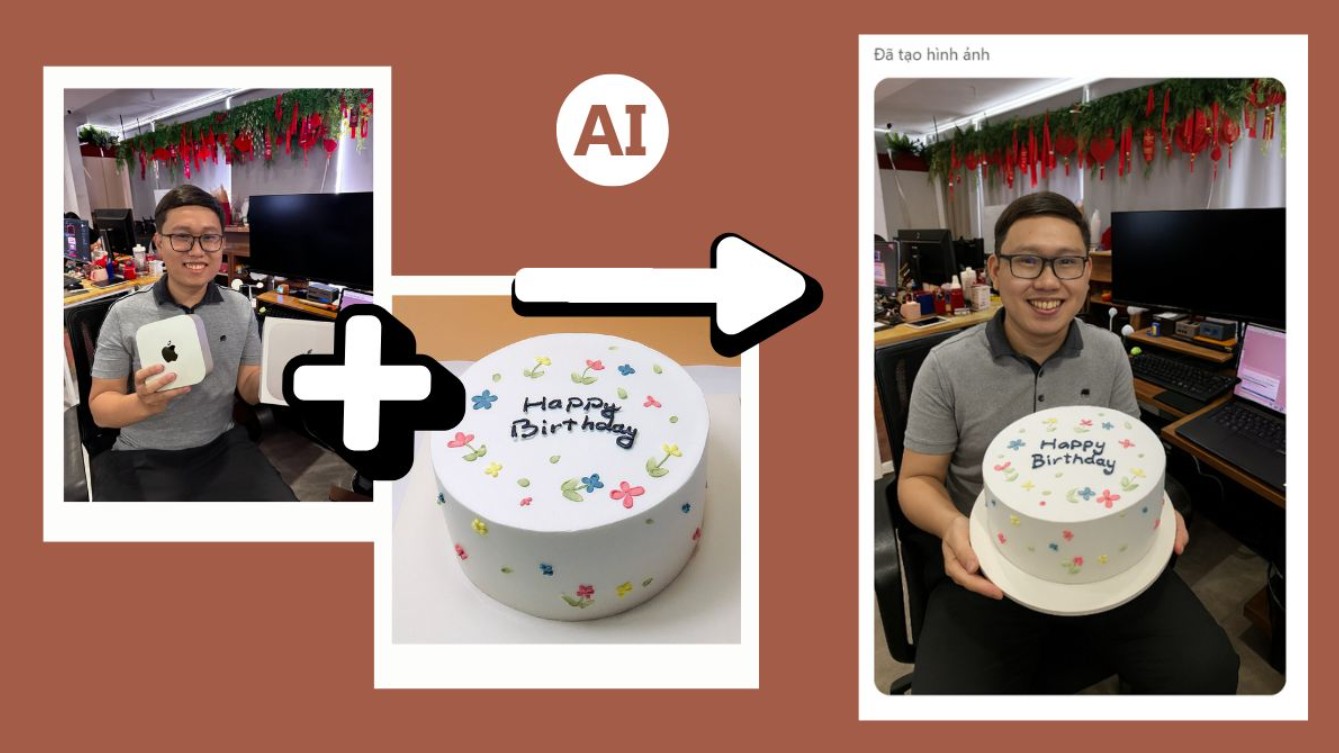
No need to open software, no need for complex layers, just upload your image and describe what changes you want. AI can perform tasks such as sharpening blurry photos, increasing brightness or contrast, removing unwanted objects, adjusting colors to specific tones, reducing noise in low-light photos, or even transforming real photos into illustrations.
ChatGPT's power lies in its ability to analyze image content. When you upload a photo, the AI can describe in detail the composition, lighting, colors, camera angle, main and secondary objects, and style. This is what sets it apart from traditional photo editing applications, which only apply filters without understanding the content.
For creative professionals, this image analysis capability helps create more beautiful and consistent products, because the AI understands the editing goals and provides appropriate suggestions. If necessary, you can ask ChatGPT to suggest image styles that match your brand to increase content consistency.
3. Record and summarize the meeting.
Meetings are an indispensable part of work, but they are incredibly time-consuming. Many meetings last for hours, requiring participants to both listen attentively and take notes. Even with recordings, listening back to an entire long file to find key points can still be time-consuming.
You simply upload the meeting recording. Within minutes, the AI will transcribe the speech into text and analyze the content coherently. Remarkably, ChatGPT doesn't just "transcribe," it "understands" the meeting. It recognizes the main topic, separates discussion points, identifies speakers, categorizes issues, lists tasks, and even highlights important details.
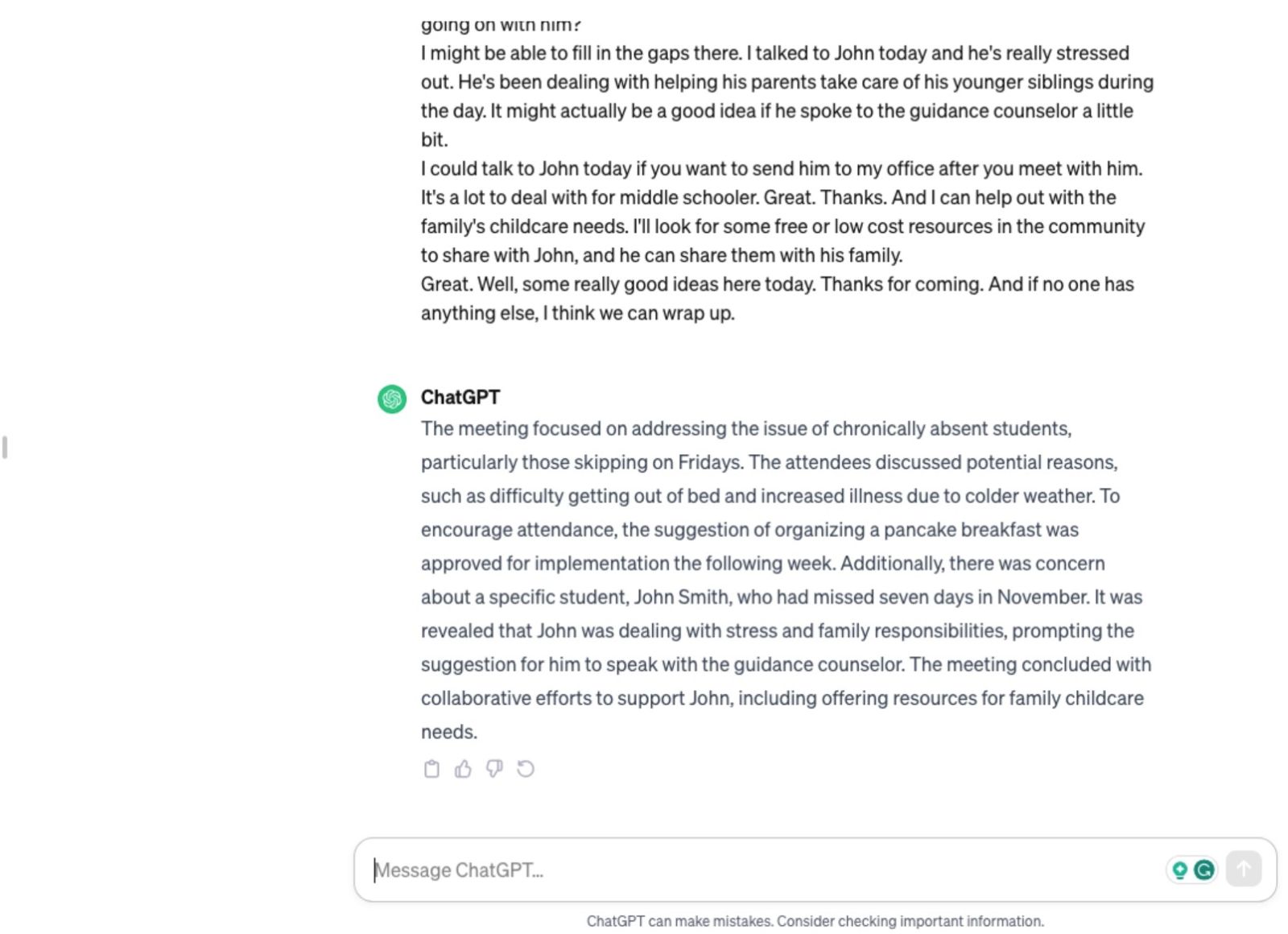
You can also ask AI to format the summary into meeting minutes, checklists, implementation timelines, or reports for leadership. AI can restructure information according to different needs and levels of detail. An internal report only needs 300 words, while a project report requires full evidence and conclusions; ChatGPT can handle both.
For marketing teams, production departments, engineering teams, or any department that frequently holds regular meetings, this feature saves a huge amount of time. Instead of listening to every minute of the meeting again, all the content is condensed clearly into a few seconds.
4. Track calories and create a healthy meal plan.
In the hustle and bustle of work, we often neglect a healthy diet. Some eat based on inspiration, others on convenience, and some fail to control their calorie intake or nutrient balance. ChatGPT offers an interesting solution: analyzing food and creating meal plans based on photos.
When you take a picture of a meal and send it to ChatGPT, the AI can analyze the ingredients in the dish using computer vision. It recognizes foods containing carbs, protein, and fat, estimates the volume, and calculates an approximate calorie value. For complex meals like pho, vermicelli, or mixed dishes, the AI can also identify the basic components.
ChatGPT then assesses whether the meal is balanced. If you're trying to lose weight, the AI will suggest reducing carbohydrates, increasing fiber, or limiting fats. If the goal is muscle gain, the AI recommends increasing protein intake from lean meats, fish, or beans. If you overeat at one meal, ChatGPT can suggest balancing your intake in the next meal.
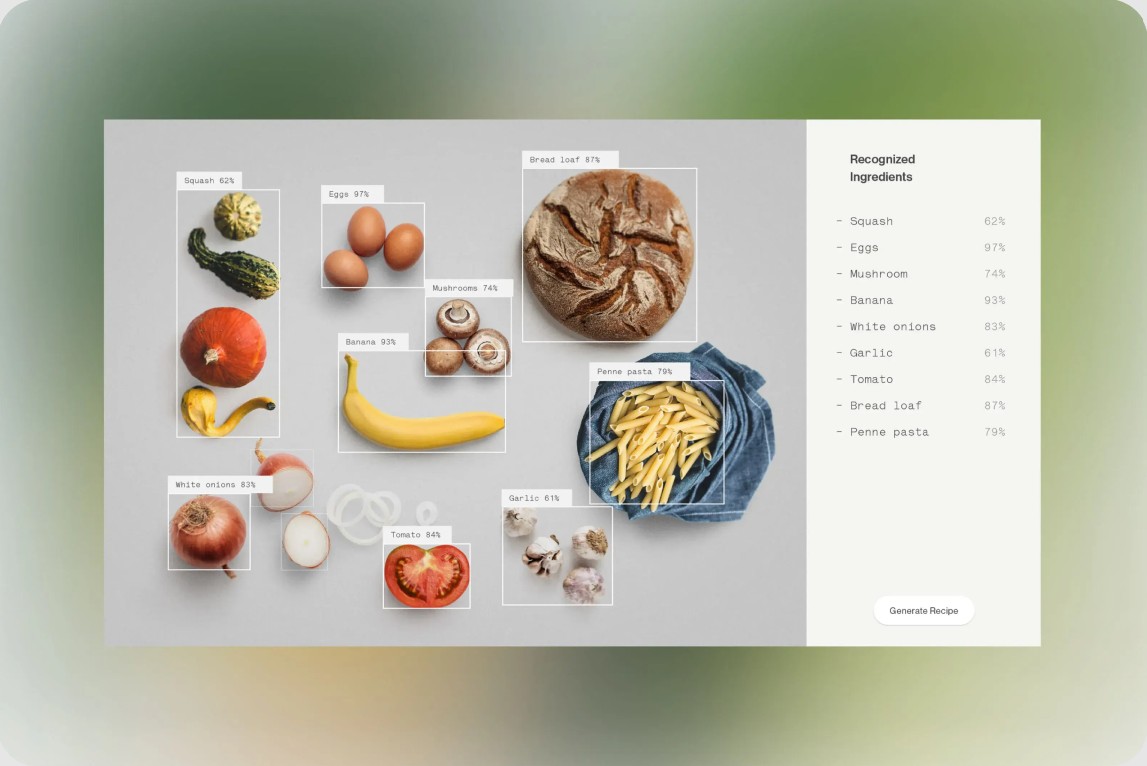
ChatGPT's strength over traditional calorie tracking apps lies in its personalization capabilities. Typical apps require you to manually enter each item, while ChatGPT processes data visually. Furthermore, the AI can create weekly meal plans tailored to your preferences, food allergies, and budget.
5. Create posters, banners, or invitation cards.
Graphic design was previously a skill only professional designers could excel at. But with ChatGPT, even those without design skills can create beautiful posters, banners, or invitations with just a few descriptions.
ChatGPT is capable of creating images with a well-structured layout, harmonious colors, and a clear style. You can specifically describe the event content, desired style, and main color scheme. The AI will generate multiple versions for you to choose from. Depending on your requirements, you can emphasize modernity, elegance, minimalism, or playfulness.
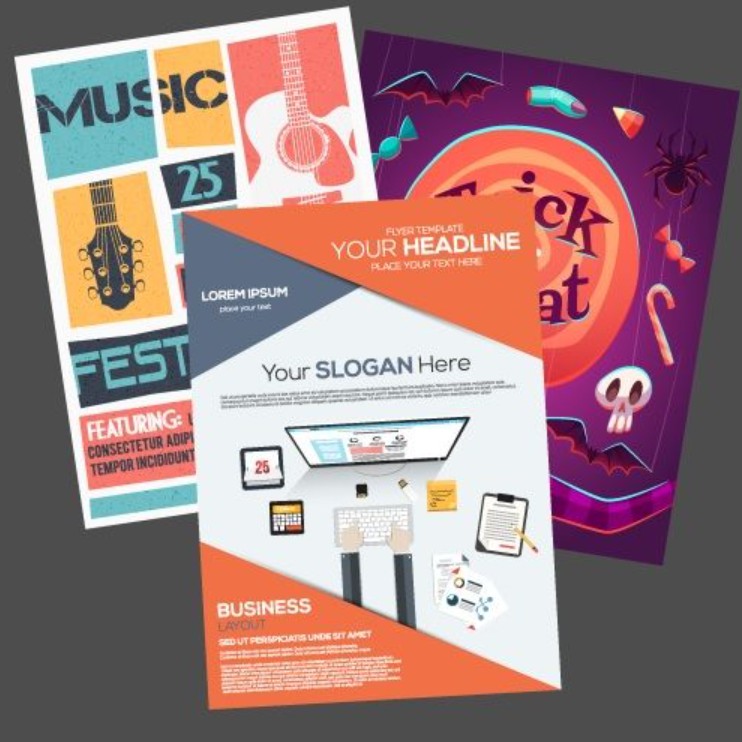
A particular advantage is that ChatGPT creates text directly within images without font errors or spelling mistakes like some other AI tools. This makes posters look more professional and is easy to apply to event design or printing.
For designers, this is an extremely effective draft creation tool. You can generate a series of ideas before choosing a suitable direction for detailed design. For general users, this feature helps create publications quickly without needing to learn additional software.
6. Manage expenses using photos of receipts or spreadsheets.
Managing personal or small business expenses can become a very complicated task if done the traditional way. Manually entering each invoice into Excel or a note-taking application requires a lot of time and concentration. If an invoice is misplaced, you may lose all the data as well.
ChatGPT solves this problem by its ability to read and understand data from images. You simply take a picture of your receipt or expense sheet and upload it. The AI will analyze the information, identifying the product name, amount, tax, payment time, and expense category.
Image processing capabilities combined with data analysis enable ChatGPT to generate a simple yet comprehensive financial report. You can view total expenses by day, week, or month; categorize them by group such as food, shopping, transportation, or work; or receive alerts for unusual expenses.
For those looking to improve their personal finances, ChatGPT helps assess spending history and provides objective feedback. You can receive advice on which spending categories to reduce, or how to optimize your budget to achieve specific goals such as buying a car, saving, investing, or traveling.

Small businesses, online shop owners, or household businesses can also utilize ChatGPT as a lightweight accounting tool. Invoices from partners, raw material costs, shipping costs, etc., can all be processed and summarized quickly. Financial management, which used to be time-consuming, now becomes easier and more intuitive.
7. Create small applications without knowing programming.
Perhaps the most surprising feature is the ability to create applications using ChatGPT. Simply describe the functionality you want to build, and the AI will automatically write the code, implement the interface, and provide instructions on how to use it. This opens up the possibility of automating tasks even for those without programming knowledge.
You can create a personal website, an internal task management application, an automated KPI spreadsheet, a timer, a project cost calculator, or even a simple chatbot for your business. Depending on your requirements, ChatGPT can use HTML, CSS, JavaScript, or Python.
The great thing is that AI not only "builds," but also "explains." You can ask about individual code snippets, request interface adjustments, color changes, feature additions, or performance optimizations. This allows you to gradually understand the application's working principles, opening the door to programming that you might have previously thought too difficult.
For designers, the ability to create applications allows you to turn prototypes into runnable versions. For marketers, you can create small landing pages for campaigns. For office workers, you can create tools to automate repetitive tasks.
The fact that it doesn't require extensive technical knowledge makes app development more accessible than ever before.
ChatGPT is not just a passing trend, but is becoming an indispensable tool in the modern workplace. Its ability to handle multiple tasks within a single platform significantly reduces the time spent switching between applications, optimizes workflows, and improves overall efficiency. Whether you're a student, office worker, creative professional, or business owner, understanding and leveraging ChatGPT's features will make a big difference in how you work every day.





















VIP Products








Best Selling Products
Windows 10 & 11 Pro Key
36 USD
Capcut Pro 1 Year
39 USD
Adobe Photoshop Copyright - Full App
120 USD
Autodesk All App Account Copyright
120 USD
Genuine Adobe Illustrator account
99 USD
Upgrade Duolingo Super
29 USD
Adobe Premiere Pro Account
99 USD
Copyright Adobe Lightroom Account
59 USD
ChatGPT Plus Account (GPT-4)
16 USD
MidJourney Account
29 USD
Upgrade Genuine Office 365
49 USD
Genuine Cheap Canva Pro
39 USD
Upgrade genuine Capture One account
120 USD
Plugin Retouch4me
69 USD
Freepik Premium Account
59 USD