Best Selling Products

Freepik Premium Account
59 USD

Autodesk All App Account Copyright
120 USD

Upgrade Duolingo Super
29 USD

Plugin Retouch4me
69 USD

ChatGPT Plus Account (GPT-4)
16 USD

Adobe Premiere Pro Account
99 USD

Upgrade Genuine Office 365
49 USD

Copyright Adobe Lightroom Account
59 USD

Genuine Cheap Canva Pro
39 USD

Upgrade genuine Capture One account
120 USD

Capcut Pro 1 Year
39 USD

Windows 10 & 11 Pro Key
36 USD

MidJourney Account
29 USD

Genuine Adobe Illustrator account
99 USD

Adobe Photoshop Copyright - Full App
120 USD
A detailed, creative, and heartfelt guide to creating a 20/11 (Teachers'' Day) greeting video using Gemini.
Nội dung
- 1. Why should you create a video to celebrate Teachers' Day on November 20th using Gemini?
- 2. What do I need to prepare before creating a November 20th video using Gemini?
- 3. Detailed instructions on creating a 20/11 (Teachers' Day) greeting video using Gemini.
- 3.1. Step 1: Access Gemini
- 3.2. Step 2: Choose a suitable image or video template
- 3.3. Step 3: Enter the prompt to create a 20/11 congratulatory video.
- 3.4. Step 4: Wait for Gemini to create the video and check the results.
- 3.5. Step 5: Edit and download the video to your device
- 4. Suggestions for creative 20/11 greetings and video ideas using Gemini.
- 4.1. Video expressing gratitude to the homeroom teacher
- 4.2. Animated video gift for teachers
- 4.3. Video expressing gratitude to teachers through commemorative photos.
- 5. Tips to make your 20/11 congratulatory video using Gemini more beautiful and emotional.
- 6. Conclusion
Vietnamese Teachers'' Day on November 20th is a special occasion for everyone to express their gratitude to the teachers who have dedicated themselves to guiding them on their journey to adulthood. Instead of just sending a familiar greeting card or message, you can create a short video with beautiful visuals, soothing music, and meaningful messages to make this spiritual gift even more memorable. With the help of Gemini, turning your ideas into a 20/11 celebratory video becomes much simpler. Let''s explore the detailed steps below with Sadesign!

1. Why should you create a video to celebrate Teachers' Day on November 20th using Gemini?
Gemini is an AI tool that can assist in creating content, images, and videos through natural language commands. Instead of manually filming each scene or spending a lot of time editing videos, you can describe your ideas and the AI will help bring them to life in emotionally rich footage. Some advantages of using Gemini to create 20/11 videos include:
-
Saves time: No need to prepare cameras or go through complicated editing processes.
-
Diverse ideas: You can create videos in cartoon, cinematic, lighthearted, or nostalgic styles.
-
Image reference support: You can upload images for the AI to use as a basis for building motion for your video.
-
You can edit using the command: Continue requesting changes to the background, camera angle, characters, or details that are not suitable.
-
Increased personalization: Easily create content tailored to homeroom teachers, subject teachers, or the entire school community.
Thanks to these capabilities, Gemini is suitable for students, parents, and anyone looking to prepare a creative gift for their teachers.

2. What do I need to prepare before creating a November 20th video using Gemini?
Before you begin, you should define the message you want to convey and the desired video style. A clear idea will help the AI understand your requirements better, reducing the chances of creating a video that is off-topic. Things you need to prepare include:
-
Google Account: Sign in to Gemini using your personal account or an account eligible to use the video creation feature.
-
Video ideas: You can choose themes such as showing gratitude to teachers, reminiscing about school days, your old classroom, or your journey of growing up.
-
Reference images: Prepare photos of the classroom, blackboard, fresh flowers, books, or personal photos if you wish to include them in the video.
-
Greeting: Prepare a short, heartfelt message to use in the content.
-
Prompt description: Identify the characters, setting, movement, lighting, visual style, and sound.
3. Detailed instructions on creating a 20/11 (Teachers' Day) greeting video using Gemini.
To create a 20/11 (Teachers' Day) greeting video, you can do it directly on your computer or phone. The basic steps are quite simple, mainly involving selecting the tool, entering commands, and waiting for the AI to process it.
3.1. Step 1: Access Gemini
First, open your browser on your computer and go to Gemini. Then, log in with your Google account. Once on the main interface, check the toolbar next to the chat box to find the video creation feature.
How to do it:
-
Visit https://gemini.google.com .
-
Log in to your Google account.
-
Open the toolbar on the left side of the interface.
-
Select the "Create video" or "Videos" option, depending on the interface.
-
If there are suggested video templates, you can choose one that suits you or start with your own ideas.
3.2. Step 2: Choose a suitable image or video template
After opening the video creation tool, you can start with a text command or use reference images to guide the content. For a video celebrating Teachers' Day (November 20th), images such as a podium, blackboard, bouquet of fresh flowers, notebook, and classroom often create a warm and familiar feeling. You can choose one of two methods:
-
Create a video from text: Describe the entire scene, characters, and movements you want.
-
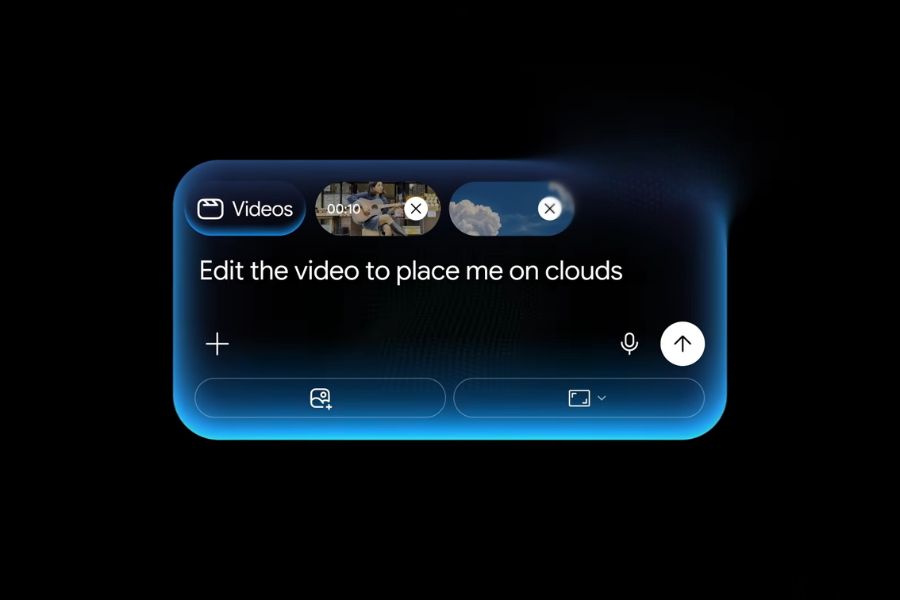
Create a video from images: Select Add image to upload a reference image, then describe how you want the image to move.
Gemini Apps currently supports uploading up to 5 images and 1 video as input data for the appropriate process. Prioritize clear, well-composed images and ensure you have the right to use them.
3.3. Step 3: Enter the prompt to create a 20/11 congratulatory video.
This is a crucial step that largely determines the video's appearance. A good prompt should specifically describe the setting, characters, actions, camera angles, colors, and the emotions you want to convey.
You can refer to the following command:
Prompt 1: Cinematic video tribute to teachers
"Create a short video celebrating Vietnamese Teachers' Day on November 20th, with a warm and emotional cinematic style. The setting should be a Vietnamese classroom in the morning, with soft golden sunlight streaming through the window. Books, sunflowers, and a small greeting card are placed on the desk. A teacher is diligently lecturing at the blackboard, and the students are attentively listening. The camera moves slowly, transitioning smoothly, the colors are gentle, the images are realistic, and the piano music is soothing. The atmosphere should convey gratitude, appreciation, and emotion."
Prompt 2: Cute 3D animated video
"Create an adorable 3D animated video with the theme of Vietnamese Teachers' Day, November 20th. A group of students in uniform bring bouquets of fresh flowers to their teacher in a classroom decorated with balloons, a whiteboard, and colorful greeting cards. The characters have cheerful expressions, natural movements, bright colors, and soft lighting. The 3D animation style is sophisticated, creating a joyful and warm atmosphere."
Prompt 3: A nostalgic video about school days.
"Create a short video with a nostalgic style about school days for November 20th. The scene should depict a schoolyard under a flame tree, old notebooks, a blackboard, and white chalk dust. A teacher should stand on the podium, smiling gently at the students. The camera should move slowly, with soft yellow lighting, a nostalgic film color palette, and the sounds of birdsong and soothing piano music. The message should convey gratitude to those who have dedicated themselves to teaching us."
After completing the prompt, enter your content into the required fields and press Submit to have Gemini start creating your video.
3.4. Step 4: Wait for Gemini to create the video and check the results.
After sending the command, Gemini will receive the request and process the content. The video creation time may vary depending on the complexity of the request and system status. Once the video is complete, review the entire content to assess its suitability. Some details to check include:
-
Does the character fit the classroom setting and the theme of Teachers' Day (November 20th)?
-
Is the character's movement natural, or are there visual glitches?
-
Is the sound appropriate for the atmosphere of the tribute?
-
Do the colors and lighting create a warm feeling?
-
Does the video convey the original message accurately?
If the results aren't what you expected, you don't need to start over immediately. Use additional commands to have Gemini adjust any unsuitable details.
3.5. Step 5: Edit and download the video to your device
A beautiful video is even more complete with harmonious visuals and a clear message. Gemini allows users to continue editing videos with short requests in natural language.
You can try some of these commands:
-
"Changing the lighting to a warmer, more golden tone creates a nostalgic feeling."
-
"Adjust the camera angle closer to highlight the bouquet on the teacher's desk."
-
"Remove unnecessary details from the back of the classroom."
-
"Create slower and smoother camera movements."
-
"Adding an atmosphere that is touching, gentle, and solemn."
Once you're satisfied with the result, press the Share button below the video and select Download video to save it to your device.

4. Suggestions for creative 20/11 greetings and video ideas using Gemini.
If you're unsure where to start, you can refer to some of the ideas below to create videos with your own unique style.
4.1. Video expressing gratitude to the homeroom teacher
This idea is suitable for students who want to express their gratitude to someone who has been with the class throughout the school year.
Prompt suggests:
"Create a video to celebrate Teachers' Day (November 20th) for your homeroom teacher. The video should depict a Vietnamese classroom full of memories, with students preparing flowers and cards to give to their teachers. The atmosphere should be sincere, joyful, and touching, with warm lighting and a gentle cinematic style."
4.2. Animated video gift for teachers
Animated videos are perfect for those who love cute styles, vibrant colors, and creative visuals.
Prompt suggests:
"Create a 3D animated video with a 20/11 theme, featuring a lovely teacher standing in the middle of the classroom, surrounded by students giving flowers and sending wishes. The space is filled with colorful flowers, natural movements, pastel colors, and a cute and cheerful style."
4.3. Video expressing gratitude to teachers through commemorative photos.
If you have photos of your classroom or photos with your teacher, you can upload them as reference images to create a personalized video.
Prompt suggests:
"Based on the uploaded reference image, create a commemorative video for November 20th with gentle movement. Retain the key identifying features of the people in the photo, create a natural motion effect, warm lighting, and a nostalgic atmosphere. The video should express appreciation and gratitude for the teachers."
5. Tips to make your 20/11 congratulatory video using Gemini more beautiful and emotional.
To ensure a high-quality video, you should pay attention to how you structure your commands instead of just entering a general request like "create a 20/11 celebratory video". Some helpful tips include:
-
Define the style from the start: Choose 3D animation, cinematic, realistic, or nostalgic to ensure consistency in the visuals.
-
Describe the specific movement: Instead of writing "create beautiful video," ask the camera to move closer, pan slowly, or transition smoothly.
-
Choose the right colors: Warm yellow, creamy white, and pastel tones often create a gentle, friendly feeling.
-
Prioritize short messages: Sincere wishes are more likely to resonate emotionally than overly long paragraphs.
-
Create videos based on your ideas: If you want multiple scenes, create each segment separately and then combine them using video editing software.
-
Check the text in the video: AI sometimes generates Vietnamese text incorrectly. You should add your greeting using a video editing tool to ensure there are no spelling errors.

6. Conclusion
Creating a 20/11 (Teachers' Day) greeting video using Gemini is a creative way to express your feelings and gratitude to your respected teachers. With just an idea, reference images, and a clear prompt, you can create unique videos without needing extensive video editing experience. Try combining memorable images, heartfelt wishes, and appropriate sound effects to make your 20/11 gift even more meaningful and memorable!





















VIP Products








Best Selling Products
Freepik Premium Account
59 USD
Autodesk All App Account Copyright
120 USD
Upgrade Duolingo Super
29 USD
Plugin Retouch4me
69 USD
ChatGPT Plus Account (GPT-4)
16 USD
Adobe Premiere Pro Account
99 USD
Upgrade Genuine Office 365
49 USD
Copyright Adobe Lightroom Account
59 USD
Genuine Cheap Canva Pro
39 USD
Upgrade genuine Capture One account
120 USD
Capcut Pro 1 Year
39 USD
Windows 10 & 11 Pro Key
36 USD
MidJourney Account
29 USD
Genuine Adobe Illustrator account
99 USD
Adobe Photoshop Copyright - Full App
120 USD