Best Selling Products

Windows 10 & 11 Pro Key
36 USD

Genuine Cheap Canva Pro
39 USD

Plugin Retouch4me
69 USD

Upgrade Duolingo Super
29 USD

Capcut Pro 1 Year
39 USD

Adobe Premiere Pro Account
99 USD

Upgrade genuine Capture One account
120 USD

Copyright Adobe Lightroom Account
59 USD

MidJourney Account
29 USD

Freepik Premium Account
59 USD

Adobe Photoshop Copyright - Full App
120 USD

Upgrade Genuine Office 365
49 USD

ChatGPT Plus Account (GPT-4)
16 USD

Autodesk All App Account Copyright
120 USD

Genuine Adobe Illustrator account
99 USD
Plugins available on ChatGPT: Discover the utilities that extend AI capabilities.
Nội dung
- 1. What are plugins on ChatGPT?
- 2. Popular Plugins Available on ChatGPT
- 2.1. Plugins that support information searching
- 2.2. Plugins to support travel and booking
- 2.3. Plugins that support learning and education
- 2.4. Plugins to support content writing and creativity
- 2.5. Plugins to support business and shopping
- 3. Benefits of using Plugins on ChatGPT
- 4. Instructions on how to use plugins on ChatGPT
- 5. Important notes when using Plugins
- 6. Differentiating between Plugins and Apps on ChatGPT today
- 7. Conclusion
ChatGPT is increasingly used by many people thanks to its ability to answer questions, write content, analyze data, and support work tasks. However, if you only use the standard chat features, you may not be fully exploiting the potential of this AI tool. The emergence of plugins helps ChatGPT expand its connectivity with external applications and services, thereby supporting users in handling many tasks more conveniently. So, what types of plugins are available on ChatGPT, what benefits do they offer, and how to use them? Let''s find out in detail in the article below.

1. What are plugins on ChatGPT?
Plugins on ChatGPT are extensions designed to connect ChatGPT with external services, applications, or data sources. This allows the AI to perform more tasks than just responding based on conversation content.
For example, when searching for travel information, users can use utilities to help them look up locations, flights, or hotels. If they want to handle office work, some utilities can assist with reading documents, analyzing data, or connecting with work applications.
Some notable features of plugins include:
-
Expanded functionality: Adding capabilities that standard ChatGPT does not directly support.
-
External service connectivity: Allows AI to interact with supported platforms and tools.
-
Optimize your time: Reduce the need to switch between multiple applications while working.
-
Supports multiple areas: Serving the needs of learning, business, content creation, and task management.
Please note that the Plugins feature, based on the early plugin mechanism, has been replaced by other extensions during the development of ChatGPT by OpenAI. Therefore, the list of available extensions may vary depending on the version and account.
2. Popular Plugins Available on ChatGPT
The plugin ecosystem has provided many utilities to serve different needs. Below are some typical tool groups that users can refer to.
2.1. Plugins that support information searching
This is a group of utilities that helps ChatGPT access information from external sources, supporting users in finding content more quickly.
Instead of manually accessing each website, users can request AI to help aggregate information from connected services.
Some typical amenities include:
-
WebPilot: Supports accessing and extracting content from websites.
-
Link Reader: Supports reading, extracting, and summarizing content from provided links.
-
Browser search engine: Supports searching for information on the Internet through integrated mechanisms.
This group of plugins is suitable for those who frequently conduct market research, find learning materials, or need to update their knowledge from multiple sources.

2.2. Plugins to support travel and booking
If you frequently plan trips, this group of plugins can make the information search process simpler.
Travel utilities that were previously integrated helped users find destinations, hotels, flights, and create suitable itineraries.
Some notable names include:
-
Expedia: Helps you find information on flights, hotels, and travel plans.
-
KAYAK: Helps you find options for flights, hotels, and transportation.
-
Trip.com: Assists in searching for and booking travel services.
-
GetYourGuide: Helps you discover sightseeing and experiences at various locations.
Thanks to these features, users can specify their budget, time, and location to receive more suitable suggestions.
2.3. Plugins that support learning and education
ChatGPT can also become a useful learning assistant when combined with specialized utilities. The group of educational plugins focuses on explaining knowledge, finding resources, and helping users access information more easily.
Some of the typical amenities that have appeared include:
-
Wolfram: Supports computation, problem-solving, and the exploitation of scientific knowledge.
-
ScholarAI: Assists in searching for research papers and academic works.
-
Speak: Supports language learning and communication practice.
-
Tutory: Supports searching for learning materials.
This is a useful set of tools for students and those who frequently self-study. However, users should still check their results, especially for important academic content.

2.4. Plugins to support content writing and creativity
For marketers, content creators, or website administrators, writing support plugins can significantly save time.
These tools focus on content creation, idea generation, and article optimization.
Some typical tools include:
-
SEO.app: Supports the creation and optimization of SEO-oriented content.
-
Prompt Perfect: Helps improve commands so ChatGPT understands requests more clearly.
-
Canva: Supports a visual content design workflow through a connected service.
-
Video Insights: Helps extract and summarize video content from supported sources.
Users can leverage this set of tools to brainstorm article ideas, create advertising content, or prepare marketing materials.
2.5. Plugins to support business and shopping
The business utility suite is designed to assist users in searching for products, comparing prices, and accessing information for commercial purposes.
Some of the plugins that were previously known include:
-
Shop: Helps you search for and discover products.
-
Instacart: Helps you find groceries and plan your shopping.
-
Klarna Shopping: Helps you search, compare products, and check prices.
-
FiscalNote: Provides information for monitoring policies and issues related to the business.
These tools provide users with additional reference data before making purchasing decisions or developing business plans.

3. Benefits of using Plugins on ChatGPT
Plugins help extend the scope of ChatGPT's support, especially for tasks requiring connection to multiple sources of information. Instead of using each tool individually, users can leverage suitable utilities to shorten workflows.
Some notable benefits include:
-
Save time: Avoid constantly switching between multiple websites and applications.
-
Increased work efficiency: Supports the execution of multiple tasks within the same process.
-
Expanding data mining capabilities: Accessing more information from external services.
-
Personalized support: Choose features based on your learning, work, or entertainment needs.
-
Optimized experience: Helping ChatGPT become a more versatile assistant in a variety of situations.
However, plugins do not guarantee accurate results. Users need to check the data source, access permissions, and information before using them for important tasks.
4. Instructions on how to use plugins on ChatGPT
With the early Plugins mechanism, users needed to access the extension management area to search for and activate the appropriate tool. However, the interface and accessibility of this feature have changed throughout ChatGPT's development.
If your account or version supports the connection app, you can follow these steps:
- Step 1: Access ChatGPT: Open ChatGPT on your browser or mobile app, then log in to your personal account.

- Step 2: Open the application management area: Access the Apps or Plugins section if your account interface supports it. Here, you can explore the available utilities.
- Step 3: Find the right utility: Enter the tool name or keywords related to your needs. Read the description to understand its functions and scope of support.
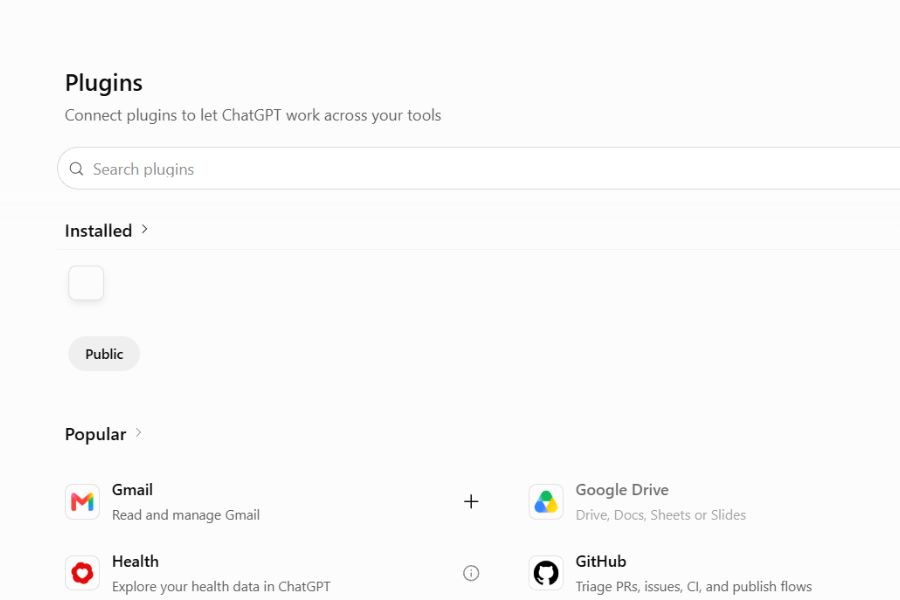
- Step 4: Connect the utility: Select the application you want to use and follow the connection instructions. Some services may require login or access permissions.
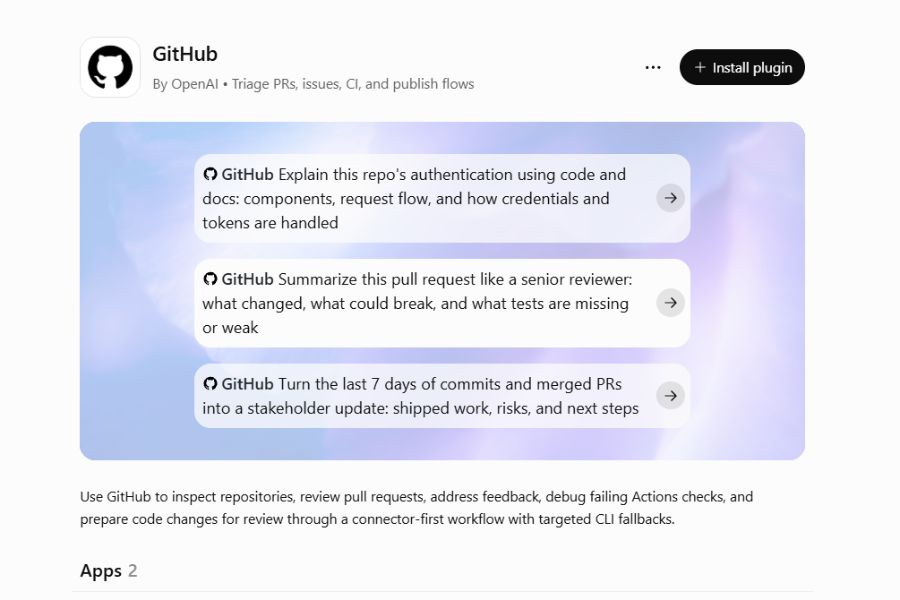
- Step 5: Get started: After successfully connecting, you can ask ChatGPT to use the application in your chat. Clearly describe the task you need to perform to receive the appropriate results.
5. Important notes when using Plugins
Although plugins offer many benefits, users still need to pay attention to the security and reliability of the connected services.
Some points to note:
-
Verify the source: Only connect to utilities with clearly identifiable and reliable providers.
-
Manage access permissions: Carefully read the permissions an application requests before agreeing.
-
Protect your personal information: Do not share passwords, financial data, or sensitive information unnecessarily.
-
Verify the results: Compare the information from ChatGPT with a reliable source before using it.
-
Track costs: Some third-party services may require account registration or separate fees.
Furthermore, not all plugins that were once available are still working. Users should prioritize applications currently supported by ChatGPT rather than trying to use discontinued extensions.
6. Differentiating between Plugins and Apps on ChatGPT today
When learning about plugins, many people easily confuse the early utility systems with the current application connection mechanisms. In fact, these are ways to extend ChatGPT's capabilities at different stages of development.
Besides apps, ChatGPT also supports various extensions such as custom GPT, data connectivity, and integrated tools. Users can access different features depending on their account.
7. Conclusion
Plugins once played a crucial role in expanding ChatGPT's capabilities, helping users connect with a wide range of services for learning, business, travel, and content creation. While the original plugin mechanism is no longer supported, solutions like apps and new integration methods continue to develop, offering more flexible ways to leverage AI. For effective use, you should choose applications that suit your needs, check access permissions, and verify information before applying them to real-world work.





















VIP Products








Best Selling Products
Windows 10 & 11 Pro Key
36 USD
Genuine Cheap Canva Pro
39 USD
Plugin Retouch4me
69 USD
Upgrade Duolingo Super
29 USD
Capcut Pro 1 Year
39 USD
Adobe Premiere Pro Account
99 USD
Upgrade genuine Capture One account
120 USD
Copyright Adobe Lightroom Account
59 USD
MidJourney Account
29 USD
Freepik Premium Account
59 USD
Adobe Photoshop Copyright - Full App
120 USD
Upgrade Genuine Office 365
49 USD
ChatGPT Plus Account (GPT-4)
16 USD
Autodesk All App Account Copyright
120 USD
Genuine Adobe Illustrator account
99 USD