Best Selling Products

Autodesk All App Account Copyright
120 USD

Genuine Cheap Canva Pro
39 USD

Freepik Premium Account
59 USD

Genuine Adobe Illustrator account
99 USD

Plugin Retouch4me
69 USD

Capcut Pro 1 Year
39 USD

Windows 10 & 11 Pro Key
36 USD

ChatGPT Plus Account (GPT-4)
16 USD

Upgrade Genuine Office 365
49 USD

MidJourney Account
29 USD

Upgrade Duolingo Super
29 USD

Upgrade genuine Capture One account
120 USD

Copyright Adobe Lightroom Account
59 USD

Adobe Photoshop Copyright - Full App
120 USD

Adobe Premiere Pro Account
99 USD
How to convert PDF to flipbook using ChatGPT in just a few steps
Nội dung
- 1. What is Flipbook on ChatGPT? What are the benefits of using it?
- 2. What do I need to prepare before converting a PDF to a flipbook using Flipbook on ChatGPT?
- 3. How to convert a PDF into a flipbook using Flipbook on ChatGPT
- 3.1. Installing and connecting the Flipbook utility with ChatGPT
- 3.2. Converting PDF documents into Flipbooks
- 4. Practical applications of Flipbook in learning and work.
- 5. Notes when converting PDF to flipbook using Flipbook on ChatGPT
- 6. Conclusion
Instead of sending regular PDF files with the familiar scrolling method, you can transform your documents into e-books with dynamic page-turning effects using the Flipbook tool. This method makes content more visually appealing, attractive, and professional, especially suitable for those who frequently work with digital documents. This guide on converting PDFs into flipbooks using Flipbook on ChatGPT helps users leverage AI technology to simplify document processing. With just a few basic steps, you can turn static text pages into an e-book with page-turning effects, serving your learning, work, and business needs. Let''s explore the detailed steps in the article below!
1. What is Flipbook on ChatGPT? What are the benefits of using it?
Flipbooks are a type of e-book that mimics the way pages turn in traditional paper books. Instead of displaying content in a conventional vertical scrolling format, this tool creates visual page-turning effects, giving the feeling of reading a real book on a computer or phone screen.
When combined with ChatGPT, users can leverage AI capabilities to learn, process, and manipulate documents more quickly. Through the compatible Flipbook app, PDF files can be transformed into vibrant digital publications without redesigning the entire content.
Some notable benefits of using Flipbook include:
-
Enhance the reading experience: Page-turning effects create a realistic feel, making the reader more engaged while following the document.
-
Time saving: Users don't need to rebuild each page of the book themselves using complex design software.
-
Increased professionalism: Company brochures, catalogs, and company profiles are presented more visually.
-
Convenient to share: You can use the links or sharing features of the Flipbook service to introduce online documents.
-
Versatile applications: Suitable for learning, teaching, business, advertising, and communication.
2. What do I need to prepare before converting a PDF to a flipbook using Flipbook on ChatGPT?
Before you begin, you should prepare your account, documents, and check the application's compatibility. This helps minimize errors that may occur during file uploads and conversions.
Some of the things that need to be prepared include:
-
ChatGPT Account: Log in with an account that has access to supported applications. Note that older plugin systems are no longer the default integration method on ChatGPT today.
-
PDF file: Prepare the file you want to convert on your computer. It's recommended to check the content, images, and fonts before uploading.
-
Flipbook applications: Identify the compatible Flipbook service you wish to use. Not all Flipbook tools are directly integrated into ChatGPT.
-
Internet connection: Ensure a stable connection to download documents and receive results.
-
Access permissions: Some third-party services may require you to log in or create a separate account before use.
3. How to convert a PDF into a flipbook using Flipbook on ChatGPT
The conversion process typically involves two main stages: connecting the tools and uploading the document to the processing system. Depending on the Flipbook application used, the interface and names of the options may vary.
3.1. Installing and connecting the Flipbook utility with ChatGPT
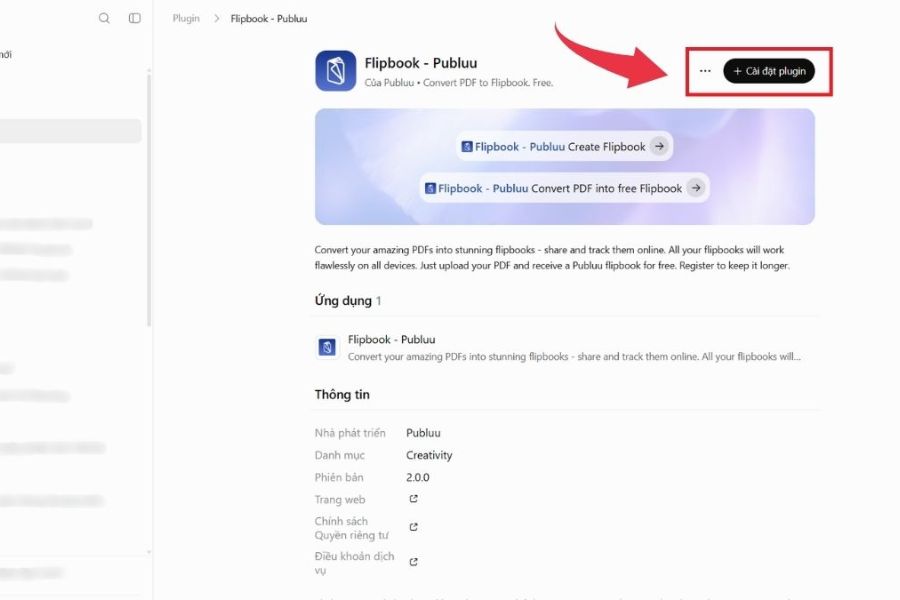
To use Flipbook, you first need to check if the app supports ChatGPT connectivity. Then, follow these steps:
Step 1: Access ChatGPT
Open your browser on your laptop, go to the ChatGPT website, and log in with your personal account. On the main interface, you can start searching for the application you need to use.
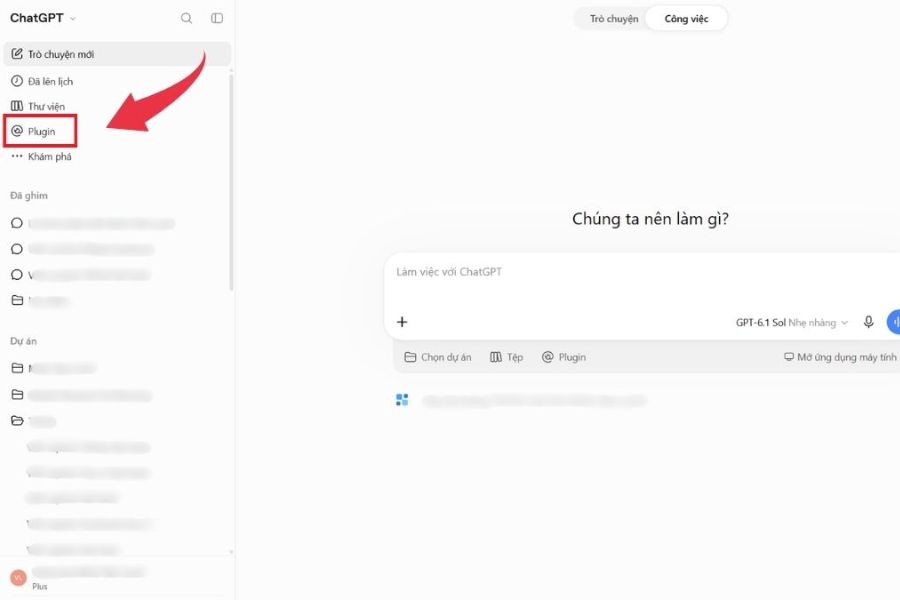
Step 2: Open the application area.
Find the "Apps" section in the ChatGPT navigation bar. This area displays the applications that can connect and be used with the chatbot.
Step 3: Search for Flipbook
Enter the keyword "Flipbook" into the search bar. When the results appear, select the appropriate app and review its description to check its functionality and usage requirements.
Step 4: Connect the application
If the app supports integration, tap the connect option or follow the on-screen instructions. If you need to log in to your Flipbook service account, complete the authentication step to grant access.
Note: If Flipbook is not found in the ChatGPT app list, you can use the standalone Flipbook service to perform the conversion.
3.2. Converting PDF documents into Flipbooks
Once you have the necessary tools, you can begin converting your document. With Flipbook services that support direct PDF downloads, the process is usually quite simple.
Step 1: Access the Flipbook tool.
Open the connected Flipbook app or access the website of your chosen service. Log in to your account if prompted to use the conversion functions.
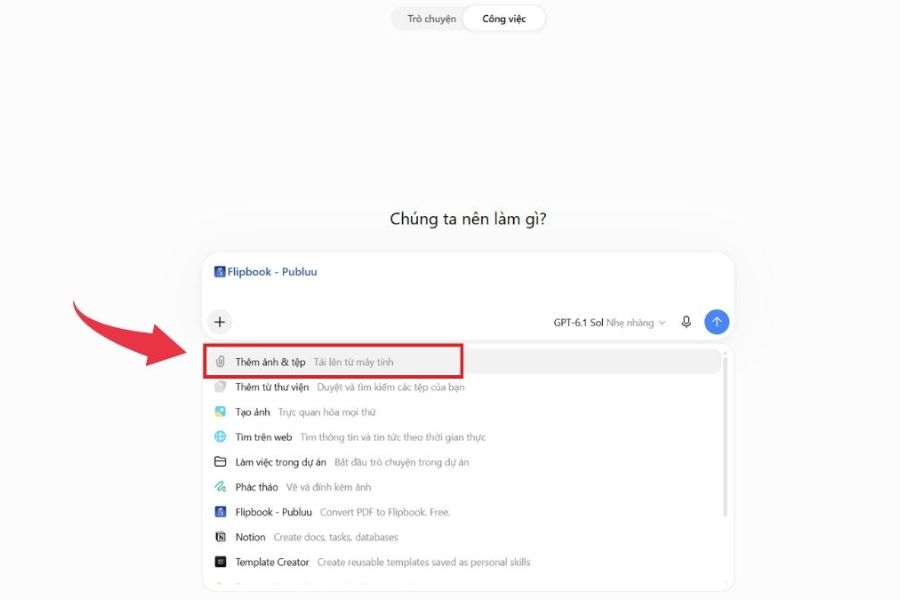
Step 2: Upload the PDF file to the system.
On the main interface, find the option Upload PDF, Upload Document, or Create Flipbook. Select one and upload the prepared PDF file from your computer to the system.
Step 3: Wait for the system to process the document.
After the file is successfully uploaded, the tool will read the content and convert each page into a flipbook format. Processing time depends on the file size, the number of pages, and the internet connection speed.
Step 4: Check the preview
Once complete, the system will display a preview of Flipbook. You should flip through a few pages to check the images, content, fonts, and layout before finalizing.
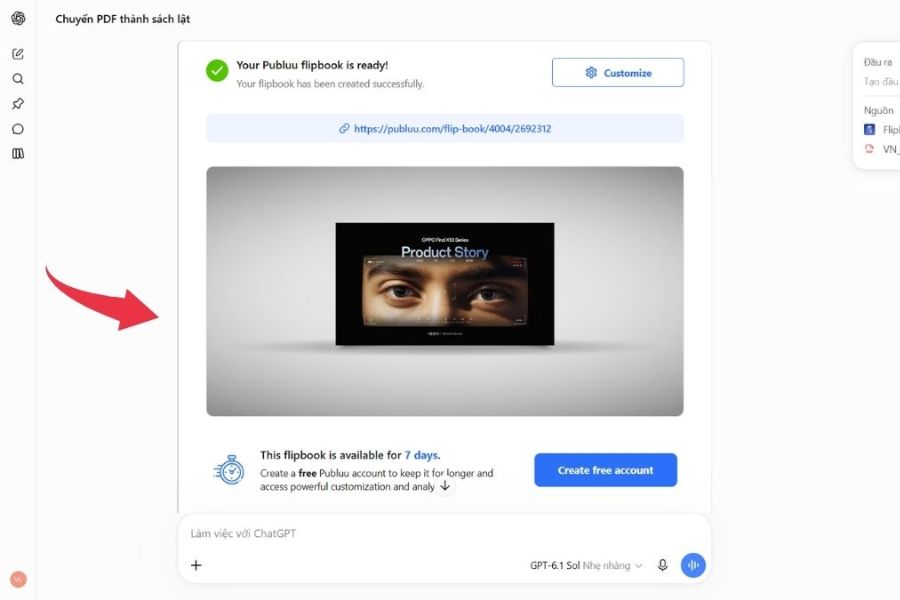
Step 5: Save and share Flipbook
If the results meet your requirements, choose the save or publish option according to the service's functionality. Some tools allow downloading, creating a sharing link, or embedding the flipbook into a website.
4. Practical applications of Flipbook in learning and work.
Flipbook is not simply a tool for changing how PDF documents are displayed; it also opens up many creative ways to present content. Thanks to its intuitive page-turning effect, users can apply this format to a variety of activities.
Some common use cases include:
-
In education: Teachers can convert lecture materials, reference books, or review materials into e-books for students to easily follow.
-
In business: Companies use Flipbook to design catalogs, price lists, company profiles, and service brochures.
-
In marketing: Stores can transform product catalogs into online publications, allowing customers to view information and images more conveniently.
-
In media: Flipbooks are suitable for presenting e-magazines, internal newsletters, and other media publications.
-
For personal use: Users can store documents, portfolios, or creative content as e-books.
5. Notes when converting PDF to flipbook using Flipbook on ChatGPT
Although the conversion process is quite simple, you still need to pay attention to a few factors to ensure that the processed document is of good quality and easy to use.
-
Check file size: Each Flipbook service may have different file size and page limits. If the file is too large, consider compressing the PDF before uploading.
-
Ensure the quality of the original document: Files with blurry images, font errors, or unbalanced layouts can affect the reading experience after conversion.
-
Check each page: Do not skip the preview step. Carefully check the content, images, and graphic elements for display errors.
-
Information security precautions: Avoid uploading documents containing personal data, financial information, or internal company content without first reviewing the service's privacy policy.
-
Check download and sharing permissions: Some features may require a paid account. You should review the terms of use beforehand to choose the option that suits you best.
-
Don't confuse ChatGPT with Flipbook: ChatGPT can assist with guidance and app integration, but the page-turning animation is usually handled by the Flipbook service.
6. Conclusion
Converting PDFs into flipbooks using Flipbook on ChatGPT is a fun way to refresh the presentation of digital documents. Instead of monotonous text pages, users can create publications with visual page-turning effects, suitable for learning, work, and business. Hopefully, with the above guide, you have grasped the steps to prepare, connect the tools, and convert documents to create more beautiful and professional e-books.





















VIP Products








Best Selling Products
Autodesk All App Account Copyright
120 USD
Genuine Cheap Canva Pro
39 USD
Freepik Premium Account
59 USD
Genuine Adobe Illustrator account
99 USD
Plugin Retouch4me
69 USD
Capcut Pro 1 Year
39 USD
Windows 10 & 11 Pro Key
36 USD
ChatGPT Plus Account (GPT-4)
16 USD
Upgrade Genuine Office 365
49 USD
MidJourney Account
29 USD
Upgrade Duolingo Super
29 USD
Upgrade genuine Capture One account
120 USD
Copyright Adobe Lightroom Account
59 USD
Adobe Photoshop Copyright - Full App
120 USD
Adobe Premiere Pro Account
99 USD