Best Selling Products

Plugin Retouch4me
69 USD

Adobe Photoshop Copyright - Full App
120 USD

Upgrade Duolingo Super
29 USD

Windows 10 & 11 Pro Key
36 USD

Genuine Cheap Canva Pro
39 USD

ChatGPT Plus Account (GPT-4)
16 USD

Upgrade Genuine Office 365
49 USD

Genuine Adobe Illustrator account
99 USD

MidJourney Account
29 USD

Capcut Pro 1 Year
39 USD

Copyright Adobe Lightroom Account
59 USD

Freepik Premium Account
59 USD

Upgrade genuine Capture One account
120 USD

Adobe Premiere Pro Account
99 USD

Autodesk All App Account Copyright
120 USD
Discover: Mastering 80% of the ChatGPT Codex for Beginners
Nội dung
- 1. What is the ChatGPT Codex?
- 2. Key benefits of using the Codex
- 3. A guide to getting started with the Codex for beginners.
- 4. Discover key features that will help you master the Codex.
- 4.1. Accessing and manipulating local files
- 4.2. Using Skills to Reuse Workflows
- 4.3. Connecting Plugins to Extend the Capabilities of the Codex
- 5. Secrets to writing prompts that help the Codex understand the requirements correctly.
- 6. Advanced tips for more effective use of the Codex
- 7. Mistakes to avoid when using the Codex
- 8. It is recommended to upgrade ChatGPT in Sadesign to utilize the Codex more effectively.
- 9. Conclusion
AI is opening up many new ways of working, especially in the field of programming and software development. Instead of writing every line of code, finding errors, or editing every file yourself, you can now rely on ChatGPT''s Codex to help you perform these tasks more quickly. The tool doesn''t just provide answers; it can also directly participate in the process of building and completing a project. So what are the notable features of Codex? How can you effectively utilize the full potential of this tool even without much programming experience? Let''s explore the details in the article below!
1. What is the ChatGPT Codex?
Codex is an AI programming assistant developed by OpenAI. The tool can read and understand source code, write code, edit files, find bugs, and perform many tasks during software development. The unique feature is that you don't need to manually perform each step; you can describe the work in natural language for Codex to analyze and execute. Instead of just asking the AI how to write a piece of code, you can assign Codex tasks like testing an entire project, finding the root cause of website malfunctions, or building a new feature.
Some of the tasks that the Codex can support include:
-
Write source code for websites and applications.
-
Analyze the structure and function of the project.
-
Detect, explain, and fix programming errors.
-
Customize the interface according to your requirements.
-
Optimize the source code and improve performance.
-
Write a user manual for the project.
Thanks to these capabilities, the Codex is suitable for both professional programmers and beginners who want to learn how to build software with the help of AI.

2. Key benefits of using the Codex
The Codex has revolutionized the way people approach programming. You no longer have to spend so much time on repetitive tasks; instead, you can focus on defining goals, generating ideas, and testing results.
The notable benefits of the tool include:
-
Save time: Supports quick code writing, editing, and bug checking, reducing manual processes.
-
Minimize programming errors: Source code can be reviewed to identify problems and suggest solutions.
-
Easy access to knowledge: Beginners can ask for explanations of complex code snippets in simple language.
-
Support for large projects: Ability to analyze multiple related files to understand how project components function.
-
Increased productivity: Helps programmers handle more tasks in the same amount of time.
However, the Codex cannot guarantee that all results are absolutely accurate. You still need to check the source code, test the functionality, and evaluate the changes before applying them to a real-world project.

3. A guide to getting started with the Codex for beginners.
To use the Codex, you first need to log in to a ChatGPT account with access to the feature. Depending on your needs, you can choose to use the Codex on the web, a desktop application, a programming environment, or a command-line interface.
The basic steps are as follows:
Step 1: Access the Codex
Open the appropriate Codex application or environment and log in using your ChatGPT account. Once successfully logged in, you can begin creating new tasks.
Step 2: Select the project to be processed.
If working on a computer, select the directory containing the source code you want the Codex to support. Providing the correct directory helps the AI better understand the project's structure and content.
Step 3: Enter your specific requirements.
Describe the task you want to perform. For example, you could ask the Codex to check the website, find interface errors, or explain the function of each file.
Step 4: Monitor the implementation process.
The Codex will analyze the request and perform the appropriate actions. You should monitor the processing steps to understand what changes the AI is making.
Step 5: Check the results
Once complete, review the edited files, check the source code, and test the functionality. If the results are not as expected, you can continue to request adjustments.

4. Discover key features that will help you master the Codex.
To make the most of the Codex, you should focus on understanding the features that directly support the programming and project management process. Among these, file manipulation, the use of Skills, and plugin integration are particularly noteworthy.
4.1. Accessing and manipulating local files
One of the strengths of the Codex is its ability to work directly with files within a project that has been granted access. You don't need to copy each code snippet into the chat window; instead, you can ask the AI to read, analyze, and edit the content right within the working environment.
For example, when building a website using HTML, CSS, and JavaScript, you can ask the Codex to check the project structure, find display errors, or add a new feature.
Some useful operations include:
-
Read and analyze the file content.
-
Create a new file as required.
-
Edit the existing source code.
-
Find the faulty code sections.
-
Rearrange the folder structure.
-
Check the changes after editing.
You should start with small tasks to understand how the Codex works. At the same time, restrict access permissions to folders containing personal data or important information unless absolutely necessary.
4.2. Using Skills to Reuse Workflows
Skills are a feature that helps Codex perform familiar tasks according to a pre-prepared set of instructions. Instead of having to re-enter all the requirements each time you work, you can build a custom Skill for the AI to apply when encountering a suitable task.
For example, if you regularly check the quality of source code, you can create a Skill specifically for reviewing code with specific criteria such as:
-
Check for syntax errors and logical errors.
-
Duplicate code snippets have been detected.
-
Evaluate the naming conventions for variables and functions.
-
Check the directory structure.
-
Suggest ways to improve the source code.
Once you have the right skills, you can reuse this process for many different projects. This saves time and maintains a consistent workflow.
4.3. Connecting Plugins to Extend the Capabilities of the Codex
Plugins extend the capabilities of the Codex by connecting with supported external tools and services. This allows you to build more convenient workflows instead of constantly switching between multiple applications.
Depending on the plugin, you can utilize features such as information retrieval, document management, or support for teamwork.
To use it, you can follow these steps:
-
Open the Plugins or Supported Application management area.
-
Find the tool you want to connect to.
-
Choose the app that best suits your needs.
-
Log in to your account if prompted.
-
Verify access permissions before confirming.
-
Start using it in appropriate tasks.
Note that not all plugins can connect directly to the Codex or perform the same functions. You should check the compatibility and permissions of each application before using it.
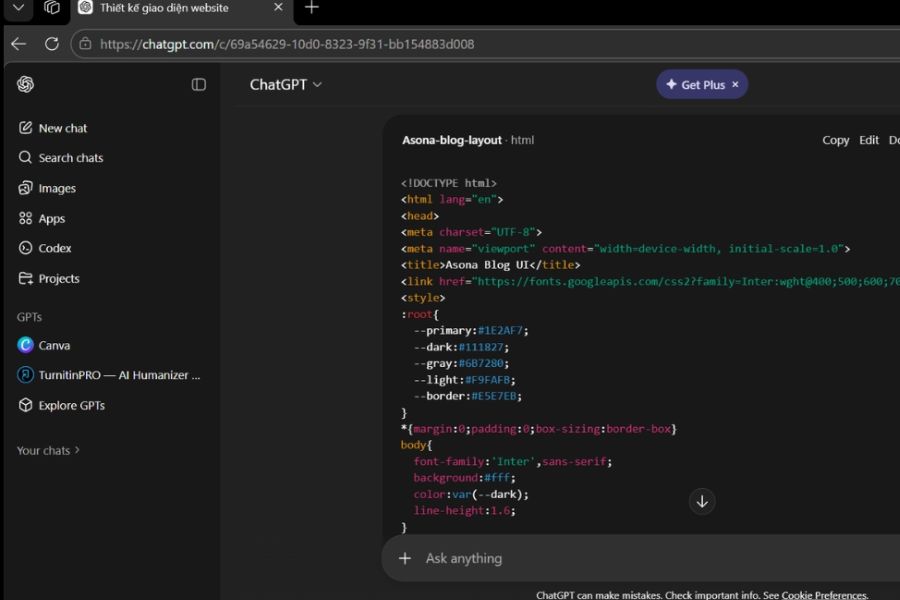
5. Secrets to writing prompts that help the Codex understand the requirements correctly.
For the Codex to perform its tasks accurately, you need to know how to describe the task clearly. A command that is too short or lacks information can cause the AI to misunderstand the objective, leading to unexpected results.
An effective prompt should include four elements: the task to be performed, the project context, specific requirements, and the desired outcome.
Here are some easy-to-use prompt templates:
Prompt 1: Project Analysis
"Please review the current project structure, explain the function of each folder and important files. Describe how the components connect to each other and ensure no content has been modified."
Prompt 2: Find and fix errors
"Please examine the source code to find the reason why the login button is not working. Explain the cause, suggest a solution, and only modify the files that are truly necessary."
Prompt 3: Building a website
"Create a product showcase website using HTML, CSS, and JavaScript. The interface should be modern, user-friendly, and compatible with both mobile phones and computers. After completion, please test all the functionalities."
Prompt 4: Optimize source code
"Review the project for duplicate, unmaintainable, or illogical code. Provide a list of suggestions before making any changes."
Prompt 5: Write a user manual
"Analyze the project and create documentation outlining the installation, configuration, and usage of key features. Present the information in easily understandable language so that even beginners can follow along."
A helpful tip is to break down large tasks into smaller requirements. This allows the Codex to focus on addressing each issue individually, while also making it easier to check and adjust the results.
6. Advanced tips for more effective use of the Codex
Once you're familiar with the basic operations, you can explore more advanced features to improve the speed and quality of your work.
-
Use multiple parallel tasks: For independent tasks, you can assign work to multiple agents to handle simultaneously.
-
Provide reference images: Use screenshots of the interface, design sketches, or error messages to help the Codex better understand the requirements.
-
Integrate Git for source code management: Track edit history, compare versions, and easily restore when needed.
-
Post-editing testing required: Please have the Codex run tests to check functionality and identify any remaining bugs.
-
Create the AGENTS.md file: Save the project's specific rules, guidelines, and requirements so the Codex has more information to work with.
-
Leverage the Review feature: Use AI to review changes in the source code before deployment.
In particular, you should maintain the habit of testing changes before accepting them. This helps to mitigate risks and ensure the project continues to function as intended.
7. Mistakes to avoid when using the Codex
Despite its many useful capabilities, the Codex still needs to be used correctly to be effective. New users often struggle because they don't know how to delegate tasks or they rely too heavily on the results provided by the AI.
Here are some mistakes you should avoid:
-
The request lacks specificity: Clearly describe the problem, the functions to be performed, and the desired outcome.
-
Granting excessively broad access: Only allow the Codex to use resources that are truly necessary.
-
Don't skip testing the results: Always run tests and review the source code after the AI has made its adjustments.
-
Assigning too many tasks at once: Break down the work into smaller tasks to make it easier to track progress.
-
Completely reliant on AI: Proactively researching and evaluating changes instead of accepting every suggestion.
Think of the Codex as a programming partner. It can help you with many tasks, but quality control and final decisions ultimately rest with the user.

8. It is recommended to upgrade ChatGPT in Sadesign to utilize the Codex more effectively.
If you frequently use AI for programming, data analysis, or project development, choosing the right ChatGPT package will give you a more convenient work experience. ChatGPT packages differ in usage limits and Codex access rights, so you should research carefully before making a choice.
Sadesign offers AI account upgrade services, including ChatGPT, for individuals and businesses with frequent usage needs. When choosing to upgrade at Sadesign, you can receive many practical support benefits:
-
We will advise you on the account package that best suits your needs.
-
Fast and convenient upgrade support.
-
A guide to using useful AI features.
-
Dedicated support throughout the usage process.
-
Reasonable costs, simple payment process.
If you're looking to leverage the Codex to support programming, automation, and improve work efficiency, you can check out Sadesign's ChatGPT upgrade service to find the right solution.
9. Conclusion
ChatGPT's Codex is a useful AI tool that simplifies many steps in the software programming and development process. From file manipulation and using Skills to connecting Plugins, writing prompts, and checking source code, each feature can contribute to improved work efficiency if used correctly. To master 80% of the Codex, you don't need to learn everything from scratch. Start with simple tasks, practice regularly, and gradually explore advanced features. By knowing how to delegate tasks, track progress, and control results, you will leverage the power of AI to save time, handle work efficiently, and develop your own projects.





















VIP Products








Best Selling Products
Plugin Retouch4me
69 USD
Adobe Photoshop Copyright - Full App
120 USD
Upgrade Duolingo Super
29 USD
Windows 10 & 11 Pro Key
36 USD
Genuine Cheap Canva Pro
39 USD
ChatGPT Plus Account (GPT-4)
16 USD
Upgrade Genuine Office 365
49 USD
Genuine Adobe Illustrator account
99 USD
MidJourney Account
29 USD
Capcut Pro 1 Year
39 USD
Copyright Adobe Lightroom Account
59 USD
Freepik Premium Account
59 USD
Upgrade genuine Capture One account
120 USD
Adobe Premiere Pro Account
99 USD
Autodesk All App Account Copyright
120 USD