Best Selling Products

Upgrade genuine Capture One account
120 USD

Upgrade Duolingo Super
29 USD

Autodesk All App Account Copyright
120 USD

Capcut Pro 1 Year
39 USD

Copyright Adobe Lightroom Account
59 USD

MidJourney Account
29 USD

Windows 10 & 11 Pro Key
36 USD

Genuine Adobe Illustrator account
99 USD

Plugin Retouch4me
69 USD

Upgrade Genuine Office 365
49 USD

Freepik Premium Account
59 USD

Adobe Photoshop Copyright - Full App
120 USD

Adobe Premiere Pro Account
99 USD

Genuine Cheap Canva Pro
39 USD

ChatGPT Plus Account (GPT-4)
16 USD
AI Gemini 8/3 Avatar Creation Trend Loved by Young People
Nội dung
- 1. Preparation Before Creating an 8/3 Avatar with AI
- 2. How to Create an 8/3 Avatar with AI Gemini (Beginner-Friendly Guide)
- 2.1 Step 1: Access Gemini and Open Image Generation Mode
- 2.2 Step 2: Upload Your Portrait Photo
- 2.3 Step 3: Enter a Detailed Prompt for Your 8/3 Avatar
- 2.4 Step 4: Generate the Image and Wait for Processing
- 2.5 Step 5: Review and Download Your Avatar
- 3. Collection of Multi-Style 8/3 Avatar Prompts Using AI
- 4. Tips for Creating Beautiful and Accurate 8/3 Avatars with Google Gemini
- 5. Frequently Asked Questions
- 6. Conclusion
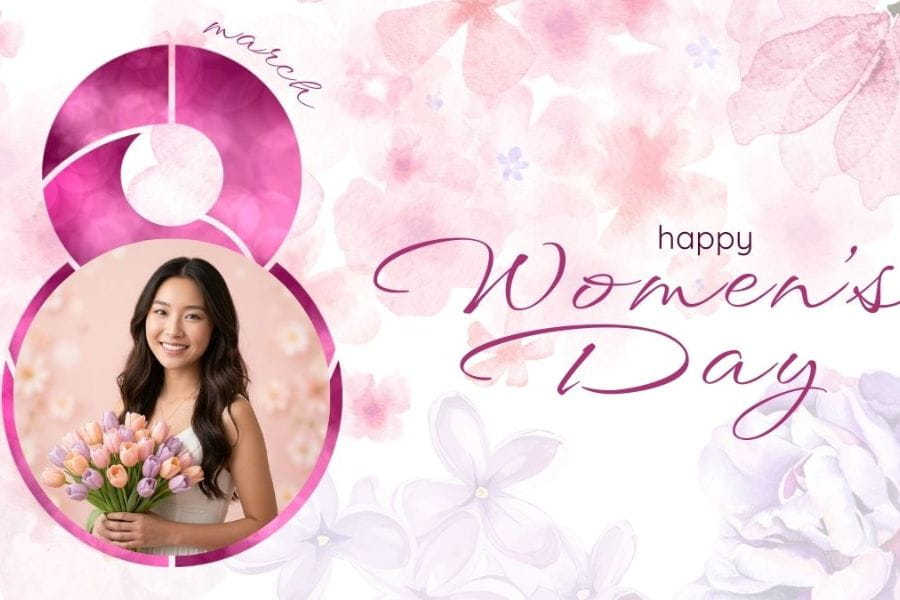
International Women’s Day on March 8 is a great occasion to refresh your profile picture and spread messages of love in a more creative way.
1. Preparation Before Creating an 8/3 Avatar with AI
Prepare a clear, high-quality portrait photo: This is the most important step because the AI will rely entirely on the original image to recreate your face in a new style. You should choose a front-facing or slightly angled photo with high resolution and no blur. Your face should occupy most of the frame so the AI can accurately recognize every detail. Avoid using heavily filtered images that alter your facial structure.
Ensure natural lighting and no obstructions on the face: Good lighting helps the AI process skin tone and details more clearly. Take photos in well-lit environments with even lighting on both sides of your face, avoiding overly harsh or dim conditions. Also, avoid wearing sunglasses, masks, or letting hair cover your eyes, nose, or mouth, as this may lead to incorrect recognition or unnatural results.
Define your desired 8/3 avatar style in advance: Before starting, visualize the concept you want: soft feminine with flowers, modern tech style, cute chibi, or a professional look for social media. A clear concept helps you write better prompts, allowing the AI to generate accurate results on the first try.
Prepare a detailed prompt description: In addition to style, include elements such as dominant colors, types of flowers, lighting effects, outfits, and even text you want to appear (e.g., “Happy Women’s Day 8/3”). The more detailed your description, the better the AI can understand your idea and produce impressive results.
%20(1).jpg)
2. How to Create an 8/3 Avatar with AI Gemini (Beginner-Friendly Guide)
With just a clear portrait photo and a few minutes on Google Gemini, you can create a unique 8/3 avatar without any design skills.
2.1 Step 1: Access Gemini and Open Image Generation Mode
First, open Gemini on your browser or mobile app. On the main interface, select Tools and click Generate Image. In this mode, you can both input a description and upload a portrait for AI reference. This step ensures you activate the image creation feature instead of just text chatting.
2.2 Step 2: Upload Your Portrait Photo
In the input box, click the plus icon to upload your prepared image. After uploading, the image will appear in the input area. Check if the face is clear and not cropped (forehead or hair missing). The clearer the image, the more accurate the AI will recreate your face.
2.3 Step 3: Enter a Detailed Prompt for Your 8/3 Avatar
After uploading the image, enter your prompt describing the desired style. Clearly mention the 8/3 atmosphere with flowers, pastel backgrounds, or soft lighting. You can also include outfit details like a white dress, áo dài, or modern fashion. If creating for social media, don’t forget to specify a 1:1 ratio.
Example:
“Create an 8/3 avatar in a feminine style, pastel rose background, soft glow lighting, wearing an elegant white dress, 1:1 ratio, high quality.”
The more specific your prompt, the closer the result will match your idea.
%20(1).jpg)
2.4 Step 4: Generate the Image and Wait for Processing
After completing your prompt, click submit to let Gemini process it. Image generation usually takes a few seconds to about a minute depending on prompt complexity.
2.5 Step 5: Review and Download Your Avatar
Once the image is generated, zoom in to check the face, lighting, and overall composition. If it’s not satisfactory, you can adjust the prompt and regenerate. When satisfied, click Download to save the high-resolution image and use it as your 8/3 avatar on social media platforms.
%20(1).jpg)
3. Collection of Multi-Style 8/3 Avatar Prompts Using AI
Prompt 1: Create an 8/3 avatar based on the provided original face, preserving all facial structure, proportions, eyes, and natural expression without altering identifiable features. Medium close-up 3/4 angle, eye-level camera, 85mm focal length for a professional portrait effect. Slight 30-degree head tilt, gentle gaze, subtle natural smile. Elegant white dress, holding pastel tulips. Light pink background with soft bokeh, softbox lighting from the left. Moderate depth of field, realistic skin, high sharpness, 4K quality, square 1:1 composition.
%20(1).jpg)
Prompt 2: Create an 8/3 avatar from the uploaded face, preserving all facial features. Front-facing shot, chest-up frame, 70–85mm focal length, direct eye contact with a confident expression and slight professional smile. Minimalist white or beige suit, modern office background with natural window light from the right. Balanced lighting with soft fill light. Neutral tones, high detail, 1:1 ratio.
Prompt 3: Create an 8/3 avatar preserving the original face and natural expression. Medium shot, slightly turned back pose with head looking toward the camera. Eye-level camera, 50mm focal length. Flower garden at sunset with backlight creating a glow around hair and shoulders. Warm film tone, shallow depth of field. High detail, 4K quality, square 1:1 composition.
%20(1).jpg)
Prompt 4: Create an 8/3 avatar in chibi style based on the original face, preserving key facial features (especially eyes and nose-mouth structure). Transform into a big-head, small-body cartoon style with cheerful expression, sparkling eyes, and rosy cheeks. Front view, heart-hand pose. Pink pastel background with floating flowers. Clean illustration style, soft shadows, vibrant colors, high quality, 1:1 ratio.
Prompt 5: Create an 8/3 avatar preserving facial structure and natural expression. Close medium shot, eye-level camera, 85mm focal length, subject resting chin on hand with a thoughtful yet soft gaze. Minimal white outfit, nude or light pastel background. Soft natural front lighting. Premium minimalist style, realistic skin, high resolution, centered 1:1 composition.
Prompt 6: Create an 8/3 avatar preserving all facial proportions. Close-up 3/4 angle, 85mm focal length, slightly off-camera gaze for a natural and captivating feel. Confident expression, subtle smile. Light peach-toned makeup, dark studio background with spotlight. Soft key light with rim light for depth. High detail, natural skin, 1:1 ratio.
%20(1).jpg)
Prompt 7: Create an 8/3 avatar preserving real facial features. Front-facing medium shot, eye-level camera, gentle side gaze, elegant expression. Wearing a white or light pink áo dài, holding a lotus flower. Traditional Vietnamese background with soft morning light. Clear colors, high detail, 4K resolution, square 1:1 composition.
Prompt 8: Create an 8/3 avatar preserving the original face. 45-degree angle, 50mm focal length, focused gaze toward the screen with a strong and determined expression. Sitting on a gaming chair, wearing RGB headphones. Neon pink-purple background, high contrast lighting with glowing edges. Modern eSports style, high detail, 1:1 ratio.
Prompt 9: Create an 8/3 avatar preserving facial features and natural expression. Medium shot, eye-level camera, slight body turn with a gentle gaze toward the camera. Floating flower effects for motion. Soft pink-purple pastel lighting, moderate depth of field. Cinematic artistic style, high detail, 4K quality, 1:1 composition.
%20(1).jpg)
Prompt 10: Create an 8/3 avatar preserving all facial features and natural expression. Slight top-down selfie angle (~20 degrees), direct eye contact, bright genuine smile. Background with flowers and “Happy Women’s Day 8/3” text. Bright natural lighting, accurate white balance. Realistic lifestyle style, detailed skin, high resolution, square 1:1 composition.
%20(1).jpg)
4. Tips for Creating Beautiful and Accurate 8/3 Avatars with Google Gemini
-
Avoid overly vague prompts like “create a beautiful 8/3 avatar.” Add details about color, style, lighting, and outfit for better results.
-
Specify preserving original facial features if you want realistic likeness.
-
Don’t overload with too many styles (cinematic + chibi + neon + vintage at once). Choose one main concept.
-
Always define image ratio (preferably 1:1 for avatars).
-
Check spelling when adding text like “Happy Women’s Day 8/3.”
-
Be ready to refine and regenerate if the first result isn’t perfect.
5. Frequently Asked Questions
5.1 Is creating 8/3 avatars with Gemini free?
Gemini currently offers a free version with a limited number of daily image generations—enough to experiment with different concepts. Paid upgrades provide faster processing and higher-quality outputs.
5.2 Are uploaded photos stored publicly?
Your uploaded images are used for processing and are not automatically made public. However, avoid using sensitive or private photos for safety.
5.3 Why doesn’t the generated avatar look like the real face?
This usually happens due to low-quality input images or overly stylized prompts. Use clear photos and include phrases like “preserve original facial features.”
5.4 Can AI keep the original outfit?
Yes. Simply specify that you want to keep the outfit and only change the background or add 8/3 elements.
5.5 What image ratio is best for social media avatars?
A 1:1 (square) ratio works best for platforms like Facebook, Zalo, and Instagram.
5.6 Can I add “Happy Women’s Day 8/3” text?
Yes. Clearly describe the text, position, color, and font style for best results.
6. Conclusion
Creating an 8/3 avatar with AI Gemini is no longer complicated or limited to designers. With just a portrait photo and a clear prompt, you can create a personalized avatar that follows tech trends and spreads meaningful messages celebrating women in a creative way. Hopefully, with this detailed guide from Sadesign, you’ll confidently explore different styles and find the perfect 8/3 avatar that is both visually appealing, meaningful, and truly stands out among countless social media profile pictures.





















VIP Products








Best Selling Products
Upgrade genuine Capture One account
120 USD
Upgrade Duolingo Super
29 USD
Autodesk All App Account Copyright
120 USD
Capcut Pro 1 Year
39 USD
Copyright Adobe Lightroom Account
59 USD
MidJourney Account
29 USD
Windows 10 & 11 Pro Key
36 USD
Genuine Adobe Illustrator account
99 USD
Plugin Retouch4me
69 USD
Upgrade Genuine Office 365
49 USD
Freepik Premium Account
59 USD
Adobe Photoshop Copyright - Full App
120 USD
Adobe Premiere Pro Account
99 USD
Genuine Cheap Canva Pro
39 USD
ChatGPT Plus Account (GPT-4)
16 USD