Best Selling Products

Copyright Adobe Lightroom Account
59 USD

Upgrade Genuine Office 365
49 USD

Adobe Photoshop Copyright - Full App
120 USD

Adobe Premiere Pro Account
99 USD

ChatGPT Plus Account (GPT-4)
16 USD

Upgrade Duolingo Super
29 USD

Autodesk All App Account Copyright
120 USD

Windows 10 & 11 Pro Key
36 USD

Plugin Retouch4me
69 USD

Genuine Cheap Canva Pro
39 USD

Freepik Premium Account
59 USD

Genuine Adobe Illustrator account
99 USD

Upgrade genuine Capture One account
120 USD

MidJourney Account
29 USD

Capcut Pro 1 Year
39 USD
CapCut: An online video explainer creation platform for all fields.
Nội dung
- 1. The benefits of an Explainer Video
- 2. Key features of the CapCut video explainer creation tool
- 2.1. Template library specifically for explainer videos
- 2.2. No watermarks, no intrusive advertisements.
- 2.3. Professional voiceover and screen recording tools
- 3. Benefits of creating explainer videos
- 3.1. Supporting effective product and service promotion
- 3.2. Reaching customers through multiple channels
- 3.3. Creating additional sustainable income streams
- 4. Create explainer videos with CapCut in just 3 steps.
- 4.1. Choose an explainer video template
- 4.2. Editing content, text, and music
- 4.3. Export and upload videos instantly.
- 5. Frequently Asked Questions
Whether you work in education, business, technology, or content creation, CapCut has a suitable template. This tool helps you quickly create explanatory videos that are optimized for each platform. A comprehensive option for both beginners and experts.
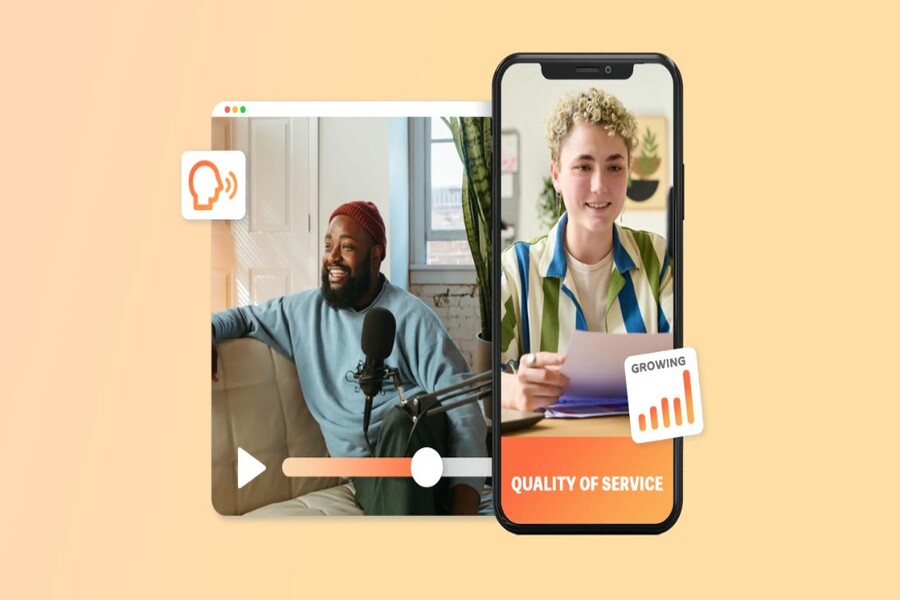
CapCut: An online video explainer creation platform for all fields.
Whether you work in education, business, technology, or content creation, CapCut has a suitable template. This tool helps you quickly create explanatory videos that are optimized for each platform. A comprehensive option for both beginners and experts.
In just a few dozen seconds, a good explainer video can accomplish what thousands of words might not fully convey: identifying the problem, offering a solution, and persuading viewers to take action. The core goal of an introductory video is to explore the problem your product or service is solving, then show the audience why they truly need it in their lives or work. An effective explainer video doesn't sell directly, but guides viewers from "what problem am I facing?" to "this solution is made for me." Today, you no longer need a professional production team, expensive cameras, or complex post-production software to create a quality introductory video. With CapCut, you have everything you need to turn your idea into a complete, visually appealing, and persuasive video.
1. The benefits of an Explainer Video
Explainer videos are not simply instructional videos. In fact, this type of content plays many different roles in communication, marketing, and personal branding strategies.
First and foremost, as the name suggests, explainer videos are designed to provide explanations. The content can include instructions on how to use a product, a process for performing a task, or how to solve a specific problem. Many people turn to explainer videos as a helpful tool in their daily lives, from repairing household appliances and learning a new skill to understanding how a technology service works.
Besides providing guidance, explainer videos are also highly entertaining. Many people watch "how-to," "explanation," and "tips and tricks" videos even if they don't actually need to apply the information. This shows that the appeal of explainer videos lies in their storytelling and the way they present information in a simple, relatable, and accessible manner.
.jpg)
For content creators, the goal isn't just to explain things correctly, but also to make the video engaging enough for viewers to watch from beginning to end. A successful explainer video is one where the audience feels they are learning something, being entertained, and not being forced to watch an advertisement.
2. Key features of the CapCut video explainer creation tool
Among the many online video creation tools available today, CapCut stands out thanks to its rare balance of professionalism, creativity, and free availability. In particular, with the need to produce quick, short, and effective explainer videos, CapCut is becoming a familiar choice for millions of content creators worldwide.
2.1. Template library specifically for explainer videos
Unlike traditional lectures that last for tens of minutes, modern explainer videos, especially on platforms like TikTok, Instagram Reels, or YouTube Shorts, are typically very short. The majority of popular explainer videos today are under a minute long, yet still convey the full message.
.jpg)
CapCut understands this and provides a library of explainer video templates optimized for short content. With just a few selections, you'll have a complete video frame with background music, transition effects, and a well-designed layout. From there, you can easily personalize your video by adding text, icons, stickers, or changing the colors to match your brand style.
Thanks to readily available templates, content creators can produce videos quickly and consistently – a crucial element for success in any digital field.
2.2. No watermarks, no intrusive advertisements.
One of the things that makes many people wary of online video editing tools is watermarks and ads. Nothing ruins the explainer video viewing experience more than a huge watermark logo or being forced to watch a barrage of ads before downloading the video.
CapCut completely solves this problem. Users can export complete videos without watermarks, without needing to provide credit card information, and without being asked to watch lengthy advertisements. Even premium resources like animated stickers, moving text, and pre-made templates are provided free of charge.
.jpg)
This allows content creators to focus entirely on video quality, instead of struggling with technical hurdles or unexpected costs.
2.3. Professional voiceover and screen recording tools
Explainer videos often require specialized features such as screen recording or voice-over explanations. For example, when demonstrating the use of software, applications, or websites, recording screen activity is almost mandatory.
CapCut includes a built-in screen recording tool, allowing you to record your actions directly and save them to a cloud library. You can then add voiceovers using the voiceover tool or use AI-powered text-to-speech. This is an extremely useful solution for those who don't have a high-quality microphone or want to produce content quickly.
By combining screen recording and voiceovers on the same platform, the explainer video production process becomes seamless, saving time while still ensuring professional quality.
.jpg)
3. Benefits of creating explainer videos
Explainer videos are not just an "easy-to-watch" content format; they also offer significant strategic value for individuals and businesses.
3.1. Supporting effective product and service promotion
Instead of direct advertising, explainer videos allow you to create content that offers real value to your viewers. When you explain a problem a customer is facing and offer a solution in a subtle way, that's the most effective form of "soft selling."
.jpg)
Customers tend to trust and remember brands that helped them understand the problem, rather than brands that only focused on selling products.
3.2. Reaching customers through multiple channels
Explainer videos naturally appeal to a large audience. These viewers frequently seek out explanatory and instructional content and are willing to follow channels that provide useful information.
.jpg)
By simply choosing the right topic and maintaining a consistent content style, you can absolutely build a loyal following across multiple platforms.
3.3. Creating additional sustainable income streams
With a large audience, explainer videos open up opportunities to monetize through advertising, sponsorships, affiliate marketing, or selling your own products/services. Many content creators have built a significant income stream simply by consistently producing high-quality explainer videos.
.jpg)
4. Create explainer videos with CapCut in just 3 steps.
One of CapCut's biggest advantages is its simple video creation process, suitable for both beginners and professional content creators.
4.1. Choose an explainer video template
The first step is to browse through the free template library and choose a template that suits the theme you want to implement. CapCut offers templates for many different fields, from education, technology, and marketing to everyday life. After choosing a template, you can start editing immediately.
.jpg)
4.2. Editing content, text, and music
To make your videos more lively and engaging, you can take advantage of CapCut's extensive resource library. Adding animated text, stickers, or effects helps convey information more clearly and memorably. Royalty-free music also plays a crucial role in maintaining the rhythm and emotion of the video.
.jpg)
4.3. Export and upload videos instantly.
Once completed, you can export your video directly to social media platforms without worrying about watermarks or ads. CapCut supports various aspect ratios, suitable for TikTok, YouTube, Facebook, or Instagram.
.jpg)
5. Frequently Asked Questions
How long should the introductory video be?
Introductory videos are typically short. However, the exact length depends on the social media platform you choose. For example, TikTok introductory videos are usually under one minute, while Facebook introductory videos are often longer than five minutes. On YouTube, content creators often upload compilation videos that are over twenty minutes long. Remember, tailor your video to the social media platform and adhere to general guidelines.
How should I start an introductory video?
Because introductory videos are typically short, they don't need a lengthy opening. Instead, start explaining right away! Get straight to the point. You only have a few minutes, so make the most of every second. Remember, on platforms like TikTok, keep your videos concise and to the point. Never let your content drag on or become boring.
How much should a promotional video cost?
When using CapCut, the best online intro video creation software, you don't need to spend a dime. With just a few things, like a phone and some basic household items, you can create a free intro video. If you want to make a tech-related intro video, you might need to buy more equipment, but content like kitchen tips and craft videos has lower production costs. As your channel grows, consider investing in a good microphone, camera, and lighting system.
.jpg)
What should a promotional video include?
A typical introductory video usually consists of two parts: first, the content creator presents a common problem; second, they offer an innovative solution. By following this formula, you're sure to please your audience. Additionally, at the end of each introductory video, you should add a call to action (CTA) to invite viewers to like, comment, and subscribe to your channel. You can invite them verbally, in text, or by using animated stickers.
What are the different types of introductory videos?
You can find intro videos for everything. When choosing a specialty, choose something you understand well. You'll find an audience for anything, so instead of chasing trends, focus on creating high-quality content related to a topic you love. Your enthusiasm will shine through and attract followers. Remember, whether you want to produce animated intro videos or standard-format content, you can find all the necessary tools on CapCut.
Explainer videos are gradually becoming the common language of modern digital content. With their ability to convey information quickly, easily, and emotionally, they are an indispensable format for anyone wanting to build a personal brand, promote products, or share knowledge.
CapCut, as a powerful and free online explainer video maker, has broken down the barrier between idea and finished product. With just a computer or phone, you can create professional, engaging, and truly valuable introductory videos for your viewers.
If you're looking for a simple yet powerful tool to get started on your explainer video creation journey, CapCut is a worthwhile investment.





















VIP Products








Best Selling Products
Copyright Adobe Lightroom Account
59 USD
Upgrade Genuine Office 365
49 USD
Adobe Photoshop Copyright - Full App
120 USD
Adobe Premiere Pro Account
99 USD
ChatGPT Plus Account (GPT-4)
16 USD
Upgrade Duolingo Super
29 USD
Autodesk All App Account Copyright
120 USD
Windows 10 & 11 Pro Key
36 USD
Plugin Retouch4me
69 USD
Genuine Cheap Canva Pro
39 USD
Freepik Premium Account
59 USD
Genuine Adobe Illustrator account
99 USD
Upgrade genuine Capture One account
120 USD
MidJourney Account
29 USD
Capcut Pro 1 Year
39 USD