Best Selling Products

Genuine Adobe Illustrator account
99 USD

Adobe Premiere Pro Account
99 USD

Genuine Cheap Canva Pro
39 USD

Upgrade Duolingo Super
29 USD

MidJourney Account
29 USD

Capcut Pro 1 Year
39 USD

Freepik Premium Account
59 USD

ChatGPT Plus Account (GPT-4)
16 USD

Upgrade Genuine Office 365
49 USD

Upgrade genuine Capture One account
120 USD

Windows 10 & 11 Pro Key
36 USD

Adobe Photoshop Copyright - Full App
120 USD

Plugin Retouch4me
69 USD

Autodesk All App Account Copyright
120 USD

Copyright Adobe Lightroom Account
59 USD
CapCut: The Most Popular Free Music Video Editing Software Today
Nội dung
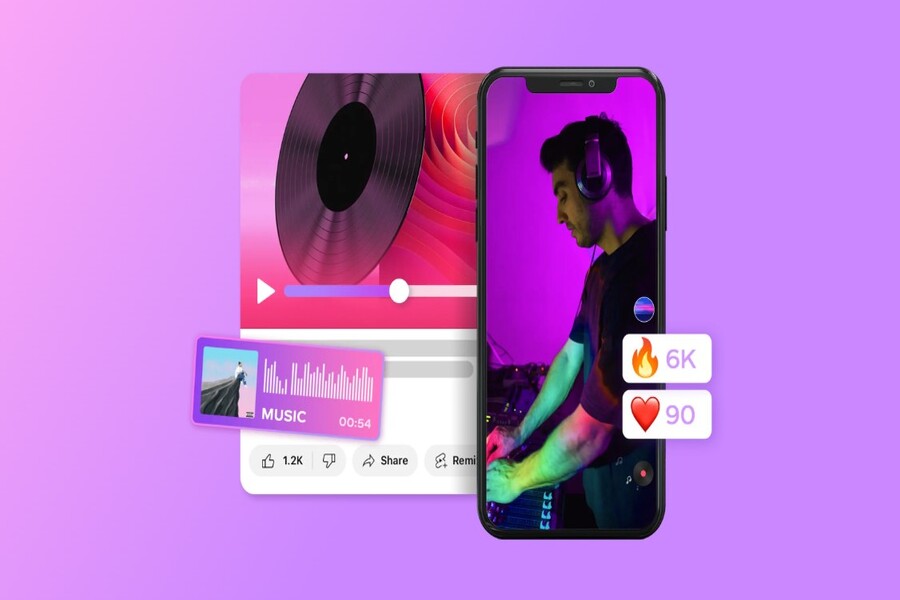
Introducing why CapCut has become the top choice for music content creators. From royalty-free music libraries to AI-powered subtitle generation, it's suitable for both beginners and professionals.
CapCut: The Most Popular Free Music Video Editing Software Today
Introducing why CapCut has become the top choice for music content creators. From royalty-free music libraries to AI-powered subtitle generation, it's suitable for both beginners and professionals.
Not everyone has the resources to invest in a professional filming and editing team or use complex, expensive post-production software. Technical and cost barriers once made music video production the "privilege" of large studios. Today, the emergence of online video editing tools has completely changed the game, especially CapCut: a platform considered a leading music video creation software with the ability to be free, easily accessible, yet maintain professional quality. CapCut is more than just a simple video editing tool. With its ecosystem of audio editing, visual effects, AI support, and a rich resource library, CapCut opens up opportunities for anyone to create high-quality music videos that suit today's digital trends.
1. What is the best music video editing app?
The question "Which music video editing app is best?" doesn't have a single, absolute answer for everyone, as each user has different needs, skills, and goals. However, considering the general needs of today's users—easy to use, low cost, strong audio support, and suitability for the online environment—CapCut stands out as a superior choice.
Currently, the market offers a wide range of video editing software advertised as capable of creating music videos, from professional desktop software to mobile applications. Most of these either require high-end computer specifications or require users to pay to unlock important features, especially music resources and effects.
CapCut takes a different approach. The platform focuses on providing professional tools while maintaining user-friendliness. Users can create complete music videos using only a browser or phone, without needing advanced post-production knowledge. More importantly, CapCut offers a library of royalty-free music.
.jpg)
Furthermore, CapCut integrates an AI-powered automatic subtitle generator. This is especially useful for music videos with lyrics, lyric videos, or live performance videos. CapCut's AI can recognize speech, convert lyrics into subtitles, and even translate into multiple languages. This is a huge advantage for artists who want to reach an international audience without investing in additional translation costs.
The combination of being free, easy to use, having abundant resources, and AI technology has made CapCut one of the best music video editing apps available today, especially in the context of the explosion of short video content and digital music on social media platforms.
2. Key features of CapCut, a leading music video creation software.
CapCut attracts users not only because it's "free," but also because of its feature system designed around a creative experience. These features not only serve for general video editing, but are also specifically optimized for music video production.
2.1. Copyright Issues
One of the biggest obstacles in creating music videos is copyright. Using background music or sound effects from unknown sources can lead to video removal, distribution restrictions, or loss of monetization potential. CapCut thoroughly addresses this issue with its library of royalty-free music and sound effects, allowing users to confidently create and publish content.
The value here lies not only in the quantity of resources, but also in how CapCut categorizes and organizes them by mood, genre, and context. Users can easily find music that matches the atmosphere of their music video. If you're producing punk rock, CapCut offers effects and filters with dark, strong, and gloomy tones. If you're pursuing pop, acoustic, or indie, bright, clear, and emotional tones are also readily available.
.jpg)
The combination of music, color filters, and visual effects allows users to quickly set the overall mood for their videos. For situations requiring rapid production, CapCut also offers pre-built templates, where users simply insert footage and songs to create a complete music video with a well-balanced layout and rhythm.
2.2. Sound Quality
A successful music video is not just about beautiful visuals, but also about sound quality. CapCut understands this very well and invests heavily in its audio editing tools. Even if you don't have a perfect recording, CapCut still provides all the tools to improve it and make it more professional.
Features like Noise Remover help eliminate background noise, Volume Changer allows for volume balancing between sections, Speeder and Reverser support adjusting speed and reversing sound for creative effects. Fade-in and Fade-out enable smooth transitions, while Pitch Converter opens up the possibility of pitch manipulation, suitable for new musical experiments.
.jpg)
Notably, all of these tools are designed with a low level of difficulty. Users don't need any technical audio knowledge to use them effectively. More importantly, no crucial features are "locked" behind a paywall. CapCut offers a complete audio editing experience, something rarely found on free platforms.
2.3. Image Quality
In the music and digital content industry, image quality is non-negotiable. A blurry, pixelated music video will struggle to make an impression, no matter how good the audio is. CapCut allows users to work with high-resolution video, including 4K Ultra HD, without significant performance issues.
Users can record videos with their phones at the highest resolution, capturing performances, rehearsals, or everyday moments, and then edit them directly on CapCut. The platform handles large files well and supports cloud storage, making it easy to manage projects without worrying about data loss.
.jpg)
Maintaining image sharpness throughout the editing process is a major advantage, especially for artists and creators who want to build a professional image right from their first projects.
3. The positive aspects of making music videos
Investing in music videos isn't just about "doing it for the sake of it." In fact, music videos offer numerous strategic benefits for artists, bands, and independent content creators alike.
First and foremost, music videos significantly improve promotional efforts. Even the best song struggles to reach a wider audience without effective marketing. Videos make songs appear more vibrant on social media platforms, increasing their chances of being shared and remembered.
Furthermore, music videos are a powerful tool for building and increasing online followings. Viewers not only hear the music but also see the artist's image, style, and personality. This creates a deeper emotional connection, turning viewers into loyal fans.
.jpg)
Ultimately, music videos open up opportunities for generating additional income. Once a video achieves significant reach, you can monetize it through distribution platforms, brand collaborations, or concert ticket sales. In the context of a thriving creative economy, music videos are no longer an expense, but a long-term investment in your personal brand.
4. Instructions on how to create videos with music using CapCut
The music video creation process on CapCut is designed to be simple yet flexible enough to accommodate a wide range of creative styles.
The first step is to upload your video and music. You can film yourself performing, singing, or playing an instrument. Adding background footage, also known as b-roll, will make the video more dynamic. This could be the surrounding scenery, the studio, the street, or any visuals that are relevant to your musical story.
.jpg)
Once you have all the necessary materials, the next step is to edit the music and visuals to ensure synchronization. CapCut allows for easy cutting and splicing, helping to remove unnecessary segments. Synchronizing the cuts with the rhythm of the song is key to making the video look more professional and engaging.
.jpg)
Once the video is complete, you can store it on the platform or publish it directly to social media. CapCut supports multiple aspect ratios, suitable for YouTube, TikTok, Instagram, Facebook, and many other platforms. This helps you optimize your content for each distribution channel without having to edit it from scratch.
.jpg)
CapCut is not just a free video editing tool, but a comprehensive creative platform for music videos in the digital age. Combining powerful audio editing tools, a library of royalty-free resources, intelligent AI support, and the ability to handle high-resolution video, CapCut has broken down the barrier between idea and finished product.





















VIP Products








Best Selling Products
Genuine Adobe Illustrator account
99 USD
Adobe Premiere Pro Account
99 USD
Genuine Cheap Canva Pro
39 USD
Upgrade Duolingo Super
29 USD
MidJourney Account
29 USD
Capcut Pro 1 Year
39 USD
Freepik Premium Account
59 USD
ChatGPT Plus Account (GPT-4)
16 USD
Upgrade Genuine Office 365
49 USD
Upgrade genuine Capture One account
120 USD
Windows 10 & 11 Pro Key
36 USD
Adobe Photoshop Copyright - Full App
120 USD
Plugin Retouch4me
69 USD
Autodesk All App Account Copyright
120 USD
Copyright Adobe Lightroom Account
59 USD