Best Selling Products

Genuine Adobe Illustrator account
99 USD

ChatGPT Plus Account (GPT-4)
16 USD

Adobe Photoshop Copyright - Full App
120 USD

Windows 10 & 11 Pro Key
36 USD

Copyright Adobe Lightroom Account
59 USD

Upgrade genuine Capture One account
120 USD

Adobe Premiere Pro Account
99 USD

Upgrade Duolingo Super
29 USD

Upgrade Genuine Office 365
49 USD

MidJourney Account
29 USD

Plugin Retouch4me
69 USD

Freepik Premium Account
59 USD

Capcut Pro 1 Year
39 USD

Autodesk All App Account Copyright
120 USD

Genuine Cheap Canva Pro
39 USD
Photoshop vs CorelDRAW: The Showdown Between Two Graphics Giants
Nội dung
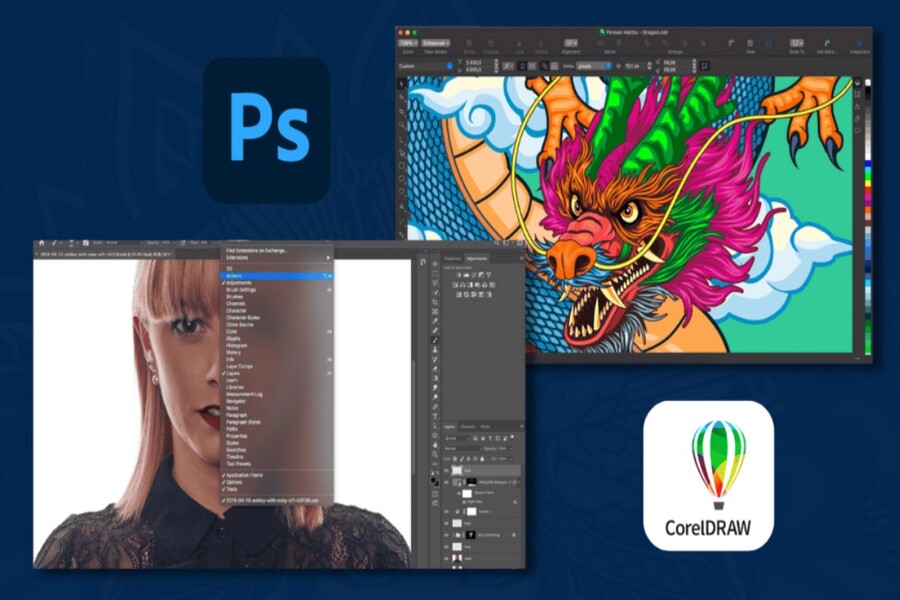
Adobe Photoshop and CorelDRAW are both familiar tools for professional designers. One excels in photo editing, while the other is outstanding in vector graphics. So which is the right choice for your needs? Let's explore the detailed differences in this article.
Photoshop vs CorelDRAW: The Showdown Between Two Graphics Giants
Choosing the right software not only affects product quality but also determines the speed of work, creativity, and long-term efficiency of the designer. The two most prominent names in this field are Adobe Photoshop and CorelDRAW . Each software has its own strengths, serving different needs from photo editing, print design, illustration to branding.
However, a common question among both beginners and professional designers is: Photoshop or CorelDRAW, and which is the better choice? This article will analyze each aspect of the two software programs in detail, from features, tools, interface, learnability, to price and practical applications. Through this, you will understand the differences and determine which software best suits your needs.
1. Introduction to Photoshop and CorelDRAW
Both Photoshop and CorelDRAW are software programs created for editing and processing graphics, and both are leading programs in the design industry. However, their operating philosophies and intended uses differ significantly.
Adobe Photoshop is a professional raster graphics editor, originally developed for image processing. Over time, Photoshop has evolved into a versatile editing tool used in photography, web design, digital drawing, effects creation, short video editing, and even basic UI/UX design. Photoshop's power lies in its ability to handle detailed images, work with layers, colors, and effects.
.jpg)
CorelDRAW is vector-based design software widely used by businesses, printers, and designers to create logos, business cards, banners, brochures, packaging, and other printed materials. While CorelDRAW can also edit images, its primary focus is on creating and processing vector graphics.
The biggest difference between the two software programs lies in the nature of their graphics: Photoshop works primarily with raster (pixels), while CorelDRAW works with vectors (lines and geometric shapes).
2. Basic Features
Both Photoshop and CorelDRAW offer powerful toolkits, but which software is better suited to your needs and goals will depend on your usage requirements.
CorelDRAW excels in the field of print design and vector graphics. Thanks to its precise vector processing capabilities, the software allows for the creation of high-resolution logos, posters, banners, brochures, catalogs, packaging, and other advertising materials. CorelDRAW provides excellent support for CMYK and Pantone color systems, manages print dimensions, bleed, margin, and exports professional print files such as PDF/X. Furthermore, CorelDRAW offers basic page layout capabilities, supporting multiple pages in a single file, making it suitable for designing print materials such as brochures or catalogs.
.jpg)
Photoshop is widely used in photo editing, retouching, compositing, digital design, online advertising, and visual creation. Its layer system, masks, adjustment layers, smart objects, and blend modes allow for non-destructive editing, giving designers control over details and the ability to experiment with various styles. Photoshop is also powerful in handling light, color, texture, and effects, helping to create images with depth and emotion. Additionally, Photoshop is used in basic UI/UX design, product mockups, social media design, and short animation creation.
One notable difference is that Photoshop targets a broader user base, ranging from photographers, digital artists, designers, marketers to content creators. CorelDRAW, on the other hand, focuses heavily on vector design, printing, and commercial graphic production. Therefore, the choice of software will depend on whether you work more with raster or vector images.
3. Tools
Photoshop is renowned for its comprehensive set of image editing tools. Selection tools like Quick Selection, Magic Wand, Select Subject, and Select and Mask enable quick and precise background removal. The Brush and Mixer Brush tools support digital drawing, texture creation, and artistic effects. The Healing Brush, Clone Stamp, and Patch Tool help retouch images, remove imperfections, and adjust details. Additionally, Photoshop includes Transform, Warp, and Liquify tools that allow for flexible image manipulation, useful for portrait editing, advertising, and creative design.
CorelDRAW focuses on a precise vector drawing toolset. The Bezier, Pen, and Freehand tools allow for smooth curve creation and precise control over each anchor point. The Shape Tool enables flexible shape editing, while tools like Contour, Blend, Extrude, and Envelope support the creation of geometric effects and depth. CorelDRAW also includes the PowerTRACE tool, which quickly converts bitmap images to vectors, useful for digitizing logos or illustrations.
.jpg)
In terms of functionality, Photoshop primarily works with raster code but supports vector graphics through Smart Objects and Shape Layers, preserving quality when resizing or editing. CorelDRAW, being vector software, can work with both vector and raster code within the same document without conversion, and allows for sharp print output at any size.
Furthermore, Photoshop excels at effects, lighting, color, and compositing, while CorelDRAW is strong in technical drawing, precise design, and print file preparation. This difference makes each software suitable for different types of projects, and in practice, many professional designers often use both to maximize the strengths of each tool.
4. Artistic filters
Both Photoshop and CorelDRAW offer artistic filter systems that allow for image transformation in a variety of creative styles, from painting effects to color and surface texture adjustments. However, the two software programs have distinctly different approaches.
CorelDRAW features the Smooth Acrylic filter, which allows you to transform photos into paintings with smooth surfaces and well-controlled detail. Users can adjust smoothness, contrast, and detail levels to create effects ranging from subtle to highly artistic. Additionally, Corel PHOTO-PAINT, an application included with the CorelDRAW Graphics Suite, provides numerous texture, blur, lighting, and color transform effects for more in-depth image processing when needed.
.jpg)
Photoshop is notable for its Oil Paint filter, which can transform images into realistic oil paintings. Photoshop's strength lies in its deep customization capabilities and the ability to combine various filters such as Gaussian Blur, Camera Raw, Neural Filters, Texture, and Lighting Effects to create unique effects. Thanks to its Smart Filter system, users can re-edit effects at any time without destroying the original image, making workflows more flexible and professional.
A significant advantage of CorelDRAW is its PowerTRACE and Quick Trace tools, which allow for rapid conversion of bitmap images to vectors with varying degrees of detail. This is a very useful feature when reproducing logos, illustrations, or print graphics from raster images. Photoshop doesn't have a vector tracing tool, but Adobe Illustrator offers an Image Trace feature with similar functionality.
5. Animation
Photoshop is not just a photo editing tool; it also supports basic animation creation through its Timeline panel. Users can create animated GIFs, advertising banners, slideshows, or short animations for websites and social media. Photoshop supports both frame animation and video timelines, allowing adjustments to layers, opacity, transforms, text, and effects frame by frame. Additionally, Photoshop can export GIF, MP4, or sequence image files, making it suitable for digital marketing design, simple UI motion, and social media content.
However, Photoshop is not specialized for motion graphics, so complex animation projects are usually done in Adobe After Effects or Premiere Pro.
CorelDRAW currently lacks built-in animation tools. If animation design is required, users must combine it with other software such as Corel RAVE (formerly), After Effects, or specialized animation tools. Therefore, in the field of basic animation and dynamic digital content, Photoshop has a distinct advantage.
See also: buy a perpetual Adobe license
6. Group and Collaborative Projects
CorelDRAW has an advantage for teamwork thanks to its integrated commenting feature. Users can leave comments directly on the file or through CorelDRAW.app without needing to install the software.
Photoshop currently lacks a built-in commenting system, so collaboration often relies on external platforms.
.jpg)
7. User Interface
Photoshop boasts a modern, intuitive, and highly customizable interface. Users can choose a workspace that suits their purpose, such as Photography, Graphic Design, Web, or Motion. Creating new documents is also very intuitive, allowing users to select presets based on device, web, or print.
CorelDRAW also supports interface customization, but with fewer presets and a more traditional feel. However, for those working in the printing industry, CorelDRAW remains very convenient.
8. Photoshop and CorelDRAW: Which is better?
There is no absolute answer.
Photoshop excels in photo editing, advanced retouching, digital painting, digital graphic design, and visual effects. It's a near-standard tool in photography, advertising, digital media, and content creation. Thanks to its layer system, masks, blend modes, filters, and ever-evolving AI technology, Photoshop allows for highly detailed image processing, from color correction and background removal to image restoration and complex artwork creation. Additionally, Photoshop is suitable for banner design, social media, basic UI/UX, product mockups, and digital marketing projects. If you work extensively with raster images, create digital content, or need a versatile tool, Photoshop is often the optimal choice.
CorelDRAW once again demonstrates its strength in the field of vector graphics and print design. This software is widely used in the printing industry, outdoor advertising, packaging production, labels, signage, and logo design. Thanks to its vector capabilities, designs can be scaled indefinitely without image distortion, making it ideal for large-format printing or products requiring high precision. CorelDRAW also excels in basic page layout capabilities, CMYK color management, and support for CNC, laser, and decal printers and cutting equipment. If your work focuses on logos, vector illustrations, printing, or physical graphic production, CorelDRAW is often a more efficient and stable choice.
.jpg)
In addition to intended use, you should also consider your work environment. Photoshop is suitable when you work within the Adobe ecosystem alongside Illustrator, InDesign, After Effects, and Lightroom, facilitating a seamless creative process. CorelDRAW, on the other hand, is more suitable for traditional printing environments, manufacturing businesses, or users who want a standalone vector solution that is easy to deploy and offers more reasonable long-term costs.
In summary, if you are a photographer, digital artist, content creator, or designer who works primarily with raster images, Photoshop will be a more powerful and versatile choice. Conversely, if you specialize in logo design, packaging, print, or vector illustration, CorelDRAW will be more effective. In fact, many professional designers use both software in parallel: Photoshop for image processing and effects, and CorelDRAW for vector and print to maximize the strengths of each tool





















VIP Products








Best Selling Products
Genuine Adobe Illustrator account
99 USD
ChatGPT Plus Account (GPT-4)
16 USD
Adobe Photoshop Copyright - Full App
120 USD
Windows 10 & 11 Pro Key
36 USD
Copyright Adobe Lightroom Account
59 USD
Upgrade genuine Capture One account
120 USD
Adobe Premiere Pro Account
99 USD
Upgrade Duolingo Super
29 USD
Upgrade Genuine Office 365
49 USD
MidJourney Account
29 USD
Plugin Retouch4me
69 USD
Freepik Premium Account
59 USD
Capcut Pro 1 Year
39 USD
Autodesk All App Account Copyright
120 USD
Genuine Cheap Canva Pro
39 USD