Best Selling Products

Windows 10 & 11 Pro Key
36 USD

Upgrade Duolingo Super
29 USD

Upgrade genuine Capture One account
120 USD

Copyright Adobe Lightroom Account
59 USD

ChatGPT Plus Account (GPT-4)
16 USD

Genuine Adobe Illustrator account
99 USD

Capcut Pro 1 Year
39 USD

Plugin Retouch4me
69 USD

Adobe Photoshop Copyright - Full App
120 USD

Genuine Cheap Canva Pro
39 USD

MidJourney Account
29 USD

Freepik Premium Account
59 USD

Adobe Premiere Pro Account
99 USD

Upgrade Genuine Office 365
49 USD

Autodesk All App Account Copyright
120 USD
CapCut: A Solution for Creating Fast, Beautiful, and Effective YouTube Ad Videos
Nội dung
- 1. What is YouTube advertising?
- 2. Online YouTube ad creation tool with CapCut
- 2.1. Personalization, Presets, and Ready-to-Use for YouTube
- 2.2. All-in-one user interface
- 2.3. Unlimited stickers, sounds, and lights.
- 3. Advantages of creating promotional videos on YouTube
- 3.1. Increase traffic and visibility
- 3.2. Earn extra income from YouTube
- 3.3. Building long-term brand reputation
- 4. Instructions on how to create YouTube advertising videos using CapCut
- 5. Frequently Asked Questions
CapCut offers a new approach to YouTube video advertising production, helping users create professional content without needing complex video editing skills. The tool supports pre-made templates, flexible editing, and exporting videos to the platform's standards. Suitable for both individuals and small businesses.
CapCut: A Solution for Creating Fast, Beautiful, and Effective YouTube Ad Videos
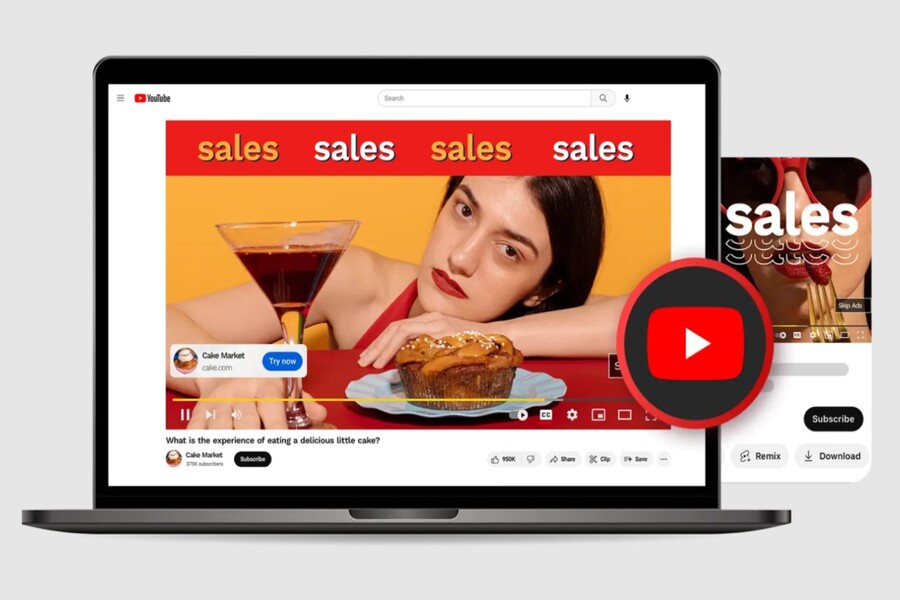
CapCut offers a new approach to YouTube video advertising production, helping users create professional content without needing complex video editing skills. The tool supports pre-made templates, flexible editing, and exporting videos to the platform's standards. Suitable for both individuals and small businesses.
YouTube video ads are not just a marketing tool, but also part of a long-term brand-building strategy. A well-produced video ad can help businesses tell their story, convey their core values, build trust, and inspire action from viewers. However, the biggest hurdle for many individuals and businesses when starting to advertise on YouTube is the production cost and the complexity of professional video editing software.
This is why CapCut is a noteworthy option. As an online YouTube ad creation tool, CapCut offers a simple, intuitive yet powerful solution for creating polished, modern, and platform-compliant video ads. In this article, we will discuss in detail how to create YouTube video ads to build a sustainable brand presence, and analyze why CapCut is a popular choice for creators and marketers today.
1. What is YouTube advertising?
YouTube advertising is a form of advertising that uses video to deliver marketing messages to viewers through the YouTube platform. Unlike traditional advertising, which is passive and coercive, YouTube advertising has the ability to reach users in a more natural way, especially when the content is tailored to the needs, interests, and behaviors of the audience.
Essentially, YouTube ads are short to medium-length videos that focus on showcasing a product, service, brand, or a specific message. These videos can appear in various forms: pre-view ads, suggested videos, videos displayed in search results, or even content created and developed by the brand itself on its channel.
The most important aspect of YouTube advertising isn't its length or complexity, but its ability to solve a problem for the viewer. An effective advertising video doesn't just say "what we sell," but answers the question "how does this product or service help me?" Therefore, many businesses choose instructional videos, illustrative videos, or educational content to reach customers more subtly.
.jpg)
For example, instead of simply advertising photo editing software, a brand could create a tutorial video on how to quickly adjust photo colors for beginners. Instead of directly introducing a household product, a business could create a video showing how that product solves a daily problem. When content addresses real-world needs, advertising ceases to be advertising and becomes a valuable asset for the viewer.
2. Online YouTube ad creation tool with CapCut
2.1. Personalization, Presets, and Ready-to-Use for YouTube
Before you begin learning how to create YouTube ads, it's crucial to familiarize yourself with the tool that will accompany you throughout the content creation process. CapCut is designed as a cross-platform, online video editor aimed at social media users, content creators, and modern marketers.
One of CapCut's biggest strengths lies in its pre-set video template system. When creating a new project, you can easily choose a format suitable for YouTube, from traditional 16:9 horizontal video to 9:16 vertical video for YouTube Shorts. This ensures that the video is exported correctly, avoiding cropping, loss of content, or a reduced viewer experience.
.jpg)
CapCut allows users to clearly define the goal of their video from the outset. Are you creating a short promotional video to quickly grab attention, or a longer video to convey detailed information? Choosing the right initial settings makes the editing process much smoother and more time-efficient.
For those without a background in design or video editing, CapCut's pre-made projects serve as a complete "framework." Users simply need to replace content, images, videos, and text to create a relatively complete product suitable for promotion on YouTube.
2.2. All-in-one user interface
One of the biggest barriers that deters many people from creating advertising videos is the complexity of the editing software. Many professional tools require users to have a thorough understanding of timelines, layers, keyframes, and a host of other technical terms. CapCut takes the opposite approach, simplifying the experience while retaining essential features.
CapCut's interface is designed as an all-in-one tool, allowing users easy access to both basic and advanced editing tools within a single workspace. From video editing and text editing to animations, transition effects, color correction, background changes, and AI-powered automatic subtitle generation, everything is seamlessly integrated and easily accessible.
.jpg)
For those new to YouTube marketing, a versatile video ad creation tool like CapCut is an ideal choice. You don't need to switch between different software programs, nor do you need to invest a lot of time learning complex operations. After a short time getting familiar with it, you can confidently create well-structured and professional-looking advertising videos.
In particular, CapCut's AI-powered automatic subtitle generation feature is a major plus. In a context where many viewers watch videos without sound, subtitles make content more accessible and increase viewer retention on YouTube.
2.3. Unlimited stickers, sounds, and lights.
Creating video content requires a wealth of supporting resources, from music and images to visual effects. CapCut provides a rich library of resources, allowing users to experiment freely without worrying about copyright issues.
Users can easily find background music suitable for various styles, from lively and youthful to gentle and emotional. All sounds in the library are licensed and free, allowing you to confidently use them for YouTube advertising videos without worrying about copyright infringement.
.jpg)
In addition, CapCut's system of stickers, fonts, and lighting effects is also a powerful tool for adding emphasis to videos. With just a few drag-and-drop actions, you can transform a simple video into a vibrant, eye-catching advertisement that aligns with modern visual trends.
Notably, CapCut doesn't constantly require users to upgrade their accounts to unlock basic features. This creates a relaxed atmosphere and encourages users to focus on content creation rather than worrying about costs.
3. Advantages of creating promotional videos on YouTube
3.1. Increase traffic and visibility
YouTube is the world's second-largest search engine, after Google. This means that every advertising video you upload has the potential to reach a huge audience. By using a free online YouTube ad creation tool like CapCut, you can easily produce multiple high-quality videos to test different messages.
Regularly appearing with polished content helps brands increase visibility, create a lasting impression in viewers' minds, and drive traffic to their website, landing page, or sales channel. With low production costs, businesses can flexibly adjust their content strategy without facing significant budgetary pressure.
.jpg)
3.2. Earn extra income from YouTube
For individuals and content creators, promotional videos not only serve marketing purposes but also represent a potential source of income. As your YouTube channel grows larger, you can monetize through advertising, brand collaborations, or selling your own products and services.
CapCut acts as a supporting tool to help you build a professional image from the start. Well-edited videos with clear structure and a consistent message will help your channel grow more sustainably in the long term.
.jpg)
3.3. Building long-term brand reputation
YouTube is a platform where users search for knowledge and solutions. When your brand consistently appears with quality content, credibility will be built over time. A well-invested YouTube channel can become a long-term media asset, helping businesses build trust and strong relationships with customers.
.jpg)
4. Instructions on how to create YouTube advertising videos using CapCut
Select the aspect ratio 16:9
The first step in creating a YouTube video ad is determining the appropriate format. For typical video ads, a 16:9 aspect ratio is the optimal choice. CapCut allows you to select the aspect ratio right from the start of the project, making video editing and export more precise.
.jpg)
After selecting the aspect ratio, simply add your video, image, and audio files to the timeline to begin the editing process.
Elaborate on and perfect the video.
After completing the basic editing, the next step is to finalize the video with visual effects. CapCut allows you to adjust colors to create stylistic consistency, add transition effects for smoother video, and use dynamic text to highlight the main message.
.jpg)
At this stage, design plays a crucial role. An effective advertising video needs a logical rhythm, clear visuals, and a message conveyed coherently within a short timeframe.
Upload videos to YouTube
Once the video is complete, you can export it in 1080p resolution: the resolution preferred by YouTube. Directly linking to YouTube makes the uploading process faster and more convenient.
.jpg)
After uploading, don't forget to interact with viewers through the comments section, and share the video on other platforms to increase its reach.
5. Frequently Asked Questions
How do I create ads for YouTube?
To create YouTube ads, you need to start by defining your goals, target audience, and main message. Then, refer to the guide in this article to understand the basic steps. CapCut is an ideal tool for practicing and experimenting with different video styles as you learn.
How do YouTube ads work?
YouTube advertising operates in two main forms. First, there's algorithmic advertising, where YouTube suggests high-quality content to interested viewers. Second, there's paid advertising, where you set a budget to get your video shown more widely. Both forms require engaging content that's relevant to your target audience.
Are paid ads on YouTube worth it?
Paid advertising on YouTube can be highly effective if you understand how to create content and target the right audience. CapCut helps you create high-quality advertising videos at a low cost, thereby optimizing the effectiveness of your advertising campaigns.
How much does it cost to create an ad on YouTube?
Creating promotional videos with CapCut is completely free. You don't need to invest in expensive software. The main cost will be your paid advertising budget on YouTube, if you want to expand your reach in the initial stages.
By combining content thinking, design knowledge, and the right tools, you can absolutely build a strong presence on YouTube. Whether you're a beginner or an experienced user, CapCut is a worthwhile option for realizing your advertising ideas and developing your brand in the long term.





















VIP Products








Best Selling Products
Windows 10 & 11 Pro Key
36 USD
Upgrade Duolingo Super
29 USD
Upgrade genuine Capture One account
120 USD
Copyright Adobe Lightroom Account
59 USD
ChatGPT Plus Account (GPT-4)
16 USD
Genuine Adobe Illustrator account
99 USD
Capcut Pro 1 Year
39 USD
Plugin Retouch4me
69 USD
Adobe Photoshop Copyright - Full App
120 USD
Genuine Cheap Canva Pro
39 USD
MidJourney Account
29 USD
Freepik Premium Account
59 USD
Adobe Premiere Pro Account
99 USD
Upgrade Genuine Office 365
49 USD
Autodesk All App Account Copyright
120 USD