Best Selling Products

Windows 10 & 11 Pro Key
36 USD

Genuine Cheap Canva Pro
39 USD

Upgrade Duolingo Super
29 USD

ChatGPT Plus Account (GPT-4)
16 USD

Copyright Adobe Lightroom Account
59 USD

Freepik Premium Account
59 USD

Genuine Adobe Illustrator account
99 USD

Upgrade Genuine Office 365
49 USD

MidJourney Account
29 USD

Autodesk All App Account Copyright
120 USD

Capcut Pro 1 Year
39 USD

Upgrade genuine Capture One account
120 USD

Adobe Premiere Pro Account
99 USD

Plugin Retouch4me
69 USD

Adobe Photoshop Copyright - Full App
120 USD
Comparison of Final Cut Pro vs CapCut: Which Tool Is More Worth Using in 2026?
Nội dung
- 1. Overview of Final Cut Pro and CapCut
- 1.1 What is Final Cut Pro?
- 1.2. What is CapCut?
- 2. Pros and cons of CapCut and Final Cut Pro
- 2.1 Comparison table of pros and cons Final Cut Pro vs CapCut
- 2.2 Detailed evaluation of pros and cons of each software
- 2.3 Which software should you choose based on pros and cons?
- 3. Detailed comparison of Final Cut Pro vs CapCut
- 4. Which software should you choose for video editing?
- 4.1 Choose CapCut if you are a beginner or make social media videos
- 4.2 Choose Final Cut Pro if you want professional video editing
- 5. Frequently asked questions about Final Cut Pro and CapCut
- 5.1 Final Cut Pro and CapCut, which software is better for beginners?
- 5.2 Can CapCut replace Final Cut Pro?
- 5.3 Is Final Cut Pro suitable for making YouTube videos?
- 5.4 Does CapCut have enough features for professional video editing?
- 5.5 Should you choose CapCut or Final Cut Pro in 2026?
- 5.6 Does Final Cut Pro have a free version?
- 5.7 Can CapCut run on low-spec computers?
- 6. Conclusion
In an era where video has become the most important content delivery tool, choosing the right editing software can directly impact the quality and creative efficiency.
1. Overview of Final Cut Pro and CapCut
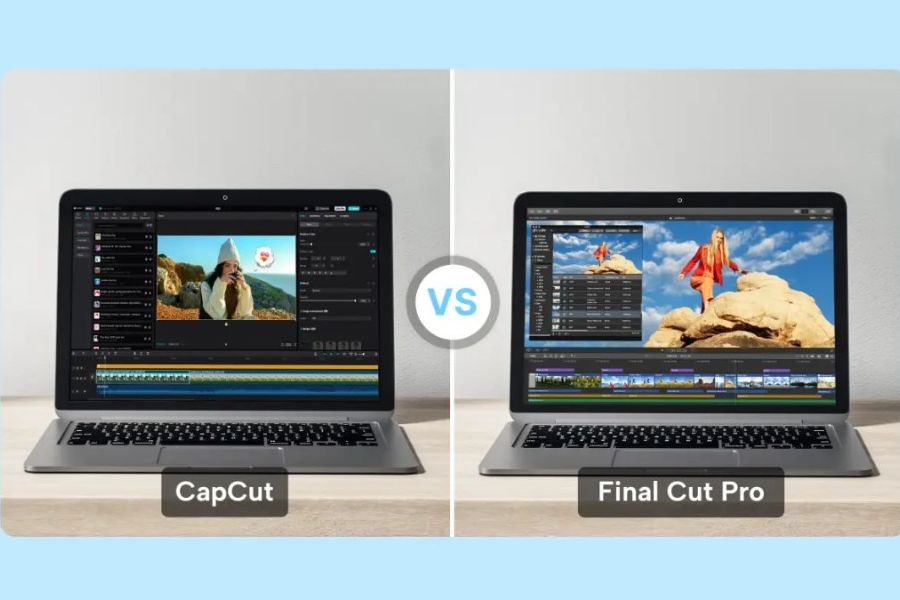
In an era where video has become the dominant content format on YouTube, TikTok, Reels, and many other platforms, choosing a suitable video editing software plays an extremely important role. Among many tools available today, Final Cut Pro and CapCut are two prominent names, representing two different approaches: one is professional software for the Apple ecosystem, the other is an AI-integrated, easy-to-use video editing tool popular worldwide. Understanding the overview of these two software solutions will help you determine which is the right choice for your content creation needs in 2026.
1.1 What is Final Cut Pro?
Final Cut Pro is a professional video editing software developed by Apple, exclusively for the macOS operating system. This is a tool used by many filmmakers, professional YouTubers, editors, and content producers thanks to its powerful performance, smooth video processing, and ecosystem optimized for Apple hardware.
One of the highlights of Final Cut Pro is the Magnetic Timeline technology, which allows users to edit videos flexibly without disrupting the overall structure. In addition, the software supports high-resolution video editing such as 4K, 6K, and even 8K stably. Optimization with Apple Silicon chips such as M1, M2, M3, and newer generations helps Final Cut Pro process videos quickly, render smoothly, and save significant time.
Final Cut Pro is not only suitable for personal projects but also used in professional video production such as vlogs, short films, commercials, high-quality YouTube videos, and commercial content. The interface is intuitive while still ensuring depth of features, allowing users to control the entire editing process from cutting, color grading, adding effects to exporting high-quality videos.
.jpg)
1.2. What is CapCut?
CapCut is a video editing software developed by ByteDance, the company behind the TikTok platform. Initially designed for mobile devices, CapCut has now expanded to desktop versions (Windows, macOS) and web platforms, allowing users to edit videos flexibly across multiple devices.
The biggest strength of CapCut lies in simplifying the video editing process. The user-friendly interface makes it easy even for beginners to create complete videos in a short time. CapCut provides many built-in templates, effects, filters, fonts, and sounds, helping users create videos suitable for social media platforms without requiring advanced editing skills.
In addition, CapCut integrates many modern AI features such as automatic subtitle generation, background removal, AI editing, automatic transitions, and optimization for TikTok, YouTube Shorts, or Instagram Reels. These features help save time and improve content creation efficiency, especially suitable for creators, marketers, social media content makers, and general users.
.jpg)
2. Pros and cons of CapCut and Final Cut Pro
To choose the right video editing software, understanding the advantages and disadvantages of each tool is very important. Each software is designed with specific goals and user groups, so they have different strengths and limitations. Below is a detailed comparison table of Final Cut Pro vs CapCut desktop to give you a clearer view before deciding.
2.1 Comparison table of pros and cons Final Cut Pro vs CapCut
2.2 Detailed evaluation of pros and cons of each software
Final Cut Pro stands out with professional editing capabilities, suitable for long-term content creators or high-quality video production. The software allows detailed control over elements such as color, audio, effects, and transitions. Optimization for Apple chips ensures fast and stable editing and exporting. However, its biggest limitation is macOS-only support and relatively high initial cost.
Meanwhile, CapCut desktop focuses on convenience and speed. Users can quickly create videos thanks to templates, modern effects, and AI-assisted tools. This is a suitable choice for beginners, creators, and those producing content on TikTok, YouTube Shorts, or Reels. However, CapCut still has limitations in advanced editing capabilities, and some premium features are only available in paid versions.
Upgrade CapCut at a low cost
2.3 Which software should you choose based on pros and cons?
Looking at the comparison, each software serves different needs. Final Cut Pro is suitable for users who need professional editing, high performance, and detailed control. In contrast, CapCut is ideal for quick editing, ease of use, and social media optimization.
Choosing the right software depends on your usage goals, device, and level of editing depth. In the following sections, Appvip will continue comparing features, performance, and real-world applications to help you make the best decision.
.jpg)
3. Detailed comparison of Final Cut Pro vs CapCut
Below is a detailed comparison table between Final Cut Pro and CapCut desktop to help you clearly see differences in user groups, features, performance, and professionalism:
4. Which software should you choose for video editing?
Choosing between Final Cut Pro and CapCut does not have a one-size-fits-all answer. It depends on your purpose, device, and level of professionalism.
4.1 Choose CapCut if you are a beginner or make social media videos
CapCut is ideal if you want fast, easy editing without deep knowledge. It offers intuitive UI, many effects, filters, and AI tools like auto captions and auto cut. It supports multiple platforms, allowing editing anytime, anywhere.
Suitable for:
Beginners
TikTokers, Shorts creators, social media creators
Users needing fast editing
Those wanting free software
However, it has limitations in advanced editing and large projects.
Upgrade CapCut at a low cost
4.2 Choose Final Cut Pro if you want professional video editing
Final Cut Pro is a professional editing software developed by Apple, known for high performance, smooth 4K–8K editing, and advanced tools like multicam, color grading, and motion graphics.
It is suitable for:
Professional YouTubers
Long-form video editors
Filmmakers and commercial producers
Mac users seeking maximum performance
The downside is macOS-only support and a steeper learning curve.
.jpg)
5. Frequently asked questions about Final Cut Pro and CapCut
5.1 Final Cut Pro and CapCut, which software is better for beginners?
CapCut is more suitable due to its simple interface and ready templates. Final Cut Pro requires more learning time.
5.2 Can CapCut replace Final Cut Pro?
CapCut is good for basic and social media editing but cannot fully replace Final Cut Pro for professional projects.
5.3 Is Final Cut Pro suitable for making YouTube videos?
Yes, it supports high-resolution editing, multiple layers, and fast rendering, widely used by professional YouTubers.
5.4 Does CapCut have enough features for professional video editing?
It has useful features but lacks deep customization compared to professional software.
5.5 Should you choose CapCut or Final Cut Pro in 2026?
Choose CapCut for ease and social media. Choose Final Cut Pro for professional editing on Mac.
5.6 Does Final Cut Pro have a free version?
No, but it offers a trial version before purchase.
5.7 Can CapCut run on low-spec computers?
Yes, it is optimized for mid-range devices, though performance may drop with heavy projects.
6. Conclusion
Final Cut Pro and CapCut are both powerful video editing software, but each serves different users and purposes. If you need a professional, high-performance solution with advanced editing on Mac, Final Cut Pro is worth considering. If you prioritize simplicity, speed, and quick social media content creation, CapCut is more accessible and efficient. Through this comparison from Appvip, hopefully you now have a clearer view to choose the right software, optimize your creative workflow, and improve video quality in 2026.





















VIP Products








Best Selling Products
Windows 10 & 11 Pro Key
36 USD
Genuine Cheap Canva Pro
39 USD
Upgrade Duolingo Super
29 USD
ChatGPT Plus Account (GPT-4)
16 USD
Copyright Adobe Lightroom Account
59 USD
Freepik Premium Account
59 USD
Genuine Adobe Illustrator account
99 USD
Upgrade Genuine Office 365
49 USD
MidJourney Account
29 USD
Autodesk All App Account Copyright
120 USD
Capcut Pro 1 Year
39 USD
Upgrade genuine Capture One account
120 USD
Adobe Premiere Pro Account
99 USD
Plugin Retouch4me
69 USD
Adobe Photoshop Copyright - Full App
120 USD