
Best Selling Products

Windows 10 & 11 Pro Key
36 USD
Plugin Retouch4me
69 USD

Upgrade Duolingo Super
29 USD
Copyright Adobe Lightroom Account
59 USD
Adobe Photoshop Copyright - Full App
120 USD

ChatGPT Plus Account (GPT-4)
16 USD
Autodesk All App Account Copyright
120 USD
Genuine Cheap Canva Pro
39 USD

Freepik Premium Account
59 USD

Genuine Adobe Illustrator account
99 USD

Capcut Pro 1 Year
39 USD

MidJourney Account
29 USD
Upgrade Genuine Office 365
49 USD

Adobe Premiere Pro Account
99 USD
Upgrade genuine Capture One account
120 USD
Compilation of prompts for creating beautiful and unique Singles'' Day (11/11) photos.
Nội dung
- 1. What's special about Singles' Day on November 11th?
- 2. How to write a prompt to create a celebratory image for Singles' Day (November 11th).
- 2.1. Describe your desired idea and style.
- 2.2. Personalization using real photos
- 2.3. Check the prompt before creating the image.
- 2.4. Create multiple versions to choose the best image.
- 3. Compilation of prompts for creating beautiful and unique Singles' Day (11/11) photos.
- 3.1. Prompt creates real-life portraits of people on November 11th.
- 3.2. Prompt creates gentle muse images
- 3.3. Prompt for creating Korean-style photos
- 3.4. Prompt creates glamorous photos like those in fashion magazines.
- 3.5. Prompt creates cute photos with 11/11 balloons.
- 3.6. Prompt creates photos of happy, confident single people.
- 3.7. Prompt creates slightly melancholic, cinematic-style images.
- 4. Tips to make your AI photos for November 11th look more beautiful and realistic.
- 5. Which AI tool should I use to create Singles' Day photos?
- 6. Conclusion
Singles'' Day on November 11th is an opportunity to express your personality, confidence, and unique beauty through creative photos. You don''t need a partner or a romantic date to create stunning photos that capture the joy, freedom, and inspiration of being single. With the help of AI, transforming simple ideas into beautiful images is easier than ever. In this article, let''s explore Sadesign''s collection of prompts for creating Singles'' Day photos in various styles, from real portraits and romantic shots to Korean-style and chic, cute, and humorous concepts. You can use the available commands or customize them to your liking to create photos that reflect your personal touch.

1. What's special about Singles' Day on November 11th?
November 11th is widely known as Singles' Day, especially popular in youth culture and on social media. The four number 1s together are often associated with the image of an independent, free, and proactive person enjoying life. It's also an opportunity for people to share joyful moments, express their personality, or participate in creative trends on TikTok, Facebook, and Instagram. Instead of just posting a regular selfie, you can leverage AI to create a unique concept for November 11th. With just a portrait photo and the right command, you can try many different styles without needing to prepare outfits, rent a studio, or find a photo location. Some popular ideas include:
-
Personal portraits: Highlighting facial features, personality, and unique style.
-
Fashion photography: Pose like a model in a studio or on the street.
-
The muse's image: Possesses a gentle, romantic feel while still showcasing independence.
-
11/11 concept photos: Combining the number 11, balloons, cake, and decorative details.
-
Funny picture: Showcasing the spirit of happy single life, self-love, and enjoying life.
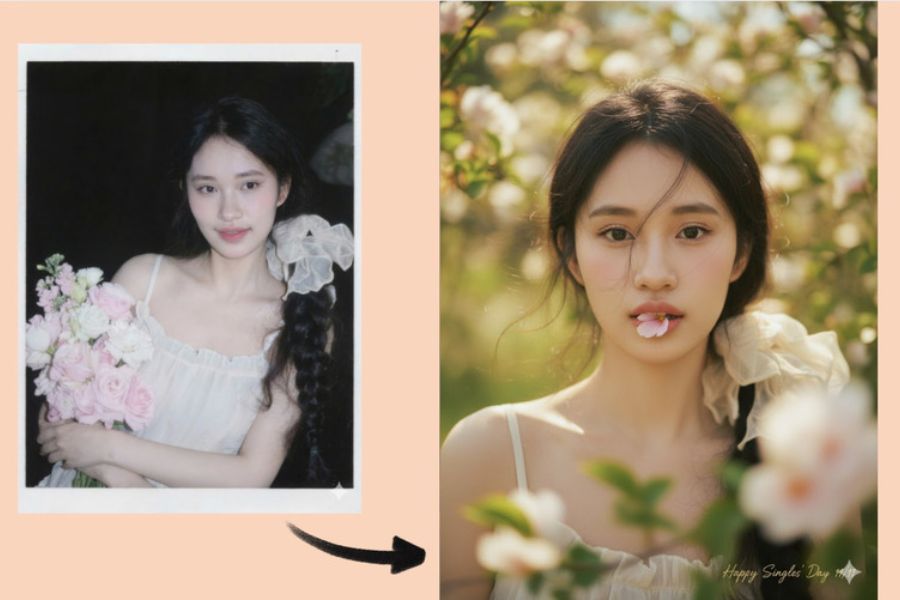
2. How to write a prompt to create a celebratory image for Singles' Day (November 11th).
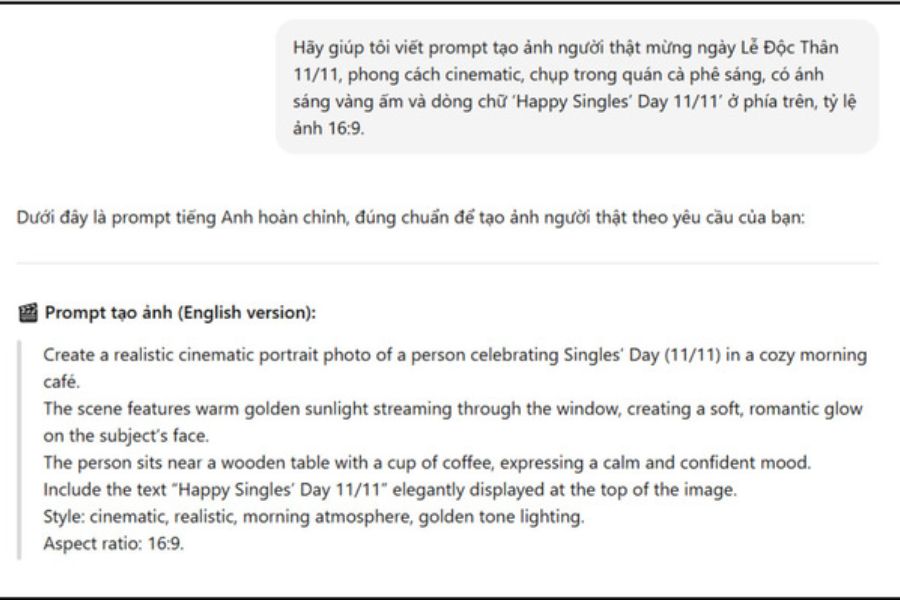
An effective prompt needs to clearly describe the subject, background, clothing, lighting, and image style. Simply entering short commands like "create a Singles' Day 11/11 photo" might result in AI producing generic, uninspired results that don't meet your expectations.
If you're unfamiliar with writing prompts, you can ask ChatGPT to build detailed commands before sending them to the image creation tool. Start with a simple idea and then add the necessary elements to create an image with a beautiful composition that truly reflects your personality.
2.1. Describe your desired idea and style.
First, determine whether you want a soft, edgy, elegant, or fun photo. Then, describe the details so the AI understands your vision precisely.
-
Subject: A single girl, boy, or group of friends.
-
Setting: Cafe, studio, street, cozy room, or outdoor scene.
-
Outfit: White dress, sweater, office wear, street style, or high fashion.
-
Lighting: Natural light, afternoon sun, studio lights, or neon lights.
-
Composition: Close-up, half-body portrait, full-body shot, or magazine-style photo.
-
Aspect ratio: 4:5 for social media posts, 9:16 for Stories and TikTok, 16:9 for landscape photos.
2.2. Personalization using real photos
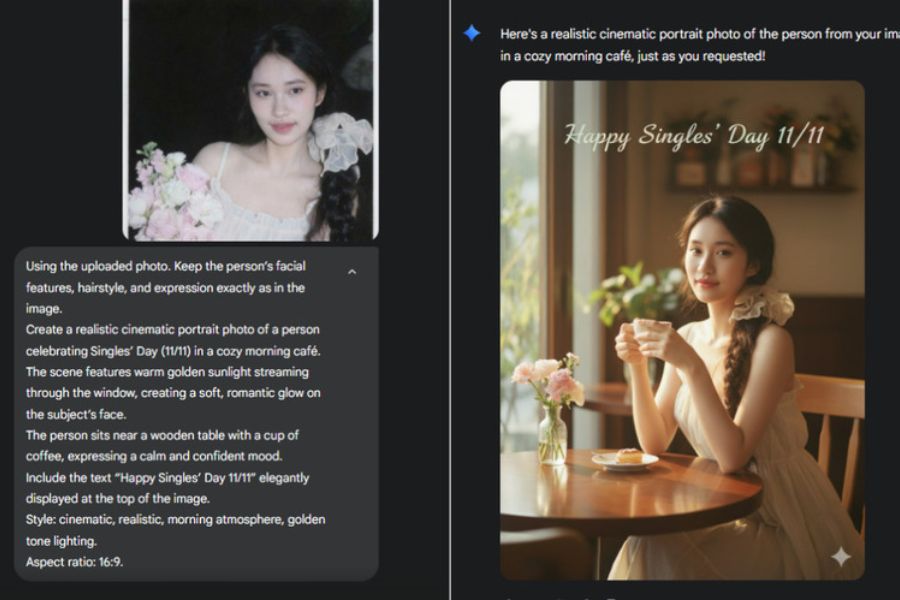
If you want to create an image that looks like yourself, you should upload a clear portrait photo to an AI tool that supports reference images. In the prompt, request that important identifying features be preserved instead of letting the AI create a completely new face.
You can use the following English command:
“Use the uploaded photo as the main identity reference. Preserve the person's facial features, natural skin tone, hairstyle and overall identity. Change only the outfit, background, lighting and pose as described. Create a realistic and high-quality portrait for Singles' Day 11/11.”
This command helps the AI prioritize preserving the appearance from the original image while changing the context and style. However, the degree of resemblance depends on the tools, the quality of the input image, and how the image is processed.
2.3. Check the prompt before creating the image.
Before using it, reread the command to avoid any unnecessary or contradictory details. The clearer the prompt, the easier it is to adjust the results to your liking.
-
Clearly state the subject and theme of Singles' Day on November 11th.
-
Describe the costumes, poses, setting, and lighting.
-
Determine whether the photo style is realistic, cinematic, or illustrative.
-
Add a requirement to keep the face visible if using a personal photo.
-
Specify the desired text placement if you wish to include a congratulatory message.
-
Avoid including too many unrelated styles in a single statement.
2.4. Create multiple versions to choose the best image.
Once you have a complete prompt, import it into an image creation tool and experiment with different expressions. You can keep the faces the same, only changing the clothing, colors, or background to create a cohesive set of images.
If the image isn't quite right, don't rush to rewrite the entire prompt. Adjust each element, such as lighting, shooting angle, expression, or composition, to find the best version.
3. Compilation of prompts for creating beautiful and unique Singles' Day (11/11) photos.
Below are prompts you can copy and use directly. For personal photos, upload a reference image before entering the command to increase the chances of maintaining the original image's appearance.
3.1. Prompt creates real-life portraits of people on November 11th.
Natural portrait style is suitable for those who want a beautiful, subtle photo that isn't overly elaborate. The image focuses on the face, eyes, and expression, creating the feeling of being photographed by a professional photographer.
Prompt:
“Create an ultra-realistic portrait of the person in the uploaded photo celebrating Singles' Day on November 11. Preserve the original facial identity, hairstyle and natural skin tone. The person is wearing a stylish cream-colored outfit, standing beside a minimalist white background decorated with elegant silver balloons shaped like 11/11. Soft studio lighting, natural expression, subtle smile, realistic skin texture, professional photography, sharp focus, sophisticated composition, high detail, 4:5 aspect ratio. No distorted facial features, no extra fingers, no watermark.”
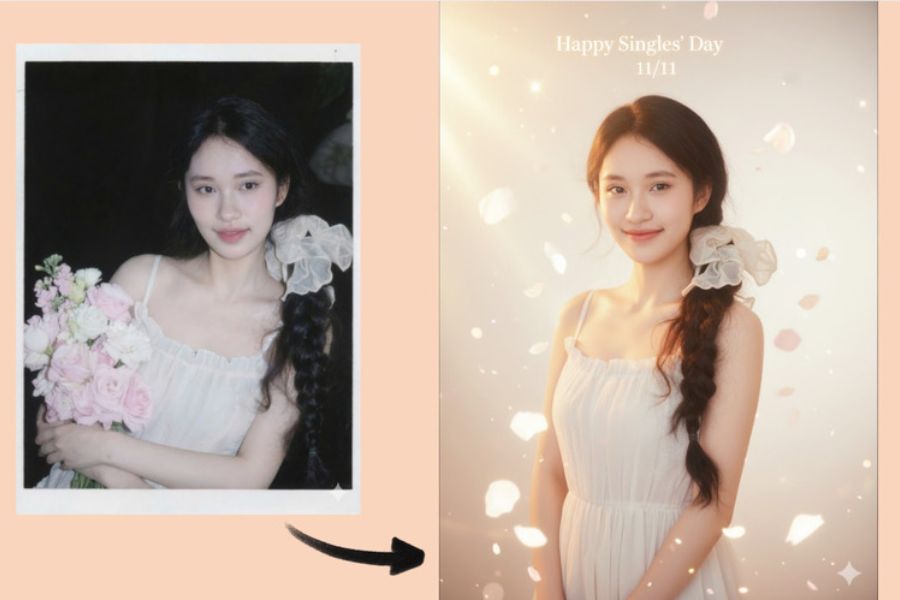
3.2. Prompt creates gentle muse images
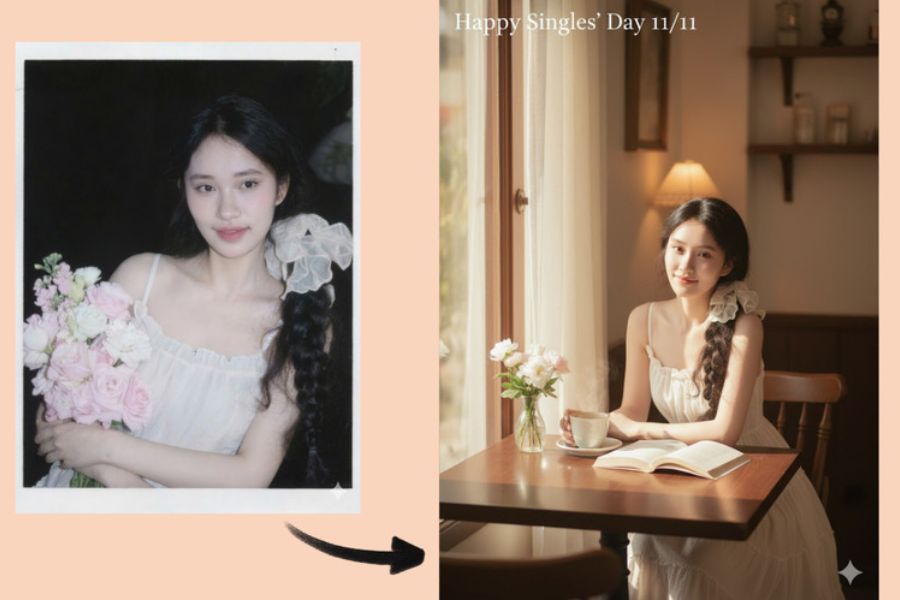
If you love a pure, feminine look, you can choose a muse concept with a white dress, fresh flowers, and soft sunlight. This style is perfect for posting as a profile picture or sharing on Instagram and Facebook on November 11th.
Prompt:
“Using the uploaded photo as the identity reference, create a dreamy and realistic portrait of a young woman celebrating Singles' Day 11/11. Preserve her original facial features and hairstyle. She wears a flowing white dress and stands in a beautiful flower garden with soft sunlight filtering through the trees. Gentle breeze, natural pose, delicate flowers, warm pastel colors, romantic atmosphere, cinematic depth of field, realistic photography, soft skin texture, elegant and peaceful mood, 4:5 portrait composition.”
3.3. Prompt for creating Korean-style photos
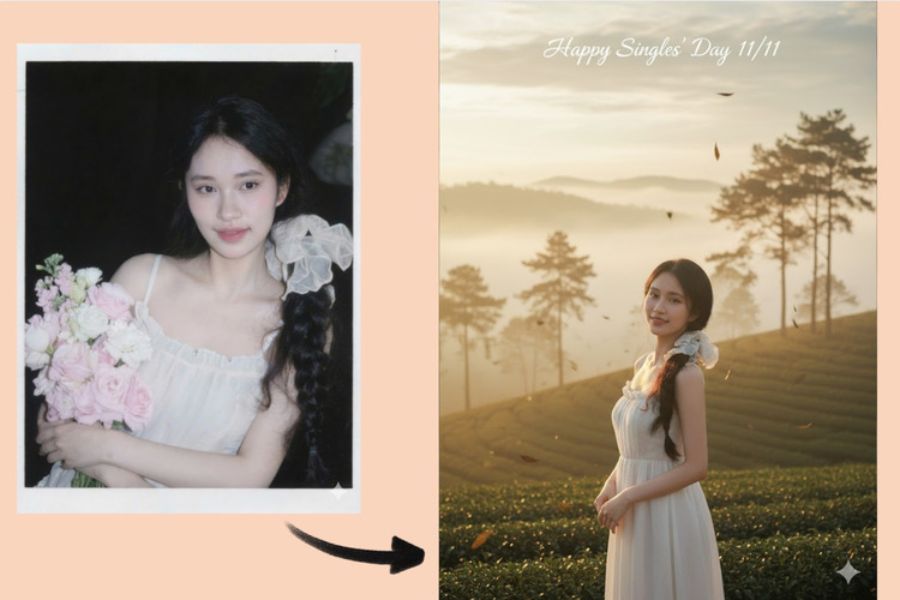
Korean-style photos are often impressive due to their bright colors, minimalist outfits, and natural poses. You can use this idea if you want a youthful, modern photo while still maintaining an elegant look.
Prompt:
“Create a realistic Korean-style fashion portrait based on the uploaded photo. Keep the person's facial identity and natural appearance unchanged. The person wears a stylish beige knit sweater, a pleated skirt and a small shoulder bag, posing casually inside a modern Korean cafe decorated with flowers and subtle 11/11 ornaments. Soft window lighting, clean composition, neutral tones, natural makeup, effortless elegance, editorial photography, realistic skin texture, high resolution, 4:5 aspect ratio.”
3.4. Prompt creates glamorous photos like those in fashion magazines.
For those who appreciate a confident aura and striking visuals, the high-fashion concept is a worthwhile option. A minimalist background, impeccably tailored attire, and deep lighting will give the photo the feel of a magazine cover.
Prompt:
“Create a luxury fashion editorial portrait of the person in the uploaded image for Singles' Day 11/11. Preserve the original facial features and identity. The person wears a sophisticated black outfit with elegant accessories, standing in a modern luxury studio with a black and silver background. Dramatic cinematic lighting, confident pose, premium fashion magazine aesthetic, realistic fabric texture, sharp facial details, professional photography, elegant shadows, balanced composition, vertical 4:5 format.”
3.5. Prompt creates cute photos with 11/11 balloons.
Balloons and decorative details help to clearly convey the atmosphere of Singles' Day in the photo. You can choose pink, white, or silver to create a sweet, youthful, and eye-catching feel.
Prompt:
“Create a cute and realistic Singles' Day 11/11 portrait using the uploaded photo as the identity reference. Preserve the person's face, hairstyle and natural skin tone. The person is smiling while holding silver number balloons reading 11/11, surrounded by pink and white balloons, small heart decorations and a beautifully wrapped gift box. Soft pastel background, bright studio lighting, joyful expression, natural pose, realistic photography, delicate details, clean composition, high resolution, 4:5 aspect ratio.”
3.6. Prompt creates photos of happy, confident single people.
Being single doesn't mean being lonely. A bright, energetic concept will help you express self-love, enjoy life, and be ready to explore new things.
Prompt:
“Create a cheerful and realistic lifestyle portrait of the person in the uploaded photo celebrating Singles' Day 11/11. Preserve the person's original facial identity. The person is walking confidently along a lively city street, wearing a trendy casual outfit and holding a takeaway coffee. Natural smile, candid pose, warm afternoon sunlight, modern urban background, youthful energy, authentic lifestyle photography, realistic skin and clothing textures, cinematic colors, 4:5 composition.”
3.7. Prompt creates slightly melancholic, cinematic-style images.
If you enjoy photos with emotional depth, try a cinematic style with soft lighting, window frames, and muted tones. The images evoke a sense of peace, fitting the message of enjoying time alone.
Prompt:
“Create a cinematic and realistic portrait of the person in the uploaded photo on Singles' Day, November 11. Keep the original facial identity and hairstyle. The person sits beside a large rain-covered window in a cozy cafe, holding a warm cup of coffee and looking thoughtfully outside. Soft rainy daylight, muted gray and brown tones, subtle reflections on the glass, natural expression, emotional storytelling, cinematic framing, shallow depth of field, realistic photography, high detail, vertical 4:5 format.”
4. Tips to make your AI photos for November 11th look more beautiful and realistic.
Even with a detailed prompt, the resulting image can still vary between attempts. For a more natural and accurate image, pay attention to the reference image, how the lighting is depicted, and details that are easily mishandled by AI.
-
Choose a clear, original photo: Prioritize photos with well-lit faces, no obstructions, and without filters that significantly alter features.
-
Provide a specific description of the outfit: Instead of just writing "nice clothes," specify the desired style, color, and material.
-
Keep the composition simple: A main subject along with a few decorative details will help the photo have a clearer focal point.
-
Adjusting the lighting: Natural light suits soft, gentle images, while strong, contrasting light creates a fashionable and cinematic feel.
-
Avoid overly long text: AI may produce incorrect characters or numbers. If you need the exact text "11/11", you can add it using an image editing tool after creation.
-
Try multiple versions: Keep the main idea the same, then change each element to choose the best photo.
If you want to create realistic-looking images, avoid asking the AI to change too many features simultaneously, such as face, hairstyle, age, and body shape. Keeping the identifying elements consistent will result in a more cohesive image.
5. Which AI tool should I use to create Singles' Day photos?
You can choose a tool based on your needs, level of familiarity, and the style of image you want to create. Some popular tools are relatively easy to use, suitable even for beginners.
-
Gemini: Suitable for those who want to input prompts using natural language, experiment with ideas, and create images from reference images when supported by the feature.
-
ChatGPT: Useful for building detailed prompts, developing multiple concepts, or creating and editing images in versions that support it.
-
Midjourney: Suitable for those who appreciate fashion, art, cinematic lighting, and creative styles.
-
Adobe Firefly: Can be used for image creation and design refinement within the Adobe ecosystem.
Each tool has its own strengths and limitations. You should check the features available in your account, especially if you want to upload personal photos, edit created images, or export images in high resolution.
6. Conclusion
With the above collection of prompts for creating Singles' Day photos on November 11th, you can easily experiment with many styles, from gentle and cute to elegant and edgy. Simply choose a suitable idea, add reference photos if needed, and adjust the commands to your liking, and you can create unique frames to share on this special day. See November 11th as an opportunity to express your personality and enjoy life in your own way. No matter which style you choose, the best photo is the one that makes you feel confident, comfortable, and truly love yourself.













VIP Products




Best Selling Products
Windows 10 & 11 Pro Key
36 USD
Plugin Retouch4me
69 USD
Upgrade Duolingo Super
29 USD
Copyright Adobe Lightroom Account
59 USD
Adobe Photoshop Copyright - Full App
120 USD
ChatGPT Plus Account (GPT-4)
16 USD
Autodesk All App Account Copyright
120 USD
Genuine Cheap Canva Pro
39 USD
Freepik Premium Account
59 USD
Genuine Adobe Illustrator account
99 USD
Capcut Pro 1 Year
39 USD
MidJourney Account
29 USD
Upgrade Genuine Office 365
49 USD
Adobe Premiere Pro Account
99 USD
Upgrade genuine Capture One account
120 USD