Best Selling Products

Genuine Adobe Illustrator account
99 USD

ChatGPT Plus Account (GPT-4)
16 USD

Autodesk All App Account Copyright
120 USD

Adobe Premiere Pro Account
99 USD

Upgrade genuine Capture One account
120 USD

Freepik Premium Account
59 USD

Windows 10 & 11 Pro Key
36 USD

MidJourney Account
29 USD

Copyright Adobe Lightroom Account
59 USD

Upgrade Duolingo Super
29 USD

Adobe Photoshop Copyright - Full App
120 USD

Plugin Retouch4me
69 USD

Genuine Cheap Canva Pro
39 USD

Capcut Pro 1 Year
39 USD

Upgrade Genuine Office 365
49 USD
Create a Circular Photo Frame Online: Quick Guide to Cropping Beautiful Circular Photos
Nội dung
- 1. Why does the circular shape dominate the interface of social media platforms?
- 1.1 Perfect compatibility with the user experience on mobile devices
- 1.2 The psychological effect of visual perception creates a feeling of friendliness and connection.
- 2. Outstanding advantages of online methods for creating circular photo frames.
- 2.1 Instant processing speed eliminates cumbersome software installation procedures.
- 2.2 An intuitive experience suitable for all levels of technological proficiency.
- 2.3 Transparent background removal export mode meets digital graphics standards.
- 3. Step-by-step guide to creating a standard resolution circular photo frame online.
- 3.1 Step 1: Select and upload the original file to the cloud processing system.
- 3.2 Step 2: Align the focus circle and apply additional filters
- 3.3 Step 3: Package the data and download the optimal file format.
- 4. Practical applications of circular image formats in digital life.
- 4.1 Develop a standardized profile picture system for all brand channels.
- 4.2 Design eye-catching product labels and stickers.
- 5. Introducing a groundbreaking technology space at appvip.ai
- 6. Classic mistakes to avoid to prevent blurry round photos.
- 6.1 Using original images with excessively low resolution or that are blurry.
- 7. Conclusion
Discover a quick and completely free online solution for creating round photo frames. Step-by-step instructions to optimize your Facebook and Instagram profile pictures to the correct size are available here.
1. Why does the circular shape dominate the interface of social media platforms?
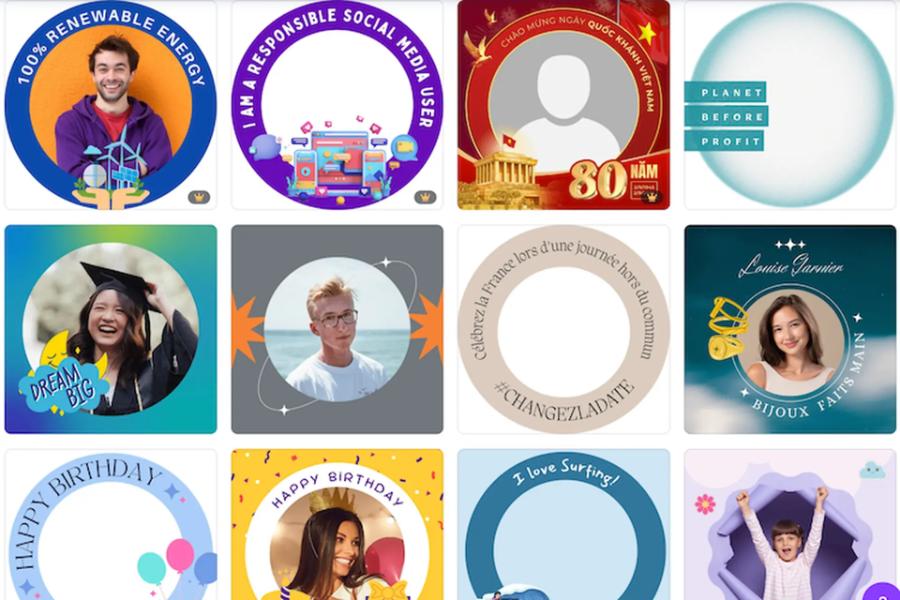
1.1 Perfect compatibility with the user experience on mobile devices
Most modern smartphone screens are designed with rounded corners for a comfortable grip and optimized display space. The use of circular frames for profile pictures (avatars) by major apps like Facebook, Instagram, TikTok, and YouTube is not a coincidence from an aesthetic standpoint. The curved structure eliminates unnecessary space at the four corners, focusing attention on the center and creating a smooth, seamless experience when scrolling.
1.2 The psychological effect of visual perception creates a feeling of friendliness and connection.
Studies on human visual behavior have shown that sharp, angular shapes tend to evoke feelings of caution, while circles suggest safety, perfection, and connection. When a business account or personal page uses this shape, visitors unconsciously develop a sense of approachability, trustworthiness, and willingness to interact. This is a subtle psychological trick that interface designers always employ to increase customer retention rates.
2. Outstanding advantages of online methods for creating circular photo frames.
2.1 Instant processing speed eliminates cumbersome software installation procedures.
Installing professional graphic design tools from Adobe or open-source editing software always requires a computer with relatively powerful hardware and consumes a lot of memory. For users who only need to crop images for basic tasks, this results in a huge waste of resources and time. Online platforms allow you to perform the entire process directly in your phone or laptop's web browser without downloading any complex installation files.
2.2 An intuitive experience suitable for all levels of technological proficiency.
The operational process of cloud-based graphic design websites is simplified to the maximum extent to serve the vast majority of ordinary users. You don't need to learn how to use complex selection tools like the Pen Tool or set up cumbersome layer mask systems. Every operation, from uploading images and moving the focus circle to resizing, is guided intuitively in Vietnamese, making it easy for even the elderly or children to complete their projects without difficulty.
2.3 Transparent background removal export mode meets digital graphics standards.
A common concern for users when processing images online is that the received file will have white borders inserted in all four corners, preventing the image from blending seamlessly with other background colors. Advanced online circular photo frame creation tools have completely solved this problem by exporting files in transparent PNG format.
3. Step-by-step guide to creating a standard resolution circular photo frame online.

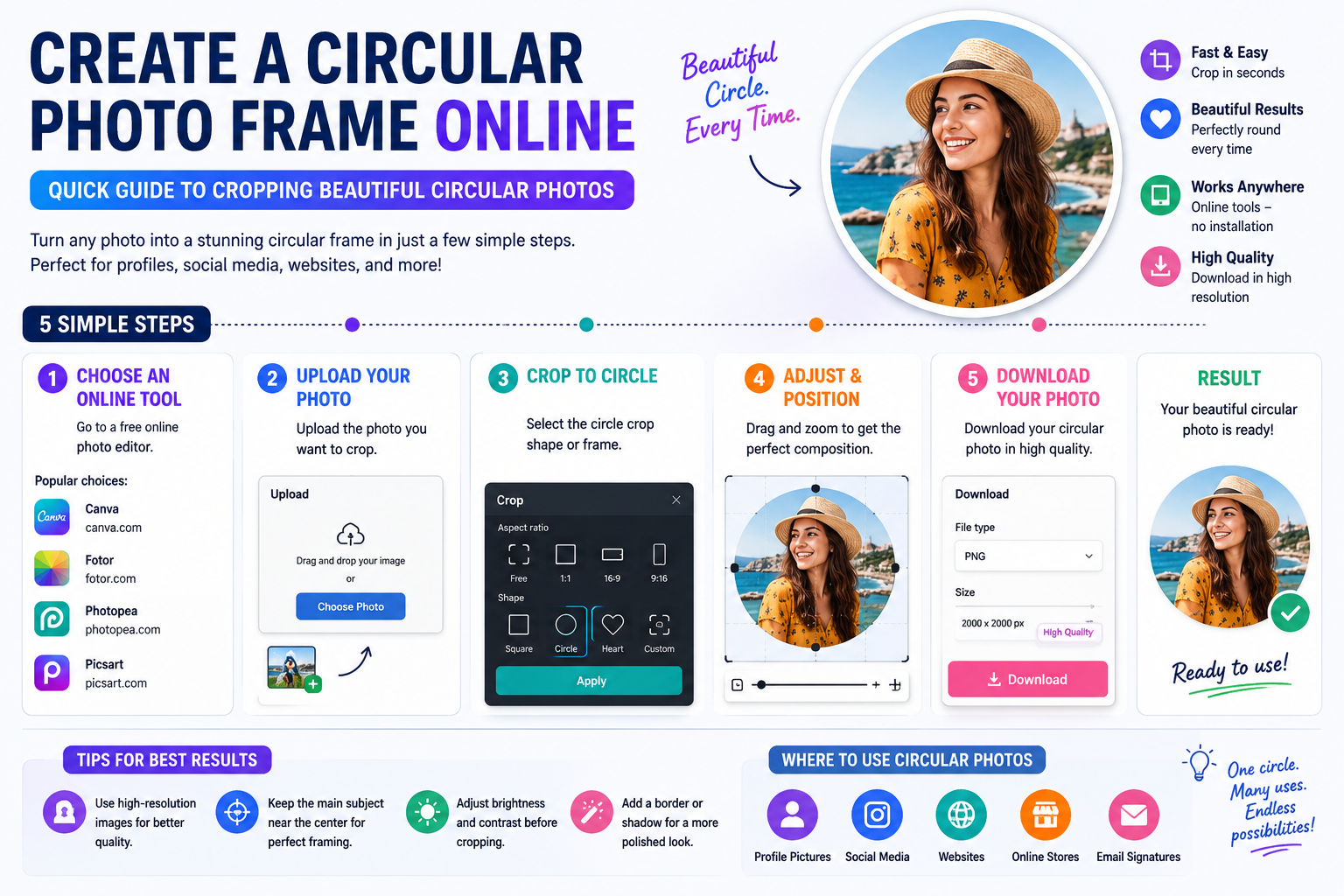
3.1 Step 1: Select and upload the original file to the cloud processing system.
The initialization process should begin with preparing a high-quality, well-lit, and high-resolution image to avoid blurring after cropping.
-
Instructions: Users access the tool's website, click the upload image button, or drag and drop the file directly from their computer's folder into the browser's workspace.
-
Expert tip: Prioritize photos with the subject centered in the frame so that adjusting the circle later is quick and doesn't result in the loss of important details.
3.2 Step 2: Align the focus circle and apply additional filters
This stage determines the aesthetics and balanced composition of the digital artwork before publication.
-
Defining the cropping area: Move the smart circular frame over the subject's position, dragging the corners to expand or shrink the circle to completely cover the face or logo.
-
Add borders: Users can choose to add borders with colors that match their brand identity, and customize the thickness of the borders to create depth for their profile picture.
-
Color correction: Use contrast and brightness sliders or apply available color filters to make your photos look more vibrant and professional.
3.3 Step 3: Package the data and download the optimal file format.
The final step requires careful format selection to ensure that image quality is not degraded when uploaded to the internet.
-
Choose PNG format: This is a mandatory option if you want to retain the transparent background around the circle, for use in inserting images into other designs.
-
Choose JPG format: This option is suitable when you want to use the image as your avatar directly on social media platforms that automatically convert file formats to optimize file size.
-
Download: Click the save or download button in high quality (HD), the system will process the data in a few seconds and save it directly to your device.
4. Practical applications of circular image formats in digital life.

4.1 Develop a standardized profile picture system for all brand channels.
For businesses operating across multiple channels, from Facebook, Zalo, Instagram to TikTok, using a consistent, rounded logo image is essential for increased brand recognition. When customers see the brand logo appearing consistently with the same border and color scheme across all platforms, they will immediately perceive the credibility, scale, and professional work ethic of that business.
4.2 Design eye-catching product labels and stickers.
In the packaging and retail industry, circular sticker designs are always popular due to their versatility and ease of application to any packaging surface, from bottles and cardboard boxes to plastic bags. By using online circular photo frame creation tools, shop owners can manually round product images and add contact information around the border to create a unique branded sticker without incurring outsourcing costs.
5. Introducing a groundbreaking technology space at appvip.ai
The shift of the digital age demands that educational and technological solutions constantly innovate to deliver optimal value to the general public. The website appvip.ai is a pioneering ecosystem, a hub of high-quality training programs and leading artificial intelligence tools. The platform's development direction is to simplify complex technical processes, making academic graphic design knowledge accessible to everyone. Instead of spending days researching cumbersome tools, the intelligent system here automatically analyzes structure, identifies market trends, and suggests optimal image optimization solutions with just a click of the mouse.
6. Classic mistakes to avoid to prevent blurry round photos.

6.1 Using original images with excessively low resolution or that are blurry.
Even the most intelligent online image cropping algorithms can only manipulate images based on the available pixel matrix of the input file. If you upload a photo taken with an older front-facing camera, a compressed image sent via text message, or a screenshot, the resulting product will almost certainly suffer from severe jagged edges and pixelation.
6.2 Cutting too close to the core identifying details of the subject
A common mistake for beginners is narrowing the focus circle too much, obscuring the top of the subject's head, ears, or cutting across the lettering on a brand logo. This carelessness creates a cramped, unbalanced, and unprofessional look in reality. The golden rule is to always leave a safe amount of padding around the subject, about 10% to 15% of the image area, to allow the photo to breathe.
7. Conclusion
Utilizing online circular photo frame creation solutions is a smart move that helps you optimize time, enhance aesthetics, and create a professional style for all your digital media publications. The shift from cumbersome tools to intuitive online platforms accurately reflects the trends of the technological age: minimalism, speed, and high efficiency.





















VIP Products








Best Selling Products
Genuine Adobe Illustrator account
99 USD
ChatGPT Plus Account (GPT-4)
16 USD
Autodesk All App Account Copyright
120 USD
Adobe Premiere Pro Account
99 USD
Upgrade genuine Capture One account
120 USD
Freepik Premium Account
59 USD
Windows 10 & 11 Pro Key
36 USD
MidJourney Account
29 USD
Copyright Adobe Lightroom Account
59 USD
Upgrade Duolingo Super
29 USD
Adobe Photoshop Copyright - Full App
120 USD
Plugin Retouch4me
69 USD
Genuine Cheap Canva Pro
39 USD
Capcut Pro 1 Year
39 USD
Upgrade Genuine Office 365
49 USD