Best Selling Products

Copyright Adobe Lightroom Account
59 USD

Freepik Premium Account
59 USD

Genuine Adobe Illustrator account
99 USD

Upgrade Genuine Office 365
49 USD

ChatGPT Plus Account (GPT-4)
16 USD

Capcut Pro 1 Year
39 USD

MidJourney Account
29 USD

Plugin Retouch4me
69 USD

Autodesk All App Account Copyright
120 USD

Adobe Photoshop Copyright - Full App
120 USD

Windows 10 & 11 Pro Key
36 USD

Upgrade Duolingo Super
29 USD

Adobe Premiere Pro Account
99 USD

Genuine Cheap Canva Pro
39 USD

Upgrade genuine Capture One account
120 USD
Create Artistic Portrait Paintings with AI Gemini Easily
Nội dung
- 1. What Is AI Gemini?
- 2. Why Is Creating AI Portrait Artwork So Popular?
- 3. Detailed Guide to Creating Portrait Paintings with AI Gemini
- 3.1 Step 1: Access AI Gemini
- 3.2 Step 2: Switch to Image Creation Mode
- 3.3 Step 3: Upload the Original Portrait Photo
- 3.4 Step 4: Enter a Prompt (Describe the Desired Style)
- 3.5 Step 5: Wait for AI to Process the Image
- 3.6 Step 6: Download and Share the Artwork
- 4. Small Tips to Make Your AI Portrait Look Better
- 5. The Most Popular Painting Styles on AI Gemini
- 5.1 Classic Oil Painting
- 5.2 Modern Digital Painting Style
- 5.3 Black-and-White Artwork (Charcoal or Pencil Sketch)
- 5.4 Manga or Anime Style
- 5.5 Unique Abstract Painting Style
- 5.6 The Trending “Museum” Style
- 6. Benefits of Using AI Gemini for Creativity
- 7. A Reliable and Affordable Place to Upgrade Gemini
- 8. Conclusion
With just an ordinary portrait photo, you can completely transform it into a stunning work of art using the AI Gemini tool. No drawing skills are required, no complicated editing is needed—just a few simple steps and you can instantly create a masterpiece in a classic oil painting style, youthful manga style, or even an impressive abstract artwork. Gemini helps recreate your own image in the most creative way possible—both realistic and emotionally expressive—making anyone who sees it stop and admire. Let's explore it with Appvip right away!
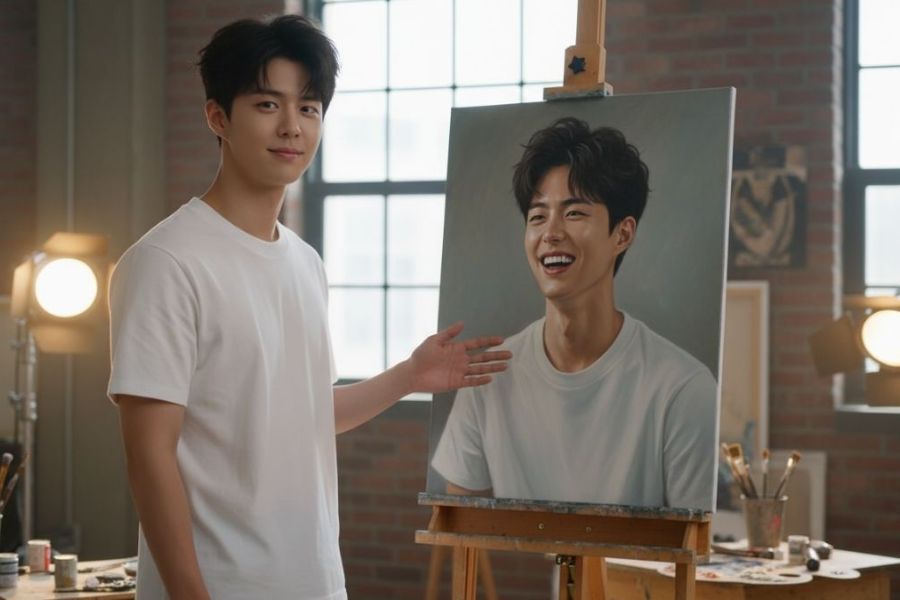
1. What Is AI Gemini?
AI Gemini is an advanced artificial intelligence tool developed by Google that allows users to chat, write content, generate images, and most notably transform real photos into artistic paintings using just a few short descriptions (prompts).
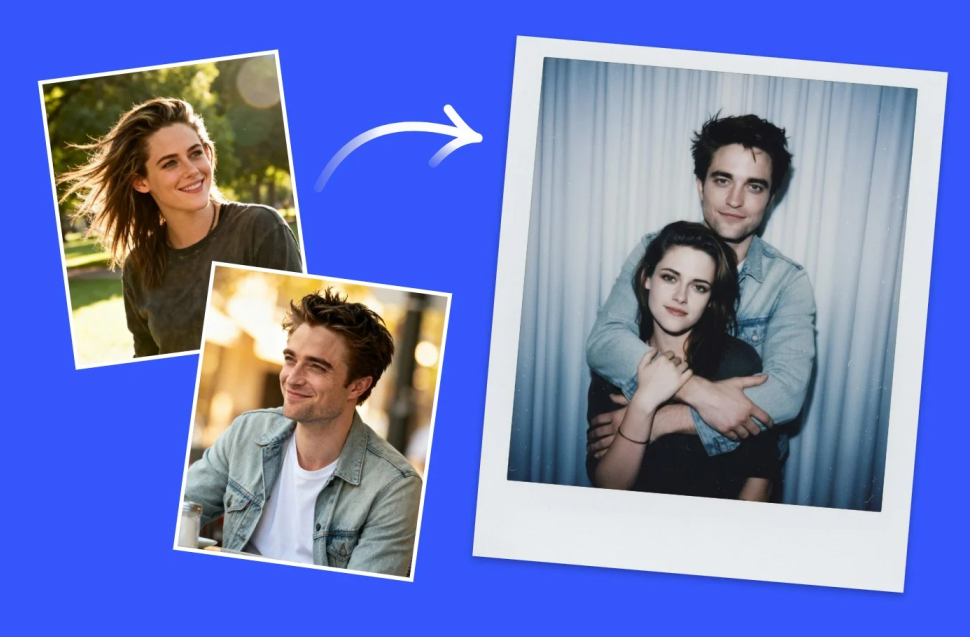
Unlike conventional photo-editing applications, Gemini has the ability to “understand” the ideas you describe. Simply upload an original image and enter your requests regarding painting style, background, lighting, or colors, and the AI will automatically process the image and create a portrait artwork in the artistic style you desire.
Gemini operates entirely online, is easy to use, and requires no design skills. This is precisely why it has become a favorite tool among content creators, photographers, and everyday users.
.jpg)
2. Why Is Creating AI Portrait Artwork So Popular?
The trend of using AI to transform real photos into paintings is growing rapidly. Since this technology emerged, numerous trends such as “seeing your portrait in a museum,” “turning selfies into oil paintings,” and “creating anime-style portraits” have spread widely across social media platforms.
The reasons are simple:
Fast: Transform a real photo into a painting in just a few seconds.
Easy to use: No drawing experience or editing skills required.
Diverse styles: Choose from oil painting, watercolor, digital art, manga, classic, modern, and more.
Zero cost: Most basic features are free, allowing everyone to create their own artwork.
Highly personal: Every artwork is unique, reflecting the creator’s emotions and individual style.
That is why more and more people choose AI Gemini as a “digital artist” that helps them express themselves through art.
Affordable Gemini Upgrade
3. Detailed Guide to Creating Portrait Paintings with AI Gemini
3.1 Step 1: Access AI Gemini
First, access the AI Gemini platform—Google’s outstanding tool powered by advanced artificial intelligence image-generation technology. You can access it directly through the website or Gemini mobile application. Simply sign in with your personal Google account to get started. The entire process takes place online, with no need to install any additional software.
One of AI Gemini’s strengths is its user-friendly interface, clear layout, and intuitive design. All features are organized logically, allowing even first-time AI users to become familiar with the platform immediately. You will see options such as text generation, image creation, and AI chat. Simply select the appropriate feature to begin your own creative journey.
.jpg)
3.2 Step 2: Switch to Image Creation Mode
After successfully signing in, you will see Gemini’s main interface. Here, select the “Image Generation” feature. This is the creative workspace where you can enter prompts and upload original photos for AI processing according to your desired artistic style.
This mode operates using artificial intelligence combined with deep learning models, allowing the AI to understand both the content of the image and the ideas described in your prompt. Once selected, the system will automatically take you to the prompt-entry and image-upload interface, which is extremely intuitive. With just a few clicks, you are ready to transform a real photo into an artistic painting.
.jpg)
3.3 Step 3: Upload the Original Portrait Photo
Next, choose an original portrait photo—this will serve as the primary source material that Gemini uses to recreate your image as a painting. Prioritize high-quality photos with a clear face, natural lighting, and sharp details. Small details such as facial expressions, shooting angle, and lighting all directly affect the quality of the final artwork.
If possible, choose a front-facing portrait where the face is not obscured by hair, accessories, or other objects. The clearer the image, the easier it is for AI to recognize your facial features and accurately recreate your unique characteristics—from your eyes and smile to your skin tone and surrounding lighting. A high-quality original photo acts like a perfect canvas, helping AI Gemini create a painting that is both vivid and highly artistic.
.jpg)
3.4 Step 4: Enter a Prompt (Describe the Desired Style)
This is the most important step because the prompt is how you “instruct” the AI on the artistic style you want. The more detailed the prompt, the more accurate the result. You can describe the type of artwork (oil painting, manga, abstract, modern, etc.), colors, lighting, emotions, or even the overall atmosphere of the image.
For example:
“Create a portrait in a classic oil painting style, warm lighting, blurred background, and soft brush strokes.”
“Generate a manga-style portrait with bright colors, large expressive eyes, and a natural smile.”
“Create an abstract portrait that represents the face through bold color blocks and high-contrast lighting.”
When writing prompts, try using descriptive emotional and visual language, such as “soft golden light,” “classic Italian style,” or “gentle brushwork similar to a Van Gogh painting.” This helps the AI understand your artistic vision more clearly instead of interpreting only a generic command.
.jpg)
3.5 Step 5: Wait for AI to Process the Image
After entering your prompt, simply click the “Generate Image” button and wait a few seconds. Based on the information you provided, AI Gemini will begin processing the image, combining the original photo with your style description to create multiple artistic versions. Processing is extremely fast, taking only a few seconds, which saves significant time compared to hiring an artist or creating the artwork yourself.
You can preview several different versions suggested by Gemini. Each version carries its own mood and artistic direction, ranging from soft and classic to bold and modern. If you are not satisfied, simply refine your prompt with more details or request additional versions. Every regeneration is an exciting experience because you never know exactly what creative interpretation the AI will produce next.
.jpg)
3.6 Step 6: Download and Share the Artwork
After selecting your favorite artwork, click “Download” to save it to your device. From there, you can freely use your creation in various ways. An artistic portrait can serve as a profile picture, be printed as wall art, given as a gift to loved ones, or shared on social media to make a strong impression on friends.
What makes it even more exciting is that every artwork generated is unique, reflecting your personal identity through every detail. Whether it features the soft brushwork of an oil painting, the vibrant colors of manga art, or the bold lines of abstract expression, everything is shaped by your own vision through just a few short descriptions. This is the creative power AI Gemini offers, bringing art closer to everyone than ever before.
.jpg)
4. Small Tips to Make Your AI Portrait Look Better
To make AI-generated portrait artwork appear natural, refined, and artistically compelling, there are several important tips you should keep in mind. With just a few adjustments during preparation and prompt writing, you can help the AI better understand your vision and generate nearly perfect results.
Choose a high-quality original photo: A clear, well-lit, and sharp original image provides the foundation for an impressive portrait painting. Select a front-facing image where the face is not hidden by hair, accessories, or shadows. Natural lighting is always the best choice because it reveals facial features, expressions, and skin tones clearly. Avoid extremely close-up selfies or dramatic side angles, as AI may misinterpret facial structure, resulting in distorted or unbalanced artwork.
Write detailed and emotional prompts: The prompt is the soul of the entire AI Gemini painting process. If your description is vague, the AI may create a generic image lacking personality. Therefore, be specific about style, lighting, color palette, emotions, and surrounding environment. For example: “A classic oil painting with warm golden light, a woman in a white dress reading by a window, soft brush strokes, muted colors.” The more detailed your description, the easier it is for the AI to create artwork that is both visually stunning and emotionally accurate.
Experiment multiple times to find the perfect version: Every prompt is a new creative opportunity. Do not hesitate to try different descriptions repeatedly. Simply changing a small detail such as “early morning light,” “soft pastel colors,” or “classic European painting style” can dramatically alter the final result. Experimentation not only helps you understand how AI works but also inspires fresh and unique ways to express yourself.
5. The Most Popular Painting Styles on AI Gemini
AI Gemini allows unlimited creativity, ranging from classical elegance to modern innovation, from subtle beauty to bold artistic expression. Below are the painting styles most loved by users when creating AI portrait artwork.
5.1 Classic Oil Painting
This style remains popular because of its elegance and emotional depth. Oil paintings evoke warmth, nostalgia, and romance. Common color palettes include golden brown, wine red, teal, and muted beige, creating a sophisticated and gentle atmosphere. Thick, soft brush strokes give faces a lifelike quality, as if painted by hand. This style is ideal for those who appreciate traditional European artistic beauty.
5.2 Modern Digital Painting Style
If you enjoy youthful, energetic, and creative aesthetics, digital painting is the perfect choice. Digital artwork typically features smooth textures, strong lighting, and clearly defined details. Bright and vivid colors create a contemporary, technology-inspired feel. With AI Gemini, you can easily create cinematic or game-art-inspired portraits that work perfectly as profile pictures, cover images, or personal posters.
5.3 Black-and-White Artwork (Charcoal or Pencil Sketch)
Charcoal and pencil sketch styles are ideal for those who appreciate minimalism and elegance. Despite using only two basic tones, the delicate lines and strong contrast create remarkable artistic depth. A pencil or charcoal portrait often conveys authenticity, simplicity, and individuality. This style carries a timeless quality that recalls the sketchbooks of classical artists.
5.4 Manga or Anime Style
This style is extremely popular among young people, especially fans of Japanese culture. Manga-inspired portraits typically feature large expressive eyes, vibrant facial expressions, bright skin tones, and cheerful colors. The style feels lively, charming, and full of energy. You can ask AI Gemini to recreate your face as an anime character, resulting in an exciting and highly personalized animated version of yourself.
5.5 Unique Abstract Painting Style
If you love artistic freedom, abstract art will undoubtedly captivate you. In this style, faces are not represented realistically but instead expressed through colors, shapes, and emotions. Every abstract painting is spontaneous and reflects the creator’s personality and state of mind. Through AI Gemini’s artistic interpretation, these color compositions become both unconventional and harmonious, creating a powerful visual impact.
5.6 The Trending “Museum” Style
One of the most fascinating recent trends is creating images of yourself standing in a museum, admiring your own AI-generated portrait displayed on a gallery wall. This style combines artistic sophistication with unique visual storytelling, making viewers feel as though you are part of a real exhibition. AI Gemini allows you to describe museum interiors, exhibition lighting, and even antique frames, creating a highly distinctive and memorable image.
.jpg)
6. Benefits of Using AI Gemini for Creativity
AI Gemini is not just an entertainment tool—it is also a powerful source of creative inspiration:
-
Helps you discover your personal style: Every prompt generates artwork with a different emotional atmosphere.
-
Suitable for everyone: Whether you are a student, office worker, content creator, or photographer, Gemini can help you create unique works of art.
-
Versatile applications: Use your creations as avatars, print them on clothing, create profile images, or give them as personalized gifts.
-
Encourages artistic expression: Thanks to AI, anyone can “paint” without learning traditional drawing techniques. This opens new opportunities for creative expression on a broad scale.
7. A Reliable and Affordable Place to Upgrade Gemini
If you are looking for a reliable and affordable place to upgrade to Gemini Pro, Appvip is one of the leading choices trusted by many users. With years of experience in technology services and premium account solutions, Appvip is committed to providing authentic Google AI Pro / Gemini Pro accounts that are secure and stable for long-term use. Every upgrade is completed quickly, supported 24/7, and protected with strict security measures, allowing you to confidently enjoy all premium AI Gemini features without any concerns.
Appvip consistently follows the principles of “Reliability – Quality – Great Value,” ensuring that users can access advanced artificial intelligence technology at the most cost-effective price. When using services here, you not only receive a complete account upgrade but also detailed guidance on how to maximize Gemini’s capabilities for image generation, content creation, and learning. This dedication and transparency have made Appvip a trusted destination for anyone seeking to unlock the full potential of AI Gemini Pro for work and creativity.
Affordable Gemini Upgrade
8. Conclusion
With AI Gemini, creating portrait paintings has never been easier. Every photo is no longer just a captured moment—it becomes a unique work of art that reflects your personal identity. Whether you want to explore classic, modern, or unconventional artistic styles, Gemini can bring your ideas to life in just a few seconds. Start exploring today and let artificial intelligence breathe artistic inspiration into every one of your photos with Appvip.





















VIP Products








Best Selling Products
Copyright Adobe Lightroom Account
59 USD
Freepik Premium Account
59 USD
Genuine Adobe Illustrator account
99 USD
Upgrade Genuine Office 365
49 USD
ChatGPT Plus Account (GPT-4)
16 USD
Capcut Pro 1 Year
39 USD
MidJourney Account
29 USD
Plugin Retouch4me
69 USD
Autodesk All App Account Copyright
120 USD
Adobe Photoshop Copyright - Full App
120 USD
Windows 10 & 11 Pro Key
36 USD
Upgrade Duolingo Super
29 USD
Adobe Premiere Pro Account
99 USD
Genuine Cheap Canva Pro
39 USD
Upgrade genuine Capture One account
120 USD