Best Selling Products

Upgrade Duolingo Super
29 USD

Upgrade Genuine Office 365
49 USD

Freepik Premium Account
59 USD

Plugin Retouch4me
69 USD

Upgrade genuine Capture One account
120 USD

Genuine Adobe Illustrator account
99 USD

ChatGPT Plus Account (GPT-4)
16 USD

Windows 10 & 11 Pro Key
36 USD

Autodesk All App Account Copyright
120 USD

Adobe Photoshop Copyright - Full App
120 USD

Genuine Cheap Canva Pro
39 USD

Capcut Pro 1 Year
39 USD

Adobe Premiere Pro Account
99 USD

MidJourney Account
29 USD

Copyright Adobe Lightroom Account
59 USD
Create Professional 3D Images in Just Minutes with Nano Banana Pro
Nội dung
- 1. What is Nano Banana Pro?
- 2. Creating 3D Images – The Modern Trend in Content Creation and Design
- 3. What Do You Get When Using Nano Banana Pro to Create 3D Images from Drawings?
- 3.1 Detailed 3D Models That Recreate Realistic Spaces
- 3.2 Sharp 3D Images with High Detail Quality
- 3.3 Realistic Material and Lighting Display
- 3.4 Intuitive and Easy-to-Understand Images for All Audiences
- 3.5 Time Savings Through an Automated Workflow
- 4. 3 Steps to Create 3D Images with Nano Banana Pro
- 4.2 Step 2: Switch to Banana Pro Image Creation Mode
- 4.3 Step 3: Upload the Original Image to Gemini and Enter a Detailed Prompt
- 5. Useful Tips to Create the Most Natural 3D Images with Nano Banana Pro
- 5.1 Prepare Clear Original Images with Complete Information
- 5.2 Enter Detailed Prompts to Control Proportions and Space
- 5.3 Create Multiple Versions to Choose the Best Viewing Angle
- 5.4 Carefully Compare with the Original Sketch
- 5.5 Refine Lighting and Shadows for a More Natural Appearance
- 6. Conclusion
Creating 3D images with Nano Banana Pro is a modern method that helps you transform flat images into vivid spatial models in just a few minutes.
1. What is Nano Banana Pro?
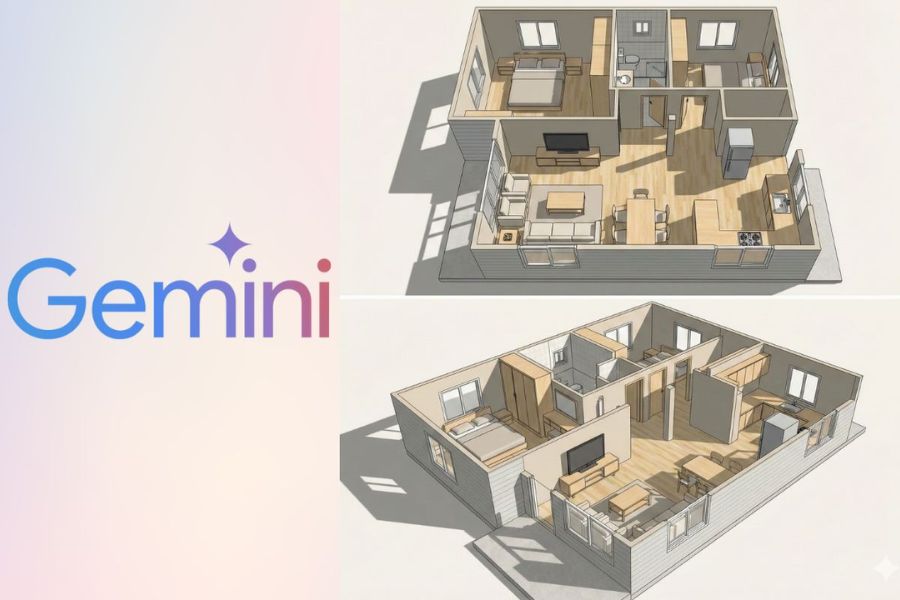
Nano Banana Pro is a modern 3D image creation support tool that allows users to convert ordinary 2D images into models with depth and spatial realism in a short amount of time. Instead of working through multiple complicated modeling software programs, Nano Banana Pro focuses on a simple and intuitive experience while still ensuring sharp and professional output quality.
The highlight of Nano Banana Pro lies in its intelligent image processing capability through the Gemini platform. Users only need to upload the original image, describe their desired outcome, or adjust a few basic parameters, and the system will automatically analyze the layout, lighting, and objects to recreate natural 3D effects. Thanks to this, even users without a design or 3D technical background can easily use the tool.
Nano Banana Pro is especially suitable for many different users such as architects, interior designers, marketers, online sellers, or content creators. This tool significantly saves image production time while also improving persuasiveness and viewer attraction compared to traditional 2D images.
(1).jpg)
2. Creating 3D Images – The Modern Trend in Content Creation and Design
In the increasingly competitive digital content landscape, images no longer only need to look beautiful but also need to create strong impressions and realism. 3D images help viewers better visualize space, proportions, and object structures, thereby increasing memorability and interaction. This is why creating 3D images is becoming a prominent trend in design, media, and advertising today.
For architecture, interior design, and real estate, 3D images play an important role in presenting ideas and convincing clients. A spatial model with depth always provides a more intuitive experience compared to flat drawings or ordinary photographs. Meanwhile, for e-commerce and content creation, 3D images help products appear more vivid, distinctive, and professional in the eyes of viewers.
The development of 3D image creation tools like Nano Banana Pro has contributed to spreading this trend further. Users are no longer limited by technical barriers or high costs, but can quickly create 3D images for many different purposes. This convenience and efficiency are gradually making 3D images the new standard in modern content creation and design.
3. What Do You Get When Using Nano Banana Pro to Create 3D Images from Drawings?
When using Nano Banana Pro to create 3D images from sketches, you are not simply converting 2D images into 3D but also gaining a vivid, intuitive image system with high practical application value. Below are the outstanding benefits this tool offers.
3.1 Detailed 3D Models That Recreate Realistic Spaces
From a simple 2D sketch, Nano Banana Pro can transform it into a 3D model with clear depth. Important elements such as spatial layout, wall positions, doors, staircases, and hallways are accurately recreated based on the original drawing. As a result, the overall space becomes much easier to visualize compared to ordinary flat images.
Beyond the basic structure, Nano Banana Pro also models interior and secondary architectural details such as tables, chairs, cabinets, lamps, railings, and more with proper proportions. This helps viewers clearly perceive depth, perspectives, and the scale of the space, creating a realistic feeling even from the earliest idea stage.
3.2 Sharp 3D Images with High Detail Quality
Nano Banana Pro stands out with its ability to generate highly detailed 3D images, from large surfaces to small elements. The lines in the model are processed smoothly and clearly, making the overall image look more professional and visually deeper.
Thanks to its intelligent image processing capabilities, architectural and interior details do not appear stiff or disconnected. Instead, the 3D model creates a seamless, natural, and easy-to-observe appearance, suitable for both idea presentation and use in professional documents or media content.
3.3 Realistic Material and Lighting Display
Nano Banana Pro not only focuses on building 3D forms but also simulates materials in a refined way. Surfaces such as wood, glass, metal, stone, or fabric are displayed with distinct characteristics, helping viewers easily imagine the intended materials used in the space.
In addition, the lighting system is recreated realistically, from natural sunlight passing through windows to artificial indoor lighting. Shadows, reflections, and lighting tones are harmoniously processed, making the 3D space more vivid while supporting more intuitive evaluation of colors and lighting.
(1).jpg)
3.4 Intuitive and Easy-to-Understand Images for All Audiences
One of the biggest advantages of 3D images created with Nano Banana Pro is their high level of visual clarity. Even viewers without expertise in design or architecture can quickly understand the concept through clear and vivid 3D visuals.
As a result, these 3D models are highly suitable for client presentations, team discussions, or pitching ideas to partners. Additionally, 3D images can be used for marketing purposes, project showcases, or construction planning, bringing practical value right from the sketching stage.
3.5 Time Savings Through an Automated Workflow
Previously, building a complete 3D space often required many complicated and time-consuming steps, from modeling and applying materials to rendering. With Nano Banana Pro, this entire process is automated and significantly simplified.
Users only need to upload their sketch, select the appropriate modeling mode, and wait a few minutes for the system to process everything. This is especially useful for projects that require quick image production, helping save time while still ensuring high-quality output.
4. 3 Steps to Create 3D Images with Nano Banana Pro
In this section, Sforum will guide you step by step on how to create 3D images with Nano Banana Pro in a simple and practical way. With just a sketch and a few minutes of operation, you can create intuitive 3D visuals for design, idea presentation, or content creation purposes.
4.1 Step 1: Quickly Access Gemini Nano Banana Pro
First, open your browser and access the Gemini website or use the Gemini application on your device. Then log in with your personal account to fully use the content and image creation tools.
After successfully logging in, you will be taken to Gemini’s main interface. Here, all operations are arranged intuitively and are easy to learn, even for first-time users. Staying logged into your account also helps save your image creation history, making future editing and reuse more convenient.
(1).jpg)
4.2 Step 2: Switch to Banana Pro Image Creation Mode
Once inside the Gemini interface, find the Tools section and select Image Creation mode. This is where you can use Nano Banana Pro to process images and create 3D models from sketches or original images.
Switching to the correct mode is an important step that helps the system clearly understand your purpose. In Image Creation mode, Gemini activates advanced image processing algorithms optimized for 3D modeling, spatial display, object rendering, and more accurate lighting simulation.
.jpg)
4.3 Step 3: Upload the Original Image to Gemini and Enter a Detailed Prompt
Next, click the “+” icon to upload your 2D sketch or the image you want to convert into a 3D model. The clearer the drawing and the more organized the layout, the closer the final 3D image will match your expectations.
.jpg)
After uploading the image, you need to enter a detailed prompt describing your requirements. The prompt acts as an “instruction guide” that helps Nano Banana Pro understand the type of 3D space you want to create. You can describe the style, materials, lighting, viewing angle, or overall atmosphere of the space. For example:
“Analyze the drawing and convert it into a detailed 3D model, clearly displaying walls, windows, doors, spatial layout, natural lighting, and realistic viewing angles.”
“Create a modern minimalist 3D living space with neutral color tones, clean interior arrangement, and a combination of natural and artificial lighting.”
“Build a Scandinavian-style 3D model with white tones, light wood materials, minimalist design, spacious layout, and abundant lighting.”
After entering the prompt, simply click Send and Nano Banana Pro will begin processing. Within seconds, Gemini will suggest one or multiple 3D images based on your drawing and requirements. If the results are not fully satisfying, you can add more prompts or edit the instructions to fine-tune the output according to your expectations.
Once you are satisfied with the generated 3D image, simply click the Download button to save the image and use it for presentations, marketing, design, or content creation purposes.
5. Useful Tips to Create the Most Natural 3D Images with Nano Banana Pro
To achieve highly realistic 3D images with Nano Banana Pro, having a good tool alone is not enough — proper usage also matters. From preparing the original drawing and writing prompts to refining the final result, every small detail directly affects the overall image quality. Below are important tips to help you create 3D images that look more natural, balanced, and professional.
5.1 Prepare Clear Original Images with Complete Information
The original image or sketch serves as the foundation of the 3D image creation process. You should use drawings with a clear layout, organized lines, and fully displayed main areas within the space. When the AI has enough information about walls, doors, pathways, and main objects, the 3D result will be more realistic and minimize proportion errors.
If possible, you should provide additional viewing angles or detailed drawings for each area. This helps Nano Banana Pro distinguish main subjects from the background, resulting in a more accurate and seamless 3D recreation. The higher the quality of the original image, the more effective the processing becomes.
5.2 Enter Detailed Prompts to Control Proportions and Space
Prompts are the key factor that determines how accurately the 3D image matches your expectations. Instead of writing general descriptions, you should include specific details such as ceiling height, window dimensions, walkway width, or light source positions. These details help Nano Banana Pro better understand the proportions and structure of the space.
For interior spaces, you can also describe the design style, primary materials, and overall atmosphere you want to achieve. Combining technical descriptions with emotional descriptions helps the 3D image not only appear structurally correct but also aesthetically appealing and natural-looking.
5.3 Create Multiple Versions to Choose the Best Viewing Angle
An important tip when using Nano Banana Pro is not to stop after generating just one image. You can submit different prompts to ask the system to create multiple 3D versions with various perspectives, such as top-down views, eye-level views, or diagonal angles.
Comparing multiple versions helps you easily choose the image with the best composition, balanced proportions, and clearest spatial representation. At the same time, this also helps you quickly identify unsuitable details so you can adjust the prompts and regenerate improved results..jpg)
5.4 Carefully Compare with the Original Sketch
After Nano Banana Pro finishes generating the 3D image, you should take time to compare it carefully with the original sketch. Check whether important elements such as room layout, door positions, staircases, or major furniture items are accurately preserved. This step ensures that the final 3D image truly reflects the original idea.
If you notice inaccurate details, you can edit the prompt or request a new version with clearer descriptions. Reviewing and refining each step helps ensure the final 3D image is both technically accurate and aligned with your actual expectations.
5.5 Refine Lighting and Shadows for a More Natural Appearance
Lighting and shadows are essential elements that create realism in 3D images. After receiving the result, pay attention to shadow softness, lighting direction, and overall brightness intensity. Harsh lighting or overly sharp shadows can make the space feel unnatural.
You can adjust the prompt to request softer lighting, enhanced natural light, or a more balanced combination of indoor and outdoor lighting. These small refinements help objects within the 3D space appear more harmonious, visually comfortable, and closer to the feeling of a real environment.
6. Conclusion
With its intelligent processing capabilities, simple operation, and flexible customization options, Nano Banana Pro is suitable for many types of users, from beginners, content creators, and marketers to architects, interior designers, and project implementation teams. Through Gemini’s intuitive interface, every step of creating 3D images becomes more accessible, helping users save time while still ensuring professional-quality output.
If you are looking for a modern and effective method to create 3D images without requiring complex technical skills while still delivering high practical value, Nano Banana Pro is definitely a worthwhile long-term investment. Contact Thế Giới Phần Mềm AI today for consultation, upgrades, and unlimited access to Nano Banana Pro, allowing you to freely create and bring your ideas to life quickly and impressively.





















VIP Products








Best Selling Products
Upgrade Duolingo Super
29 USD
Upgrade Genuine Office 365
49 USD
Freepik Premium Account
59 USD
Plugin Retouch4me
69 USD
Upgrade genuine Capture One account
120 USD
Genuine Adobe Illustrator account
99 USD
ChatGPT Plus Account (GPT-4)
16 USD
Windows 10 & 11 Pro Key
36 USD
Autodesk All App Account Copyright
120 USD
Adobe Photoshop Copyright - Full App
120 USD
Genuine Cheap Canva Pro
39 USD
Capcut Pro 1 Year
39 USD
Adobe Premiere Pro Account
99 USD
MidJourney Account
29 USD
Copyright Adobe Lightroom Account
59 USD