Best Selling Products

Copyright Adobe Lightroom Account
59 USD

Genuine Adobe Illustrator account
99 USD

MidJourney Account
29 USD

Capcut Pro 1 Year
39 USD

Adobe Premiere Pro Account
99 USD

Freepik Premium Account
59 USD

Upgrade Duolingo Super
29 USD

Autodesk All App Account Copyright
120 USD

Genuine Cheap Canva Pro
39 USD

ChatGPT Plus Account (GPT-4)
16 USD

Upgrade genuine Capture One account
120 USD

Upgrade Genuine Office 365
49 USD

Windows 10 & 11 Pro Key
36 USD

Adobe Photoshop Copyright - Full App
120 USD

Plugin Retouch4me
69 USD
How to Create the Viral “Head Grab” TikTok Image Easily Without Editing Skills
Nội dung
- 1. Why the “head grab” trend on TikTok attracts Gen Z
- 2. How to create head grab trend images and videos with CapCut
- 2.1 Step 1 Open the CapCut app
- 2.2 Step 2 Search for head grab templates
- 2.3 Step 3 Insert images and let AI process
- 2.4 Step 4 Check layout and make basic edits
- 2.5 Step 5 Open Filters to adjust colors
- 2.6 Step 6 Choose a suitable color and save
- 2.7 Step 7 Export and share on TikTok
- 3. How to create unique head grab images with Gemini
- 4. Tips to help head grab videos go viral on TikTok
- 5. Conclusion
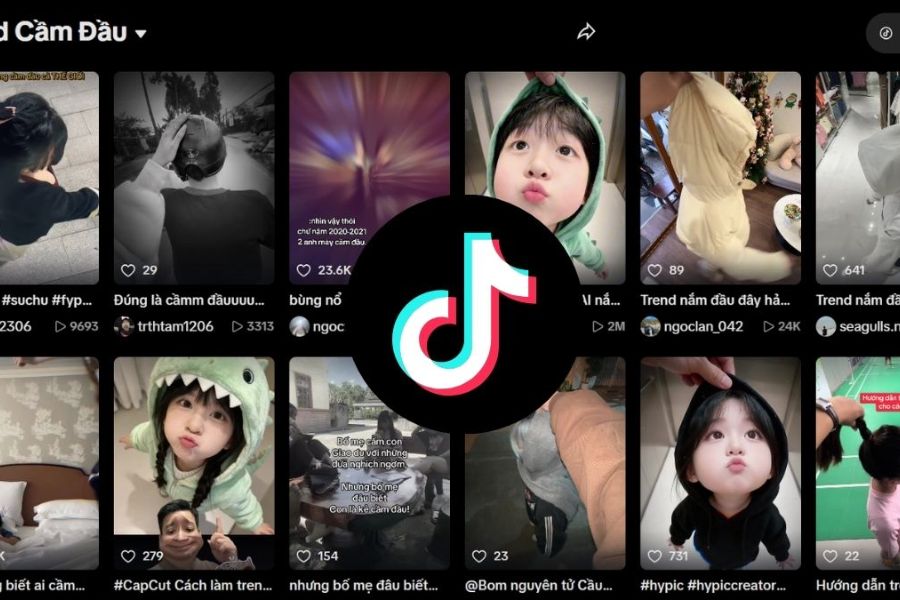
The “head grab” trend featuring a tiny character being lifted into the air by a giant hand is taking over TikTok thanks to its super cute design, “adorably helpless” expressions, and the ability to make viewers laugh within seconds.
1. Why the “head grab” trend on TikTok attracts Gen Z
The head grab trend on TikTok is not just a passing visual effect but has quickly become a phenomenon widely embraced by Gen Z. What makes this trend special is the combination of humor, cuteness, and extremely high personalization. With just the image of a tiny character being lifted by a giant hand, viewers instantly feel the interesting contrast between small and large, helplessness and power, creating a natural sense of entertainment. In a context where Gen Z is constantly looking for fast, eye-catching content that leaves a personal mark, this trend meets almost all those criteria.
Here are the main reasons why this trend is especially appealing to Gen Z:
Create a contrasting effect that is funny at first glance: The size difference between the tiny character and the giant hand creates a frame that is both dramatic and adorable. The viewer’s brain is stimulated by something illogical yet reasonable in TikTok’s creative world. This contrast helps retain viewers in the first seconds, a crucial factor in short-form content competition.
Tap into Gen Z’s love for cuteness: Characters often show pampering, confused, or adorably helpless expressions. These create a soft and positive feeling, making viewers happy and more likely to engage. Gen Z loves cute yet slightly humorous content, making this trend an ideal way to express personality.
Extremely easy to execute without advanced editing skills: One of the most important reasons is convenience. With ready-made templates on CapCut, users only need to select images and wait for processing to get a complete video. This matches Gen Z’s fast creation habits and desire to catch trends quickly without spending too much time on post-production.
Easy to personalize content based on personal stories: The head grab trend is not limited to one format. Users can adapt it into grabbing a lover, best friend, crush, colleague, or even a pet. Each version tells a different story, keeping content fresh while maintaining the trend’s spirit.
Interesting combination with AI technology: Gen Z grew up with technology and is always ready to try new tools. Adding AI to create 3D or Anime-style characters elevates the trend to another level. Users not only follow trends but also showcase creativity and personal aesthetics.
Fits TikTok’s fast viewing pace: Head grab videos are short, visual, and easy to understand. Viewers don’t need to read or follow complex content—just looking at the image conveys the idea. This increases completion rates and engagement, important for TikTok’s algorithm.
Creates a fun, low-pressure experience: In a social media environment full of comparison pressure, light and humorous trends like this bring pure entertainment. It doesn’t require showing achievements or a perfect life—just a fun moment. This simplicity makes Gen Z comfortable participating.
.jpg)
2. How to create head grab trend images and videos with CapCut
The fastest way to create a head grab trend video for TikTok without advanced editing skills is to use the Template feature available in CapCut. These templates already include the giant hand effect and AI processing, so you just insert images and wait for rendering. Below is a step-by-step guide that anyone can follow on their phone.
2.1 Step 1 Open the CapCut app
First, open CapCut on your phone. If not installed, download it from the App Store or Google Play and log in to access full features. The interface is intuitive and beginner-friendly.
On the main screen, you’ll see options like Edit, Templates, Camera, or a search bar. To create the head grab trend quickly, use Templates, where ready-made AI effects are available.
2.2 Step 2 Search for head grab templates
In the search bar, type keywords like head grab trend, carry away, or giant hand grabbing head. The system will show many templates, from cute styles to humorous or 3D effects.
Choose templates with high usage, as they are often trending and smoother. Tap Use Template to begin editing.
.jpg)
2.3 Step 3 Insert images and let AI process
After selecting the template, CapCut will ask you to choose images. Pick a clear photo with good lighting and no obstructions. Portrait or full-body images both work, but ensure the face is centered.
Once selected, the system automatically applies the giant hand effect and processes it. This usually takes about a minute depending on device performance.
2.4 Step 4 Check layout and make basic edits
After the video is created, review it to ensure the face is not covered or misaligned. If needed, adjust positioning using editing tools.
Tap the pencil icon to access detailed edits. You can adjust brightness, contrast, colors, or framing to make the subject clearer.
.jpg)
2.5 Step 5 Open Filters to adjust colors
After basic edits, go to Filters to choose color tones. CapCut offers styles like bright, warm, vintage, or cinematic.
Filters help unify the video and make it more appealing. Choose tones that match the mood—bright for cute styles or darker tones for personality.
2.6 Step 6 Choose a suitable color and save
After selecting a filter, apply it to the entire video. Review again to ensure balanced colors and clarity.
If satisfied, tap Save to finalize editing. Checking carefully helps avoid redoing the process.
.jpg)
2.7 Step 7 Export and share on TikTok
Finally, tap Export and choose high resolution for clarity on TikTok. Export takes a few seconds depending on video length.
To avoid the CapCut watermark, choose Save and share directly to TikTok. Add caption and hashtags, then post. Your head grab trend video is ready without complex editing.
3. How to create unique head grab images with Gemini
If you’re used to using real photos and want something more creative, using AI to create 3D or Anime avatars is worth trying. Instead of using existing images, you can transform into a cute Chibi character, a funny cartoon, or even a cinematic version. With Gemini, it’s easier than ever—even for beginners.
The key to AI image creation is the Prompt. A prompt is a detailed description of what you want. The more specific you are about character, expression, style, lighting, and colors, the better the result. You can use these sample prompts and customize them.
English prompt: “A cute chibi girl being held up by a giant realistic hand grabbing its head. The character is hanging in the air, dangling legs, cute confused expression. 3D Pixar style, high detail, solid pastel background.”
Vietnamese prompt: “Create an image of a cute Chibi-style girl being lifted by a giant hand grabbing her head. Confused, adorable expression, dangling legs. High-detail 3D render, pastel background.”
Funny style prompt: A funny cartoon character boy being lifted by a giant hand with exaggerated derp face, rolling eyes, tongue out, comic style, bright colors.
Horror style prompt: A terrified character grabbed by a giant monster hand with sharp claws in a dark, foggy cinematic horror scene, 8K resolution.
Follow these steps:
Step 1 Access Gemini website: Open a browser and go to https://gemini.google.com/app. Log in with your Google account. The interface is simple and easy to use.
.jpg)
Step 2 Enter prompt: Paste your prepared prompt. Customize details like character type, background, or colors. The more specific, the better the result.
Step 3 Click Generate: Press Generate and wait a few seconds. Gemini will create the image based on your prompt. Download it to use in CapCut or post directly on TikTok.
Combining Gemini for 3D or Anime avatars makes the trend much more unique. With just a good prompt and simple steps, you can create standout content that attracts engagement on TikTok.
.jpg)
4. Tips to help head grab videos go viral on TikTok
Even if a trend is hot, poor strategy can still lead to low performance. TikTok prioritizes retention and engagement in the first seconds, so optimization is key.
Focus on audio: Background music strongly affects emotions. For this trend, use playful game music like Mario, cartoon soundtracks, or upbeat remixes. Trending sounds also help algorithms distribute your content.
Use effective hashtags: Include hashtags like #headgrabtrend, #carryaway, #capcut, #transformation, #tiktoktrend. Avoid overusing irrelevant tags—stick to related keywords.
Ensure video quality: Export at least 1080p or higher (2K/4K). Enable HD upload in TikTok settings to avoid blur. Clear visuals improve professionalism and retention.
Post at the right time: Evening hours (7 PM – 10 PM) usually have higher activity. Posting then increases early engagement and algorithm boost.
Add personalization: Even within the same trend, add humor, unique captions, or creative twists. Creativity keeps viewers engaged and encourages follows.
5. Conclusion
Among countless daily-changing TikTok trends, the “head grab” trend stands out thanks to its simplicity, humor, and high personalization. By using CapCut templates or combining them with creative 3D effects from Gemini AI, you can turn a small idea into engaging content without editing skills. The key is not complex techniques but quick trend adaptation and willingness to experiment. Don’t let your channel stay inactive—just a few minutes of work can help you create your own unique version and get ready to go viral on TikTok.





















VIP Products








Best Selling Products
Copyright Adobe Lightroom Account
59 USD
Genuine Adobe Illustrator account
99 USD
MidJourney Account
29 USD
Capcut Pro 1 Year
39 USD
Adobe Premiere Pro Account
99 USD
Freepik Premium Account
59 USD
Upgrade Duolingo Super
29 USD
Autodesk All App Account Copyright
120 USD
Genuine Cheap Canva Pro
39 USD
ChatGPT Plus Account (GPT-4)
16 USD
Upgrade genuine Capture One account
120 USD
Upgrade Genuine Office 365
49 USD
Windows 10 & 11 Pro Key
36 USD
Adobe Photoshop Copyright - Full App
120 USD
Plugin Retouch4me
69 USD