Best Selling Products

Autodesk All App Account Copyright
120 USD

Capcut Pro 1 Year
39 USD

Adobe Photoshop Copyright - Full App
120 USD

Genuine Adobe Illustrator account
99 USD

Windows 10 & 11 Pro Key
36 USD

Upgrade Genuine Office 365
49 USD

Upgrade Duolingo Super
29 USD

Genuine Cheap Canva Pro
39 USD

Copyright Adobe Lightroom Account
59 USD

Plugin Retouch4me
69 USD

MidJourney Account
29 USD

Upgrade genuine Capture One account
120 USD

Freepik Premium Account
59 USD

ChatGPT Plus Account (GPT-4)
16 USD

Adobe Premiere Pro Account
99 USD
How to Share Location for Couples During Lunar New Year
Nội dung
- 1. Overview of the Bump app for location sharing for couples
- 2. How does the Bump location sharing app work?
- 3. Why is Bump suitable for couples?
- 3.1 Be more proactive in every date
- 3.2 Peace of mind on every journey
- 3.3 Stay connected even when apart
- 3.4 Reduce unnecessary misunderstandings
- 3.5 Thoughtful care based on mutual consent
- 4. Step-by-step guide to download and use Bump
- 4.1 Step 1: Find and download the app from the App Store
- 4.2 Step 2: Enter personal information
- 4.3 Step 3: Enter phone number for verification
- 4.4 Step 4: Enter verification code
- 4.5 Step 5: Grant contact access
- 4.6 Step 6: Allow notifications
- 4.7 Step 7: Allow location access
- 4.8 Step 8: Complete setup and start using
- 4.9 Step 9: Open the invite section
- 4.10 Step 10: Choose how to send the invitation
- 4.11 Step 11: Enter recipient and finish
- 5. Does location sharing affect privacy?
- 6. Conclusion
Location sharing for couples is gradually becoming a unique “love language” during Lunar New Year, when everyone is busy returning home, visiting relatives, meeting friends, and constantly moving through crowded streets.
1. Overview of the Bump app for location sharing for couples
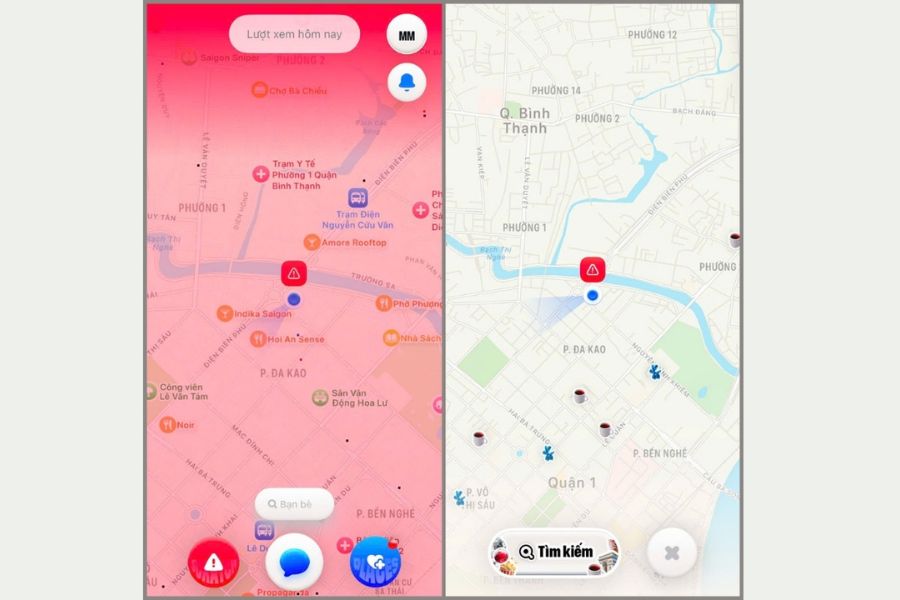
In recent years, the need for real-time connection between couples has become increasingly popular, especially during peak occasions like Tết. Among various location-based apps, Bump Friends Map is known as a modern connection space for iPhone users. This app allows real-time location sharing, helping you see where your loved one is and how they are moving with just a few simple steps. Instead of constantly texting to check in, you can proactively follow each other’s journey in a more intuitive and convenient way.
What makes Bump interesting is not only its ability to display locations, but also how it turns the map into an interactive space for close relationships. When opening the app, you can see friends or your partner appearing on the map with specific locations, creating a sense of closeness even during busy days. Every movement is continuously updated, making it easy for both of you to stay informed, especially during travel-heavy periods like Tết.
It can be said that Bump is not just a location tool but a technology-driven way of caring. The app makes connections more transparent and faster, while still requiring mutual consent to maintain comfort in the relationship. When used properly, Bump can become a gentle bridge that helps couples feel more secure and connected even when apart.
2. How does the Bump location sharing app work?
The Bump app operates based on real-time location data, allowing you to see the position of connected users directly on an interactive map. After downloading the app and registering with your phone number, users can send or receive invitations to establish private connections with friends or partners. Location sharing is only activated when both parties agree, ensuring transparency and control during use.
Once connected, you can track your partner’s location in real time, observe movement direction, and check their current status. Beyond showing location, Bump also provides additional details such as whether the person is stationary or moving, along with device battery level so you can know if their phone might be running low. These small details create a smoother and more realistic experience, making care feel thoughtful instead of overwhelming with constant questions.
Importantly, full control remains with the user. You can turn location sharing on or off anytime, limit who can view your location, or even activate hidden mode when you need privacy. This flexibility ensures Bump doesn’t become a surveillance tool but rather a connection built on trust and agreement. When used properly, it brings a gentle sense of reassurance, especially during busy travel periods like holidays.
3. Why is Bump suitable for couples?
3.1 Be more proactive in every date
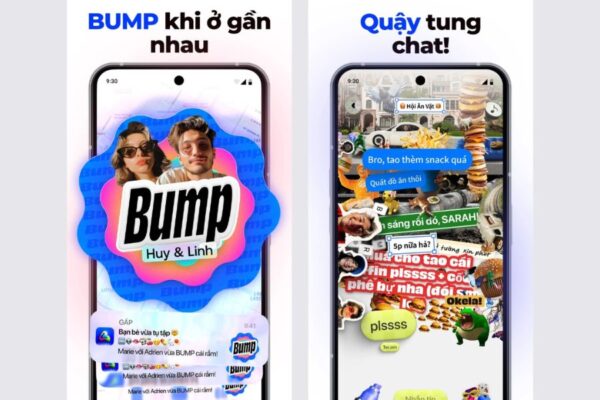
No more constant texting to ask where someone is or how far away they are—Bump helps couples be more proactive in every meeting. Just open the app, and you’ll know if your partner is on the way, stuck in traffic, or already near the meeting point. This clarity allows both sides to adjust timing flexibly and avoid anxious waiting.
Especially during Lunar New Year, when streets are crowded and schedules are tight, knowing each other’s route helps make meetings smoother. You can plan departure time, choose better routes, or adjust locations if needed instead of waiting passively.
3.2 Peace of mind on every journey
Tet is a time when people travel frequently—going home, visiting relatives, or meeting friends late into the evening. When your partner travels far or returns home late, worry is natural. Bump helps you know they’ve arrived safely without needing to ask repeatedly.
Sometimes that reassurance is more valuable than words. Just seeing the location dot stop at home can ease your mind. It’s a quiet yet meaningful form of care—subtle but deeply felt.
3.3 Stay connected even when apart
Couples cannot always stay together throughout the Tết holiday. One may be in their hometown, the other in the city, each with separate schedules. Thanks to real-time location sharing, both can still feel each other’s daily rhythm.
Seeing your partner visiting relatives or hanging out with friends creates a sense of closeness, as if you’re accompanying them from afar. This reduces the impact of physical distance and helps maintain natural connection during busy days.
3.4 Reduce unnecessary misunderstandings
During holidays, constantly changing schedules can lead to small misunderstandings. Late replies or missed calls may simply be due to travel or social obligations. With location sharing, you can better understand the situation instead of overthinking.
This transparency reduces pressure and tension in the relationship. There’s no need for excessive explanations or suspicion—just a glance at the map can answer everything calmly.
3.5 Thoughtful care based on mutual consent
What makes Bump suitable for couples is that full control lies with users. Location sharing only happens when both agree and can be turned off anytime. This ensures the feature doesn’t become intrusive while still respecting privacy.
When used voluntarily, location sharing during Tết becomes a subtle form of care. No need for long promises—just a small action is enough to show that you’re always looking out for each other’s safety.
4. Step-by-step guide to download and use Bump
Below is a detailed guide on how to download and use the Bump app on iPhone. The steps are simple and easy to follow so you can quickly set up location sharing with your partner or friends during Tet.
4.1 Step 1: Find and download the app from the App Store
First, open the App Store on your iPhone. In the search bar, type “Bump” and search. The results will show relevant apps—select the correct one named Bump Friends Map to avoid confusion with similar apps.
Once confirmed, tap Get to download. If authentication is required via Face ID, Touch ID, or Apple ID password, simply confirm. After a few seconds, the Bump icon will appear on your home screen.
4.2 Step 2: Enter personal information
After installation, open the app to start registration. First, Bump will ask you to enter your First Name and Last Name. It’s best to use your real or commonly used name so your partner can recognize you easily.
Next, enter your age as required. Providing basic information helps complete your profile and ensures transparency when sharing location. Then tap continue to proceed.
%20(1).jpg)
4.3 Step 3: Enter phone number for verification
The app will require registration using your phone number. Enter your active number, including country code +84 if you’re in Vietnam. This step ensures account security and prevents duplication.
After entering the number, choose how to receive the verification code—via SMS or through Zalo depending on available options. Confirm to receive the code.
4.4 Step 4: Enter verification code
Once you receive the numeric code, enter it correctly into the required field. Verification usually completes within seconds.
If you don’t receive the code, you can request a resend after a short time. Double-check your number to avoid errors. Once verified, your account will be activated.
%20(1)(1).jpg)
4.5 Step 5: Grant contact access
Bump will request access to your Contacts. Granting permission allows the app to suggest friends already using Bump, helping you connect faster.
You can tap Continue to allow or Decline if you prefer adding friends manually via invitation codes. This permission is optional.
4.6 Step 6: Allow notifications
Next, the app will request permission to send Notifications. If allowed, Bump can notify you when your partner moves, is nearby, or changes status.
This is especially useful during Tet when schedules are busy. However, you can decline or adjust settings later if you don’t want frequent notifications.
%20(1).jpg)
4.7 Step 7: Allow location access
This is the most important step. When prompted, select Allow While Using App to ensure accurate updates when Bump is open.
If you prefer temporary use, choose Allow Once. If not ready to share, select Deny and enable later in iPhone settings. Permissions can be changed anytime.
4.8 Step 8: Complete setup and start using
After granting location access, you’ll see the main map interface. This displays your location and connected users. The intuitive layout makes tracking and interaction easy.
Here, you can add friends, toggle location sharing, view movement status, and adjust privacy settings. Spend a few minutes exploring before regular use.%20(1).jpg)
4.9 Step 9: Open the invite section
To connect with your partner, go to the invite friends section on the main interface. The app provides options like QR code or personal link.
You can copy the link or send it directly via messaging platforms. This allows quick access and easy connection.
4.10 Step 10: Choose how to send the invitation
After tapping share, iPhone will show options like AirDrop, Messages, Mail, or copy link. Choose what fits your communication habits.
For example, sending directly via Messages allows quick sharing with your partner. This saves time and improves connection success.
%20(1).jpg)
4.11 Step 11: Enter recipient and finish
In the message screen, enter the recipient’s name or phone number. Your Bump profile link will automatically attach.
After checking details, tap send. Once accepted, both of you can start sharing and tracking each other in real time.
5. Does location sharing affect privacy?
Location sharing may raise privacy concerns, but in reality, it only works meaningfully when based on trust and mutual agreement. The app does not force users to share location but gives full control to you. When you need personal space, you can adjust settings freely.
Users can manage privacy through options such as:
Turn off location sharing anytime with just a few taps
Limit viewers to trusted people only
Activate Ghost Mode to temporarily hide location
Manage location permissions directly in phone settings
According to privacy policies, location data remains under user control. Transparency and mutual respect are key to making location sharing a positive form of care rather than pressure.
6. Conclusion
Tet is a time of reunion, love, and long journeys home. Sharing location during this time, when done voluntarily and respectfully, can become a beautiful expression of care—quiet, non-intrusive, simply wishing for each other’s safety. What matters is not whether you enable location sharing, but how both of you communicate, agree, and build trust. Technology is meant to support emotions, not replace trust. When used properly, location sharing won’t suffocate love—instead, it helps both of you feel more secure and fully enjoy the Tết atmosphere with family and loved ones.





















VIP Products








Best Selling Products
Autodesk All App Account Copyright
120 USD
Capcut Pro 1 Year
39 USD
Adobe Photoshop Copyright - Full App
120 USD
Genuine Adobe Illustrator account
99 USD
Windows 10 & 11 Pro Key
36 USD
Upgrade Genuine Office 365
49 USD
Upgrade Duolingo Super
29 USD
Genuine Cheap Canva Pro
39 USD
Copyright Adobe Lightroom Account
59 USD
Plugin Retouch4me
69 USD
MidJourney Account
29 USD
Upgrade genuine Capture One account
120 USD
Freepik Premium Account
59 USD
ChatGPT Plus Account (GPT-4)
16 USD
Adobe Premiere Pro Account
99 USD