Best Selling Products

Adobe Photoshop Copyright - Full App
120 USD

Copyright Adobe Lightroom Account
59 USD

Freepik Premium Account
59 USD

Windows 10 & 11 Pro Key
36 USD

Upgrade Genuine Office 365
49 USD

Capcut Pro 1 Year
39 USD

Genuine Cheap Canva Pro
39 USD

ChatGPT Plus Account (GPT-4)
16 USD

Upgrade Duolingo Super
29 USD

MidJourney Account
29 USD

Genuine Adobe Illustrator account
99 USD

Plugin Retouch4me
69 USD

Upgrade genuine Capture One account
120 USD

Autodesk All App Account Copyright
120 USD

Adobe Premiere Pro Account
99 USD
How to Use Gemini AI to Create Beautiful Tet Holiday Schedule Images in Just 5 Minutes
Nội dung
- 1. General Applications When Creating Tet Holiday Schedule Images with AI
- 2. Steps to Create Tet Holiday Schedule Images Using Google Gemini
- 2.1 Step 1: Access the Google Gemini Website and Log In
- 2.2 Step 2: Switch Gemini to “Image Generation” Mode
- 2.3 Step 3: Enter a Detailed Prompt to Generate Tet Holiday Images
- 2.4 Step 4: Generate and Adjust the Image
- 2.5 Step 5: Download the Image
- 3. 5 Popular Prompts to Create Tet Holiday Announcements with Gemini AI – Beautiful – Standard – Easy to Apply
- 3.1 Prompt 1: Tet Holiday Schedule for Schools – Cute, Friendly, Education-Oriented
- 3.2 Prompt 2: Tet Holiday Announcement for Milk Tea Shops – Cheerful, Sweet, Friendly
- 3.3 Prompt 3: Tet Holiday Announcement for Cosmetic Shops – Feminine, Elegant, Radiant
- 3.4 Prompt 4: Tet Holiday Announcement for Accounting Firms – Formal, Professional
- 3.5 Prompt 5: Versatile Tet Holiday Announcement Template – Suitable for All Contexts
- 4. Important Notes When Creating Tet Holiday Schedule Announcements with AI
- 5. Conclusion
Every Tet season, the demand for designing holiday schedule images to notify employees, customers, or post on fanpages and websites increases significantly.
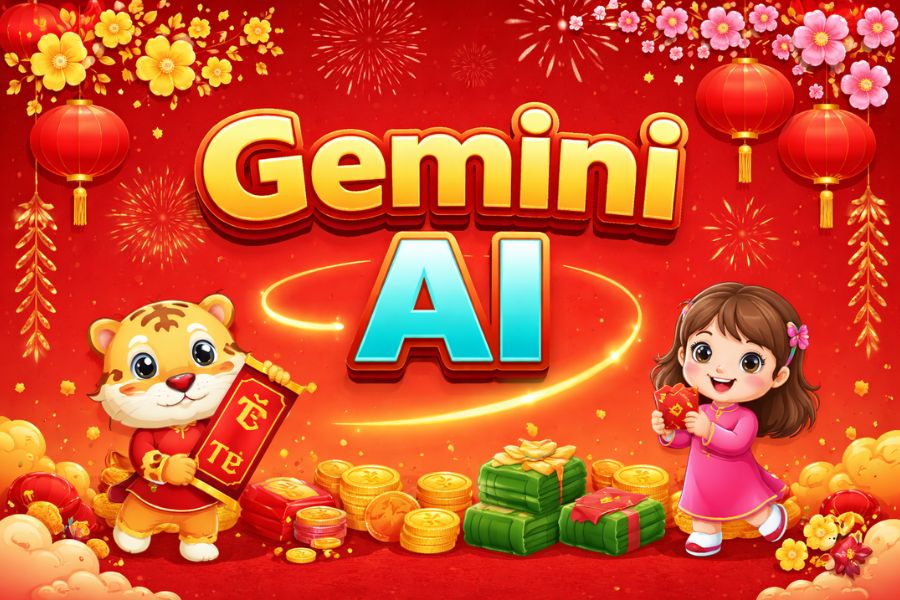
1. General Applications When Creating Tet Holiday Schedule Images with AI
The use of AI in designing Tet holiday schedule images is becoming increasingly popular thanks to its flexibility and high customization capabilities. By combining holiday announcements with AI technology, users can create visuals that are both clear in information and rich in aesthetics while capturing the spring atmosphere. Instead of posting plain text, businesses can easily create professional holiday schedule images with brand colors, logos, specific time information, and clear layouts. This not only ensures accurate communication but also enhances brand image in the eyes of customers, partners, and employees.
In online business and e-commerce, AI-generated Tet holiday images have become an effective communication tool at year-end. Shops can quickly create multiple design versions in different styles such as traditional with apricot blossoms, peach blossoms, bánh chưng; modern minimalist tones; or creative concepts featuring the zodiac mascot. As a result, holiday announcements are no longer monotonous but become engaging content that increases interaction, shares, and brand recall. Especially, the ability to easily edit holiday schedules and post-Tet delivery timelines helps sellers be more proactive in business planning.
Not only businesses, but schools, training centers, and individual users can also take advantage of AI to create vivid and easy-to-understand Tet holiday visuals. Parents and students can quickly grasp information when schedules are presented visually instead of long text. In addition, individuals can use AI to design Tet greeting cards with holiday schedules, post festive stories, decorate homes, or create mini desk calendars. Thanks to AI, creating Tet content becomes faster, more cost-effective, yet still visually impressive.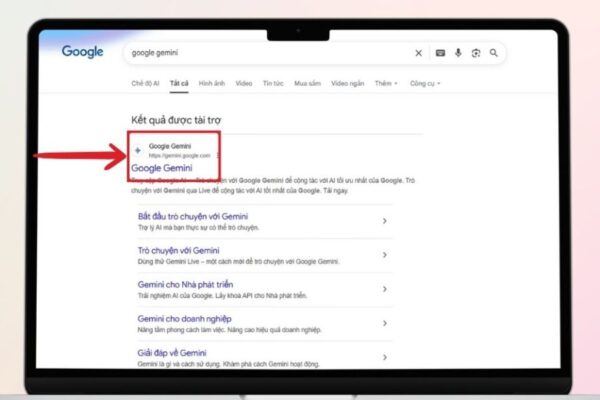
2. Steps to Create Tet Holiday Schedule Images Using Google Gemini
Google Gemini is currently one of the most powerful AI tools, supporting text-to-image generation with fast processing speed and strong Vietnamese language understanding. With its intuitive and user-friendly interface, users can design professional Tet holiday schedule images in just a few minutes without graphic design skills. Below is the detailed process from accessing the platform to downloading the final image.
2.1 Step 1: Access the Google Gemini Website and Log In
To begin creating Tet holiday schedule images with AI, access the Google Gemini platform via a browser on your computer or phone. The system will require you to log in using a Google account. If you already have Gmail, simply select your account and confirm login. Otherwise, register a new account to access full features.
After logging in successfully, the main Gemini interface will display a content input box at the center of the screen. This is where you will enter your request for AI processing. Before generating images, ensure your account is stable and your internet connection is strong to avoid interruptions.
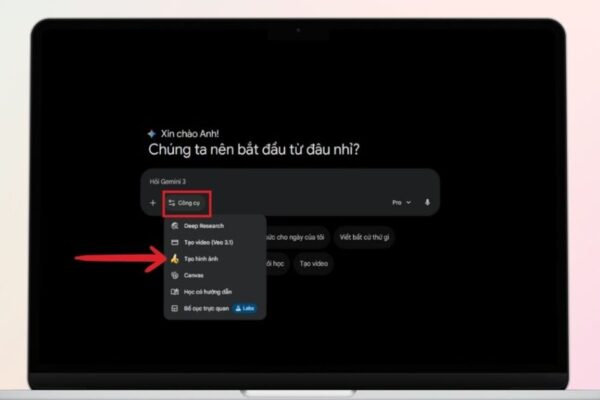
2.2 Step 2: Switch Gemini to “Image Generation” Mode
After entering the main interface, you need to switch the tool to the correct image generation mode. This is an important step because Gemini supports multiple functions such as answering questions, writing content, and analyzing data. When selecting image generation mode, the system activates a specialized AI model for creating visuals from text prompts.
Switching to the correct mode ensures more accurate results and prevents the AI from responding with text instead of images. Once activated, the prompt input area will be ready for use.
2.3 Step 3: Enter a Detailed Prompt to Generate Tet Holiday Images
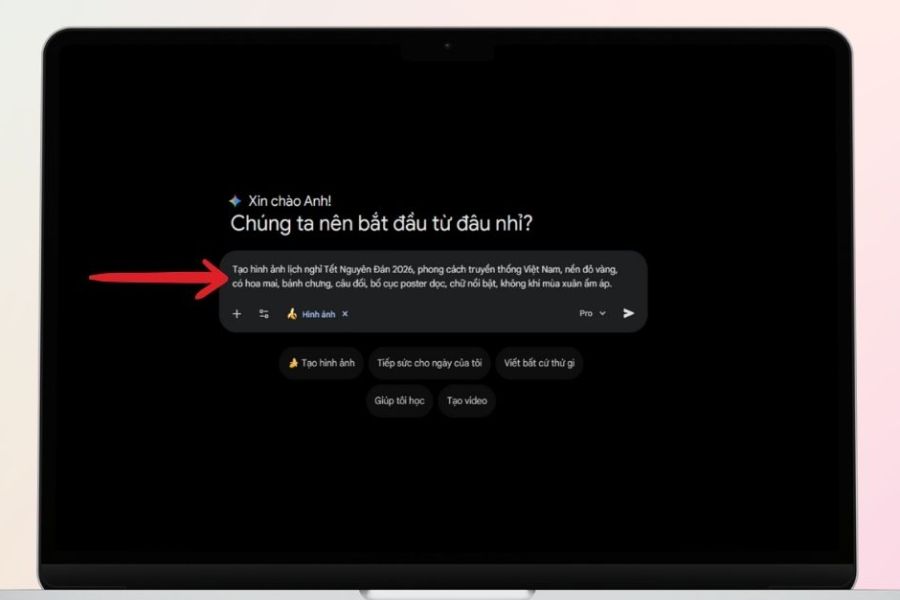
The prompt acts as a “text-based design blueprint.” The more detailed and clear your description is, the closer the generated image will match your expectations. When creating Tet holiday schedule images, you should include key elements such as:
Title: Lunar New Year Holiday Schedule + specific year
Holiday period and return-to-work date
Main colors (red, yellow, orange – spring tones)
Tet symbols (apricot blossoms, peach blossoms, Chung cake, lion dance, couplets, fireworks)
Design style (traditional, modern, minimalist, chibi cartoon)
Brand logo or company name (if any)
Example prompt:
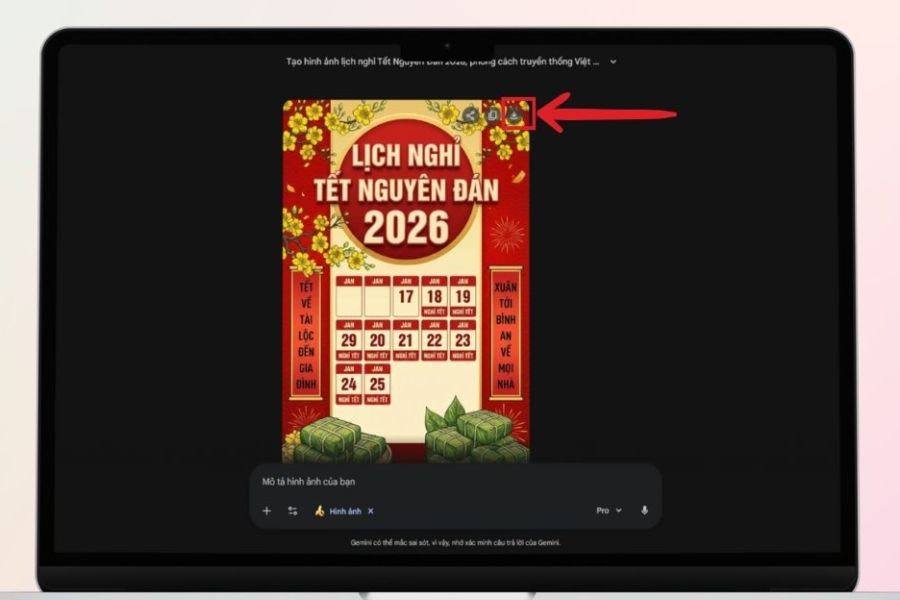
“Create a Lunar New Year holiday schedule image for 2026, traditional Vietnamese style, red and yellow background, featuring apricot blossoms, bánh chưng, couplets, vertical poster layout, bold text, warm spring atmosphere.”
You can also add more details such as:
Calligraphy or modern fonts
Zodiac mascot
Chibi characters
Fireworks and lighting effects
The more detailed the prompt, the fewer errors the AI will make regarding dates, layout, or missing elements. This step determines whether the AI-generated Tet holiday image is visually appealing and professional.
2.4 Step 4: Generate and Adjust the Image
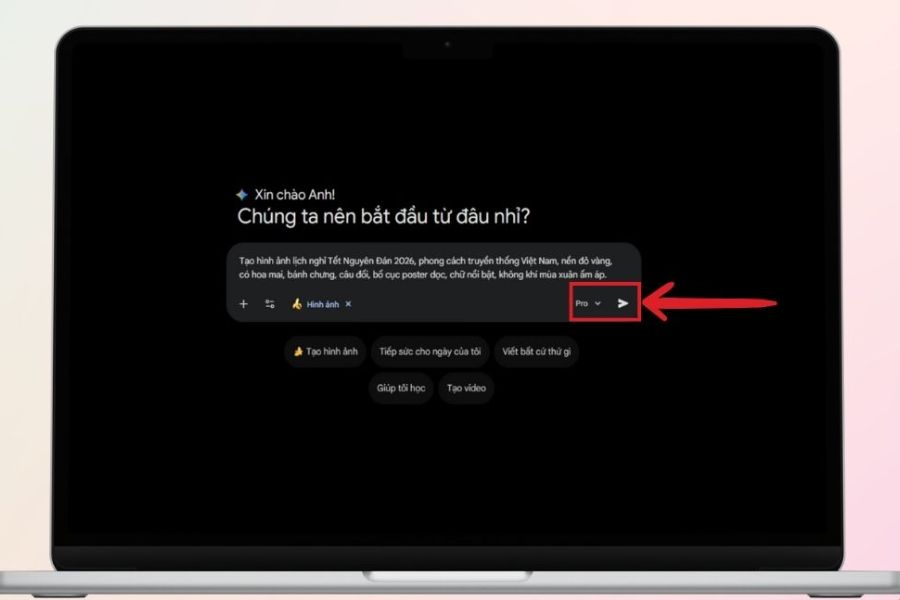
After completing the description, click submit and let the system process your request. The waiting time usually ranges from a few seconds to several dozen seconds depending on the complexity. Gemini may return multiple versions for you to choose from.
When reviewing the results, carefully check:
Is the layout balanced and easy to read?
Are the holiday and return dates accurate?
Do the colors match your brand identity?
Do the illustrations reflect Vietnamese Tet culture?
If you are not satisfied, you can refine by:
Rewriting a more detailed prompt
Adjusting color tones
Changing design style
Requesting clear Vietnamese text without errors
This process is similar to working with a professional designer but much faster. You can try multiple versions to find the most suitable design.
2.5 Step 5: Download the Image
Once you have selected your preferred version, simply click the download icon to save the image to your device. After downloading, you can immediately use it for purposes such as posting on websites, fanpages, sending internal emails, or printing.
If additional editing is needed (adding vector logos, extra details, resizing), you can open the image using simple tools like Canva or other design software. However, in many cases, AI-generated images are already complete and ready to use.
3. 5 Popular Prompts to Create Tet Holiday Announcements with Gemini AI – Beautiful – Standard – Easy to Apply
To effctively create Tet holiday announcement images using AI, it is important not only to ensure accurate content but also to match the style of each industry. Below are 5 popular prompt templates that are easy to apply and flexible for customization. You only need to adjust the brand name, colors, or desired style to get a professional design.
3.1 Prompt 1: Tet Holiday Schedule for Schools – Cute, Friendly, Education-Oriented
In educational environments, clarity and friendliness are the most important factors. The design should be cheerful and approachable while ensuring absolute accuracy.
Suggested prompt:
Create an illustrated poster “LUNAR NEW YEAR HOLIDAY SCHEDULE 2026”, cute 3D cartoon style, high quality. Vertical layout, center features a classic scroll board in cream with gold border, clear Vietnamese text. Above is “Happy New Year” on a golden ribbon. Blue sky background with vibrant fireworks, colorful lanterns on both sides.
Main title in red with gold border: “LUNAR NEW YEAR HOLIDAY SCHEDULE 2026”
Content:
Holiday period: From Saturday (February 14, 2026) to Sunday (February 21, 2026).
Return to school: Monday (February 23, 2026).
On both sides are 3D cartoon boy and girl in school uniforms, round faces, big eyes, friendly smiles. Decorated with peach blossoms, apricot blossoms, gently falling petals. Vietnamese spring atmosphere, soft lighting, bright colors. 1:1 ratio, 4K resolution, no text errors, no watermark.
This template is especially suitable for kindergartens, primary schools, language centers, or life skills training centers.
3.2 Prompt 2: Tet Holiday Announcement for Milk Tea Shops – Cheerful, Sweet, Friendly
For milk tea or fruit tea shops, the design should feel warm and familiar like a cozy meeting spot at the beginning of the year. It should not be too formal or rigid.
Suggested prompt:
Create a Lunar New Year 2026 holiday announcement poster for milk tea shop “SHOP NAME”, cheerful – sweet – warm style.
16:9 ratio, symmetrical layout, easy to read, with sufficient spacing.
Content remains 100% unchanged:
LUNAR NEW YEAR HOLIDAY ANNOUNCEMENT 2026
Holiday period: From Saturday (February 14, 2026) to Sunday (February 21, 2026).
Return to work: Monday (February 23, 2026).
“SHOP NAME” respectfully announces
Wishing customers a Happy New Year “Peace – Prosperity – All the Best!”
Bright Tet red background, soft gold text. Color palette: milk tea brown – peach orange – fruit green. Decorated with stylized blossoms, bubble milk tea cups, fruit tea elements placed subtly at the corners. Rounded Unicode font, easy to read, no character errors. 8K resolution, no watermark.
This template helps increase engagement on fanpages significantly.
3.3 Prompt 3: Tet Holiday Announcement for Cosmetic Shops – Feminine, Elegant, Radiant
The beauty industry requires refinement and a glowing aesthetic at first glance. The design should not be overly detailed but instead clean and elegant.
Suggested prompt:
Create a Lunar New Year 2026 holiday announcement poster for cosmetic shop “SHOP NAME”, feminine – youthful – elegant style.
16:9 frame, clean layout, prominent title.
Content remains 100% unchanged as follows:
LUNAR NEW YEAR HOLIDAY ANNOUNCEMENT 2026
Holiday period: From Saturday (February 14, 2026) to Sunday (February 21, 2026).
Return to work: Monday (February 23, 2026).
“SHOP NAME” respectfully announces
Wishing customers a Happy New Year “Peace – Prosperity – All the Best!”
Background: red blended with peach pink, champagne gold text. Accents: nude pink – beige – ivory. Soft peach blossom patterns, subtle metallic shine. Light illustrations of lipstick, serum, cream placed at poster corners. Modern Unicode font, no text errors. 8K Ultra HD, no watermark.
This design helps cosmetic shops maintain a professional yet approachable image.
3.4 Prompt 4: Tet Holiday Announcement for Accounting Firms – Formal, Professional
For accounting and financial services, professionalism and credibility are the most important factors. The design should be serious, clear, and not overly emotional.
Suggested prompt:
Create a Lunar New Year 2026 holiday announcement poster for an accounting service company. Professional – formal – trustworthy style.
Deep red background, sharp metallic gold text.
Content remains 100% unchanged:
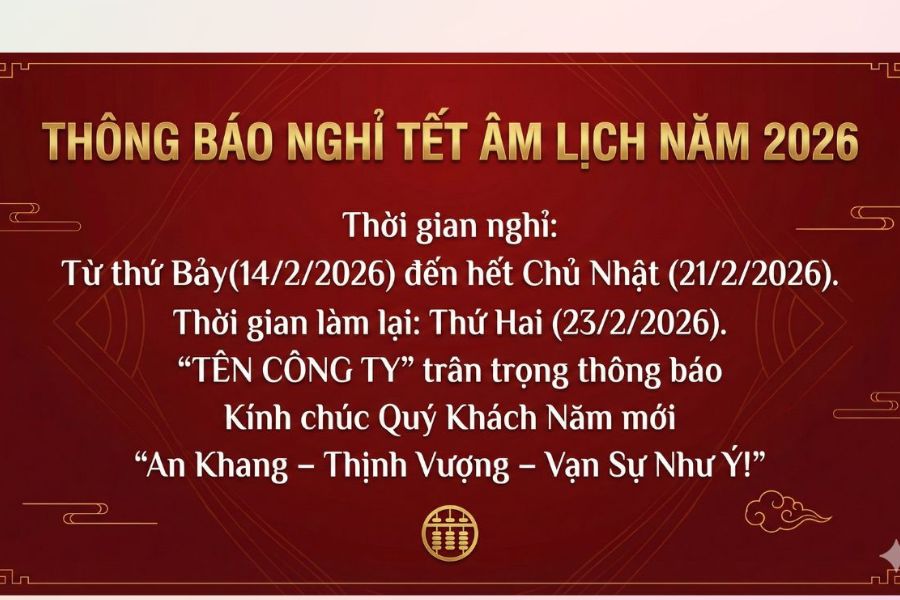
LUNAR NEW YEAR HOLIDAY ANNOUNCEMENT 2026
Holiday period: From Saturday (February 14, 2026) to Sunday (February 21, 2026).
Return to work: Monday (February 23, 2026).
“COMPANY NAME” respectfully announces
Wishing customers a Happy New Year “Peace – Prosperity – All the Best!”
Symmetrical layout, clear structure, no excessive decoration. Standard Unicode font, no character errors. 8K resolution, no watermark.
This template is suitable for company websites, client emails, or internal announcements.
3.5 Prompt 5: Versatile Tet Holiday Announcement Template – Suitable for All Contexts
If you need a flexible template for restaurants, offices, or small businesses, choose a warm yet professional style.
Suggested prompt:
Create a Lunar New Year 2026 holiday announcement poster, warm – refined – professional style.
16:9 frame, symmetrical layout, centered title, clearly divided content sections.
Content remains 100% unchanged:
LUNAR NEW YEAR HOLIDAY ANNOUNCEMENT 2026
Holiday period: From Saturday (February 14, 2026) to Sunday (February 21, 2026).
Return to work: Monday (February 23, 2026).
“SHOP/COMPANY/RESTAURANT NAME” respectfully announces
Wishing customers a Happy New Year “Peace – Prosperity – All the Best!”
Deep red background, soft gold text. Minimal decorations: apricot blossoms, peach blossoms, traditional cloud patterns. Rounded Unicode font, easy to read. 8K Ultra HD, no watermark, no unnecessary details.
4. Important Notes When Creating Tet Holiday Schedule Announcements with AI
Check accurate Tet holiday dates (lunar – solar) before entering prompts to avoid incorrect outputs.
Confirm all time milestones: start date, return date, makeup schedule (if any).
Clearly specify Vietnamese text with diacritics to minimize font or spelling errors.
Request readable fonts and emphasize titles like “Tet Holiday Schedule” or “Holiday Announcement” to ensure clarity.\
Include Vietnamese cultural elements such as apricot blossoms, peach blossoms, Chung cake, red couplets,Ao Dai to create a festive atmosphere.
Prioritize traditional colors like red, yellow, and orange.
Keep layout clean, avoid overcrowding text or details.
Choose square (1:1) or vertical formats for social media.
Download high-resolution images for printing posters, standees, or banners.
Avoid asking AI to recreate detailed logos; it’s better to add official logos after downloading.
Always double-check spelling, alignment, and spacing before publishing or sending officially.
5. Conclusion
It can be seen that using Gemini AI to create Tet holiday schedule images not only reduces design time to just a few minutes but also opens up unlimited creative opportunities for individuals and businesses. You don’t need to be skilled in design or install heavy software—just a clear idea and a detailed description are enough to create professional, visually appealing templates that match your brand. In the context of rapidly advancing AI technology, leveraging tools like Gemini AI is a smart solution to optimize productivity and enhance communication visuals every Tet season.





















VIP Products








Best Selling Products
Adobe Photoshop Copyright - Full App
120 USD
Copyright Adobe Lightroom Account
59 USD
Freepik Premium Account
59 USD
Windows 10 & 11 Pro Key
36 USD
Upgrade Genuine Office 365
49 USD
Capcut Pro 1 Year
39 USD
Genuine Cheap Canva Pro
39 USD
ChatGPT Plus Account (GPT-4)
16 USD
Upgrade Duolingo Super
29 USD
MidJourney Account
29 USD
Genuine Adobe Illustrator account
99 USD
Plugin Retouch4me
69 USD
Upgrade genuine Capture One account
120 USD
Autodesk All App Account Copyright
120 USD
Adobe Premiere Pro Account
99 USD