Best Selling Products

Windows 10 & 11 Pro Key
36 USD

Adobe Premiere Pro Account
99 USD

Upgrade Duolingo Super
29 USD

Upgrade genuine Capture One account
120 USD

Capcut Pro 1 Year
39 USD

ChatGPT Plus Account (GPT-4)
16 USD

Autodesk All App Account Copyright
120 USD

Adobe Photoshop Copyright - Full App
120 USD

Plugin Retouch4me
69 USD

MidJourney Account
29 USD

Upgrade Genuine Office 365
49 USD

Genuine Adobe Illustrator account
99 USD

Copyright Adobe Lightroom Account
59 USD

Freepik Premium Account
59 USD

Genuine Cheap Canva Pro
39 USD
How to Design Impressive Tet Red Envelopes on Canva in Just a Few Minutes
Nội dung
- 1. Why should you design Tet red envelopes yourself using Canva?
- 2. Essential elements of a beautiful Tet red envelope
- 3. How to design Tet red envelopes on Canva for beginners
- 3.1 Step 1: Find available red envelope templates on Canva
- 3.2 Step 2: Choose a layout that fits your needs
- 3.3 Step 3: Open the template and switch to editing mode
- 3.4 Step 4: Edit greetings and images
- 3.5 Step 5: Add more Tet elements
- 3.6 Step 6: Insert and arrange elements
- 3.7 Step 7: Use Canva AI to create a unique mascot
- 3.8 Step 8: Insert and adjust the mascot
- 3.9 Step 9: Align the layout
- 3.10 Step 10: Open download section
- 3.11 Step 11: Choose format and download
- 4. Tet red envelope design trends 2026
- 5. How to export red envelope files from Canva correctly, sharp, and print-ready
- 5.1 When to use PNG vs PDF Print?
- 5.2 How to export without losing quality
- 5.3 Check colors before printing
- 6. Conclusion
Thanks to a rich template library, simple drag-and-drop tools, and AI-powered illustration features, Canva allows anyone to create beautiful, modern, and print-ready red envelope designs without design skills.

1. Why should you design Tet red envelopes yourself using Canva?
Complete personalization: You can add the recipient’s name, meaningful wishes, or personal images to create a unique red envelope that makes your gift more special.
Freedom to choose design styles: From traditional red and gold tones symbolizing luck to modern, minimalist, or cute styles, Canva allows you to create freely without limitations.
Easy to use, no professional skills required: With an intuitive drag-and-drop interface and a rich template library, anyone can design beautiful red envelopes without knowing design or using complex software.
Suitable for both individuals and businesses: You can add logos, slogans, or brand colors to maintain consistency, turning red envelopes into effective branding tools during Tet.
Cost-saving and reusable: Design once, then edit and reuse for future Tet seasons, saving both time and cost compared to buying new designs every year.
Enhances emotional value: A custom-designed red envelope is not just a gift but also shows care, thoughtfulness, and sincerity from the giver.
.jpg)
2. Essential elements of a beautiful Tet red envelope
Colors symbolizing luck and prosperity: Red, yellow, orange, and warm tones are preferred as they represent fortune, happiness, and new beginnings. You can also combine green or teal for a modern touch while maintaining the Tet spirit.
Background that highlights the main content: A bright background with good contrast helps greetings and elements stand out when printed. Avoid overly dark or overly detailed backgrounds.
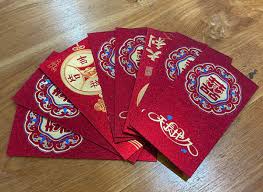
Traditional Tet patterns: Familiar images like apricot blossoms, peach blossoms, lanterns, firecrackers, gold coins, and stylized clouds help convey the festive atmosphere and prosperity.
Zodiac mascot for a unique highlight: Adding the zodiac animal of the year enhances symbolism and makes the design more meaningful and trendy.
Greetings placed centrally and easy to read: Phrases like “Happy New Year”, “Prosperity and Health”, or personalized wishes should be placed prominently and sized appropriately for readability.
Clear and suitable fonts: Choose simple, readable fonts that match the style. Avoid overly complex fonts that reduce readability.
Balanced layout with proper spacing: A good design balances text, images, and white space to create a clean, professional look.
Upgrade Canva at a low cost
3. How to design Tet red envelopes on Canva for beginners
When starting on Canva, you don’t need prior experience. Just follow these steps to quickly create a beautiful and print-ready design.
3.1 Step 1: Find available red envelope templates on Canva
Go to Canva and select Templates. Search keywords like “Red envelope”, “Lunar New Year envelope”. Canva will display hundreds of designs in various styles.
Using templates saves time and ensures a professional layout.
%20(1).jpg)
3.2 Step 2: Choose a layout that fits your needs
Review different layouts and select one with enough space for text, images, or logos.
For personal use, choose lively designs. For business, choose clean and simple layouts.
3.3 Step 3: Open the template and switch to editing mode
Click the template and select “Customize this template”. You can edit text, colors, and images directly.
%20(1).jpg)
3.4 Step 4: Edit greetings and images
Click text to edit messages like:
Happy New Year
Prosperity and Success
All the Best Wishes
Happy New Year 2026
You can also change fonts, colors, and layout.
3.5 Step 5: Add more Tet elements
Go to Elements and search for “Tet”, “lantern”, “zodiac”, etc. Choose elements that match your concept.
%20(1).jpg)
3.6 Step 6: Insert and arrange elements
Add and adjust size, position, and layout. Keep the design balanced and clean.
3.7 Step 7: Use Canva AI to create a unique mascot
Use AI image generation by entering prompts like “cute zodiac animal” or “horse cartoon Lunar New Year”. Canva will generate unique images.
3.8 Step 8: Insert and adjust the mascot
Place and adjust the mascot to fit your layout.
3.9 Step 9: Align the layout
Ensure readability, no overlaps, and balanced spacing.
3.10 Step 10: Open download section
Click Share → Download.
Upgrade Canva at a low cost
3.11 Step 11: Choose format and download
PDF Print: best for printing
PNG: best for online sharing
Download and your design is ready.
%20(1).jpg)
4. Tet red envelope design trends 2026
2026 is the Year of the Horse (Bính Ngọ), associated with the Water element. Designs combine horse imagery with blue tones for a modern yet meaningful look.
Horse mascot style: Represents strength, progress, and success.
Water-tone colors: Blue, teal, aqua combined with gold or red accents create a luxurious look.
%20(1).jpg)
5. How to export red envelope files from Canva correctly, sharp, and print-ready
5.1 When to use PNG vs PDF Print?
PNG: for quick printing or sharing
PDF Print: best for professional printing, high quality, accurate colors
PDF ensures consistency and professional results, especially for bulk printing.
5.2 How to export without losing quality
Choose PDF Print
Enable High quality
Use high-resolution images
Avoid stretching images
Zoom 200–300% to check quality
5.3 Check colors before printing
Print sample copies
Compare with screen
Adjust brightness/contrast if needed
Avoid neon or overly dark colors
Ensure harmony and Tet spirit
6. Conclusion
Designing Tet red envelopes on Canva is a simple way to create beautiful, modern, and personalized designs without design skills. With detailed guidance from Appvip, you can easily choose templates, edit, add mascots, and export print-ready files with sharp quality and accurate colors. In just a few minutes, you can own impressive red envelope designs ready to share luck and prosperity for the New Year.





















VIP Products








Best Selling Products
Windows 10 & 11 Pro Key
36 USD
Adobe Premiere Pro Account
99 USD
Upgrade Duolingo Super
29 USD
Upgrade genuine Capture One account
120 USD
Capcut Pro 1 Year
39 USD
ChatGPT Plus Account (GPT-4)
16 USD
Autodesk All App Account Copyright
120 USD
Adobe Photoshop Copyright - Full App
120 USD
Plugin Retouch4me
69 USD
MidJourney Account
29 USD
Upgrade Genuine Office 365
49 USD
Genuine Adobe Illustrator account
99 USD
Copyright Adobe Lightroom Account
59 USD
Freepik Premium Account
59 USD
Genuine Cheap Canva Pro
39 USD