Best Selling Products

Copyright Adobe Lightroom Account
59 USD

Adobe Premiere Pro Account
99 USD

Genuine Adobe Illustrator account
99 USD

Freepik Premium Account
59 USD

Autodesk All App Account Copyright
120 USD

MidJourney Account
29 USD

Capcut Pro 1 Year
39 USD

Upgrade Genuine Office 365
49 USD

Windows 10 & 11 Pro Key
36 USD

Adobe Photoshop Copyright - Full App
120 USD

ChatGPT Plus Account (GPT-4)
16 USD

Plugin Retouch4me
69 USD

Upgrade genuine Capture One account
120 USD

Upgrade Duolingo Super
29 USD

Genuine Cheap Canva Pro
39 USD
Guide to Creating Men’s Tet Ao Dai Photos in Cinematic Spring 2026 Style Using AI
Nội dung
- 1. Why should you create Tet ao dai photos using AI?
- 2. Preparation before creating images
- 3. Guide to creating men’s Tet ao dai photos in cinematic Spring 2026 style using AI
- 3.1 Step 1: Open Gemini and choose the “Create image” tool
- 3.2 Step 2: Add your face photo
- 3.3 Step 3: Paste the prompt describing the ao dai image
- 3.4 Step 4: Generate the image
- 3.5 Step 5: View and download the result
- 4. Prompts for creating men’s Tet ao dai images using AI
- 4.1 Prompt 1: Red layered ao dai with a cool cinematic pose
- 4.2 Prompt 2: Light sheer red silk ao dai with a powerful cinematic walk
- 4.3 Prompt 3: Traditional red ao dai with nostalgic Tet film vibe
- 4.4 Prompt 4: Modern red ao dai as a Tet action movie male lead
- 5. Frequently asked questions when creating men’s Tet ao dai images with AI
- 5.1. Does my original photo have to be taken with a professional camera?
- 5.2. What if the generated image does not look like me?
- 5.3. Can I change the ao dai color, accessories, or style after generating the image?
- 5.4. Do I have to write the prompt in English?
- 5.5. Are the generated images sharp enough for social media or printing?
- 5.6. Will my face photo be stored or used for other purposes?
- 5.7. How long does it take to generate a cinematic Tet ao dai image?
- 6. Conclusion
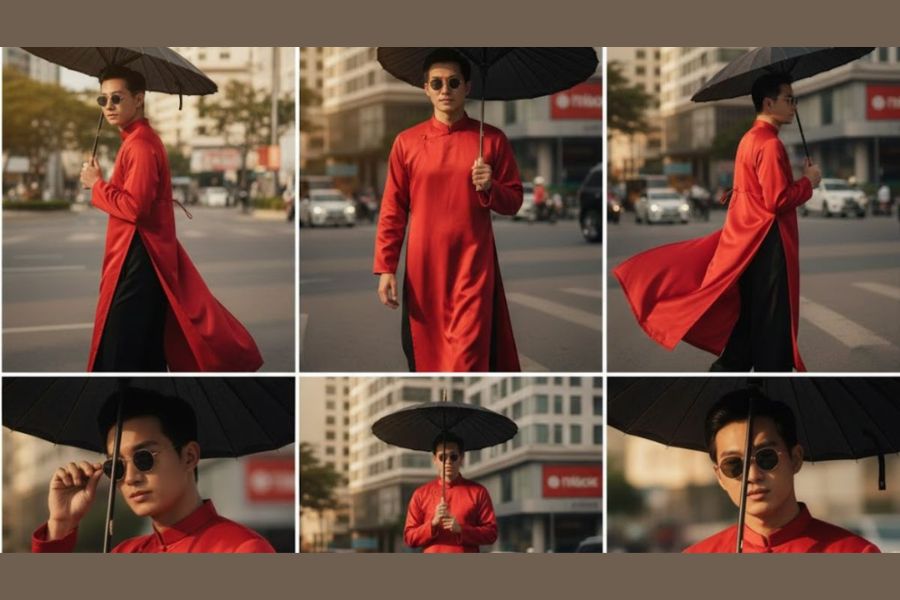
Tet 2026 is not only a time for reunion but also an opportunity for each person to refresh their personal image in a more impressive and distinctive way.
1. Why should you create Tet ao dai photos using AI?
Creating Tet ao dai photos with AI is becoming a prominent trend every spring, especially for men who want to refresh their image with a modern cinematic style. It’s not just about creating a beautiful photo; it’s also a smart and cost-effective way to express your personality and aesthetic taste. Specifically, creating Tet ao dai photos with AI offers many clear benefits:
You don’t need to prepare or rent a real ao dai, because AI can recreate outfits with accurate form, structure, and colors based on your description. Whether you want a traditional high-collar elegant ao dai, a modern redesigned version, or a cinematic-inspired design with standout patterns, AI can handle it in detail and with sophistication.
You don’t need makeup, a studio, or a scenic location—just a clear portrait photo is enough to create a complete Tet photo set. AI can generate vibrant Tet backgrounds such as spring flower streets, red lanterns, ancient courtyards, or cinematic lighting environments with depth, making the image look professionally produced.
You can freely choose your desired style, from gentle scholarly looks and traditional elegance to strong, bold, or rugged film-character vibes. Without being limited by real-life outfits or shooting conditions, you have full creative control to match your personality.
You have complete control over camera angles, lighting, and cinematic colors, from warm nostalgic tones to deep film colors or backlighting for depth. This ensures the image is not only beautiful but also emotional, capturing the spirit of a trending “Tet 2026 movie.”
The final output is usually high quality and impressively sharp, resembling a fashion photoshoot by a professional photographer. Details like fabric folds, shadows, and lighting effects are handled delicately, creating a realistic and aesthetic feel.
For men, this is an effective way to refresh your image at the beginning of the year, maintaining the elegance of traditional ao dai while expressing a modern personal style on social media. A well-prepared Tet photo set also helps create a positive impression with friends, partners, and the online community.
(1).jpg)
2. Preparation before creating images
Before starting to create cinematic Tet ao dai images, you only need to prepare a clear portrait photo of yourself. Prioritize a front-facing photo with natural or sufficient lighting, with your face not covered by hair, masks, or sunglasses. The clearer the image, the easier it is for AI to accurately recognize facial features, hairstyle, and expression—this is the key factor determining whether the final image truly “looks like you.”
This portrait acts as the “base data” for AI to preserve your unique features and aura when generating Tet ao dai images. From your eyes and nose bridge to facial structure, everything will remain consistent, ensuring the generated image does not feel unfamiliar or unnatural. As long as the input photo is clear and well-angled, you already have a solid foundation to create a personalized spring photo set.
All other elements such as the red ao dai, traditional patterns, accessories, cinematic lighting, and Tet background will be recreated by AI based on your prompt. You don’t need to prepare outfits or find reference images. With just one quality portrait, you are ready to create a men’s Tet ao dai photo set for 2026 that is both elegant and cinematic.
(1).jpg)
3. Guide to creating men’s Tet ao dai photos in cinematic Spring 2026 style using AI
To create a cinematic-style men’s Tet ao dai photo set for 2026, you can do it directly on Google Gemini with just a few simple steps. Below is a detailed step-by-step process suitable even for beginners.
3.1 Step 1: Open Gemini and choose the “Create image” tool
First, access Gemini via a web browser on your computer or a mobile app. When the main interface appears, look to the left of the input box and click on “Tools.” From the list of features, select “Create image.”
After selecting it, Gemini will switch to image creation mode. At this point, you can not only enter text descriptions but also upload a face photo for AI to use as base data. This step is crucial to ensure the system understands that you want to create a new image using your real face.
3.2 Step 2: Add your face photo
Next, in the input box, click the “+” icon on the left and choose “Upload file.” Then select a clear portrait photo from your device.
Prioritize a front-facing photo with good lighting, no blur, no face obstruction, and no sunglasses. The clearer the image, the more accurately AI will preserve facial features, expressions, and hairstyle. Once uploaded, the image will appear in the input box—this is the “base face” Gemini will use for the cinematic Tet ao dai creation.
3.3 Step 3: Paste the prompt describing the ao dai image
After uploading your face photo, paste a detailed prompt describing your desired image. The prompt should include ao dai color, style, fabric material, accessories, Tet background, and cinematic tone.
At this stage, Gemini understands two elements: your uploaded photo is the real face to keep unchanged, while the description defines the new outfit and setting. The more detailed the prompt, the closer the result will match your vision and the spirit of Tet 2026 films.
.jpg)
3.4 Step 4: Generate the image
Once both the face photo and prompt are ready, click the send arrow button on the right side of the input box. The system will begin analyzing data and generating the image.
During this process, AI will retain your face, change the outfit to an ao dai based on your description, and build the background with cinematic lighting and colors. Within seconds, you will receive a complete image.
3.5 Step 5: View and download the result
When the image is ready, Gemini will display it directly on the screen. You can zoom in to check facial details, fabric folds, lighting effects, and background depth.
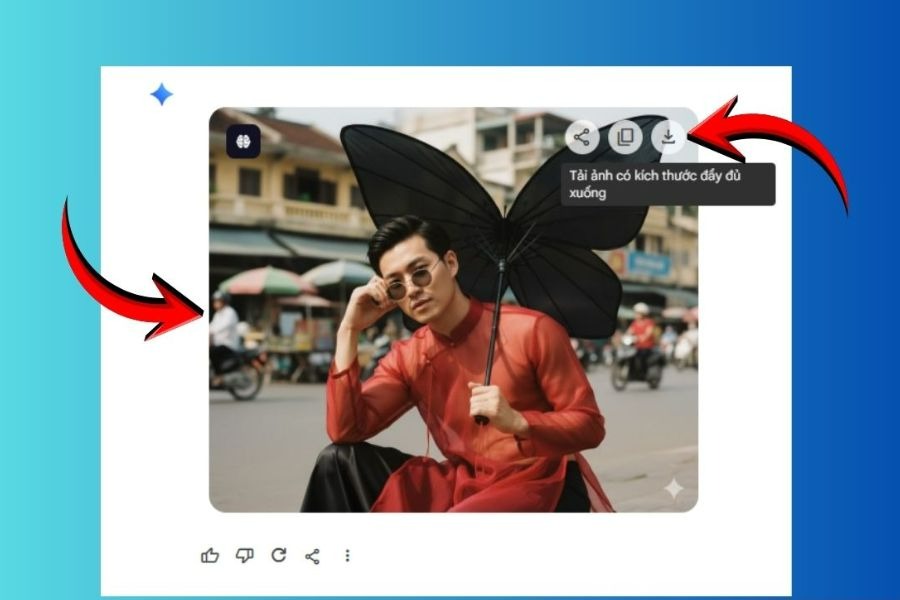
If you are satisfied, simply click the “Download” icon at the top corner. The image will be saved in high resolution, ready for social media posting or use as a profile picture for the new year.
4. Prompts for creating men’s Tet ao dai images using AI
4.1 Prompt 1: Red layered ao dai with a cool cinematic pose
Using my face and hairstyle, I created a photo of a cool-looking guy wearing a Vietnamese ao dai. Outfit: A thin red ao dai worn over a black ao dai. A thin red string is tied around his chest, letting it hang down (See outfit in photo 2). He wears small, round sunglasses, casually revealing his eyes. Style: Close-up shot, he's sitting, one hand on his temple in a cool pose, sunglasses slightly lowered to reveal his eyes, looking into the camera. His other hand holds a large black butterfly-shaped umbrella (See photo 3). Scenery: Behind him is an urban area of a Vietnamese city. Color: The photo is taken with film colors, giving it a cinematic feel, with high image sharpness, vertical aspect ratio 9:16. Lighting: Sunlight shines on his face, making him look radiant.
(1).jpg)
4.2 Prompt 2: Light sheer red silk ao dai with a powerful cinematic walk
Using my face and hairstyle, I created a photo of a cool-looking guy wearing a Vietnamese ao dai. Outfit: A loose, thin red sheer silk ao dai worn over a black ao dai. The fabric is light, flowing and not tight on the body. A thin red string is tied around his chest, letting it hang down. He wears small, round sunglasses worn slightly low on his nose, revealing his eyes looking slightly upward. Style: Medium close-up cinematic shot. He is walking slowly toward the camera, one hand adjusting his sunglasses, looking at the camera with a calm, cold, confident expression. His other hand holds a large black butterfly-shaped umbrella. Scenery: Behind him is an urban area of a Vietnamese city. Color: The photo is taken with film colors, giving it a cinematic feel, with high image sharpness, vertical aspect ratio 9:16. Lighting: Sunlight shines on his face, creating strong contrast and depth.
.jpg)
4.3 Prompt 3: Traditional red ao dai with nostalgic Tet film vibe
Using my face and hairstyle, I created a photo of a handsome Vietnamese man wearing a traditional red Vietnamese ao dai. Outfit: A classic red ao dai with subtle golden patterns, long sleeves, elegant and slightly fitted. He does not wear sunglasses. Style: Medium shot, he is standing still, slightly turning his body, looking calmly into the camera with a gentle and confident expression. One hand lightly holds the front flap of the ao dai. Scenery: Behind him is a Tet flower street with yellow apricot blossoms, red lanterns and soft crowd blur. Color: Warm cinematic film tone with soft highlights and gentle contrast, high sharpness, vertical aspect ratio 9:16. Lighting: Soft golden sunlight at sunset shining on his face, creating a warm and festive atmosphere.
4.4 Prompt 4: Modern red ao dai as a Tet action movie male lead
Using my face and hairstyle, I created a photo of a stylish Vietnamese man wearing a modern Vietnamese ao dai. Outfit: A modern red ao dai with black collar details and subtle embroidery, worn over black pants. He wears small round sunglasses slightly lowered, revealing sharp eyes. Style: Cinematic medium shot, low angle camera, he is standing confidently in the middle of the street, wind slightly blowing his ao dai, giving a dramatic movie poster vibe. One hand holds a large black butterfly-shaped umbrella resting on his shoulder. Scenery: Urban Vietnamese street decorated with Tet banners and red lanterns. Color: Deep cinematic film color grading with strong contrast and moody shadows, ultra sharp, vertical 9:16 ratio. Lighting: Strong side sunlight creating highlights on his face and dramatic shadows for depth.
5. Frequently asked questions when creating men’s Tet ao dai images with AI
5.1. Does my original photo have to be taken with a professional camera?
You absolutely do not need a professional camera. A phone photo can still produce good results as long as it is well-lit, sharp, and clearly shows your face. The most important factor is image quality: no blur, no shake, no backlighting, and no face obstruction. The clearer the image, the better AI preserves your facial features and natural expression.
5.2. What if the generated image does not look like me?
If the result does not closely resemble you, try using a clearer portrait or refining the prompt description. You can add details about hairstyle, age, or demeanor such as “elegant,” “calm,” or “youthful.” Sometimes simply switching to a better-lit photo can significantly improve results.
5.3. Can I change the ao dai color, accessories, or style after generating the image?
Yes, completely. You can edit the prompt with new colors, add or remove accessories like sunglasses or umbrellas, or change the Tet background. AI will generate a new version based on your face but with updated elements.
5.4. Do I have to write the prompt in English?
Not required. You can write entirely in Vietnamese as long as the description is clear and detailed. Language matters less than the level of detail provided.
5.5. Are the generated images sharp enough for social media or printing?
Most generated images have high enough resolution for platforms like Facebook, Zalo, or TikTok. Downloading directly ensures full quality.
5.6. Will my face photo be stored or used for other purposes?
Your uploaded photo is used to generate images within your session. However, each platform has its own privacy policy, so you should review it carefully.
5.7. How long does it take to generate a cinematic Tet ao dai image?
Usually just a few seconds to about a minute, depending on system speed.
6. Conclusion
Creating men’s Tet ao dai images with AI is not just about following trends but also an opportunity to redefine your personal style with the captivating spirit of cinematic Spring 2026. With just a clear portrait and a detailed prompt, you can own an elegant, sharp, and emotional photo set without investing in outfits or complex photoshoots. The fusion of traditional Vietnamese ao dai beauty and AI creativity opens nearly limitless possibilities. Be confident in experimenting with different concepts and refining details to find your most impressive version. And if you want to explore more AI guides, don’t forget to follow Appvip to stay updated with the latest trends.





















VIP Products








Best Selling Products
Copyright Adobe Lightroom Account
59 USD
Adobe Premiere Pro Account
99 USD
Genuine Adobe Illustrator account
99 USD
Freepik Premium Account
59 USD
Autodesk All App Account Copyright
120 USD
MidJourney Account
29 USD
Capcut Pro 1 Year
39 USD
Upgrade Genuine Office 365
49 USD
Windows 10 & 11 Pro Key
36 USD
Adobe Photoshop Copyright - Full App
120 USD
ChatGPT Plus Account (GPT-4)
16 USD
Plugin Retouch4me
69 USD
Upgrade genuine Capture One account
120 USD
Upgrade Duolingo Super
29 USD
Genuine Cheap Canva Pro
39 USD