Best Selling Products

Capcut Pro 1 Year
39 USD

Adobe Photoshop Copyright - Full App
120 USD

Upgrade genuine Capture One account
120 USD

Windows 10 & 11 Pro Key
36 USD

ChatGPT Plus Account (GPT-4)
16 USD

Adobe Premiere Pro Account
99 USD

Genuine Adobe Illustrator account
99 USD

Plugin Retouch4me
69 USD

Upgrade Duolingo Super
29 USD

Upgrade Genuine Office 365
49 USD

Genuine Cheap Canva Pro
39 USD

Freepik Premium Account
59 USD

MidJourney Account
29 USD

Autodesk All App Account Copyright
120 USD

Copyright Adobe Lightroom Account
59 USD
Guide to Creating AI Tet Greeting Videos 2026 Super Fast for Beginners
Nội dung
- 1. Detailed guide to creating AI Tet greeting videos on Flow
- 1.1 Step 1: Access Flow and create a new project
- 1.2 Step 2: Choose “Create video from frames” mode
- 1.3 Step 3: Add reference images to enhance Tet atmosphere
- 1.4 Step 4: Open advanced settings
- 1.5 Step 5: Choose the appropriate AI model
- 1.6 Step 6: Enter the prompt for the video
- 1.7 Step 7: Wait for AI processing and preview results
- 1.8 Step 8: Download the video
- 2. Impressive AI Tet Greeting Video Prompt Templates 2026
- 2.1 Traditional style – Hands clasped New Year greeting
- 2.2 Modern style – Walking forward and waving
- 2.3 Prosperity style – Holding a lucky envelope
- 2.4 Gentle style – Soft turning in spring breeze
- 2.5 Radiant style – Opening arms to welcome the New Year
- 2.6 Elegant style – Raising a cup of tea
- 2.7 Energetic style – Tossing lucky envelopes
- 3. Important tips for more realistic videos
- 4. Conclusion
Tet 2026 is knocking on every door, bringing a vibrant festive atmosphere, fresh spring colors, and wishes for peace and prosperity. If you want to create a unique AI Tet greeting video yourself to send to family, friends, or customers without needing professional editing skills, then Flow is a tool worth trying.
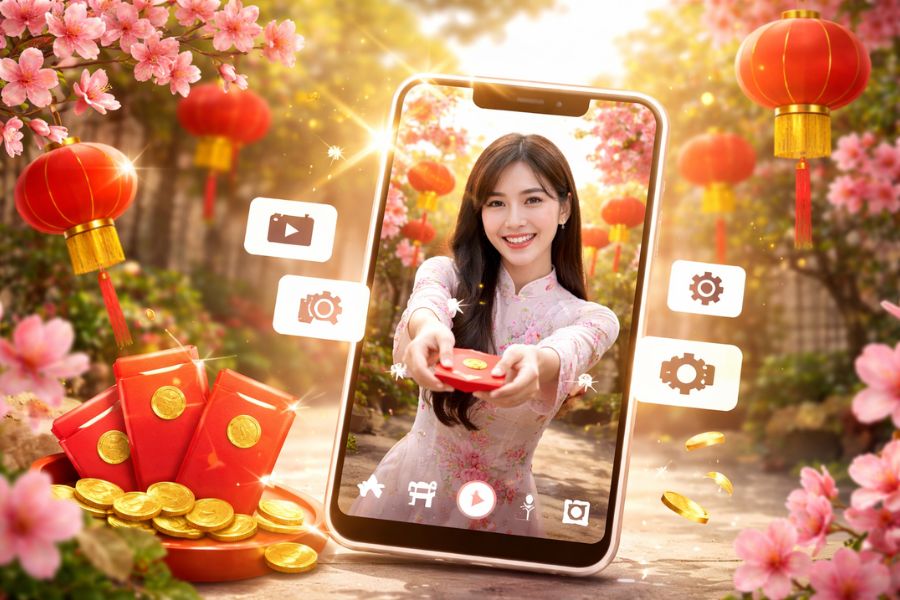
1. Detailed guide to creating AI Tet greeting videos on Flow
Below is a step-by-step guide to help you create a professional, emotional AI Tet greeting video 2026 that is extremely easy to execute, even if you have never edited a video before.
1.1 Step 1: Access Flow and create a new project
First, open your browser and search for the keyword “Flow AI” on Google. After accessing the correct official platform, click the Create with Flow button to begin your creative journey. If you don’t have an account yet, you can quickly sign up using email or a Google account in just a few simple steps. The login process is smooth and does not require complex setup, making it very suitable for beginners.
After successfully logging in, you will be taken to the main interface – where previously created projects are displayed (if any). To create a new AI Tet greeting video, simply click the “+ New Project” button in the center of the screen. This is the starting point for building a completely new video with your own ideas, ready to transform the spring atmosphere into vivid footage.
.jpg)
1.2 Step 2: Choose “Create video from frames” mode
When starting a new project, Flow will display different content creation options. To create an AI Tet greeting video with controlled visuals and a clear layout, you should select “Create video from frames.” This mode allows AI to build motion based on reference images and your description, resulting in more natural and idea-aligned outputs.
Choosing the correct mode from the beginning will save you a lot of editing time later. Instead of letting AI generate everything randomly, this mode helps you clearly define the setting, characters, and overall emotion of the video. For Tet greeting videos—where traditional visuals and spring atmosphere are essential—this is an excellent choice.
.jpg)
1.3 Step 3: Add reference images to enhance Tet atmosphere
After selecting the mode, the system will display a content input box along with an image upload area. Click the “+” icon on the left to upload reference images. This is a crucial step because images help AI better understand your desired style, from clothing and colors to the overall setting.
To make your AI Tet greeting video look authentic and festive, you should choose images of people wearing áo dài, standing in scenes with peach blossoms, apricot blossoms, red lanterns, or traditional fruit trays. These details help AI recreate a vivid traditional Tet atmosphere. The clearer the image, with good lighting and balanced composition, the more natural the generated video will be, with smoother motion and more realistic expressions.
(1).jpg)
1.4 Step 4: Open advanced settings
After successfully uploading images, click the adjustment icon (three sliders) on the right side of the toolbar to open advanced settings. This is where you can fine-tune important parameters that directly affect video quality.
Do not skip this step if you want higher sharpness and professionalism. Advanced settings allow you to control the AI model, aspect ratio, and other processing factors. Setting these correctly from the start helps avoid recreating videos due to format or processing issues.
.jpg)
1.5 Step 5: Choose the appropriate AI model
In the settings panel, under “Model,” select Veo 3.1 – Fast to ensure quick processing speed and stable motion. This is an optimal choice if you want fast video generation while maintaining good image quality. For beginners, prioritizing a fast model helps save experimentation time.
Also, don’t forget to check the aspect ratio. If you plan to post on TikTok or Reels, a 9:16 ratio is suitable for vertical format. For Facebook or YouTube, you can choose 16:9. Setting the correct format from the beginning ensures the video displays properly without cropping.
.jpg)
1.6 Step 6: Enter the prompt for the video
After completing the setup, start entering your description into the text box. The prompt is the “soul” of the video, determining style, motion, and overall emotion. You should clearly describe the character, outfit, setting, lighting, filming style, and desired atmosphere.
For example, you can describe a girl wearing a bright áo dài, standing in a courtyard decorated with peach blossoms, with soft sunlight shining through, in a warm cinematic style. The more detailed the description, the easier it is for AI to create a video that matches your idea. After finishing, click the send arrow for the system to begin processing.
.jpg)
1.7 Step 7: Wait for AI processing and preview results
Immediately after sending the prompt, Flow will start generating the video. Processing time usually takes only a few minutes depending on complexity. While waiting, you can prepare ideas for editing or adding Tet background music to complete the product after downloading.
Once completed, the system will display two video versions side by side. Carefully review each version, paying attention to hand movements, facial expressions, lighting, and overall realism. If not satisfied, you can adjust the prompt and regenerate for better results.
.jpg)
1.8 Step 8: Download the video
After selecting your preferred version, click the download icon above the video. The system will display file quality options. For sharp social media uploads, choose the 1080p upscaled version.
Once downloaded, the video will be saved directly to your device. You can then post it on TikTok, Facebook, or send it to loved ones as a meaningful New Year gift. With just a few simple steps, you now have a professional, warm, and personalized AI Tet greeting video 2026..jpg)
2. Impressive AI Tet Greeting Video Prompt Templates 2026
If you want to create engaging Tet greeting videos without complicated filming or editing, the prompts below will help you instantly produce cinematic clips full of spring atmosphere—from elegant traditional styles to modern, vibrant, and prosperity-filled concepts.
The key when using prompts is: clearly describe the setting – lighting – motion – emotion – message. The more detailed, the more natural, cinematic, and realistic the AI-generated video will be. Below are enhanced prompt templates for direct use or customization.
2.1 Traditional style – Hands clasped New Year greeting
This style is suitable if you want a culturally rich Vietnamese feel, gentle yet formal.
Enhanced prompt:
A warm and elegant Vietnamese Lunar New Year greeting video. A young woman wearing a light pastel traditional áo dài with delicate floral embroidery stands gracefully in a peaceful old courtyard decorated with blooming peach blossoms, red lanterns and traditional wooden doors. Soft golden morning sunlight shines gently, creating warm cinematic highlights. She looks at the camera with kind eyes, slowly brings her hands together in a respectful New Year greeting gesture, slightly bows her head with a gentle smile. Smooth natural motion, shallow depth of field, warm festive tones, realistic fabric details, natural skin texture, soft breeze moving lightly. She softly says in Vietnamese: “Chúc bạn một năm mới An Khang Thịnh Vượng, vạn sự bình an.” No text, no watermark, ultra realistic, high quality, stable camera.
2.2 Modern style – Walking forward and waving
A youthful, friendly concept suitable for TikTok or Reels.
Enhanced prompt:
A cinematic Vietnamese Lunar New Year greeting video with modern and joyful atmosphere. A young woman wearing a soft pastel áo dài stands in a traditional courtyard decorated with kumquat trees full of golden fruits and hanging red lanterns. Gentle sunlight and light breeze create natural movement in her hair and dress. She takes a few slow, confident steps toward the camera, smiling warmly and waving her hand in a friendly way. Smooth realistic motion, soft background blur, warm festive color grading, elegant and vibrant mood. She happily says: “Wishing you a Happy New Year filled with good fortune, abundant wealth, and excellent health.” No subtitles, no watermark, 4K quality, stable cinematic camera.
2.3 Prosperity style – Holding a lucky envelope
A perfect concept for wishes of wealth and success.
Enhanced prompt:
A realistic and festive Vietnamese New Year greeting video. A young woman wearing an elegant white áo dài stands among blooming peach blossoms and red lanterns glowing in warm sunset light. Cinematic atmosphere with golden tones. She smiles confidently, gently takes out a bright red lucky envelope with gold patterns and slowly extends it toward the camera as if giving blessings directly to the viewer. Natural smooth motion, soft background blur, detailed fabric movement, warm glowing light, realistic skin texture. She cheerfully says: “Wishing you prosperity and good fortune, and a successful year ahead! (Giving you lucky money at the beginning of the year, wishing you wealth and success in your business endeavors.)” High quality, smooth animation, no text overlay, ultra realistic.
2.4 Gentle style – Soft turning in spring breeze
A romantic, emotional concept with cinematic movement.
Enhanced prompt:
A soft and elegant Vietnamese Lunar New Year greeting video. A young woman wearing a delicately embroidered traditional áo dài stands in a quiet courtyard decorated with blooming peach flowers and lanterns. Gentle spring breeze moves her hair and dress naturally. She slowly turns her body gracefully, looks back over her shoulder with a warm smile, then softly faces the camera. Cinematic lighting, shallow depth of field, smooth realistic motion, warm pastel color tones, peaceful and festive atmosphere. She gently says: “Wishing you a peaceful and happy New Year with your loving family..” No subtitles, clean frame, high resolution, stable camera.
2.5 Radiant style – Opening arms to welcome the New Year
A positive, energetic concept ideal for social media or branding.
Enhanced prompt:
A bright and joyful Vietnamese Lunar New Year greeting video. A young woman wearing a light traditional Ao Dai stands in a sunny courtyard filled with blooming peach blossoms and red lanterns. Warm morning sunlight creates vibrant festive colors. She smiles brightly, gently opens her arms slightly as if welcoming the new year, looking directly into the camera with sparkling joyful eyes. Smooth cinematic motion, soft focus background, natural light reflections, detailed fabric texture. She enthusiastically says: “Chúc mừng năm mới 2026, mọi điều tốt đẹp và may mắn sẽ đến với bạn!” No text overlay, no watermark, ultra realistic style, high quality.
2.6 Elegant style – Raising a cup of tea
A traditional concept symbolizing peace and connection.
Enhanced prompt:
A cinematic and peaceful Vietnamese Lunar New Year greeting video. A young woman wearing an elegant pastel Ao Dai sits at a small wooden table in a traditional courtyard decorated with peach blossoms and red lanterns. Warm golden morning sunlight creates a calm and refined atmosphere. She gently lifts a small porcelain teacup, smiles softly at the camera, slightly nods her head in a graceful New Year gesture. Smooth natural motion, shallow depth of field, realistic fabric texture, warm festive tones, stable camera. She gently says: “Please join me for a cup of tea this New Year, wishing you a peaceful and prosperous Spring..” No subtitles, no watermark, high resolution, ultra realistic.
2.7 Energetic style – Tossing lucky envelopes
A lively, playful concept full of energy.
Enhanced prompt:
A joyful and energetic Vietnamese Lunar New Year greeting video. A young woman wearing a bright red áo dài stands in a festive courtyard filled with peach blossoms, kumquat trees and hanging lanterns. Soft sunlight and gentle wind create natural movement in her hair and dress. She laughs happily, lightly tosses a red lucky envelope upward and catches it playfully before looking directly at the camera with a radiant smile. Cinematic motion, vibrant warm tones, shallow depth of field, realistic animation, smooth stable camera. She cheerfully says: “As spring arrives with joy, I wish you a house full of blessings, a purse full of wealth, and good fortune all year round!” No text overlay, clean frame, 4K quality.
.jpg)
3. Important tips for more realistic videos
To make your AI Tet greeting video truly realistic, emotionally rich, and not stiff, you need to pay attention to every detail during content creation. A great video is not only about outfits or spring settings, but also lighting, motion rhythm, facial expressions, and how characters interact with their environment. When AI receives clear descriptions and high-quality reference images, the results become much more natural and lifelike. Treat each prompt like a short script: the more detailed the emotion, lighting, and pacing, the more cinematic the video will be.
Key tips:
-
Use clear, well-lit reference images
-
Describe slow and natural motion
-
Emphasize cinematic lighting
-
Keep expressions subtle and natural
-
Add environmental interaction details
-
Always include “no text, no watermark, stable camera”
-
Refine prompts instead of recreating from scratch
By following these points, your AI Tet greeting video will become smooth, realistic, and emotionally engaging.
4. Conclusion
With a bit of creativity and the support of Flow, creating AI Tet greeting videos 2026 is no longer difficult or time-consuming. You can design a meaningful, personalized gift to share love at the beginning of the year. Don’t hesitate to try and start today—because sometimes a small video is enough to spread joy, warmth, and good wishes to those you cherish this spring.





















VIP Products








Best Selling Products
Capcut Pro 1 Year
39 USD
Adobe Photoshop Copyright - Full App
120 USD
Upgrade genuine Capture One account
120 USD
Windows 10 & 11 Pro Key
36 USD
ChatGPT Plus Account (GPT-4)
16 USD
Adobe Premiere Pro Account
99 USD
Genuine Adobe Illustrator account
99 USD
Plugin Retouch4me
69 USD
Upgrade Duolingo Super
29 USD
Upgrade Genuine Office 365
49 USD
Genuine Cheap Canva Pro
39 USD
Freepik Premium Account
59 USD
MidJourney Account
29 USD
Autodesk All App Account Copyright
120 USD
Copyright Adobe Lightroom Account
59 USD