1. The importance of installing Adobe Premiere Pro CC 2020 correctly according to technical procedures.
Adobe Premiere Pro CC 2020 is considered by experts to be one of the most stable and powerful versions in the Adobe Creative Cloud ecosystem. Owning this world-leading video editing tool helps content creators realize any idea, from short clips to high-quality feature films. However, the installation process for Adobe Premiere Pro CC 2020 is not simply a matter of copying files to your computer; it requires careful preparation of the operating system environment and supporting hardware settings.
2. Minimum and recommended computer specifications for smooth operation.
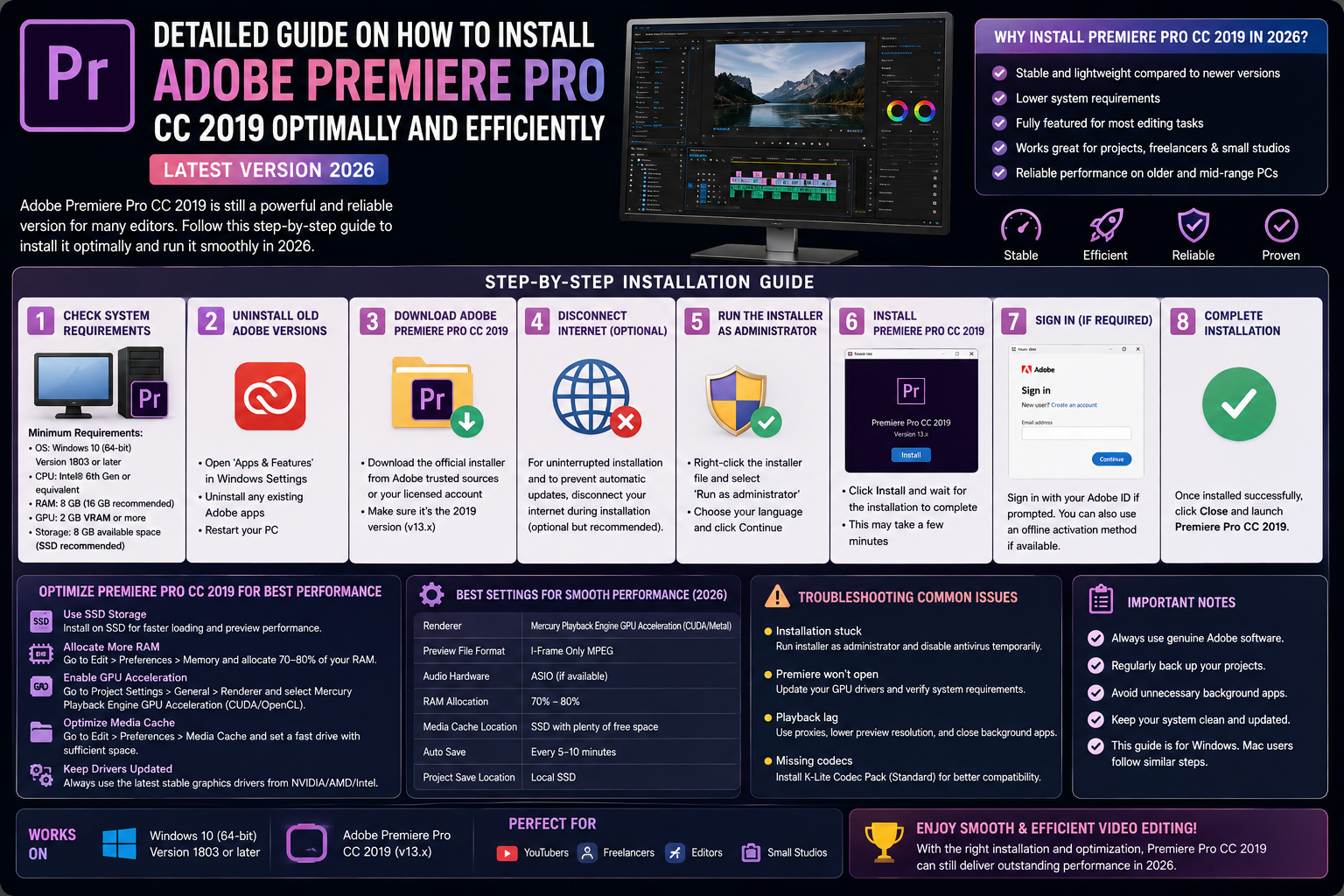
Before proceeding with the installation steps, users need to check the compatibility of their computer system. The 2020 version requires fairly stringent hardware resources to ensure the new AI features work effectively.
2.1. Operating System and Central Processing Unit (CPU)
A Windows 10 (64-bit) operating system, version 1803 or later, is required for the software to run. In terms of hardware, a 6th generation Intel processor or an AMD Ryzen 1000 Series processor is the minimum requirement for handling basic tasks. For professional users who frequently work with 4K format, 8-core CPUs such as the Intel Core i7 or the latest Ryzen 7 will be the optimal choice to shorten processing time for complex effects on the Timeline.
2.2. RAM and Storage Capacity
16GB of RAM is considered standard for stable operation of Adobe Premiere Pro CC 2020. However, if you frequently multitask or run After Effects simultaneously, 32GB of RAM will help prevent memory overflow. Regarding storage, installing the software on an SSD is the irreplaceable choice if you want to experience fast response times and smooth data access.
2.3. The Importance of Graphics Cards (GPUs)
Graphics cards play a crucial role in color processing and video decoding. NVIDIA cards with CUDA technology or AMD cards with OpenCL significantly increase rendering speed compared to using only the CPU. Updating your GPU drivers to the latest version is an essential step before installing Adobe Premiere Pro CC 2020 to avoid common display errors.
3. Steps to prepare the software and system environment
The stability of a demanding graphics software program depends heavily on the runtime libraries available on the computer. A lack of these components often leads to error messages that disrupt the workflow.
3.1. Install the complete Microsoft Visual C++ library suite.
Most errors that prevent applications from starting are related to missing .dll files. You should proactively install all Microsoft Visual C++ Redistributable packages from version 2005 to 2019 to create a solid foundation for supporting Adobe's source code.
3.2. Clean up the system and free up space on drive C.
The system drive needs at least 15-20GB of free space to accommodate the installation files and temporary files generated during operation. Cleaning up junk files using Disk Cleanup or CCleaner will help the operating system run more smoothly, creating the best conditions for newly installed software.
4. Detailed instructions on how to install Adobe Premiere Pro CC 2020
Once the hardware and software requirements are fully met, the installation process will proceed automatically and simply through Adobe's drivers.
4.1. Start the installer and set up administrator privileges.
Users should locate the "Set-up.exe" file in the downloaded installer, then right-click and select "Run as administrator". Granting the installer the highest privileges ensures that system files and registry entries are correctly registered, preventing access permission errors later on.
4.2. Choosing the language and storage location for the software
The setup interface will allow you to customize the working language; English (English - North America) is usually the preferred choice for easy access to international documentation. Regarding the installation location, unless there are specific requirements, you should leave it on the default C drive to ensure the best connectivity between applications in the Creative Cloud ecosystem.
4.3. Monitor the installation progress and completion.
The data copying process will take a few minutes, depending on your hard drive speed. Once the status bar reaches 100%, a completion dialog box will appear. At this point, the Adobe Premiere Pro CC 2020 installation is technically complete and ready for you to start exploring its new features.
5. Appvip.ai - A reputable address for software optimization and troubleshooting support.
In practical use, many users encounter problems arising from differences between computer models. The website appvip.ai was created with the mission of accompanying the Editor community, providing in-depth solutions for troubleshooting and guiding the optimal installation of Adobe Premiere Pro CC 2020. At appvip.ai , you will find articles sharing practical experience from experts, tips for optimizing system settings to achieve the highest software performance on different computer configurations. This is a valuable knowledge base that helps users master technology and significantly improve their work productivity.

6. Important adjustments immediately after software installation.
Installation is just the beginning; you need to make a few more settings within the software to turn it into a true video editing machine.
6.1. Setting up a professional Media Cache
The media cache is a leading cause of computer memory overflow after a period of video editing. You should go to the Edit > Preferences > Media Cache menu and change the storage path to a larger disk partition.
6.2. Optimizing RAM allocation (Memory Allocation)
In Preferences > Memory , adjust the RAM settings to allocate most resources to Premiere Pro. Limiting RAM for other background applications will give the software enough "space" to handle Lumetri Color effects or heavy transitions without sudden lag.
6.3. Activate the intelligent Auto Save feature.
Film editing is a labor-intensive process, so make sure your work is always protected. In Preferences > Auto Save , set the time interval for automatically saving your project to every 5 or 10 minutes.
7. Breakthrough features in Premiere Pro CC 2020
Choosing to install Adobe Premiere Pro CC 2020 gives you powerful editing tools that older versions lack.
7.1. Auto Reframe feature with integrated artificial intelligence
This is the most valuable feature for social media content creators. AI automatically analyzes the action within the frame and adjusts the video aspect ratio (for example, from landscape to portrait for TikTok) while keeping the main subject in the center. This saves hours of time compared to traditional manual editing.
7.2. Improvements to the Essential Graphics panel
The graphics panel in the 2020 version is more flexible than ever. You can easily manage layers, change fonts, and customize title animation effects intuitively right on the preview screen. Deep integration with the template library allows users to create professional videos in an instant.
8. How to fix common errors during and after installation
Unexpected situations always arise, and understanding how to handle them will save you valuable time.
8.1. Missing DLL Error Message
If you encounter an error message like "MSVCP140.dll" or similar when opening the software, it means that the Windows support packages have not been updated correctly. Simply download the latest Microsoft Visual C++ installation package and restart your computer; the problem should be completely resolved.
8.2. Blue screen errors or software crashes.
This error is often related to graphics card conflicts or outdated driver versions. You should visit the manufacturer's website (NVIDIA or AMD) to download the correct driver for your operating system. In some cases, changing the rendering mode from GPU to "Mercury Playback Engine Software Only" in Project Settings is also a temporary fix.
10. Conclusion
Mastering the Adobe Premiere Pro CC 2020 installation process is the most important step towards entering the world of professional video editing. A well-established system from the start not only allows you to create with peace of mind but also demonstrates the professional working style of a true editor. Technology is constantly evolving, so equipping yourself with accurate knowledge from reliable sources like appvip.ai will help you stay ahead of new trends.