Best Selling Products

Genuine Cheap Canva Pro
39 USD

Genuine Adobe Illustrator account
99 USD

Upgrade genuine Capture One account
120 USD

Autodesk All App Account Copyright
120 USD

Plugin Retouch4me
69 USD

Windows 10 & 11 Pro Key
36 USD

Upgrade Genuine Office 365
49 USD

Adobe Premiere Pro Account
99 USD

Upgrade Duolingo Super
29 USD

Capcut Pro 1 Year
39 USD

Adobe Photoshop Copyright - Full App
120 USD

Copyright Adobe Lightroom Account
59 USD

Freepik Premium Account
59 USD

MidJourney Account
29 USD

ChatGPT Plus Account (GPT-4)
16 USD
Figma or Adobe XD: Which Tool Is Best for Website Design?
UX/UI design is increasingly becoming a field full of potential, attracting the attention of many young people who are passionate about creativity and love technology.
1. Learn what Figma is
Figma is a user interface (UI) design platform based on vector graphics technology, widely used to create digital products such as websites, mobile applications, and many other types of software. The special point of Figma is its ability to operate directly on a web browser without needing to install complicated software, while also supporting both MacOS and Windows operating systems, bringing convenience and flexibility to users.
Figma is highly appreciated by the designer community thanks to its outstanding teamwork capability. This platform allows many members to edit together, track project progress in real time, and communicate directly on the design file. Not only stopping at interface design, Figma also supports prototyping and code generation for the Handoff feature, helping optimize the workflow between designers and developers.

2. Some outstanding benefits of Figma
Figma brings many outstanding benefits, supporting designers and project teams in optimizing the creative process, while improving the quality of design products. This is an ideal tool for both individuals and businesses in the field of digital design.
Users can create icons, specialized graphics for the web, and presentation designs completely free of charge.
Supports thousands of fonts, shape styles, and diverse color palettes, helping design products become lively and professional.
Allows the creation of realistic mockups, easy to customize and suitable for many different device formats.
Provides free resources from the community, while allowing users to create their own unique publications.
Supports effective teamwork, many members can design and collaborate directly on one project, saving time and improving work efficiency.
3. Some outstanding features compatible with Figma
Figma is not only known as an interface design tool but also owns many outstanding features, providing maximum support for the process of creating and developing digital products. These features help designers, developers, and the entire project team work more effectively, synchronously, and save more time. Below are the important features that Figma brings to users:
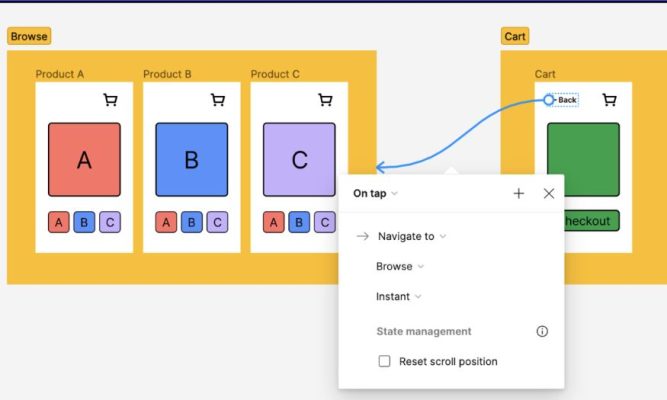
Figma works as a professional Prototyping tool, allowing users to easily design, create prototypes, and present directly on the same platform without needing other software.
Users can edit designs and the system will automatically update all changes into the prototype immediately without manual file exporting, ensuring work takes place continuously and quickly.
Supports running prototypes on many mobile devices, helping visually test and evaluate user experience on many different screen formats.
Figma provides a code generation feature for developers, allowing them to check, copy, and export CSS code directly from the design file, helping the programming process become faster and more accurate.
Users can easily adjust frame sizes to check product compatibility with popular devices and operating systems such as iOS and Android, thereby optimizing the interface effectively.
The real-time collaboration feature helps designers and developers work on the same file, while also limiting errors during the product handoff process, improving quality and project development speed.
4. Learn what Adobe XD is
Adobe XD is a powerful vector graphic design software developed by Adobe to serve user interface and user experience (UI/UX) design. This tool is especially suitable for those working in the field of website, mobile application, or software design, bringing a modern, professional, and effective design workflow. Adobe XD stands out thanks to its smooth operation, optimized working performance, and easy combination with other software in the Adobe ecosystem such as Photoshop or Illustrator, creating perfect synchronization in every design project.
The special point that makes Adobe XD popular with many designers is its ability to integrate Prototyping features directly into the platform. This allows designers not only to create visual interfaces but also to simulate user actions and behaviors vividly without using additional software. With Adobe XD, you can work from the idea development stage, design, testing, to product sharing, helping save time and optimize the workflow for both individuals and teams.
5. Some outstanding features of Adobe XD
Adobe XD provides a diverse set of features, suitable for many different needs in interface design and user experience design. These tools not only support designers in creativity but also help improve cooperation efficiency between project members.
Website design: Adobe XD brings a professional website design experience with powerful features such as Stacks, Padding, and Repeat Grid. Users can easily build layouts, design details, and create prototypes directly on the software, while optimizing the design process from idea to finished product.
Application design: The software supports app design for many different platforms such as mobile phones, desktops, and websites. Outstanding features such as Responsive Resize, Auto-Animate, and Dragging Triggers help you customize interfaces and simulate user actions visually, bringing a smooth and professional design experience.
Game design: Adobe XD is also a great tool for testing and building game interfaces. Users can directly check elements such as menus, settings, or navigation systems by connecting to a game controller device, thereby evaluating the feasibility and effectiveness of the design before actual implementation.
Integration with the Adobe ecosystem: Adobe XD easily synchronizes and combines with famous software such as Photoshop, Illustrator, and After Effects, helping optimize the design and editing process for images and graphics. This is a major advantage for designers who are already familiar with working in the Adobe environment.
Easy sharing and collaboration: Adobe XD supports online file sharing, receiving feedback from customers or teammates directly on the software. This feature helps project teams save time and avoid mistakes during the editing and product development process.
6. Detailed comparison table between Figma and Adobe XD
Choosing between Figma and Adobe XD can make many designers hesitate, because both are leading UI/UX design tools today. However, each platform has its own distinctive characteristics suitable for different needs and working styles. Below is a detailed comparison table to help you easily visualize and make the right choice.
7. So should you choose Figma or Adobe XD
Choosing between Figma and Adobe XD depends a lot on your goals, working expectations, and budget. If you often work in a team, need smooth online collaboration, and want flexibility to work anywhere with only a device connected to the internet, Figma is definitely the ideal choice. This tool is especially suitable for startups, small businesses, or young design teams, where speed and connectivity play a key role. In addition, with a free version that already provides many powerful features, Figma helps you start a project easily without spending too much initial investment cost.
Meanwhile, Adobe XD is a “powerful weapon” for professional designers, especially those who are already familiar with the Adobe ecosystem such as Photoshop or Illustrator. Adobe XD not only brings powerful design capabilities but also owns in-depth prototyping effects, allowing user experience simulation in a vivid and professional way. However, the cost of using Adobe XD is usually higher and requires a device with strong configuration. Therefore, if you need a professional, synchronized tool for large-scale projects, Adobe XD will be a choice worth investing in. AI Software World provides Adobe XD accounts at cheap prices, contact AI Software World now for consultation!
8. Conclusion
Choosing Figma or Adobe XD depends on the needs, habits, and project scale you are working on. If you prioritize teamwork, want flexible online collaboration, and save time, Figma is definitely the top choice. On the contrary, if you are already familiar with the Adobe ecosystem and want synchronization between tools such as Photoshop and Illustrator, Adobe XD will bring a more seamless experience. No matter which tool you choose, the most important thing is still your design thinking ability and understanding of users.





















VIP Products








Best Selling Products
Genuine Cheap Canva Pro
39 USD
Genuine Adobe Illustrator account
99 USD
Upgrade genuine Capture One account
120 USD
Autodesk All App Account Copyright
120 USD
Plugin Retouch4me
69 USD
Windows 10 & 11 Pro Key
36 USD
Upgrade Genuine Office 365
49 USD
Adobe Premiere Pro Account
99 USD
Upgrade Duolingo Super
29 USD
Capcut Pro 1 Year
39 USD
Adobe Photoshop Copyright - Full App
120 USD
Copyright Adobe Lightroom Account
59 USD
Freepik Premium Account
59 USD
MidJourney Account
29 USD
ChatGPT Plus Account (GPT-4)
16 USD