Best Selling Products

Upgrade genuine Capture One account
120 USD

Plugin Retouch4me
69 USD

Genuine Adobe Illustrator account
99 USD

Copyright Adobe Lightroom Account
59 USD

Upgrade Duolingo Super
29 USD

Adobe Premiere Pro Account
99 USD

ChatGPT Plus Account (GPT-4)
16 USD

Capcut Pro 1 Year
39 USD

Genuine Cheap Canva Pro
39 USD

Upgrade Genuine Office 365
49 USD

Windows 10 & 11 Pro Key
36 USD

Autodesk All App Account Copyright
120 USD

Freepik Premium Account
59 USD

Adobe Photoshop Copyright - Full App
120 USD

MidJourney Account
29 USD
How To Join The AI Muse Photo Trend Super Fast With Just 1 Prompt
Nội dung
- 1. Where did the AI muse photo trend originate?
- 2. How AI muse photo editing differs from traditional photo editing
- 3. Elements that create a beautiful and natural AI muse photo
- 4. Common mistakes when creating AI muse photos and how to avoid them
- 5. Why Gemini AI is chosen by so many people for creating muse photos
- 6. Detailed guide to creating muse photos with Gemini AI in a super simple way
- 6.1 Step 1 Access Gemini AI and select image creation mode
- 6.2 Step 2 Upload your portrait photo to Gemini
- 6.3 Step 3 Enter a prompt to define the muse style
- 6.4 Step 4 Refine and download the final image
- 7. Top 5 prompts for creating the most natural AI muse photos
- 7.1 Prompt 1 Dreamy fairytale muse
- 7.2 Prompt 2 Pastel flower garden muse
- 7.3 Prompt 3 Vietnamese Ao Dai muse in a flower field
- 7.4 Prompt 4 Morning sunlight muse
- 7.5 Prompt 5 Princess muse in a flower garden
- 8. Conclusion
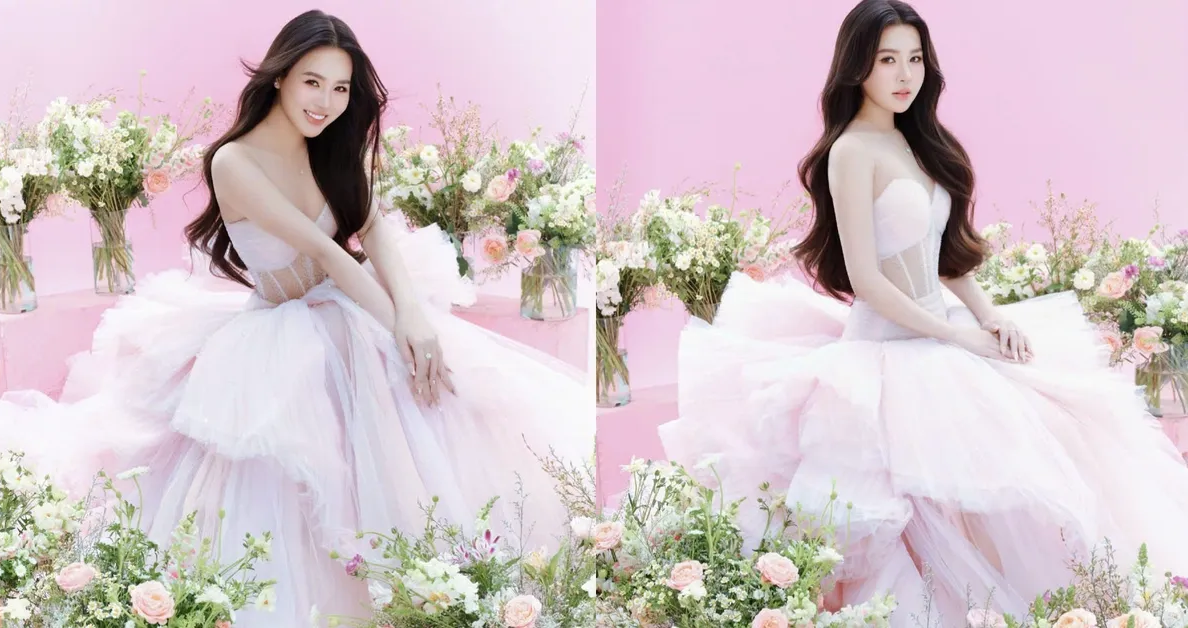
AI muse photo editing is becoming one of the most “addictive” photo creation trends on social media thanks to its soft, dreamy, and artistic beauty.
1. Where did the AI muse photo trend originate?
The AI muse photo trend originated from artistic photography aesthetics, where beauty lies not in sharp perfection but in a fragile, gentle feeling filled with emotional depth. Photos in this style often use soft lighting, soothing colors, minimalist compositions, and natural expressions, creating the feeling of a very real-life moment that is still poetic. As it spread across TikTok, Instagram, and Pinterest, the muse aesthetic quickly became a favorite visual style, especially among people who pursue a soft, refined, cinematic-inspired look.
The real explosion of this trend happened when AI technology entered the image creation process. Users no longer needed professional studios, elaborate makeup, or complicated editing skills to achieve beautiful photos. With just a normal portrait, AI can analyze facial features, lighting, and expressions, then recreate the image in a natural and harmonious muse style. Everything happens very quickly, is easy to experiment with, and can generate multiple versions within minutes.
%20(1).jpg)
2. How AI muse photo editing differs from traditional photo editing
The difference between AI muse photo editing and traditional editing lies not only in the tools but also in the approach to enhancing images. Manual editing usually focuses on directly altering details such as skin, face shape, or lighting, while AI rebuilds the entire atmosphere of the photo. As a result, AI muse photos feel more emotional, natural, and deeper, without looking overly edited.
Process: Traditional editing requires users to understand editing software, layers, masks, colors, and lighting. In contrast, AI muse photo editing simplifies the entire workflow into just one original image and one prompt that describes the desired vibe, allowing anyone to create beautiful photos without editing knowledge.
How AI processes faces and expressions: Instead of reshaping faces based on fixed beauty standards, AI analyzes facial structure, expressions, and lighting to recreate more harmonious results. This helps preserve individuality, preventing everyone’s photos from looking identical.
Ability to create emotions and atmosphere: Manual editing often focuses on the image surface, while AI emphasizes the overall environment, lighting, colors, and mood. Because of this, AI muse photos often carry dreamy, cinematic vibes with greater emotional depth compared to regular beauty edits.
Speed and experimentation: Traditional editing takes time whenever you want to change styles. Meanwhile, AI allows you to create multiple versions simply by changing prompts, making it ideal for content creators or anyone wanting to experiment with various muse concepts in a short time.
3. Elements that create a beautiful and natural AI muse photo
A beautiful AI muse photo does not come from overusing effects but from subtle balance in every element. When the original image, prompt, and artistic style are combined properly, the final result feels poetic, realistic, and free from obvious AI traces.
Original photo with suitable lighting and composition: Portrait photos should have even lighting, avoid harsh shadows, show clear facial details, and feature soft expressions. The more natural the original photo, the easier it is for AI to recreate a soft and authentic muse vibe.
Prompt focused on atmosphere instead of excessive facial editing: A good prompt should describe the mood, lighting, style, and emotions of the image rather than demanding too many facial changes. This helps AI maintain realism and avoid an artificial appearance.
Gentle and consistent color tones: Pastel, neutral, or slightly warm tones work especially well for the muse aesthetic. Keeping the color palette simple makes the image soothing, emotional, and visually elegant.
Soft lighting and natural effects: Diffused lighting, gentle sunlight, or window light often give photos depth and a dreamy atmosphere. Avoid overly harsh lighting or high contrast, as they can ruin the poetic feel.
Preserving skin texture and authentic details: A beautiful AI muse photo should still retain natural skin texture, hair strands, eye details, and authentic expressions. Avoiding excessive smoothing or aggressive facial changes keeps the image artistic while still grounded in reality.
%20(1).jpg)
4. Common mistakes when creating AI muse photos and how to avoid them
Although creating AI muse photos is relatively simple, many users still make mistakes that cause images to look unnatural or lose the poetic essence of the style. The issue usually does not come from the AI tool itself but from poor original photo choices or prompts that miss the main focus. Identifying these mistakes early will significantly improve image quality after only a few attempts.
Original photos with harsh lighting or unsuitable angles: Photos taken under strong lighting, harsh sunlight, or extreme angles make it difficult for AI to process facial expressions and details naturally. To avoid this, choose photos with natural lighting, clear faces, soft expressions, and simple angles.
Prompts that are too long and overly focused on facial editing: Asking AI to modify noses, eyes, or chins in excessive detail often creates artificial-looking results and removes individuality. Instead, focus on describing the mood, lighting, tones, and overall style so AI can generate more harmonious results.
Overusing dreamy effects: Too much artificial light, thick fog, or strong filters can make photos look flat and lose depth. Muse-style beauty lies in subtlety, so effects should only be used moderately to preserve realism.
Inconsistent or overly vibrant colors: Mixing too many tones or using excessively bright colors can destroy the refined aesthetic. Keep the palette simple and prioritize pastel or warm tones for a soothing and artistic feeling.
%20(1).jpg)
5. Why Gemini AI is chosen by so many people for creating muse photos
Gemini AI is loved by many users for creating muse photos because it balances artistic aesthetics and realism exceptionally well. The tool not only creates beautiful images but also preserves facial expressions and individuality, which are crucial for the muse style that values emotion and subtle beauty.
Accurate facial and lighting analysis: Gemini AI handles facial structures, lighting, and expressions effectively, producing harmonious images without distortion compared to the original photo.
Natural artistic recreation: Instead of generating overly “perfect” faces, Gemini AI preserves natural skin texture and authentic details, creating images that feel realistic yet poetic.
Easy to use and beginner-friendly: Users do not need technical skills or advanced editing knowledge. With just an original image and a clear prompt, high-quality muse photos can be created easily.
Flexible experimentation with multiple styles: From soft, pure muse aesthetics to moody cinematic vibes, Gemini AI allows users to test many concepts without spending much time or effort.
6. Detailed guide to creating muse photos with Gemini AI in a super simple way
If you think creating a true muse-style photo requires a studio, elaborate makeup, or professional editing skills, Gemini AI will completely change your perspective. With its intuitive interface and intelligent image processing, Gemini can transform an ordinary portrait into a dreamy, gentle muse photo in just a few minutes. Below is a complete, beginner-friendly guide for anyone trying AI image creation for the first time.
6.1 Step 1 Access Gemini AI and select image creation mode
First, open your browser and access the Gemini AI platform. After signing in with your Google account, the main interface will appear in a clean and user-friendly layout. Here, go to the Tools section and choose Create Image. This mode allows Gemini to receive your original photo and recreate it according to your desired style, making it perfect for turning portraits into muse-style images.
%20(1).jpg)
6.2 Step 2 Upload your portrait photo to Gemini
The quality of the original image greatly affects how natural the AI muse photo looks. Before uploading, spend a little time selecting a suitable photo to ensure beautiful and realistic results.
Choose a bright, high-quality image that is not blurry or pixelated. Avoid heavily filtered photos, excessive skin smoothing, or distorted facial edits because AI may struggle to preserve natural texture. Front-facing or slightly angled shots usually provide the best facial recognition results. In addition, crop the photo so the face is centered with some empty space around it, allowing AI to process composition more effectively.
Once ready, click the plus icon and choose Upload File, then select your image from the device. The upload process only takes a few seconds.
%20(1).jpg)
6.3 Step 3 Enter a prompt to define the muse style
This is the most important step because it determines the overall muse vibe of your image. The prompt does not need to be overly long, but it should be clear and focused on the overall feeling. Instead of requesting detailed facial modifications, describe the style, lighting, colors, and atmosphere.
You can start with directional phrases such as muse aesthetic, ethereal portrait, soft pastel lighting, dreamy film tone, delicate floral details, natural skin texture. These keywords help AI understand that you want a gentle, dreamy, emotionally rich style. If you prefer a stronger cinematic feel, you can add descriptions about natural sunlight, window lighting, or analog film tones.
After entering the prompt, press Send to let Gemini begin processing the image. Within seconds, AI will generate your muse-style portrait based on the description provided.
%20(1).jpg)
6.4 Step 4 Refine and download the final image
Once Gemini finishes processing, you will see your AI muse image displayed with a clearly defined style. If you feel the colors are not ideal, the lighting is not soft enough, or you want to slightly change the vibe, you can continue adding additional requests. For example, you can ask for warmer tones, a dreamier atmosphere, or more natural skin texture.
One of Gemini AI’s strengths is the ability to refine the same image multiple times without re-uploading from scratch, making it very convenient for experimenting with different aesthetics. Once satisfied with the final result, simply click the download icon to save the image to your device for social media, profile pictures, or personal use.
%20(1).jpg)
7. Top 5 prompts for creating the most natural AI muse photos
7.1 Prompt 1 Dreamy fairytale muse
Keep 100% of the original face and expression from the uploaded image, use the uploaded photo as the main facial reference, do not alter facial structure. Create a dreamy fairytale muse portrait. A young woman wearing a delicate white strappy dress made from soft lace and layered tulle fabric. Long black wavy hair with small floral accessories. She holds an open book, colorful butterflies flying from the pages, with one butterfly gently resting on her hand. The background is filled with roses, hydrangeas, and lush greenery. Warm soft lighting spreads throughout the scene, creating a magical, romantic, and elegant atmosphere. Artistic photography style, ultra detailed, high resolution, soft and clear lighting.
7.2 Prompt 2 Pastel flower garden muse
Keep the original face and expression from the uploaded photo. Create an image of a young woman gracefully sitting in a dreamy flower garden surrounded by roses, peonies, and greenery. Long black slightly wavy hair decorated with small pastel roses. She wears a pastel pink layered chiffon and tulle dress, creating a floating fairy-like appearance. Natural makeup highlighting authentic beauty and realistic skin texture. Elegant sitting pose with one hand gently touching her face. Background filled with sunlight and blooming flowers. Soft cinematic lighting, gentle focus, dreamy atmosphere, high resolution.
7.3 Prompt 3 Vietnamese Ao Dai muse in a flower field
Preserve 100% of the real face from the uploaded image without modifications, rejuvenation, or changes to the smile and facial structure. Create a highly realistic image. A Vietnamese girl wearing a soft pastel pink áo dài, holding a small woven basket full of white and yellow daisy flowers. She stands in a blooming daisy field under gentle sunrise or sunset lighting reflecting softly on the áo dài, creating a pure and warm feeling. Long naturally flowing hair with light waves. Background shows an endless flower field with soft bokeh and distant green trees. Natural balanced lighting with soft facial reflections. Cinematic style, light pastel tones, soft colors, peaceful and poetic atmosphere. Ultra sharp quality, high detail, natural skin tones.
7.4 Prompt 4 Morning sunlight muse
Keep the original face from the uploaded image and only change the overall style. A young woman with long black lightly curled hair and glowing skin under natural sunlight. Soft and pure makeup. She sits comfortably with one hand supporting her chin and a gentle gaze. She wears a soft off-shoulder dress in light colors. Colorful fresh flowers surround her. The background uses a soft pastel palette, creating an airy and refined atmosphere. Gentle morning light spreads evenly without harsh contrast. Romantic feminine photography style, high quality, 8K resolution suitable for large prints.
7.5 Prompt 5 Princess muse in a flower garden
Use the uploaded image as the facial reference, preserving 100% of the original face and expression. A young woman sitting gracefully in a blooming flower garden surrounded by hydrangeas and pink daisies. She wears a white off-shoulder princess dress made from delicate lace and soft tulle fabric. Long wavy hair styled half-up with soft floral accessories, highlighting natural beauty. She gently leans against a medium-sized modern white harp. Warm sunlight shines through the garden, creating a romantic and magical atmosphere. Fantasy-inspired photography style, highly detailed, soft lighting, clear colors, high resolution.
8. Conclusion
The AI muse photo trend is no longer just a temporary social media craze but is becoming a creative way for people to express personality, aesthetics, and personal stories through images. With just the right prompt, you can completely upgrade your visual identity into a soft, refined style without complicated editing skills. If you know how to use Gemini AI effectively, you can create highly artistic photos capable of attracting engagement, building a personal brand, or supporting creative content projects. Following trends intelligently is not about copying others, but about turning AI into a creative assistant that helps you craft your own unique muse version.





















VIP Products








Best Selling Products
Upgrade genuine Capture One account
120 USD
Plugin Retouch4me
69 USD
Genuine Adobe Illustrator account
99 USD
Copyright Adobe Lightroom Account
59 USD
Upgrade Duolingo Super
29 USD
Adobe Premiere Pro Account
99 USD
ChatGPT Plus Account (GPT-4)
16 USD
Capcut Pro 1 Year
39 USD
Genuine Cheap Canva Pro
39 USD
Upgrade Genuine Office 365
49 USD
Windows 10 & 11 Pro Key
36 USD
Autodesk All App Account Copyright
120 USD
Freepik Premium Account
59 USD
Adobe Photoshop Copyright - Full App
120 USD
MidJourney Account
29 USD